
.Net Core集成Office Web Apps(二)
想要使用OWA需要一台单独的服务器来部署,这对很多人造成困难。而写该文的目的是为了分享有个OWA的集成步骤,它不仅适用于.Net开发环境,其它语言也是一样的,只要实现了需要的服务接口。并且该文不局限与OWA的研究,还包括Config、XML、Cache、Redis等技术。更重要的是熟悉.Net Core开发。
在OwaFileInfo的SupportsUpdate、UserCanWrite、SupportsLocks属性为true时将允许用户在线编辑文件。
在原有的基础上编辑一个test.xlsx文件,其访问链接为(测试链接没有实际意义):http://owa.test.com/x/_layouts/xlviewerinternal.aspx?edit=1&WOPISrc=http%3a%2f%2f192.168.1.1%2fapi%2fwopi%2ffiles%2ftest.xlsx&access_token=H7lFBYT4pVMK
将弹出如下对话框
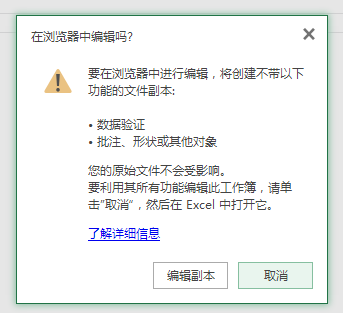
点击编辑副本

查看请求日志发现,另存副本请求将调用PutRelativeFile服务,所有我们应该再原来的基础上添加PutRelativeFile服务。
PutRelativeFile服务
PutRelativeFile操作将在主机上创建一个基于当前文件的副本文件,创建成功后必须将副本文件名及URL以Json的格式返回给OWA服务器。
如果OWA客户端设置了CheckFileInfo的SupportsUpdate为true的话,就必须要实现PutRelativeFile服务,否则需要设置UserCanNotWriteRelative为true并且返回501状态码。
Method:POST
URI:HTTP://server/<...>/wopi*/files/<id>
Request Headers:
X-WOPI-Override 固定值 PUT_RELATIVE
X-WOPI-SuggestedTarget 文件扩展名或全名(可修改)
X-WOPI-RelativeTarget 文件全名(不可更改)
X-WOPI-OverwriteRelativeTarget 是否覆盖文件名
X-WOPI-Size 文件的大小bytes
X-WOPI-FileConversion 指示请求是否转换文件
Response Headers:
X-WOPI-ValidRelativeTarget
X-WOPI-Lock
X-WOPI-LockFailureReason
该接口需要返回的Json格式如下:
{Name:”test.xlsx”,Url:” http://server/<...>/wopi/files/ test.xlsx”, HostViewUrl :””, HostEditUrl :””}
说明:Name为新的文件名(如果修改的话),Url为新的文件的CheckFileInfo服务路径。
在线Excel用到这个服务的情况有两种:
1.另存为,如果没有实现PutRelativeFile服务,则另存为将不能使用;
2.当编辑服务器不支持的Excel某些格式的文件时,会先保存一个系统支持格式的副本,如果没有实现PutRelativeFile服务,则不能编辑该Excel(因为保存新文件会失败);
PutRelativeFile服务与CheckFileInfo服务的URL是相同的,只是Method不同,所以我们只需在CheckFileInfo的基础上修改。
        [RouteAttribute("files/{name}")]

        public JsonResult GetFileInfo(string name, string access_token)

        {

            string wopiType = Request.Headers["X-WOPI-Override"];

            Console.WriteLine("1.X-WOPI-Override:" + wopiType);

            if (wopiType == "PUT_RELATIVE")

            {

                using (FileStream fs = System.IO.File.Create("Files/new_" + name))

                {

                    Request.Body.CopyTo(fs);

                }

                Response.Headers.Add("X-WOPI-ValidRelativeTarget", "new_" + name);

                Response.Headers.Add("X-WOPI-Lock", Request.Headers["X-WOPI-Lock"]);

                Response.StatusCode = ;

                PutRelativeFile file = new PutRelativeFile();

                file.Name = "new_" + name;

                file.Url = "http://b1wcfoqm7r.proxy.qqbrowser.cc/api/wopi/files/new_" + name;

                return Json(file);

            }

            else if (wopiType == "UNLOCK" || wopiType == "LOCK")

            {

                Response.Headers.Add("X-WOPI-Lock", Request.Headers["X-WOPI-Lock"]);

                Response.StatusCode = ;

                return Json("");

            }

            else

            {

                FileHelper helper = new FileHelper();

                var info = helper.GetFileInfo(name);

                info.SupportsUpdate = true;

                info.SupportsLocks = true;

                info.UserCanWrite = true;

                return Json(info);

            }
GetFileInfo
    [DataContract(Name = "PutRelativeFile")]

    public class PutRelativeFile

    {

        [DataMember(Name = "Name")]

        public string Name { get; set; }

        [DataMember(Name = "Url")]

        public string Url { get; set; }

        [DataMember(Name = "HostViewUrl")]

        public string HostViewUrl { get; set; }

        [DataMember(Name = "HostEditUrl")]

        public string HostEditUrl { get; set; }

    }
PutRelativeFile
Discovery.xml
访问OWA服务器的如下地址:http://owa.host.com/hosting/discovery(该链接无实际意义)就能得到OWA服务器能够处理的所有文件格式、操作及相关的URL。
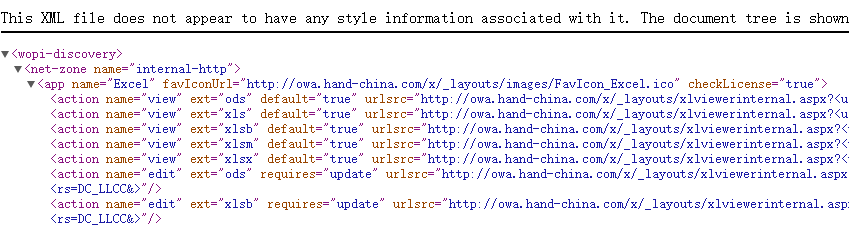
<action name="view" ext="xls" default="true" urlsrc="http://owa.hand-china.com/x/_layouts/xlviewerinternal.aspx?<ui=UI_LLCC&><rs=DC_LLCC&>"/>
name=”view”表示动作为查看,ext=”xls”表示文件扩展名为xls,urlsrc则表示相应动作的地址。
以预览test.xls为例,其ChecFileInfo路径为:http://localhost:5000/api/wopi/files/test.xls
则最终预览的链接为:http://owa.host.com/x/_layouts/xlviewerinternal.aspx?WOPISrc=http://localhost:5000/api/wopi/files/test.xls
我将OWA服务提交的discovery内容放到了本地的xml文件中,读取方法如下:
        public static List<DiscoveryAction> GetDiscoveryAction()

        {

            List<DiscoveryAction> list = new List<DiscoveryAction>();

            XmlReader reader = XmlReader.Create("Files/Discovery.xml");

            //循环Read方法直到文档结束

            while (reader.Read())

            {

                //Console.WriteLine("rdr.NodeType = " + reader.NodeType);

                //如果是开始节点

                if (reader.NodeType == XmlNodeType.Element)

                {

                    //通过rdr.Name得到节点名

                    string elementName = reader.Name;

                    //读取到cat元素 这时rdr.Read()读取到的内容为<cat color="white">

                    if (elementName == "action")

                    {

                        DiscoveryAction act = new DiscoveryAction();

                        //可以通过中括号获得属性值

                        act.Name = reader["name"];

                        act.UrlSrc = reader["urlsrc"];

                        act.Default = TransBool(reader["default"]);

                        act.Ext = reader["ext"];

                        act.ProGid = reader["progid"];

                        act.Requires = reader["requires"];

                        list.Add(act);

                    }

                }

            }

            return list;

        }
GetDiscovery
Discovery.xml文件下载:Disconvery
Controller Action代码如下:
        [Route("files/{name}/links")]

        [HttpGetAttribute]

        public JsonResult GetOwaLinks(string name, string type, string access_token, string lang)

        {

            if (string.IsNullOrEmpty(type))

            {

                type = "view";

            }

            if (string.IsNullOrEmpty(lang))

            {

                lang = "zh-CN";

            }

            if (string.IsNullOrEmpty(access_token))

            {

                access_token = "H7lFBYT4pVMK";

            }

            List<string> lst = new List<string>();

            var res = XmlHelper.GetDiscoveryAction();

            var ext = Path.GetExtension(name).TrimStart('.');

            var discovery = res.Where(t => t.Ext == ext && t.Name == type);

            foreach (var item in discovery)

            {

                Console.WriteLine(item.UrlSrc);

                var index = item.UrlSrc.IndexOf('<');

                var api = System.Net.WebUtility.UrlEncode("http://localhost:5000/api/wopi/files/" + name);

                lst.Add(string.Format(item.UrlSrc.Substring(, index) + "WOPISrc={0}&access_token={1}&ui={2}", api, access_token, lang));

            }

            return Json(lst);

        }
GetOwaLinks
测试访问:http://localhost:5000/api/wopi/files/test.docx/links

.Net Core集成Office Web Apps(二)的更多相关文章
- .Net Core集成Office Web Apps(一)
最近开始学习.Net Core,并使用Visual Studio Code工具来开发.感觉开发起来特别的方便,但是有个头疼的地方:许多的类库被修改了,一时半会儿还熟悉不了,需要查阅官方API... M ...
- SharePoint RBS 安装(集成Office Web Apps)
前言 本文完全原创,转载请说明出处,希望对大家有用. 本篇博客是个人总结,一方面以便日后查看,另一方面希望能为其他人提供一些便利. 阅读目录 安装RBS 为多个内容数据库开启RBS 正文 目的:在Sh ...
- 部署Office Web Apps Server并配置其与SharePoint 2013的集成
部署Office Web Apps Server并配置其与SharePoint 2013的集成 Office Web Apps Server 是新的 Office 服务器产品,它提供 Word.P ...
- 新手必看!Office Web Apps 2013 安装与配置(实战)
分享人:广州华软 星尘 一. 前言 Office Web Apps Server 是Office 服务器产品,它可提供在Sharepoint 2013网站中在线浏览和编辑 Word.PowerPoin ...
- 如何整合Office Web Apps至自己开发的系统(一)
在前面我的一篇博客中 Office Web Apps安装部署(一),有一张介绍Office Web Apps与其他系统的关系图, 从上述图中,可知实际上Office Web Apps也是可以接入自 ...
- 整合Office Web Apps至自己的开发系统
原文出处:http://www.cnblogs.com/poissonnotes/p/3267190.html 还可参考:https://www.cnblogs.com/majiang/p/36729 ...
- [转载]部署Office Web Apps Server并配置其与SharePoint 2013的集成
Office Web Apps Server 是新的 Office 服务器产品,它提供 Word.PowerPoint.Excel 和 OneNote 的基于浏览器的版本.单个 Office Web ...
- 微软office web apps 服务器搭建之在线文档预览(二)
上一篇文章已经介绍了整个安装过程了.只要在浏览器中输入文档转换server的ip,会自动跳转,出现如下页面. 那么就可以实现本地文档预览了,你可以试试.(注意:是本地哦,路径不要写错,类似“\\fil ...
- sharepoint 2013 和 office web apps server 2013集成
环境: 三台服务器 系统:window 2008 R2server01: 192.168.10.162(office web app)server02: 192.168.10.163(AD)serv ...
随机推荐
- php表单身份验证
1. index.php <form method="post" action="dbtest.php"> 姓名: ...
- Scala集合类详解
对scala中的集合类虽然有使用,但是一直处于一知半解的状态.尤其是与java中各种集合类的混合使用,虽然用过很多次,但是一直也没有做比较深入的了解与分析.正好趁着最近项目的需要,加上稍微有点时间,特 ...
- Word转换为markdown
Word转换为markdown 首先你的电脑要有office word 1 安装pandoc https://github.com/jgm/pandoc/releases,可以找到最新的pando ...
- LVS + Keepalived 实现高可用、负载均衡 Web 集群
简介: LVS 是 Linux Virtual Server 的简写,Linux 虚拟服务器的意思,是一个虚拟的服务器集群系统,此项目由章文嵩博士于 1998 年 5 月成立,是中国最早出现的自由软件 ...
- 如何用softmax和sigmoid来做多分类和多标签分类
首先,说下多类分类和多标签分类的区别 多标签分类:一个样本可以属于多个类别(或标签),不同类之间是有关联的,比如一个文本被被划分成“人物”和“体育人物”两个标签.很显然这两个标签不是互斥的,而是有关联 ...
- nltk模块基础操作
几个基础函数 (1)搜索文本:text.concordance(word) 例如,在text1中搜索词”is”在文本中出现的次数以及上下文的词:text1.concordance("is& ...
- iOS 网易彩票-6设置模块三(常用小功能)
该篇文章中,用到很多iOS开发过程中常用的小功能,当前只是将这些功能集成到网易彩票的设置中.iOS-常用小功能介绍,请参考我的另一篇文章: iOS 常用小功能 总结:http://www.cnblog ...
- webapi 返回json及route设置
1.返回json 修改App_Start/webapiconfig public static void Register(HttpConfiguration config) { // Web API ...
- yii2 restful api——app接口编程实例
<?php namespace common\components; use common\models\Cart; use common\models\User; use Yii; use y ...
- LR和SVM的相同和不同
之前一篇博客中介绍了Logistics Regression的理论原理:http://www.cnblogs.com/bentuwuying/p/6616680.html. 在大大小小的面试过程中,经 ...