
How to Sign in as a Different User in SharePoint 2013
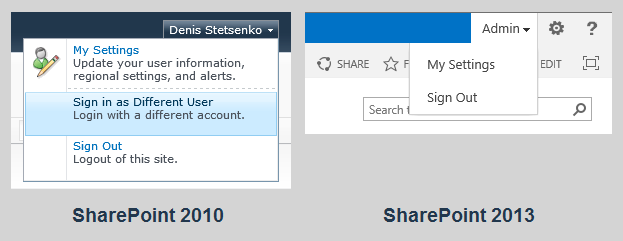
SharePoint used to have a menu option called "Sign in as Different User" in the top-right corner of every page. It was a handy tool for developers and IT professionals in SharePoint 2007 and 2010, which allowed them to login with another account to test their solutions or customizations. Microsoft removed the option in SharePoint 2013, but you can still do it with workarounds or a one-click bookmarklet.
WHY WAS THIS FEATURE REMOVED
I don't know why Microsoft removed this feature. What I do know is it was never perfect and has a number of issues in SharePoint 2007 and 2010. Some of the most common issues are:
- • Caching problems
- • Documents opened in external applications are saved with an unexpected user account
- • Right after user logs in with a different account, the page content shows information from the previous account and the cookies are not properly cleared
In other words, this feature was never meant as a security mechanism. Therefore, even though it's possible to bring the menu option back, you should carefully consider whether doing so is really necessary. After all, it was removed for a reason.
If you want to bring the menu option back for all users, you can modify the Welcome.ascx file in the 15-hive on each server by following Nick Grattan's blog post. If you just want to be able to log in with a different account without this menu option, read on.
HOW TO SIGN IN AS A DIFFERENT USER
Developers and/or IT administrators, myself included, often have to log in with a different user account to test their solutions or customizations, or get a higher-level permissions in a SharePoint site. Even though the menu option is missing, there are several workarounds that can be used to log in as a different user in SharePoint 2013.
Method 1: Internet Explorer's Different User Option
The most common way to sign in as a different user is with Internet Explorer's "Run as different user" option. Just right-click the IE icon while holding the shift key down and click on "Run as different user." Once logged in, just navigate to the SharePoint site. This method is quite cumbersome but it does allow you to run multiple instances of IE and be logged in as a different user in each one.
Note for the Windows 7 or 8 users: if you have IE pinned to your taskbar, holding the shift key and right-clicking on the taskbar icon won't work. You have to right-click the IE icon in the taskbar first, then hold the shift key and right-click on the Internet Explorer option.
Method 2: Navigate to the Close Connection Page
A slightly faster way to accomplish this is to navigate to the Close Connection page. Just visit the following URL in your browser:
http://<site URL>/_layouts/closeConnection.aspx?loginasanotheruser=true
As soon as you hit this page, the familiar pop-up will prompt you for the username to log in with. Once you log in, you will be redirected to the home page.
BOOKMARKLET TO SIGN IN AS A DIFFERENT USER
Bookmarklet (bookmark + applet) is a web browser bookmark that contains JavaScript commands in the URL. This means we can build a bookmarklet that uses JavaScript Object Model in SharePoint 2013 to automate the second method above.
First, let's build the script which uses SharePoint client context to redirect the user to the URL specified above:
- if (typeof SP !== 'undefined') {
- var ctx = new SP.ClientContext.get_current();
- var site = ctx.get_site();
- ctx.load(site, 'Url');
- ctx.executeQueryAsync(Function.createDelegate(this, function(sender, args) {
- var url = site.get_url();
- window.location = url + '/_layouts/closeConnection.aspx?loginasanotheruser=true';
- }), Function.createDelegate(this, function (sender, args) {
- alert('Error: ' + args.get_message());
- }));
- } else {
- alert('Error: This is not a SharePoint 2010 or 2013 website');
- }
Basically, what we are doing is getting the client context of the current SharePoint site, loading the "Url" property of the "site" object via an AJAX request, and then redirecting the browser to the Close Connection page. If we fail to load the "site" object, we display the error. We also display an error if "SP" is undefined, which means that you are not on a SharePoint 2010 or 2013 website.
This script can be tested in the Console window of your browser's development tools. Now we need to add this script to a hyperlink that can serve as a bookmarklet. To do so, just create an HTML file and add the following text to it, which includes the script above without line breaks:
- <a href="javascript: (function(){if (typeof SP !== 'undefined') { var ctx = new SP.ClientContext.get_current(); var site = ctx.get_site(); ctx.load(site, 'Url'); ctx.executeQueryAsync(Function.createDelegate(this, function (sender, args) { var url = site.get_url(); window.location = url + '/_layouts/closeConnection.aspx?loginasanotheruser=true'; }), Function.createDelegate(this, function (sender, args) { alert('Error: ' + args.get_message()); })); } else { alert('Error: This is not a SharePoint 2010 or 2013 website'); }})();">SP Login</a>
Open this HTML file in your favorite browser, and drag and drop this link to your bookmarks/favorites bar. Alternatively, you can just create a new bookmark in your browser, call it "SP Login" (or whatever else you like) and use the content of the "href" property of the hyperlink above in place of its URL. Unfortunately, some technical limitations are preventing me from adding this bookmarklet directly to this post.
Incidentally, this bookmarklet can also be used to log in as a different user in SharePoint 2010, since it also exposes the JavaScript Object Model. This can be useful in some scenarios, for example if you have a staging environment for your public site where the ribbon controls are only shown to the "admin" accounts, which are different from your main AD account you use in your organization.
How to Sign in as a Different User in SharePoint 2013的更多相关文章
- SharePoint 2013 启用 以其他用户身份登陆(Sign in as different user)
习惯于SharePoint 2010的用户会发现,SharePoint 2013默认把 以其他用户身份登陆(Sign in as different user)的选项去掉了,这对于开发人员来说很麻烦 ...
- Sharepoint2013切换用户菜单
Sharepoint2013中没有切换用户的菜单,每次登录后,浏览器就会记住密码.要重新换一个用户登录的时候,就需要把浏览器都关闭,然后重新启动.这样非常不方便.特别是在测试权限这一块的时 ...
- Integrating SharePoint 2013 with ADFS and Shibboleth
Time again to attempt to implement that exciting technology, Federation Services (Web Single Sign On ...
- 关于如何在Android、Java等非微软平台上建立高信任的SharePoint应用程序
关于如何在非微软平台上建立高信任的SharePoint应用程序 原文 :http://blogs.msdn.com/b/kaevans/archive/2014/07/14/high-trust-sh ...
- SharePoint 2013 一些小技巧
一.添加“SharePoint 2013 切换用户”标签 相比SharePoint 2010,SharePoint2013版本去掉了切换用户登陆的功能(如下图),其实这个可以通过改welcome.as ...
- Sharepoint-Hosted App in 2013资料
一个完整的流程,可参考网址 My First Sharepoint-Hosted App in 2013 部署第一个APP会遇到各种问题,可以参考网址 App development in Share ...
- SharePoint安全 - 在Goolge和Bing中查找SharePoint相关内容
博客地址 http://blog.csdn.net/foxdave 本篇提供两个查询串字典,分别对应Google和Bing的搜索,用来查询SharePoint网站的相关内容 Google ShareP ...
- 【FBA】SharePoint 2013自定义Providers在基于表单的身份验证(Forms-Based-Authentication)中的应用
//http://www.cnblogs.com/OceanEyes/p/custom-provider-in-sharepoint-2013-fba-authentication.html 由于项目 ...
- [FBA]SharePoint 2013自定义Providers在基于表单的身份验证(Forms-Based-Authentication)中的应用
//http://tech.ddvip.com/2014-05/1401197453210723.html 由于项目的需要,登录SharePoint Application的用户将从一个统一平台中获取 ...
随机推荐
- centos ssh终端下高亮显示git分支名
#set git branch green=$'\e[1;32m' magenta=$'\e[1;35m' normal_colours=$'\e[m' function find_git_branc ...
- java将文件打包成ZIP压缩文件的工具类实例
package com.lanp; import java.io.BufferedInputStream; import java.io.BufferedOutputStream; import ja ...
- List、Set、Map 和 Queue 之间的区别
list 和set 有共同的父类 它们的用法也是一样的 唯一的不太就是set中不能有相同的元素 list中可以list和set的用途非常广泛 list可以完全代替数组来使用map 是独立的合集 它使用 ...
- JBPM使用方法、过程记录
一.How to call Web Service Using JBPM 5, designer https://204.12.228.236/browse.php?u=ObFK10b3HDFCQUN ...
- ASP.NET MVC与Sql Server交互,把字典数据插入数据库
在"ASP.NET MVC与Sql Server交互, 插入数据"中,在Controller中拼接sql语句.比如: _db.InsertData("insert int ...
- springcloud 分布式服务跟踪sleuth+zipkin
原文:https://www.jianshu.com/p/6ef0b76b9c26 分布式服务跟踪需求 随着分布式服务越来越多,调用关系越来越复杂,组合接口越来越多,要进行分布式服务跟踪监控的需求也越 ...
- adb install -r 中出现INSTALL_FAILED_UNKNOWN_SOURCES,怎样解决?
adb install -r 中出现INSTALL_FAILED_UNKNOWN_SOURCES,怎样解决? D:\android_code\0708\tools>adb install -r ...
- System.loadLibrary()的使用方法汇总
当使用System.loadLibrary()调用 Dll,两种方法: 1.设定环境变量. 比如:所编辑的Dll在目录“D:/cppProjects/nativecode/release”内,将这个路 ...
- sharepoint 2013 网站集解锁
前言 最近碰到这样的一个问题,就是SharePoint 站点备份(Backup-SPSite)的时候,速度特别慢,然后网站变成只读状态(备份过程中只读属于正常现象).但是,自己手欠把备份命令的Powe ...
- go 用的不多的命令
8.go doc 文档注释相关,可以搭建本地GO文档服务器,包含自己的项目注释,更多细节请参考:https://github.com/hyper-carrot/go_command_tutorial/ ...