
V-rep学习笔记:Reflexxes Motion Library 3
路径规划 VS 轨迹规划
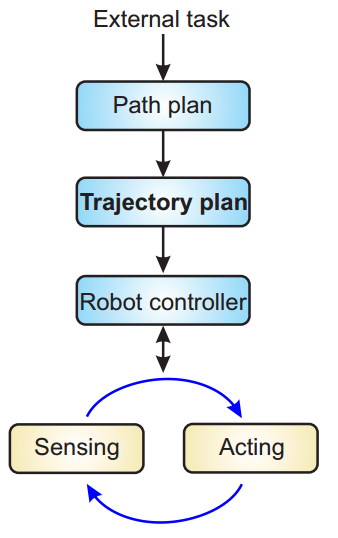
轨迹规划的目的是将输入的简单任务描述变为详细的运动轨迹描述。注意轨迹和路径的区别:Trajectory refers to a time history of position, velocity, and acceleration for each degree of freedom. The path provides a pure geometric description of motion.
- Path planning (global)
- The (geometric) path is a sequence of waypoints defining the trajectory coarsely.
- Issues solved at this level: obstacle avoidance, shortest path.
- Trajectory generating (local)
- The path provided by path planning constitutes the input to the trajectory generator.
- Trajectory generator “approximates” the desired path waypoints by a class of polynomial functions and generates a time-based control sequence moving the manipulator/mobile platform from its initial configuration to the destination.
受到驱动机构性能等因素的制约,机器人进行运动轨迹规划时需要考虑加速度约束、速度约束和位置约束等多个约束条件。比如,一般低速运动情况下只要保证关节角度不超限即可,这对运动轨迹规划影响很小。但是当机器人运动速度较快时,关节角加速度和角速度容易超出约束范围,导致驱动电流过大或者超出限位的事故发生。轻则机器人运动出错,重则损坏硬件。此时,必须在机器人运动轨迹规划时综合考虑各种约束条件。

Trajectory = path + timing law
Having the path (way-points), the trajectory is completed by a choice of a timing law. If s(t) = t, the trajectory parametrization is the natural one given by the time.
• Operational (Cartesian) space: p(s) = ( x(s), y(s), z(s) ) ⇒ s = s(t).
• Joint space: q(λ) = (q1(λ), q2(λ), . . . , qn(λ)), where n = DOFs ⇒ λ = λ(t).
The timing law:
• is chosen based on task specifications (stop in a point, move at a constant velocity, etc.);
• may consider optimality criteria (min transfer time, min energy, etc.);
• constraints are imposed by actuator capabilities (e.g. max torque, max velocity) and/or by the task (e.g., max acceleration on payload)

Reflexxes Motion在线轨迹生成库
Reflexxes Motion Library主要分为三层:接口层提供简单易用的应用程序接口,隐藏了算法的细节;算法层主要提供在线轨迹生成算法(On-Line Trajectory Generation algorithm);数学运算层提供了最基本的数学运算功能以供算法使用:

提供合理的输入参数后,可以从输出端获取数据,用于底层控制
Input and output values of the on-line trajectory generation algorithm
同步行为(Synchronization Behavior)
Reflexxes的在线轨迹生成算法主要分为以下三步:
Step 1: Calculate the Synchronization Time
Step 2: Synchronization of All Selected DOFs
Step 3: Calculate Output Values
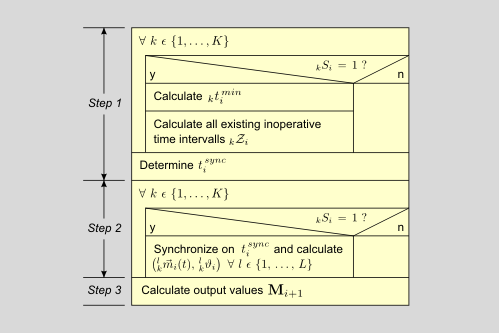
the basic OTG algorithm steps
当涉及多个轴同时运动时Reflexxes中可以设置它们的同步行为,分为无同步、时间同步、相位同步:
- non-synchronized: 多个轴到达各自目标位置的时间不限定,即有的先到有的后到
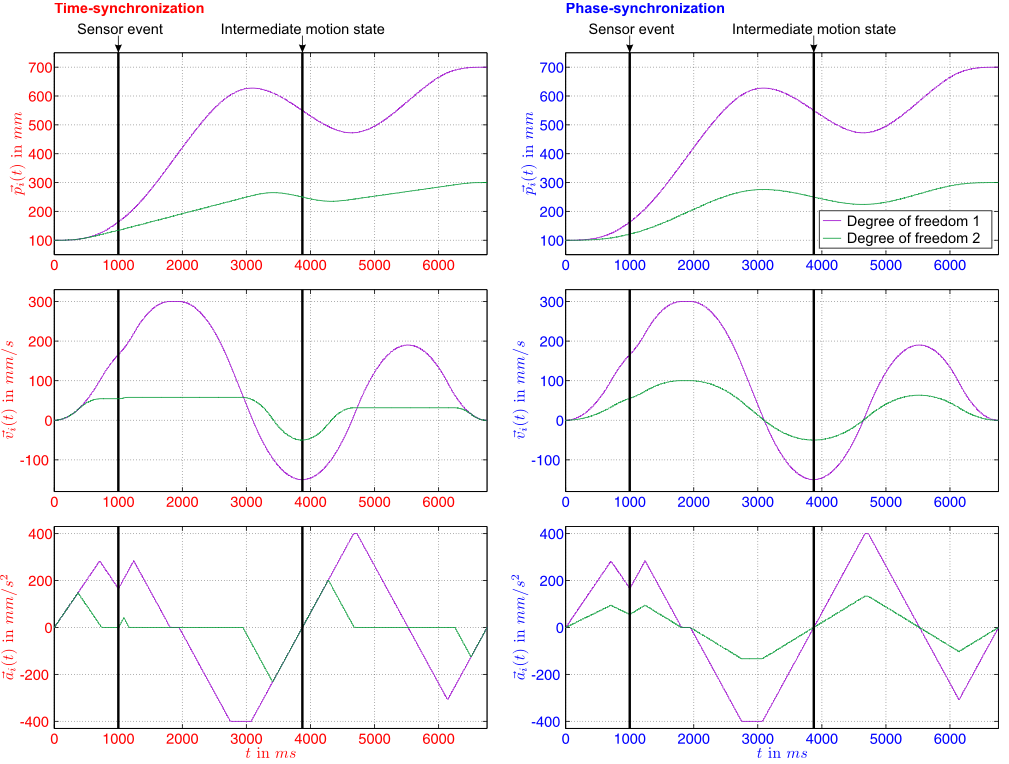
- time-synchronized: All DOFs, which are selected for trajectory-following control, have to reach their target state of motion Mtrgt at the same time instant, namely at tsync in order to achieve time synchronization
- phase-synchronized: Phase synchronization is the synchronization in position, velocity, acceleration and jerk spaces. It means that, given any instant of time, all variables must complete
the same percentage of their trajectories.
下图是某3自由度系统(3个轴)分别在无同步、时间同步、相位同步设定下的轨迹曲线。可以看出没有同步的情况下三个轴到达各自目标点的时间不一致,而时间同步和相位同步下是一致的。

Non-synchronized, time-synchronized, and phase-synchronized trajectories for a system with three degrees of freedom.
To specify the behavior of the Reflexxes Motion Library, the enumeration RMLFlags::SyncBehaviorEnum consists of four elements, and the attribute RMLFlags::SynchronizationBehavior is used to specify the synchronization behavior of the desired trajectory.
- RMLFlags::NO_SYNCHRONIZATION,
- RMLFlags::PHASE_SYNCHRONIZATION_IF_POSSIBLE,
- RMLFlags::ONLY_TIME_SYNCHRONIZATION, and
- RMLFlags::ONLY_PHASE_SYNCHRONIZATION,
在Example 3 — Different Synchronization Behaviors of the Position-based algorithm这个例子中可以修改同步行为,看看具体的差别。轨迹生成器的输入参数如下图所示,不同颜色代表了不同的自由度:
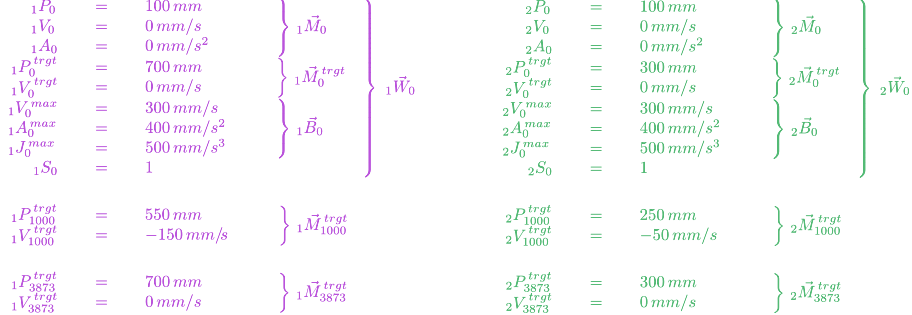
程序模拟了偶发事件的产生,传感器捕获到事件后Reflexxes可以快速、动态地计算轨迹(react instantaneously to unforeseen sensor events )。程序运行到1000ms时接收到一个传感器事件,这时将设定一个中间位置(intermediate point / waypoint),轴运动到中间位置后再将目标位置设为最开始的值。比如机器人运行过程中突然遇到障碍物,传感器检测到障碍后就可以先改变位置避开障碍,然后再驶向目标。
#include <stdio.h>

#include <stdlib.h>

#include <fstream>

#include <iostream>

#include <ReflexxesAPI.h>

#include <RMLPositionFlags.h>

#include <RMLPositionInputParameters.h>

#include <RMLPositionOutputParameters.h>

//*************************************************************************

// defines

#define CYCLE_TIME_IN_SECONDS                   0.001   // time step: 1ms

#define NUMBER_OF_DOFS                          2

int main()

{

    // ********************************************************************

    // Variable declarations and definitions

    bool                        IntermediateTargetStateSet  =   false

                            ,   IntermediateStateReached    =   false   ;

    int                         ResultValue                 =          ;

    double                      Time                        =   0.0     ;

    ReflexxesAPI                *RML                        =   NULL    ;

    RMLPositionInputParameters  *IP                         =   NULL    ;

    RMLPositionOutputParameters *OP                         =   NULL    ;

    RMLPositionFlags            Flags                                   ;

    // ********************************************************************

    // Creating all relevant objects of the Type II Reflexxes Motion Library

    RML =   new ReflexxesAPI(                   NUMBER_OF_DOFS

                                            ,   CYCLE_TIME_IN_SECONDS   );

    IP  =   new RMLPositionInputParameters(     NUMBER_OF_DOFS          );

    OP  =   new RMLPositionOutputParameters(    NUMBER_OF_DOFS          );

    std::ofstream out("data.txt", std::ios::app);

    // ********************************************************************

    // Set-up the input parameters

    // In this test program, arbitrary values are chosen. If executed on a

    // real robot or mechanical system, the position is read and stored in

    // an RMLPositionInputParameters::CurrentPositionVector vector object.

    // For the very first motion after starting the controller, velocities

    // and acceleration are commonly set to zero. The desired target state

    // of motion and the motion constraints depend on the robot and the

    // current task/application.

    // The internal data structures make use of native C data types

    // (e.g., IP->CurrentPositionVector->VecData is a pointer to

    // an array of NUMBER_OF_DOFS double values), such that the Reflexxes

    // Library can be used in a universal way.

    IP->CurrentPositionVector->VecData      [] =    100.0      ;

    IP->CurrentPositionVector->VecData      [] =    100.0      ;

    IP->CurrentVelocityVector->VecData      [] =      0.0      ;

    IP->CurrentVelocityVector->VecData      [] =      0.0      ;

    IP->CurrentAccelerationVector->VecData  [] =      0.0      ;

    IP->CurrentAccelerationVector->VecData  [] =      0.0      ;

    IP->MaxVelocityVector->VecData          [] =    300.0      ;

    IP->MaxVelocityVector->VecData          [] =    300.0      ;

    IP->MaxAccelerationVector->VecData      [] =    400.0      ;

    IP->MaxAccelerationVector->VecData      [] =    400.0      ;

    IP->MaxJerkVector->VecData              [] =    500.0      ;

    IP->MaxJerkVector->VecData              [] =    500.0      ;

    IP->TargetPositionVector->VecData       [] =    700.0      ;

    IP->TargetPositionVector->VecData       [] =    300.0      ;

    IP->TargetVelocityVector->VecData       [] =     0.0       ;

    IP->TargetVelocityVector->VecData       [] =     0.0       ;

    // The selection vector contains boolean values to mask single DOFs, for which no output values are calculated.

    IP->SelectionVector->VecData            [] =   true        ;

    IP->SelectionVector->VecData            [] =   true        ;

    // ********************************************************************

    // Setting the flag for time- and phase-synchronization:

    //

    //  - RMLPositionFlags::ONLY_TIME_SYNCHRONIZATION for

    //    time-synchronization

    //  - RMLPositionFlags::PHASE_SYNCHRONIZATION_IF_POSSIBLE for

    //    phase-synchronization

    //

    // Please feel free to change this flag to see the difference in the

    // behavior of the algorithm.

    Flags.SynchronizationBehavior = RMLPositionFlags::ONLY_TIME_SYNCHRONIZATION;

    // ********************************************************************

    // Starting the control loop

    for(;;)

    {

        // Calling the Reflexxes OTG algorithm

        ResultValue =   RML->RMLPosition(       *IP

                                            ,   OP

                                            ,   Flags       );

        if (ResultValue < )

        {

            printf("An error occurred (%d).\n", ResultValue );

            break;

        }

        // ****************************************************************

        // Here, the new state of motion, that is

        //

        // - OP->NewPositionVector

        // - OP->NewVelocityVector

        // - OP->NewAccelerationVector

        //

        // can be used as input values for lower level controllers. In the

        // most simple case, a position controller in actuator space is

        // used, but the computed state can be applied to many other

        // controllers (e.g., Cartesian impedance controllers,

        // operational space controllers).

        // ****************************************************************

        for (int i = ; i < NUMBER_OF_DOFS; i++)

            out << OP->NewPositionVector->VecData[i] << ",";

        out << std::endl;

        // ****************************************************************

        // Feed the output values of the current control cycle back to

        // input values of the next control cycle

        *IP->CurrentPositionVector      =   *OP->NewPositionVector      ;

        *IP->CurrentVelocityVector      =   *OP->NewVelocityVector      ;

        *IP->CurrentAccelerationVector  =   *OP->NewAccelerationVector  ;

        Time    +=  CYCLE_TIME_IN_SECONDS;

        // ****************************************************************

        // In this introductory example, we simple trigger a sensor event

        // after one second. On a real-world system, trigger signal are

        // commonly generated based on (unforeseen) sensor signals. This

        // event changes the input parameters and specifies a

        // intermediate state of motion, that is, a new desired target

        // state of motion for the Reflexxes algorithm.

        if (    (   Time >= 1.0                 )

            &&  (   !IntermediateTargetStateSet )   )

        {

            IntermediateTargetStateSet   =   true;

            IP->TargetPositionVector->VecData       [] =    550.0      ;

            IP->TargetPositionVector->VecData       [] =    250.0      ;

            IP->TargetVelocityVector->VecData       [] =   -150.0      ;

            IP->TargetVelocityVector->VecData       [] =    -50.0      ;

        }

        // ****************************************************************

        // After reaching the intermediate state of motion define above

        // we switch the values of the desired target state of motion

        // back to the original one. In the documentation and the

        // description of time- and phase-synchronized motion trajectories,

        // this switching happens at 3873 milliseconds.

        if (    (   ResultValue == ReflexxesAPI::RML_FINAL_STATE_REACHED    )

            &&  (   !IntermediateStateReached                               )   )

        {

            IntermediateStateReached    =   true;

            IP->TargetPositionVector->VecData       [] =    700.0      ;

            IP->TargetPositionVector->VecData       [] =    300.0      ;

            IP->TargetVelocityVector->VecData       [] =     0.0       ;

            IP->TargetVelocityVector->VecData       [] =     0.0       ;

            continue;

        }

        // ****************************************************************

        // After the final state of motion is reached, we leave the loop

        // and terminate the program.

        if (ResultValue == ReflexxesAPI::RML_FINAL_STATE_REACHED)

        {

            break;

        }

    }

    // ********************************************************************

    // Deleting the objects of the Reflexxes Motion Library end terminating

    // the process

    delete  RML         ;

    delete  IP          ;

    delete  OP          ;

    exit(EXIT_SUCCESS)  ;

}
从上面的轨迹曲线图中很难看出时间同步和相位同步有什么差别,但是将两个自由度的位置画成散点图就可以发现差异:

可以看出时间同步只是两个轴会同时到达各自目标位置,而相位同步在此基础上还限定了其相位关系(在信号处理中如果两个信号的频率相等,相位差为0或一个常数,称这两个信号相位同步)。设置成相位同步后两个自由度的位置轨迹呈线性关系,在图中表现为一条从起点到目标点的直线:p2(t) = ( p1(t) - 100 ) / 3 + 100
参考:
V-rep学习笔记:Reflexxes Motion Library 1
V-rep学习笔记:Reflexxes Motion Library 4
周期同步位置模式(CSP),轮廓位置模式(PPM),位置模式(PM)
Online Trajectory Generation: Basic Concepts for Instantaneous Reactions to Unforeseen Events
On-Line Trajectory Generation in Robotic Systems
Introduction to Robotics-Mechanics and Control. Chapter 7 Trajectory generation
Path and trajectory generation
Modern Robotics Mechanics, Planning, and Control
V-rep学习笔记:Reflexxes Motion Library 3的更多相关文章
- V-rep学习笔记:Reflexxes Motion Library 2
VREP中的simRMLMoveToPosition函数可以将静态物体按照设定的运动规律移动到指定的目标位置/姿态.If your object is dynamically enabled, it ...
- V-rep学习笔记:Reflexxes Motion Library 1
V-REP中集成了在线运动轨迹生成库Reflexxes Motion Library Type IV,目前Reflexxes公司已经被谷歌收购.(The Reflexxes Motion Librar ...
- 【HLSL学习笔记】WPF Shader Effect Library算法解读之[DirectionalBlur]
原文:[HLSL学习笔记]WPF Shader Effect Library算法解读之[DirectionalBlur] 方位模糊是一个按照指定角度循环位移并叠加纹理,最后平均颜色值并输出的一种特效. ...
- 【HLSL学习笔记】WPF Shader Effect Library算法解读之[Embossed]
原文:[HLSL学习笔记]WPF Shader Effect Library算法解读之[Embossed] Embossed(浮雕效果) 浮雕效果主要有两个参数:Amount和Wid ...
- 【HLSL学习笔记】WPF Shader Effect Library算法解读之[BandedSwirl]
原文:[HLSL学习笔记]WPF Shader Effect Library算法解读之[BandedSwirl] 因工作原因,需要在Silverlight中使用Pixel Shader技术,这对于我来 ...
- R语言与机器学习学习笔记
人工神经网络(ANN),简称神经网络,是一种模仿生物神经网络的结构和功能的数学模型或计算模型.神经网络由大量的人工神经元联结进行计算.大多数情况下人工神经网络能在外界信息的基础上改变内部结构,是一种自 ...
- DirectX Graphics Infrastructure(DXGI):最佳范例 学习笔记
今天要学习的这篇文章写的算是比较早的了,大概在DX11时代就写好了,当时龙书11版看得很潦草,并没有注意这篇文章,现在看12,觉得是跳不过去的一篇文章,地址如下: https://msdn.micro ...
- <老友记>学习笔记
这是六个人的故事,从不服输而又有强烈控制欲的monica,未经世事的千金大小姐rachel,正直又专情的ross,幽默风趣的chandle,古怪迷人的phoebe,花心天真的joey——六个好友之间的 ...
- (转) OpenCV学习笔记大集锦 与 图像视觉博客资源2之MIT斯坦福CMU
首页 视界智尚 算法技术 每日技术 来打我呀 注册 OpenCV学习笔记大集锦 整理了我所了解的有关OpenCV的学习笔记.原理分析.使用例程等相关的博文.排序不分先后,随机整理的 ...
随机推荐
- Could not install packages due to an Environment Error: [Errno 13] Permission denied 解决方案
执行pip install 报错如下: Could not install packages due to an Environment Error: [Errno 13] Permission de ...
- 【转】group_concat函数详解
转自: http://hchmsguo.iteye.com/blog/555543 问了好多人,都不知道group_concat这个函数. 这个函数好啊,能将相同的行组合起来,省老事了. MySQL中 ...
- postgresql数据库用户名密码验证失败
问题分析 (1)检查环境变量中是否指定了相关参数,比如: #export PGUSER=highgo#export PGDATABASE=highgo#export PGHOST=localhost# ...
- 第四章 logstash - type与tags属性
参考:http://kibana.logstash.es/content/logstash/plugins/input/stdin.html 最常用法: input { stdin { tags =& ...
- ZMQ和MessagePack的简单使用(转)
近段日子在做一个比较复杂的项目,其中用到了开源软件ZMQ和MessagePack.ZMQ对底层网络通信进行了封装,是一个消息处理队列库, 使用起来非常方便.MessagePack是一个基于二进制的对象 ...
- java 使用AXIS调用远程的web service
1.服务 2.代码 import javax.xml.namespace.QName; import org.apache.axis.client.Call; import org.apache.ax ...
- Kafka:ZK+Kafka+Spark Streaming集群环境搭建(五)针对hadoop2.9.0启动之后发现slave上正常启动了DataNode,DataManager,但是过了几秒后发现DataNode被关闭
启动之后发现slave上正常启动了DataNode,DataManager,但是过了几秒后发现DataNode被关闭 以slave1上错误日期为例查看错误信息: /logs/hadoop-spark- ...
- 使用 GNU Libtool 创建库
这篇文档向大家介绍 GNU Libtool 的用途及基本使用方法,同时描述如何结合 GNU Autoconf 和 Automake 来使用 Libtool. 3 评论: 吴 小虎, 程序员, 天用唯勤 ...
- Window.sessionStorage
The sessionStorage property allows you to access a session Storage object for the current origin. ...
- Windows系统内存分析工具的介绍
Windows系统内存分析工具的介绍(进程管理器,资源管理器,性能监视器, VMMap, RamMap,PoolMon) 微软官方提供多种工具来分析Windows 的内存使用情况,除了系统自带的任 ...