
UI5-文档-4.36-Device Adaptation
现在,我们根据运行应用程序的设备配置控件的可见性和属性。通过使用sap.ui。设备API和定义一个设备模型,我们将使应用程序在许多设备上看起来很棒。
Preview
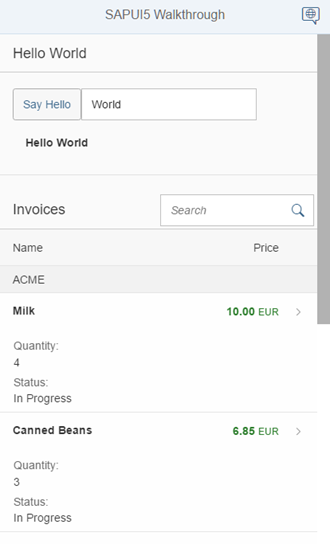
On phone devices, the panel is collapsed to save screen space and a button is hidden
Coding
You can view and download all files at Walkthrough - Step 36.
webapp/view/HelloPanel.view.xml
<mvc:View

        controllerName="sap.ui.demo.walkthrough.controller.HelloPanel"

        xmlns="sap.m"

        xmlns:mvc="sap.ui.core.mvc">

        <Panel

               headerText="{i18n>helloPanelTitle}"

               class="sapUiResponsiveMargin"

               width="auto"

               expandable="{device>/system/phone}"

               expanded="{= !${device>/system/phone} }">

               <content>

                       <Button

                               id="helloDialogButton"

                               icon="sap-icon://world"

                               text="{i18n>openDialogButtonText}"

                               press="onOpenDialog"

                               class="sapUiSmallMarginEnd sapUiVisibleOnlyOnDesktop"/>

                       <Button

                               text="{i18n>showHelloButtonText}"

                               press="onShowHello"

                               class="myCustomButton"/>

                       <Input

                               value="{/recipient/name}"

                               valueLiveUpdate="true"

                               width="60%"/>

                       <FormattedText

                               htmlText="Hello {/recipient/name}"

                               class="sapUiSmallMargin sapThemeHighlight-asColor myCustomText"/>

               </content>

        </Panel>

</mvc:View>
我们向HelloPanel添加了两个可扩展的新属性。用户现在可以关闭和打开面板,以便在屏幕较小的设备上为下表留出更多空间。可扩展属性绑定到名为设备和路径/system/phone.的模型。因此,该面板只能在手机设备上展开。设备模型由sa .ui填充。SAPUI5的设备API。展开属性控制面板的状态,我们使用表达式绑定语法在电话设备上关闭面板,并在所有其他设备上展开面板。SAPUI5的设备API提供了更多的功能来检测各种设备特定的设置,请参阅文档了解更多细节。
请注意 :sap.ui.Device API根据用户代理和设备的许多其他属性检测设备类型(Phone, Tablet, Desktop)。因此,简单地减小屏幕大小并不会改变设备类型。要测试这个特性,您必须在浏览器中启用设备模拟,或者在真实设备上打开它。
当我们设置像sapUiVisibleOnlyOnDesktop或sapUiHideOnDesktop这样的CSS类时,我们还可以根据设备类型隐藏单个控件。我们只显示在桌面设备上打开对话框的按钮,并为其他设备隐藏它。有关更多选项,请参见下面链接的文档。
webapp/Component.js
sap.ui.define([

        "sap/ui/core/UIComponent",

        "sap/ui/model/json/JSONModel",

        "sap/ui/demo/walkthrough/controller/HelloDialog",

        "sap/ui/Device"

], function (UIComponent, JSONModel, HelloDialog,Device) {

        "use strict";

        return UIComponent.extend("sap.ui.demo.walkthrough.Component", {

               metadata: {

                       manifest: "json"

               },

               init: function () {

                       // call the init function of the parent

                       UIComponent.prototype.init.apply(this, arguments);

                       // set data model

                       var oData = {

                               recipient: {

                                      name: "World"

                               }

                       };

                       var oModel = new JSONModel(oData);

                       this.setModel(oModel);

                       // disable batch grouping for v2 API of the northwind service

                       this.getModel("invoice").setUseBatch(false);

                       // set device model

                       var oDeviceModel =newJSONModel(Device);

                       oDeviceModel.setDefaultBindingMode("OneWay");

                       this.setModel(oDeviceModel,"device");

                       // set dialog

                       this._helloDialog = new HelloDialog(this.getRootControl());

                       // create the views based on the url/hash

                       this.getRouter().initialize();

               },

               exit : function() {

                       this._helloDialog.destroy();

                       delete this._helloDialog;

               },

               openHelloDialog : function () {

                       this._helloDialog.open();

               }

        });

});
在app组件中,我们向sap.ui添加了一个依赖项。在init方法中初始化设备模型。我们可以简单地将加载的依赖设备传递给JSONModel的构造函数。这将使SAPUI5设备API的大多数属性作为JSON模型可用。然后将模型作为命名模型设置在组件上,以便我们可以在数据绑定中引用它,正如我们在上面的视图中看到的那样。
请注意:我们必须将绑定模式设置为单向,因为设备模型是只读的,并且我们希望在将控件的属性绑定到模型时避免意外更改模型。默认情况下,SAPUI5中的模型是双向的(TwoWay)。当属性更改时,绑定的模型值也会更新。
webapp/view/Detail.view.xml
提示:您可以使用浏览器的开发工具测试应用程序的特定设备特性。例如,在谷歌Chrome中,您可以轻松模拟平板电脑或手机,并查看效果。SAPUI5的一些响应选项只在加载应用程序时初始设置,所以您可能需要重新加载页面才能看到结果。
<mvc:View

        controllerName="sap.ui.demo.walkthrough.controller.Detail"

        xmlns="sap.m"

        xmlns:mvc="sap.ui.core.mvc"

        xmlns:wt="sap.ui.demo.walkthrough.control">

        <Page

               title="{i18n>detailPageTitle}"

               showNavButton="true"

               navButtonPress="onNavBack">

               <ObjectHeader

                       responsive="true"

                       fullScreenOptimized="true"

                       number="{

                               parts: [{path: 'invoice>ExtendedPrice'}, {path: 'view>/currency'}],

                               type: 'sap.ui.model.type.Currency',

                               formatOptions: {

                                      showMeasure: false

                               }

                       }"

                       numberUnit="{view>/currency}"

                       intro="{invoice>ShipperName}"

                       title="{invoice>ProductName}">

                       <attributes>

                               <ObjectAttributetitle="{i18n>quantityTitle}" text="{invoice>Quantity}"></ObjectAttribute>

                               <ObjectAttributetitle="{i18n>dateTitle}" text="{

                                      path: 'invoice>ShippedDate',

                                      type: 'sap.ui.model.type.Date',

                                      formatOptions: {

                                        style: 'long',

                                        source: {

                                              pattern: 'yyyy-MM-ddTHH:mm:ss'

                                        }

                                      }

                                 }"/>

                       </attributes>

               </ObjectHeader>

               <wt:ProductRating id="rating" class="sapUiSmallMarginBeginEnd" change="onRatingChange"/>

        </Page>

</mvc:View>
一些控件已经具有可以配置的内置响应特性。ObjectHeader控件可以通过设置响应为true的属性,以及将fullscreen设置为true,从而将其置于更灵活的模式中。这将显示我们根据设备大小在屏幕上不同位置添加到视图中的数据。
我们还将前面步骤列表中的number和numberUnit字段添加到ObjectHeader,并使用与前面步骤相同的货币类型格式化程序。然后定义两个属性:发票数量和发货日期,这是数据模型的一部分。到目前为止,我们还没有从发票JSON文件中使用shippedDate字段,它包含一个典型的字符串格式的日期。
我们现在使用日期类型,并在格式选项的源部分中提供日期格式的模式。它将显示更易于阅读的格式化日期文本,也适合小屏幕设备。
webapp/controller/Detail.controller.js
sap.ui.define([

        "sap/ui/core/mvc/Controller",

        "sap/ui/core/routing/History",

        "sap/m/MessageToast",

        "sap/ui/model/json/JSONModel"

], function (Controller, History, MessageToast,JSONModel) {

        "use strict";

        return Controller.extend("sap.ui.demo.walkthrough.controller.Detail", {

               onInit : function () {

                       var oViewModel =newJSONModel({

                               currency:"EUR"

                       });

                       this.getView().setModel(oViewModel,"view");

                       var oRouter = sap.ui.core.UIComponent.getRouterFor(this);

                       oRouter.getRoute("detail").attachPatternMatched(this._onObjectMatched, this);

               },

               _onObjectMatched : …

});
在Detail控制器中,我们只需添加带有货币定义的视图模型,以正确显示数字。它与InvoiceList控制器文件中的代码相同。
webapp/i18n/i18n.properties
# Detail Page

detailPageTitle=Walkthrough - Details

ratingConfirmation=You have rated this product with {0} stars

dateTitle=Order date

quantityTitle=Quantity
当我们减小浏览器的屏幕大小或在一个小设备上打开应用程序时,我们可以看到结果。我们将列名和属性标题添加到i18n文件中。
Conventions
针对手机、平板电脑和桌面设备的不同屏幕大小优化应用程序。
Parent topic: Walkthrough
Previous: Step 35: Responsiveness
Next: Step 37: Content Density
Related Information
API Reference: sap.ui.Device.media.RANGESETS
UI5-文档-4.36-Device Adaptation的更多相关文章
- JDBC Java 程序从 MySQL 数据库中读取数据,并备份到 xml 文档中
MySQL 版本:Server version: 5.7.17-log MySQL Community Server (GPL) 相关内容:JDBC Java 程序从 MySQL 数据库中读取数据,并 ...
- LINUX 内核文档地址
Linux的man很强大,该手册分成很多section,使用man时可以指定不同的section来浏览,各个section意义如下: 1 - commands2 - system calls3 - l ...
- 【转】Directx11 SDK文档
原文地址:http://blog.csdn.net/cmt100/article/details/6343274 总结 这是一个初步的教程.我们将通过必要的步骤来创建一个Win32 Applicati ...
- ORA-01578和ORA-26040--NOLOGGING操作引起的坏块-错误解释和解决方案(文档ID 1623284.1)
ORA-01578和ORA-26040--NOLOGGING操作引起的坏块-错误解释和解决方案(文档ID 1623284.1) (一)NOLOGGING操作引起的坏块(ORA-01578和ORA-26 ...
- 转://诊断 Grid Infrastructure 启动问题 (文档 ID 1623340.1) .
文档内容 用途 适用范围 详细信息 启动顺序: 集群状态 问题 1: OHASD 无法启动 问题 2: OHASD Agents 未启动 问题 3: OCSSD.BI ...
- python文档自动翻译
关键方法 提取文档内容 读取TXT文档 txt文档的读取很简单,直接用python自带的open()方法就好,代码如下所示: # 读取TXT文档 def read_txt(path): '''实现TX ...
- 【转】刚发现一个linux在线文档库。很好很强大。
原文网址:http://blog.csdn.net/longxibendi/article/details/6048231 1.网址: http://www.mjmwired.net 2.比如查看这个 ...
- Spring Boot文档
本文来自于springboot官方文档 地址:https://docs.spring.io/spring-boot/docs/current/reference/html/ Spring Boot参考 ...
- python爬虫处理在线预览的pdf文档
引言 最近在爬一个网站,然后爬到详情页的时候发现,目标内容是用pdf在线预览的 比如如下网站: https://camelot-py.readthedocs.io/en/master/_static/ ...
- [原]Cachedb 网络模块文档
Cachedb 网络模块文档 整体结构 多路复用 (epoll 模块) 事件驱动 (事件封装) 缓冲管理 (上层buffer管理) 设计思想 层次化的设计,每一个模块只调用上一个模块的接口,并将耦合聚 ...
随机推荐
- java后台调用url
版权声明:本文为博主牟云飞原创文章,未经博主同意不得转载. https://blog.csdn.net/myfmyfmyfmyf/article/details/32690757 QXOutStrea ...
- STL版本号简单介绍
说明:本文仅供学习交流.转载请标明出处.欢迎转载! 本文的參考文献为:<STL源代码剖析>侯捷 (1)HP STL:全部STL的祖先版本号,由C++之父Alexander S ...
- PHP中数组的各种用法
$a = 'false';if($a){ echo '好坑';}输出好坑,得转换成布尔值才行哦. in_array $people = array("Bill", "St ...
- Spring本质-AOP
一.我们在做系统设计的时候,一个非常重要的工作就是把一个大系统做分解, 按业务功能分解成一个个低耦合.高内聚的模块,就像这样: 但是分解以后就会发现有些很有趣的东西, 这些东西是通用的,或者是跨越多个 ...
- position:relative与position:absolute 区别
relative:相对于它本身原来的位置进行偏移(配合 right left bottom top属性进行偏移) 他偏移会空出来一些空白 其余的html元素不会填充这些空白 absolute:相对于同 ...
- js实现loading简单的遮套层
弹出个div 设置div的背景色及透明度当加载完成后remove这个div 或者 隐藏至于淡入淡出通过setTimeout 或者setInterval改变透明度试试 .test{ widt ...
- AsyncTask使用详细说明
AsyncTask使用: 在开发Android应用时必须遵守单线程模型的原则: Android UI操作并不是线程安全的并且这些操作必须在UI线程中执行.在单线程模型中始终要记住两条法则: 1. 不要 ...
- [转载]Linux下关于system调用
曾经的曾经,被system()函数折磨过,之所以这样,是因为对system()函数了解不够深入.只是简单的知道用这个函数执行一个系统命令,这远远不够,它的返回值.它所执行命令的返回值以及命令执行失败原 ...
- 【Spring学习笔记-MVC-16】Spring MVC之重定向-解决中文乱码
概述 spring MVC框架controller间跳转,需重定向,主要有如下三种: 不带参数跳转:形如:http://localhost:8080/SpringMVCTest/test/myRedi ...
- 【EasyUI学习-3】Easyui tabs入门实践
作者:ssslinppp 1. 摘要 一般我们在设计程序主框架的时候,当点击(子)菜单时,希望相应界面都在tabs页中显示: 在显示的时候,如果之前打开过该界面,则希望重新选中对应的tab ...