
WP8.1 Windows Phone 8.1开发:何如定义Pivot头部样式、定义Pivot头部颜色
Windows Phone 8.1 ,如何自定义Pivot头部样式?用Pivot控件完成这样的效果。
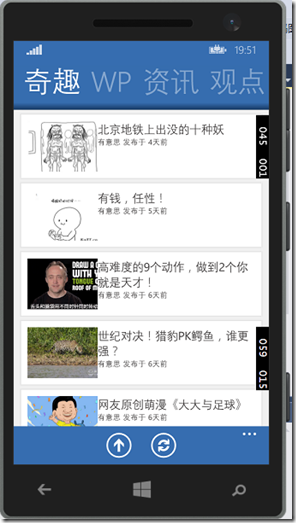
网上找了好久,只找到了windows phone 8的解决方案。 终于一个大神给支了招,我觉得我有必要跟诸位开发者分享一下经验。Windows Phone 8.1的开发资料实在太少了。我决定,用一个假期把我知道的都分享出来。
如果,你支持我的做法。请点赞或者评论本条博客、或者去 windows phone 应用商店 下载一个叫【有点意思】的app、再或者遥祝大黑兔减肥成功。 大黑兔将非常高兴。有点意思:http://www.windowsphone.com/zh-cn/store/app/%e6%9c%89%e7%82%b9%e6%84%8f%e6%80%9d/f2e705b4-5fd6-4c69-826b-c2f05c825ef0
好了,扯淡结束,开始工作。
1. 在App.xaml里定义自己的Pivot控件样式。下面的代码加在Application.Resources节点下,这样你的每一个页面就都能用到这个样式了。
 <Style TargetType="Pivot">

     <Setter Property="Template">

         <Setter.Value>

             <ControlTemplate TargetType="Pivot">

                 <Grid

                     x:Name="RootElement"

                     HorizontalAlignment="{TemplateBinding HorizontalAlignment}"

                     VerticalAlignment="{TemplateBinding VerticalAlignment}"

                     Background="{TemplateBinding Background}">

                     <VisualStateManager.VisualStateGroups>

                         <VisualStateGroup x:Name="Orientation">

                             <VisualState x:Name="Portrait">

                                 <Storyboard>

                                     <ObjectAnimationUsingKeyFrames Storyboard.TargetName="TitleContentControl" Storyboard.TargetProperty="Margin">

                                         <DiscreteObjectKeyFrame KeyTime="0" Value="{ThemeResource PivotPortraitThemePadding}" />

                                     </ObjectAnimationUsingKeyFrames>

                                 </Storyboard>

                             </VisualState>

                             <VisualState x:Name="Landscape">

                                 <Storyboard>

                                     <ObjectAnimationUsingKeyFrames Storyboard.TargetName="TitleContentControl" Storyboard.TargetProperty="Margin">

                                         <DiscreteObjectKeyFrame KeyTime="0" Value="{ThemeResource PivotLandscapeThemePadding}" />

                                   </ObjectAnimationUsingKeyFrames>

                               </Storyboard>

                           </VisualState>

                       </VisualStateGroup>

                   </VisualStateManager.VisualStateGroups>

                   <Grid.RowDefinitions>

                               <RowDefinition Height="Auto" />

                               <RowDefinition Height="*" />

                           </Grid.RowDefinitions>

                   <Border Background="Red">

                       <ContentControl x:Name="TitleContentControl"

                                       Style="{StaticResource PivotTitleContentControlStyle}"

                                       Content="{TemplateBinding Title}"

                                       ContentTemplate="{TemplateBinding TitleTemplate}"/>

                   </Border>

                   <ScrollViewer

                       x:Name="ScrollViewer"

                       Margin="{TemplateBinding Padding}"

                       Grid.Row="1"

                       HorizontalSnapPointsType="MandatorySingle"

                       HorizontalSnapPointsAlignment="Center"

                       HorizontalScrollBarVisibility="Hidden"

                       VerticalScrollMode="Disabled"

                       VerticalScrollBarVisibility="Disabled"

                       VerticalSnapPointsType="None"

                       VerticalContentAlignment="Stretch"

                       ZoomMode="Disabled"

                       Template="{StaticResource ScrollViewerScrollBarlessTemplate}">

                       <PivotPanel x:Name="Panel" VerticalAlignment="Stretch">

                           <PivotHeaderPanel x:Name="Header" Background="Red">

                               <PivotHeaderPanel.RenderTransform>

                                   <CompositeTransform x:Name="HeaderTranslateTransform" TranslateX="0" />

                               </PivotHeaderPanel.RenderTransform>

                           </PivotHeaderPanel>

                           <ItemsPresenter x:Name="PivotItemPresenter">

                               <ItemsPresenter.RenderTransform>

                                   <TranslateTransform x:Name="ItemsPresenterTranslateTransform" X="0" />

                               </ItemsPresenter.RenderTransform>

                           </ItemsPresenter>

                       </PivotPanel>

                   </ScrollViewer>

               </Grid>

           </ControlTemplate>

       </Setter.Value>

   </Setter>

 </Style>
2.在调用Pivot的页面中定义,primitives的namespace,加入以下代码。
xmlns:primitives="clr-namespace:Microsoft.Phone.Controls.Primitives;assembly=Microsoft.Phone"
3.在要使用Pivot的页面里,给Pivot指定这个样式:
<Pivot Style="{StaticResource DiaosbookPivotStyle}">
等等别走,点个赞再走~
WP8.1 Windows Phone 8.1开发:何如定义Pivot头部样式、定义Pivot头部颜色的更多相关文章
- Windows Phone 8.1 开发技术概览 (Universal APP)
前一阵真的比较懒 WP8.1 已经出来这么长时间了现在才更新BLOG让大家久等了,今天我先为大家介绍下 WP 8.1的开发框架,什么是微软所推崇的 Universal APP,以及我们要开发 Univ ...
- windows phone 8.1开发SQlite数据库操作详解
原文出自:http://www.bcmeng.com/windows-phone-sqlite1/ 本文小梦将和大家分享WP8.1中SQlite数据库的基本操作:(最后有整个示例的源码)(希望能通过本 ...
- 课程上线 -“新手入门 : Windows Phone 8.1 开发”
经过近1个月的准备和录制,“新手入门 : Windows Phone 8.1 开发”系列课程已经在Microsoft 虚拟学院上线,链接地址为:http://www.microsoftvirtuala ...
- Windows下USB磁盘开发系列二:枚举系统中所有USB设备
上篇 <Windows下USB磁盘开发系列一:枚举系统中U盘的盘符>介绍了很简单的获取系统U盘盘符的办法,现在介绍下如何枚举系统中所有USB设备(不光是U盘). 主要调用的API如下: 1 ...
- Windows平台下PHP开发环境的配置
Windows平台下PHP开发环境的配置 一.基本环境 1.Windows XP 32位 2.Apache 2.2.25,下载地址:http://mirror.bit.edu.cn/apache/ht ...
- 《深入浅出Windows 10通用应用开发》
<深入浅出Windows 10通用应用开发>采用Windows 10的SDK进行重新改版,整合了<深入浅出Windows Phone 8.1应用开发>和<深入解析 ...
- 2013-6-2 [转载自CSDN]如何入门Windows系统下驱动开发
[序言]很多人都对驱动开发有兴趣,但往往找不到正确的学习方式.当然这跟驱动开发的本土化资料少有关系.大多学的驱动开发资料都以英文为主,这样让很多驱动初学者很头疼.本人从事驱动开发时间不长也不短,大概 ...
- Windows下搭建Git开发环境
Windows下搭建Git开发环境主要有以下三种方法: 1,VS,vs2013和vs2015中已经集成了git插件了 2,msysGit+TortoiseGit 3,msysGit+SourceTre ...
- windows环境下Eclipse开发MapReduce程序遇到的四个问题及解决办法
按此文章<Hadoop集群(第7期)_Eclipse开发环境设置>进行MapReduce开发环境搭建的过程中遇到一些问题,饶了一些弯路,解决办法记录在此: 文档目的: 记录windows环 ...
随机推荐
- Calculator Part Ⅰ (代码规范化修改)
GitHub/object-oriented 本次参照的C++代码规范 有一些规范内容在文件中其实并未提及,比如:空格的使用,修改的时候真的是一头雾水--根据文件中的例子,发现了一些文字部分没有提到的 ...
- Redis的概述和简单使用(转载)
文章来源:http://jingyan.baidu.com/article/db55b60996d0124ba30a2f92.html Redis是一个基于key-value的高速缓存系统,类似于me ...
- Oracle导数据到SQL server的方法总结
通过oracle10g 访问sql server 2008 导数据步骤 最近在项目中遇到要将Oracle数据库的数据导入到SQL server数据库中,解决办法如下: 一.准备工作 配置Oracle ...
- ADO.NET基础必备之SqlCommand.Execute三方法
SqlCommand.ExecuteNonQuery 方法 对连接执行 Transact-SQL 语句并返回受影响的行数. ――语法: public override int ExecuteNon ...
- Kubernetes初探 :总体概述及使用示例
Kubernetes是Google开源的容器集群管理系统.它构建于docker技术之上,为容器化的应用提供资源调度.部署运行.服务发现.扩容缩容等整一套功能,本质上可看作是基于容器技术的mini-Pa ...
- Spring编程式事务管理及声明式事务管理
本文将深入讲解 Spring 简单而强大的事务管理功能,包括编程式事务和声明式事务.通过对本教程的学习,您将能够理解 Spring 事务管理的本质,并灵活运用之. Spring 事务属性分析 事务管理 ...
- windows 2008 iis7 上传大文件限制的真正解决办法
以前做了一个网站 ,当时本机测试时上传文件大小没有问题,上G也应该可以,可是放在服务器后只能上传小于30M以下文件,当时基本需要也基本在30M以下,就没有管,后在网上发现原来是window2008本身 ...
- 第一章 Spring 概述
Spring框架的生态,已经成了JavaWeb开发的事实标准 以IOC与AOP为基础,提供了一整套JavaWeb的开发解决方案 在需要引入功能前,先看看有没有Spring的实现,或者其他框架,看看能否 ...
- BZOJ4755 JSOI2016扭动的回文串(二分答案+哈希)
显然答案应该是由单串以某位置为中心的极长回文串继续在另一个串里拓展得到的.枚举中间位置二分答案,哈希判断即可.注意考虑清楚怎么处理偶回文,比如像manacher一样加分隔符. #include< ...
- BZOJ4247 挂饰(动态规划)
相当于一个有负体积的背包.显然如果确定了选哪些,应该先把体积小的挂上去.于是按体积从小到大排序,就是一个裸的背包了. #include<iostream> #include<cstd ...