
使用 Visual Studio 部署 .NET Core 应用 ——ASP.NET Core 发布的具体操作
ASP.NET Core 发布的具体操作
下面使用C# 编写的ASP.NET Core Web项目示例说明发布的全过程。
1、创建项目
选择“文件” > “新建” > “项目”。 在“添加新项目”对话框中,在“已安装” “Visaul C#” “Web” 项目类型窗格中选择“ASP.NET Core Web 应用程序”,在“名称”文本框中输入项目名称如“MmPS”,点击 确定(如下图1),然后在中心窗格中选择“Web应用程序(模型视图控制器)”模板, 然后选择“确定”按钮(如下图2)。
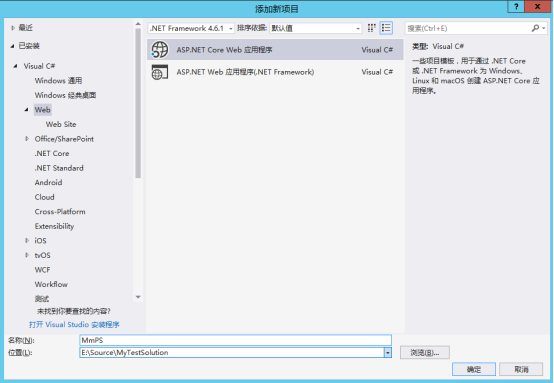
图1
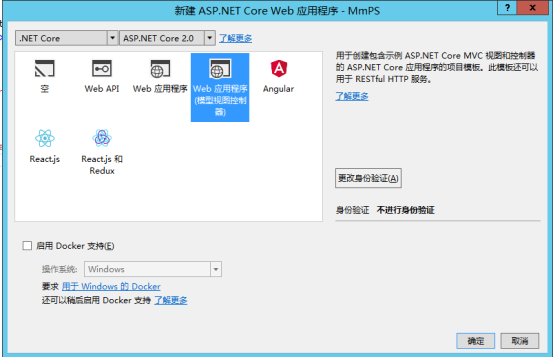
图2
2、添加Web项目应用程序的源代码的各种逻辑
本项目是已经建好的,无需创建。此步骤省略。
3、发布Web项目
发布已经完善的Web项目应用程序,首先是定义应用的目标平台。
1、编辑项目资源
在“解决方案资源管理器”中右键单击项目(而非解决方案),然后选择“编辑 MmPS.csproj”。在MmPS.csproj文件(该文件用于定义应用的目) <PropertyGroup> 部分中添加<RuntimeIdentifiers> 标记,然后指定每个目标平台的运行时标识符 (RID)。 请注意,如果是多个系统,还需要添加分号来分隔 RID。 不同系统的RID会不同,具体请查看运行时标识符目录,获取运行时标识符列表。例如,以下示例表明应用在 64 位 Windows 10 操作系统和 64 位 OS X 10.11 版本的操作系统上运行。
在MmPS.csproj文件中添加
<PropertyGroup> <RuntimeIdentifiers>ubuntun.16.04-x64;osx.10.11-x64
</RuntimeIdentifiers>
</PropertyGroup>
2、发布应用
调试并测试程序后,为应用的每个目标平台创建要与应用一起发布的文件。从Visual Studio发布应用,执行以下操作:
l 在“解决方案资源管理器”中右键单击项目(而非解决方案),然后选择“发布”,如下图3。
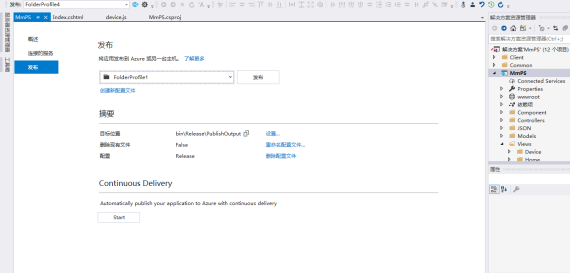
l 在“发布”选项卡上,选择“发布”。 Visual Studio将包含应用程序的文件写入本地文件系统。“发布”选项卡现在显示单个配置文件 FolderProfile。 该配置文件的配置设置显示在选项卡的“摘要”部分。目标运行时用于标识已发布的运行时,目标位置用于标识独立部署文件的写入位置。
l 默认情况下,Visual Studio 将所有已发布文件写入单个目录。 为了方便起见,最好为每个目标运行时创建单个配置文件,并将已发布文件置于特定于平台的目录中。 这包括为每个目标平台创建单独的发布配置文件。
l 根据平台单独发布应用程序
现在执行下列操作,为每个平台重新生成应用程序:
1、在“发布”对话框中选择“创建新配置文件”。
在“选取发布目标”对话框中,将“选择文件夹”位置更改为 bin\Release\PublishOutput\ubuntun.16.04-x64。 选择“确定”。
在配置文件列表中选择新配置文件 (FolderProfile1) ,并确保“目标运行时”为 ubuntun.16.04-x64。 如果不是,请选择“设置”。 在“配置文件设置”对话框中,将“目标运行时”更改为 ubuntun.16.04-x64,然后选择“保存”。 否则,选择“取消”。
2、选择“发布”,发布 64 位 ubuntun.16.04平台的应用。
3、其他平台类似操作即可
再次按照上述步骤创建 osx.10.11-x64 平台的配置文件。 “目标位置”为 bin\Release\PublishOutput\osx.10.11-x64,“目标运行时”为 osx.10.11-x64。Visual Studio 分配给此配置文件的名称是 FolderProfile2。
请注意,每个目标位置中都包含启动应用所需的完整文件集(既包含应用文件,又包含所有 .NET Core 文件)。同时与应用程序的文件一起,发布过程将发出包含应用调试信息的程序数据库 (.pdb) 文件。 该文件主要用于调试异常。 可以选择不使用应用程序文件打包该文件。 但是,如果要调试应用的发布版本,则应保存该文件。
4、可以把已经发布的文件部署到其他系统中了, 例如,可以使用简单的 copy 命令将其打包为 Zip 文件,或者使用选择的安装包进行部署(下面会把发布的文件部署到ubuntun.16.04-x64)。
下面是本项目完整的 MmPS.csproj 文件。
<Project Sdk="Microsoft.NET.Sdk.Web">
<PropertyGroup Label="Globals">
<SccProjectName>SAK</SccProjectName>
<SccProvider>SAK</SccProvider>
<SccAuxPath>SAK</SccAuxPath>
<SccLocalPath>SAK</SccLocalPath>
</PropertyGroup>
<PropertyGroup>
<TargetFramework>netcoreapp2.0</TargetFramework>
<RuntimeIdentifiers>ubuntun.16.04-x64;osx.10.11-x64</RuntimeIdentifiers>
</PropertyGroup>
<ItemGroup>
<Compile Remove="Models\authority.cs" />
<Compile Remove="Models\log.cs" />
<Compile Remove="Models\menu.cs" />
<Compile Remove="Models\module.cs" />
<Compile Remove="Models\nodes.cs" />
<Compile Remove="Models\roles.cs" />
<Compile Remove="Models\source.cs" />
<Compile Remove="Models\TestUser.cs" />
<Compile Remove="Models\user.cs" />
<Compile Remove="Models\userinrole.cs" />
</ItemGroup>
<ItemGroup>
<Content Remove="appsettings.Development.json" />
<Content Remove="Views\Index.cshtml" />
</ItemGroup>
<ItemGroup>
<None Remove="Models\MMPS.txt" />
<None Remove="Properties\PublishProfiles\CustomProfile.pubxml" />
<None Remove="Views\Log.js" />
<None Remove="Views\Log\Log.js" />
<None Remove="Views\OrganizationInfo\OrganizationInfo.js" />
<None Remove="Views\Update\UpdateUpload.js" />
</ItemGroup>
<ItemGroup>
<Content Include="Views\Device\Device.js" />
<Content Include="Views\Log\Log.js" />
<Content Include="Views\Menu\Menu.js" />
<Content Include="Views\OrganizationInfo\OrganizationInfo.js" />
<Content Include="Views\Roles\Roles.js" />
<Content Include="Views\Source\Source.js">
<CopyToOutputDirectory>Never</CopyToOutputDirectory>
</Content>
<Content Include="Views\Update\UpdateUpload.js" />
<Content Include="Views\UserInfo\UserInfo.js">
<CopyToOutputDirectory>Never</CopyToOutputDirectory>
</Content>
</ItemGroup>
<ItemGroup>
<PackageReference Include="AutoMapper" Version="6.1.1" />
<PackageReference Include="Dapper" Version="1.50.2" />
<PackageReference Include="Microsoft.AspNetCore.All" Version="2.0.0" />
<PackageReference Include="Microsoft.AspNetCore.Session" Version="2.0.0" />
<PackageReference Include="Microsoft.EntityFrameworkCore" Version="2.0.0" />
<PackageReference Include="Microsoft.EntityFrameworkCore.Design" Version="2.0.0" />
<PackageReference Include="Microsoft.EntityFrameworkCore.Tools" Version="2.0.0" />
<PackageReference Include="Microsoft.Extensions.Configuration" Version="2.0.0" />
<PackageReference Include="Microsoft.Extensions.Configuration.FileExtensions" Version="2.0.0" />
<PackageReference Include="Microsoft.Extensions.Configuration.Json" Version="2.0.0" />
<PackageReference Include="Microsoft.VisualStudio.Web.CodeGeneration.Design" Version="2.0.0" />
<PackageReference Include="MySql.Data.EntityFrameworkCore.Design" Version="8.0.8-dmr" />
<PackageReference Include="NETStandard.Library" Version="2.0.0" />
<PackageReference Include="newtonsoft.json" Version="10.0.3" />
<PackageReference Include="Pomelo.EntityFrameworkCore.MySql" Version="2.0.0-rtm-10062" />
<PackageReference Include="System.ComponentModel" Version="4.3.0" />
</ItemGroup>
<ItemGroup>
<DotNetCliToolReference Include="Microsoft.VisualStudio.Web.CodeGeneration.Tools" Version="2.0.0" />
</ItemGroup>
<ItemGroup>
<None Include="wwwroot\js\kindeditor\kindeditor-all-min.js" />
<None Include="wwwroot\js\kindeditor\kindeditor-all.js" />
<None Include="wwwroot\js\kindeditor\lang\ar.js" />
<None Include="wwwroot\js\kindeditor\lang\en.js" />
<None Include="wwwroot\js\kindeditor\lang\ko.js" />
<None Include="wwwroot\js\kindeditor\lang\ru.js" />
<None Include="wwwroot\js\kindeditor\lang\zh-CN.js" />
<None Include="wwwroot\js\kindeditor\lang\zh-TW.js" />
<None Include="wwwroot\js\kindeditor\plugins\anchor\anchor.js" />
<None Include="wwwroot\js\kindeditor\plugins\autoheight\autoheight.js" />
<None Include="wwwroot\js\kindeditor\plugins\baidumap\baidumap.js" />
<None Include="wwwroot\js\kindeditor\plugins\clearhtml\clearhtml.js" />
<None Include="wwwroot\js\kindeditor\plugins\code\code.js" />
<None Include="wwwroot\js\kindeditor\plugins\code\prettify.js" />
<None Include="wwwroot\js\kindeditor\plugins\emoticons\emoticons.js" />
<None Include="wwwroot\js\kindeditor\plugins\filemanager\filemanager.js" />
<None Include="wwwroot\js\kindeditor\plugins\fixtoolbar\fixtoolbar.js" />
<None Include="wwwroot\js\kindeditor\plugins\flash\flash.js" />
<None Include="wwwroot\js\kindeditor\plugins\image\image.js" />
<None Include="wwwroot\js\kindeditor\plugins\insertfile\insertfile.js" />
<None Include="wwwroot\js\kindeditor\plugins\lineheight\lineheight.js" />
<None Include="wwwroot\js\kindeditor\plugins\link\link.js" />
<None Include="wwwroot\js\kindeditor\plugins\map\map.js" />
<None Include="wwwroot\js\kindeditor\plugins\media\media.js" />
<None Include="wwwroot\js\kindeditor\plugins\multiimage\images\swfupload.swf" />
<None Include="wwwroot\js\kindeditor\plugins\multiimage\multiimage.js" />
<None Include="wwwroot\js\kindeditor\plugins\pagebreak\pagebreak.js" />
<None Include="wwwroot\js\kindeditor\plugins\plainpaste\plainpaste.js" />
<None Include="wwwroot\js\kindeditor\plugins\preview\preview.js" />
<None Include="wwwroot\js\kindeditor\plugins\quickformat\quickformat.js" />
<None Include="wwwroot\js\kindeditor\plugins\table\table.js" />
<None Include="wwwroot\js\kindeditor\plugins\template\template.js" />
<None Include="wwwroot\js\kindeditor\plugins\wordpaste\wordpaste.js" />
</ItemGroup>
<ItemGroup>
<ProjectReference Include="..\DownloadHelper\DownloadHelper.csproj" />
<ProjectReference Include="..\MmPS.Application\MmPS.Application.csproj" />
<ProjectReference Include="..\MmPS.Common.Data\MmPS.Common.Data.csproj" />
<ProjectReference Include="..\MmPS.EntityFrameworkCore\MmPS.EntityFrameworkCore.csproj" />
</ItemGroup>
<ItemGroup>
<Folder Include="Properties\PublishProfiles\" />
</ItemGroup>
<ItemGroup>
<Content Update="wwwroot\js\views\source.js">
<CopyToOutputDirectory>Never</CopyToOutputDirectory>
</Content>
<Content Update="wwwroot\js\views\userInfo.js">
<CopyToOutputDirectory>Never</CopyToOutputDirectory>
</Content>
</ItemGroup>
<ProjectExtensions><VisualStudio><UserProperties bower_1json__JSONSchema="" /></VisualStudio></ProjectExtensions>
</Project>
使用 Visual Studio 部署 .NET Core 应用 ——ASP.NET Core 发布的具体操作的更多相关文章
- Visual Studio Code和Docker开发asp.net core和mysql应用
Visual Studio Code和Docker开发asp.net core和mysql应用 .net猿遇到了小鲸鱼,觉得越来越兴奋.本来.net猿只是在透过家里那田子窗看外面的世界,但是看着海峡对 ...
- docker4dotnet #3 在macOS上使用Visual Studio Code和Docker开发asp.net core和mysql应用
.net猿遇到了小鲸鱼,觉得越来越兴奋.本来.net猿只是在透过家里那田子窗看外面的世界,但是看着海峡对岸的苹果园越来越茂盛,实在不想再去做一只宅猿了.于是,.net猿决定搭上小鲸鱼的渡轮到苹果园去看 ...
- 使用Visual Studio Code创建第一个ASP.NET Core应用程序
全文翻译自:Your First ASP.NET Core Application on a Mac Using Visual Studio Code 这篇文章将向你展示如何在Mac上写出你的第一个A ...
- Visual Studio for Mac中的ASP.NET Core
所以你们都听到了#Build 2017的消息,Mac上的Visual Studio已经被完全发布,是一般的.为了庆祝这个版本,我将在我的Mac上写几篇关于构建一些不同的.net应用的帖子. 正如你已经 ...
- [.net core]1,asp.net core 的优势及特性
1.跨平台 支持windows ,linux .macOS 可以托管在iis,apache,Docker,或自宿在自己的进程 2.强大的IDE visual studio 或visual studio ...
- Visual Studio 2015速递(3)——ASP.NET 新特性
系列文章 Visual Studio 2015速递(1)——C#6.0新特性怎么用 Visual Studio 2015速递(2)——提升效率和质量(VS2015核心竞争力) Visual Studi ...
- 用 Visual Studio 2012 调试你的ASP程序
最近搞到一段很值得参考的ASP项目,无奈技术有限,打开看完代码后感觉自己就像从来没学过ASP一样.唉...大神的世界 不过在网上看到一个有趣的方法,可以用Visual Studio 2005来调试AS ...
- ASP.NET Core 用户注册 - ASP.NET Core 基础教程 - 简单教程,简单编程
原文:ASP.NET Core 用户注册 - ASP.NET Core 基础教程 - 简单教程,简单编程 ASP.NET Core 用户注册 上一章节我们终于迁移完了 Identity 的数据,也创建 ...
- 它来了!!!有史以来第一个64位Visual Studio(2022)预览版将在今夏发布!
美国时间2021年4月19日,微软产品研发部一位负责人Amanda Silver在其博客上发布一则<Visual Studio 2022>的消息,表示将在今年(2021年)夏天发布Visu ...
- ASP.NET Core 视图 - ASP.NET Core 基础教程 - 简单教程,简单编程
原文:ASP.NET Core 视图 - ASP.NET Core 基础教程 - 简单教程,简单编程 ASP.NET Core 视图 花了几章节,终于把 ASP.NET Core MVC 中的 C 控 ...
随机推荐
- [NOI2009]管道取珠 DP + 递推
---题面--- 思路: 主要难点在思路的转化, 不能看见要求$\sum{a[i]^2}$就想着求a[i], 我们可以对其进行某种意义上的拆分,即a[i]实际上可以代表什么? 假设我们现在有两种取出某 ...
- [NOI2009]诗人小G 决策单调性优化DP
第一次写这种二分来优化决策单调性的问题.... 调了好久,,,各种细节问题 显然有DP方程: $f[i]=min(f[j] + qpow(abs(sum[i] - sum[j] - L - 1))); ...
- Promise用法总结
1. Promise的状态 Promise对象有三个状态: 1. 进行中(pending) 2. 成功(resolved) 3. 失败(rejected) 2. 生成一个Promise对象 ...
- Uva-oj Product 大数乘法
Product Time Limit:3000MS Memory Limit:0KB 64bit IO Format:%lld & %llu Submit Status Des ...
- 如何让浏览器在访问链接时不要带上referer
function open_without_referrer(link){ document.body.appendChild(document.createElement('iframe')).sr ...
- POJ1236:Network of Schools (思维+Tarjan缩点)
Network of Schools Time Limit: 1000MS Memory Limit: 10000K Total Submissions: 24880 Accepted: 99 ...
- mesos安装、配置和运行
环境:rhel6.6 安装: 安装依赖包 yum install -y tar wget git which nss yum groupinstall -y "Development Too ...
- zookeeper源码分析之leader选举
zookeeper提供顺序一致性.原子性.统一视图.可靠性保证服务zookeeper使用的是zab(atomic broadcast protocol)协议而非paxos协议zookeeper能处理并 ...
- AngularJS学习——价格计算器
利用AngularJs实现价格计算器,总价满100免运费.(熟悉$watch的使用)
- 51Nod 1003 阶乘后面0的数量 | 思维
题意:n的阶乘后面0的个数,如果直接算出阶乘再数0的数量一定会超时的. 因为10=2*5,所以求出5贡献的次数就行. #include "bits/stdc++.h" using ...