
MySQL 多表查询(Day43)
阅读目录
==================================================================================================================================
一,介绍
多表连接查询
复合条件连接查询
子查询
准备表,员工表和部门表
company.employee
company.department
#建表

create table department(

id int,

name varchar(20)

);

create table employee1(

id int primary key auto_increment,

name varchar(20),

sex enum('male','female') not null default 'male',

age int,

dep_id int

);

#插入数据

insert into department values

(200,'技术'),

(201,'人力资源'),

(202,'销售'),

(203,'运营');

insert into employee1(name,sex,age,dep_id) values

('egon','male',18,200),

('alex','female',48,201),

('wupeiqi','male',38,201),

('yuanhao','female',28,202),

('liwenzhou','male',18,200),

('jingliyang','female',18,204)

;
#查看表结构和数据

mysql> desc department;

+-------+-------------+------+-----+---------+-------+

| Field | Type | Null | Key | Default | Extra |

+-------+-------------+------+-----+---------+-------+

| id | int(11) | YES | | NULL | |

| name | varchar(20) | YES | | NULL | |

+-------+-------------+------+-----+---------+-------+

mysql> desc employee;

+--------+-----------------------+------+-----+---------+----------------+

| Field | Type | Null | Key | Default | Extra |

+--------+-----------------------+------+-----+---------+----------------+

| id | int(11) | NO | PRI | NULL | auto_increment |

| name | varchar(20) | YES | | NULL | |

| sex | enum('male','female') | NO | | male | |

| age | int(11) | YES | | NULL | |

| dep_id | int(11) | YES | | NULL | |

+--------+-----------------------+------+-----+---------+----------------+

mysql> select * from department;

+------+--------------+

| id | name |

+------+--------------+

| 200 | 技术 |

| 201 | 人力资源 |

| 202 | 销售 |

| 203 | 运营 |

+------+--------------+

mysql> select * from employee;

+----+------------+--------+------+--------+

| id | name | sex | age | dep_id |

+----+------------+--------+------+--------+

| 1 | egon | male | 18 | 200 |

| 2 | alex | female | 48 | 201 |

| 3 | wupeiqi | male | 38 | 201 |

| 4 | yuanhao | female | 28 | 202 |

| 5 | liwenzhou | male | 18 | 200 |

| 6 | jingliyang | female | 18 | 204 |

+----+------------+--------+------+--------+
二,多表连接查询
#重点:外链接语法

SELECT 字段列表

    FROM 表1 INNER|LEFT|RIGHT JOIN 表2

    ON 表1.字段 = 表2.字段;
1,交叉链接:不适用任何匹配条件,生成笛卡尔积
select * from employee,department;
mysql> select * from employee,department;

+----+------------+--------+------+--------+------+--------------+

| id | name       | sex    | age  | dep_id | id   | name         |

+----+------------+--------+------+--------+------+--------------+

|  1 | egon       | male   |   18 |    200 |  200 | 技术         |

|  1 | egon       | male   |   18 |    200 |  201 | 人力资源     |

|  1 | egon       | male   |   18 |    200 |  202 | 销售         |

|  1 | egon       | male   |   18 |    200 |  203 | 运营         |

|  2 | alex       | female |   48 |    201 |  200 | 技术         |

|  2 | alex       | female |   48 |    201 |  201 | 人力资源     |

|  2 | alex       | female |   48 |    201 |  202 | 销售         |

|  2 | alex       | female |   48 |    201 |  203 | 运营         |

|  3 | wupeiqi    | male   |   38 |    201 |  200 | 技术         |

|  3 | wupeiqi    | male   |   38 |    201 |  201 | 人力资源     |

|  3 | wupeiqi    | male   |   38 |    201 |  202 | 销售         |

|  3 | wupeiqi    | male   |   38 |    201 |  203 | 运营         |

|  4 | yuanhao    | female |   28 |    202 |  200 | 技术         |

|  4 | yuanhao    | female |   28 |    202 |  201 | 人力资源     |

|  4 | yuanhao    | female |   28 |    202 |  202 | 销售         |

|  4 | yuanhao    | female |   28 |    202 |  203 | 运营         |

|  5 | liwenzhou  | male   |   18 |    200 |  200 | 技术         |

|  5 | liwenzhou  | male   |   18 |    200 |  201 | 人力资源     |

|  5 | liwenzhou  | male   |   18 |    200 |  202 | 销售         |

|  5 | liwenzhou  | male   |   18 |    200 |  203 | 运营         |

|  6 | jingliyang | female |   18 |    204 |  200 | 技术         |

|  6 | jingliyang | female |   18 |    204 |  201 | 人力资源     |

|  6 | jingliyang | female |   18 |    204 |  202 | 销售         |

|  6 | jingliyang | female |   18 |    204 |  203 | 运营         |

+----+------------+--------+------+--------+------+--------------+
交叉连接查询
2,内连接:只连接匹配的行。(找到两张表共有的部分,相当于利用条件从笛卡尔积结果中筛选出正确的结果)
#找两张表共有的部分,相当于利用条件从笛卡尔积结果中筛选出了正确的结果

#department没有204这个部门,因而employee表中关于204这条员工信息没有匹配出来

mysql> select employee.id,employee.name,employee.age,employee.sex,department.name from employee inner join department on employee.dep_id=department.id;

+----+-----------+------+--------+--------------+

| id | name      | age  | sex    | name         |

+----+-----------+------+--------+--------------+

|  1 | egon      |   18 | male   | 技术         |

|  2 | alex      |   48 | female | 人力资源     |

|  3 | wupeiqi   |   38 | male   | 人力资源     |

|  4 | yuanhao   |   28 | female | 销售         |

|  5 | liwenzhou |   18 | male   | 技术         |

+----+-----------+------+--------+--------------+

#上述sql等同于

mysql> select employee.id,employee.name,employee.age,employee.sex,department.name from employee,department where employee.dep_id=department.id;
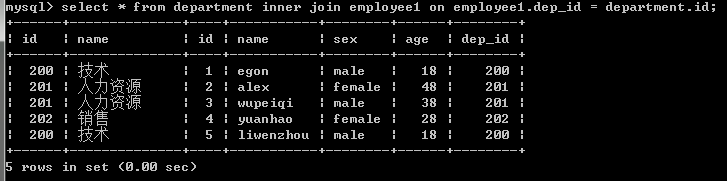
注意:内连接的join可以忽略不写,但是还是加上看起来清楚点
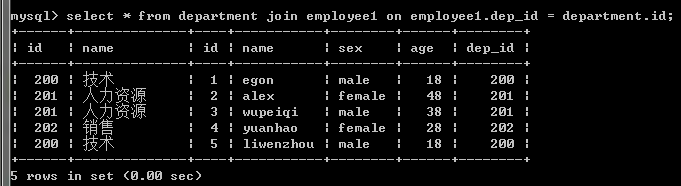
3,外连接之左连接:优先显示左表全部记录
#以左表为准,即找出所有员工信息,当然包括没有部门的员工

#本质就是:在内连接的基础上增加左边有右边没有的结果

mysql> select employee.id,employee.name,department.name as depart_name from employee left join department on employee.dep_id=department.id;

+----+------------+--------------+

| id | name       | depart_name  |

+----+------------+--------------+

|  1 | egon       | 技术         |

|  5 | liwenzhou  | 技术         |

|  2 | alex       | 人力资源     |

|  3 | wupeiqi    | 人力资源     |

|  4 | yuanhao    | 销售         |

|  6 | jingliyang | NULL         |

+----+------------+--------------+
4,外连接之右连接:优先显示右表全部记录
#以右表为准,即找出所有部门信息,包括没有员工的部门

#本质就是:在内连接的基础上增加右边有左边没有的结果

mysql> select employee.id,employee.name,department.name as depart_name from employee right join department on employee.dep_id=department.id;

+------+-----------+--------------+

| id   | name      | depart_name  |

+------+-----------+--------------+

|    1 | egon      | 技术         |

|    2 | alex      | 人力资源     |

|    3 | wupeiqi   | 人力资源     |

|    4 | yuanhao   | 销售         |

|    5 | liwenzhou | 技术         |

| NULL | NULL      | 运营         |

+------+-----------+--------------+
5,全外连接:显示左右两个表的全部记录
全外连接:在内连接的基础上增加左边有右边没有的和右边有左边没有的结果

#注意:mysql不支持全外连接 full JOIN

#强调:mysql可以使用此种方式间接实现全外连接

select * from employee left join department on employee.dep_id = department.id

union

select * from employee right join department on employee.dep_id = department.id

;

#查看结果

+------+------------+--------+------+--------+------+--------------+

| id   | name       | sex    | age  | dep_id | id   | name         |

+------+------------+--------+------+--------+------+--------------+

|    1 | egon       | male   |   18 |    200 |  200 | 技术         |

|    5 | liwenzhou  | male   |   18 |    200 |  200 | 技术         |

|    2 | alex       | female |   48 |    201 |  201 | 人力资源     |

|    3 | wupeiqi    | male   |   38 |    201 |  201 | 人力资源     |

|    4 | yuanhao    | female |   28 |    202 |  202 | 销售         |

|    6 | jingliyang | female |   18 |    204 | NULL | NULL         |

| NULL | NULL       | NULL   | NULL |   NULL |  203 | 运营         |

+------+------------+--------+------+--------+------+--------------+

#注意 union与union all的区别:union会去掉相同的纪录
三,符合条件连接查询
#示例1:以内连接的方式查询employee和department表,并且employee表中的age字段值必须大于25,即找出公司所有部门中年龄大于25岁的员工

select employee.name,employee.age from employee,department

    where employee.dep_id = department.id

    and age > 25;


#示例2:以内连接的方式查询employee和department表,并且以age字段的升序方式显示

select employee.id,employee.name,employee.age,department.name from employee,department

    where employee.dep_id = department.id

    and age > 25

    order by age asc;
四,子查询
#1:子查询是将一个查询语句嵌套在另一个查询语句中。

#2:内层查询语句的查询结果,可以为外层查询语句提供查询条件。

#3:子查询中可以包含:IN、NOT IN、ANY、ALL、EXISTS 和 NOT EXISTS等关键字

#4:还可以包含比较运算符:= 、 !=、> 、<等
1,带 in 关键字的子查询
#查询employee表,但dep_id必须在department表中出现过

select * from employee

    where dep_id in

        (select id from department);
2,带比较运算符的子查询
#比较运算符:=、!=、>、>=、<、<=、<>

#查询平均年龄在25岁以上的部门名

select id,name from department

    where id in

        (select dep_id from employee group by dep_id having avg(age) > 25);

#查看技术部员工姓名

select name from employee

    where dep_id in

        (select id from department where name='技术');

#查看不足1人的部门名

select name from department

    where id in

        (select dep_id from employee group by dep_id having count(id) <=1);
3,带exists 关键字的子查询
exists关字键字表示存在。在使用exists关键字时,内层查询语句不返回查询的记录。
而是返回一个真假值。True或False
当返回True时,外层查询语句将进行查询;当返回值为False时,外层查询语句不进行查询
#department表中存在dept_id=203,Ture

mysql> select * from employee

    ->     where exists

    ->         (select id from department where id=200);

+----+------------+--------+------+--------+

| id | name       | sex    | age  | dep_id |

+----+------------+--------+------+--------+

|  1 | egon       | male   |   18 |    200 |

|  2 | alex       | female |   48 |    201 |

|  3 | wupeiqi    | male   |   38 |    201 |

|  4 | yuanhao    | female |   28 |    202 |

|  5 | liwenzhou  | male   |   18 |    200 |

|  6 | jingliyang | female |   18 |    204 |

+----+------------+--------+------+--------+

#department表中存在dept_id=205,False

mysql> select * from employee

    ->     where exists

    ->         (select id from department where id=204);

Empty set (0.00 sec)
小练习:
#查询平均年龄在25岁以上的部门名

select name from department where id in (

select dep_id from employee group by dep_id having avg(age) > 25

);

#查看技术部员工姓名

select name from employee where dep_id = (select id from department where name='技术');

#查看小于2人的部门名

select name from department where id in (

select dep_id from employee1 group by dep_id having count(id) < 2

)

union

select name from department where id not in (select distinct dep_id from employee1);

#提取空部门                              #有人的部门

select * from department where id not in (select distinct dep_id from employee1);

或者:

select name from department where id in

(

select dep_id from employee1 group by dep_id having count(id) < 2

union

select id from department where id not in (select distinct dep_id from employee1);

);
五,综合练习
1,select语句关键字的定义顺序
select distinct <select_list>

from <left_table>

<join_type> join <right_table>

on <join_condition>

where <where_condition>

group by <group_by_list>

having <having_condition>

order by<order_by_condition>

limit<limit_number>
select语句关键字的定义顺序
init.sql文件内容
/*

 数据导入:

 Navicat Premium Data Transfer

 Source Server         : localhost

 Source Server Type    : MySQL

 Source Server Version : 50624

 Source Host           : localhost

 Source Database       : sqlexam

 Target Server Type    : MySQL

 Target Server Version : 50624

 File Encoding         : utf-8

 Date: 10/21/2016 06:46:46 AM

*/

SET NAMES utf8;

SET FOREIGN_KEY_CHECKS = 0;

-- ----------------------------

--  Table structure for `class`

-- ----------------------------

DROP TABLE IF EXISTS `class`;

CREATE TABLE `class` (

  `cid` int(11) NOT NULL AUTO_INCREMENT,

  `caption` varchar(32) NOT NULL,

  PRIMARY KEY (`cid`)

) ENGINE=InnoDB AUTO_INCREMENT=5 DEFAULT CHARSET=utf8;

-- ----------------------------

--  Records of `class`

-- ----------------------------

BEGIN;

INSERT INTO `class` VALUES ('', '三年二班'), ('', '三年三班'), ('', '一年二班'), ('', '二年九班');

COMMIT;

-- ----------------------------

--  Table structure for `course`

-- ----------------------------

DROP TABLE IF EXISTS `course`;

CREATE TABLE `course` (

  `cid` int(11) NOT NULL AUTO_INCREMENT,

  `cname` varchar(32) NOT NULL,

  `teacher_id` int(11) NOT NULL,

  PRIMARY KEY (`cid`),

  KEY `fk_course_teacher` (`teacher_id`),

  CONSTRAINT `fk_course_teacher` FOREIGN KEY (`teacher_id`) REFERENCES `teacher` (`tid`)

) ENGINE=InnoDB AUTO_INCREMENT=5 DEFAULT CHARSET=utf8;

-- ----------------------------

--  Records of `course`

-- ----------------------------

BEGIN;

INSERT INTO `course` VALUES ('', '生物', ''), ('', '物理', ''), ('', '体育', ''), ('', '美术', '');

COMMIT;

-- ----------------------------

--  Table structure for `score`

-- ----------------------------

DROP TABLE IF EXISTS `score`;

CREATE TABLE `score` (

  `sid` int(11) NOT NULL AUTO_INCREMENT,

  `student_id` int(11) NOT NULL,

  `course_id` int(11) NOT NULL,

  `num` int(11) NOT NULL,

  PRIMARY KEY (`sid`),

  KEY `fk_score_student` (`student_id`),

  KEY `fk_score_course` (`course_id`),

  CONSTRAINT `fk_score_course` FOREIGN KEY (`course_id`) REFERENCES `course` (`cid`),

  CONSTRAINT `fk_score_student` FOREIGN KEY (`student_id`) REFERENCES `student` (`sid`)

) ENGINE=InnoDB AUTO_INCREMENT=53 DEFAULT CHARSET=utf8;

-- ----------------------------

--  Records of `score`

-- ----------------------------

BEGIN;

INSERT INTO `score` VALUES ('', '', '', ''), ('', '', '', ''), ('', '', '', ''), ('', '', '', ''), ('', '', '', ''), ('', '', '', ''), ('', '', '', ''), ('', '', '', ''), ('', '', '', ''), ('', '', '', ''), ('', '', '', ''), ('', '', '', ''), ('', '', '', ''), ('', '', '', ''), ('', '', '', ''), ('', '', '', ''), ('', '', '', ''), ('', '', '', ''), ('', '', '', ''), ('', '', '', ''), ('', '', '', ''), ('', '', '', ''), ('', '', '', ''), ('', '', '', ''), ('', '', '', ''), ('', '', '', ''), ('', '', '', ''), ('', '', '', ''), ('', '', '', ''), ('', '', '', ''), ('', '', '', ''), ('', '', '', ''), ('', '', '', ''), ('', '', '', ''), ('', '', '', ''), ('', '', '', ''), ('', '', '', ''), ('', '', '', ''), ('', '', '', ''), ('', '', '', ''), ('', '', '', ''), ('', '', '', ''), ('', '', '', ''), ('', '', '', ''), ('', '', '', ''), ('', '', '', ''), ('', '', '', '');

COMMIT;

-- ----------------------------

--  Table structure for `student`

-- ----------------------------

DROP TABLE IF EXISTS `student`;

CREATE TABLE `student` (

  `sid` int(11) NOT NULL AUTO_INCREMENT,

  `gender` char(1) NOT NULL,

  `class_id` int(11) NOT NULL,

  `sname` varchar(32) NOT NULL,

  PRIMARY KEY (`sid`),

  KEY `fk_class` (`class_id`),

  CONSTRAINT `fk_class` FOREIGN KEY (`class_id`) REFERENCES `class` (`cid`)

) ENGINE=InnoDB AUTO_INCREMENT=17 DEFAULT CHARSET=utf8;

-- ----------------------------

--  Records of `student`

-- ----------------------------

BEGIN;

INSERT INTO `student` VALUES ('', '男', '', '理解'), ('', '女', '', '钢蛋'), ('', '男', '', '张三'), ('', '男', '', '张一'), ('', '女', '', '张二'), ('', '男', '', '张四'), ('', '女', '', '铁锤'), ('', '男', '', '李三'), ('', '男', '', '李一'), ('', '女', '', '李二'), ('', '男', '', '李四'), ('', '女', '', '如花'), ('', '男', '', '刘三'), ('', '男', '', '刘一'), ('', '女', '', '刘二'), ('', '男', '', '刘四');

COMMIT;

-- ----------------------------

--  Table structure for `teacher`

-- ----------------------------

DROP TABLE IF EXISTS `teacher`;

CREATE TABLE `teacher` (

  `tid` int(11) NOT NULL AUTO_INCREMENT,

  `tname` varchar(32) NOT NULL,

  PRIMARY KEY (`tid`)

) ENGINE=InnoDB AUTO_INCREMENT=6 DEFAULT CHARSET=utf8;

-- ----------------------------

--  Records of `teacher`

-- ----------------------------

BEGIN;

INSERT INTO `teacher` VALUES ('', '张磊老师'), ('', '李平老师'), ('', '刘海燕老师'), ('', '朱云海老师'), ('', '李杰老师');

COMMIT;

SET FOREIGN_KEY_CHECKS = 1;
从init.sql文件中导入数据
#准备表、记录

mysql> create database db1;

mysql> use db1;

mysql> source /root/init.sql
1、查询所有的课程的名称以及对应的任课老师姓名

2、查询学生表中男女生各有多少人

3、查询物理成绩等于100的学生的姓名

4、查询平均成绩大于八十分的同学的姓名和平均成绩

5、查询所有学生的学号,姓名,选课数,总成绩

6、 查询姓李老师的个数

7、 查询没有报李平老师课的学生姓名

8、 查询物理课程比生物课程高的学生的学号

9、 查询没有同时选修物理课程和体育课程的学生姓名

10、查询挂科超过两门(包括两门)的学生姓名和班级

、查询选修了所有课程的学生姓名

12、查询李平老师教的课程的所有成绩记录

13、查询全部学生都选修了的课程号和课程名

14、查询每门课程被选修的次数

15、查询之选修了一门课程的学生姓名和学号

16、查询所有学生考出的成绩并按从高到低排序(成绩去重)

17、查询平均成绩大于85的学生姓名和平均成绩

18、查询生物成绩不及格的学生姓名和对应生物分数

19、查询在所有选修了李平老师课程的学生中,这些课程(李平老师的课程,不是所有课程)平均成绩最高的学生姓名

20、查询每门课程成绩最好的前两名学生姓名

21、查询不同课程但成绩相同的学号,课程号,成绩

22、查询没学过“叶平”老师课程的学生姓名以及选修的课程名称;

23、查询所有选修了学号为1的同学选修过的一门或者多门课程的同学学号和姓名;

24、任课最多的老师中学生单科成绩最高的学生姓名

题目
题目
MySQL 多表查询(Day43)的更多相关文章
- MySQL多表查询之外键、表连接、子查询、索引
MySQL多表查询之外键.表连接.子查询.索引 一.外键: 1.什么是外键 2.外键语法 3.外键的条件 4.添加外键 5.删除外键 1.什么是外键: 主键:是唯一标识一条记录,不能有重复的,不允许为 ...
- Mysql 单表查询 子查询 关联查询
数据准备: ## 学院表create table department( d_id int primary key auto_increment, d_name varchar(20) not nul ...
- (转)Mysql 多表查询详解
MySQL 多表查询详解 一.前言 二.示例 三.注意事项 一.前言 上篇讲到mysql中关键字执行的顺序,只涉及了一张表:实际应用大部分情况下,查询语句都会涉及到多张表格 : 1.1 多表连接有 ...
- MySQL多表查询回顾
----------------------siwuxie095 MySQL 多表查询回顾 以客户和联系人为例(一对多) 1.内连接 /*内连接写法一*/ select * from t_custom ...
- python 3 mysql 单表查询
python 3 mysql 单表查询 1.准备表 company.employee 员工id id int 姓名 emp_name varchar 性别 sex enum 年龄 age int 入职 ...
- python3 mysql 多表查询
python3 mysql 多表查询 一.准备表 创建二张表: company.employee company.department #建表 create table department( id ...
- Mysql 单表查询-排序-分页-group by初识
Mysql 单表查询-排序-分页-group by初识 对于select 来说, 分组聚合(((group by; aggregation), 排序 (order by** ), 分页查询 (limi ...
- Mysql 单表查询where初识
Mysql 单表查询where初识 准备数据 -- 创建测试库 -- drop database if exists student_db; create database student_db ch ...
- MySQL多表查询合并结果union all,内连接查询
MySQL多表查询合并结果和内连接查询 1.使用union和union all合并两个查询结果:select 字段名 from tablename1 union select 字段名 from tab ...
- MySQL多表查询、事务、DCL:内含mysql如果忘记密码解决方案
MySQL多表查询.事务.DCL 多表查询 * 查询语法: select 列名列表 from 表名列表 where.... * 准备sql # 创建部门表 CREATE TABLE dept( id ...
随机推荐
- 内核补丁 patch
https://www.kernel.org/diff/diffview.cgi?file=/pub/linux/kernel/v3.x/patch-3.18.12.xz
- traceroute/tracert--获取网络路由路径
traceroute 是用来检测发出数据包的主机到目标主机之间所经过的网关数量的工具.traceroute 的原理是试图以最小的TTL发出探测包来跟踪数据包到达目标主机所经过的网关,然后监听一个来自网 ...
- shell变量自增 || Python脚本接收参数
一.shell变量自增a=1a=$(($a+1))a=$[$a+1]a=`expr $a + 1`let a++ let a+=1 ((a++)) echo $a 二.python脚本接收参数 fro ...
- thinkphp 读取页面报错 说 /Runtime/Cache/Home/XXXXXX.php 错误
thinkphp _STORAGE_WRITE_ERROR_:./Runtime/Cache/Home/xxxx.php 这一种报错一般是在linux 才会出现的错误,因为是权限问题.把Home文件加 ...
- 完成blog后台一枚
技术实现:纯jfinal+AmazeUI
- 文件I/O:文件流→序列化
★文件流 文件操作是最简单最直接也是最容易想到的一种方式,我们说的文件操作不仅仅是通过FileInputStream/FileOutputStream这么“裸”的方式直接把数据写入到本地文件(像我以前 ...
- Android中TextView和EditView经常使用属性设置
Android开发中最经常使用的几乎相同就是TextView和EditView了,在使用它时.我们也会设置它的一些属性,为了让我们设计的更好看,设置的更合理.这里记下它的经常使用属性,方便后期查阅. ...
- Linux IO操作——RIO包
1.linux基本I/O接口介绍 ssize_t read(int fd, void *buf, size_t count); ssize_t write(int fd, void *buf, siz ...
- IOS学习笔记28—SQLite3第三方库之FMDB
本文转载至 http://blog.csdn.net/happyrabbit456/article/details/11609451 SQLite是一种小型的轻量级的关系型数据库,在移动设备上使用是非 ...
- Android中自动跳转到系统设置界面
// 转到手机设置界面,用户设置GPS Intent intent = new Intent( Settings.ACTION_LOCATION_SOURCE_SETTINGS); startActi ...