
git "Could not read from remote repository.Please make sure you have the correct access rights."解决方案
我们在使用git clone 或其他命令的时候,有时候会遇到这类问题,如图:

fatal: Could not read from remote repository.Please make sure you have the correct access rights and the repository exists.
出现这个问题是因为没有在github账号添加SSH key
1.在终端输入。
ssh-keygen -t rsa -C "username" (注:username为你git上的用户名)
如果执行成功。返回

Generating public/private rsa key pair.
Enter file in which to save the key (/root/.ssh/id_rsa):
然后,在这里就是设置存储地址了.我们直接按回车,会出现一下两种情况的一种:
(1)如果正常运行的话,会出现

Enter passphrase (empty for no passphrase):
然后我们直接回车
(2)有的时候我们可能会出现
/Users/your username/.ssh/id_rsa already exists.
Overwrite (y/n)?
这说明你已经设置了存储地址,我们输入“y”覆盖
Overwrite (y/n)? y
回车
上面的任意两种情况之后,会出现


Enter same passphrase again:
再次回车,这时候你会看见:
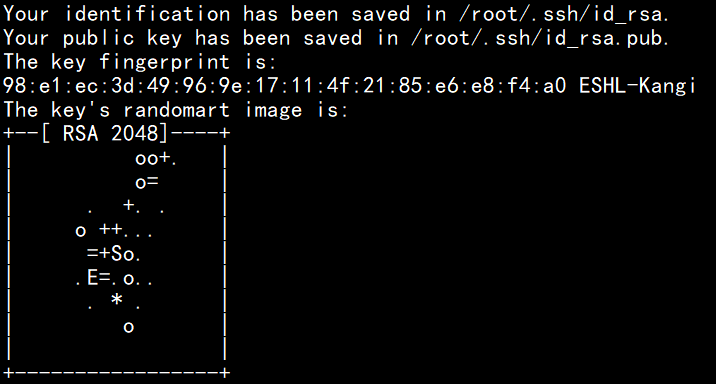
这说明SSH key就已经生成了。文件目录就是:/root/.ssh/id_rsa.pub.
我们执行cat命令查看文件的内容:
cat /root/.ssh/id_rsa.pub
这时候会看见:
ssh-rsa AAAAB3NzaC1yc2。。。。。。。。。
后面的内容我省略了
(说明:ssh-rsa 后面的内容这就是你的SSH keys)
把显示出来的SSH
keys直接添加到github账户设置里边的SSH keys
最后再执行git clone命令就可以了
git "Could not read from remote repository.Please make sure you have the correct access rights."解决方案的更多相关文章
- 4.git "Could not read from remote repository.Please make sure you have the correct access rights."解决方案
转自:https://zhiku8.com/git-could-not-read-from-remote-repository.html 我们在使用git clone 或其他命令的时候,有时候会遇到这 ...
- git pull 出错 fatal: Could not read from remote repository.Please make sure you have the correct access rights.and the repository exists.
Warning: Permanently added the RSA host key for IP address '192.30.252.131' to the list of known hos ...
- 【git 报错】Could not read from remote repository.Please make sure you have the correct access rights.
我们在使用git clone 或其他命令的时候,有时候会遇到这类问题,如图: and the repository exists. fatal: Could not read from remote ...
- Permission denied (publickey). fatal: Could not read from remote repository. Please make sure you have the correct access rights
第一次提交遇到这样的情况,怎么回事呢,我在github上提交了ssh key 的啊. 排查先看看能不能解析, 1.先 ping https://github.com 把ip添加到 host : ...
- 关于github报错:ssh: connect to host github.com port 22: Connection timed outfatal: Could not read from remote repository.Please make sure you have the correct access rightsand the repository exists.
当执行git命令如:git clone.git pull等等 出现报错:ssh: connect to host github.com port 22: Connection timed outfat ...
- git "Could not read from remote repository.Please make&n
git "Could not read from remote repository.Please make sure you have the correct access rights. ...
- git Could not read from remote repository 解决
错误: fatal: 'origin' does not appear to be a git repository fatal: Could not read from remote reposit ...
- windows 部署 git 服务器报 Please make sure you have the correct access rights and the repository exists.错误
这两天在阿里云上弄windows 服务器,顺便部署了一个git服务.根据网上教程一步步操作下来,最后在 remote远程仓库的时候提示 fatal: 'yourpath/test.git' does ...
- Git push提交时报错Permission denied(publickey)...Please make sure you have the correct access rights and the repository exists.
一.git push origin master 时出错 错误信息为: Permission denied(publickey). fatal: Could not read from remote ...
随机推荐
- 【BZOJ】3626 [LNOI2014]LCA
[算法]树链剖分+线段树(区间加值,区间求和) [题解]http://hzwer.com/3891.html 中间不要取模不然相减会出错. 血的教训:线段树修改时标记下传+上传,查询时下传.如果修改时 ...
- Desert King(POJ2728+最优比率生成树+二分)
题目链接:http://poj.org/problem?id=2728 题目: 题意:求一颗生成树,使得费用与距离的比值最小,其中距离等于两点之间的平面欧拉距离,费用为z坐标之差. 思路: 由上图我们 ...
- HDU 2553 N皇后问题 (深搜)
题目链接 Problem Description 在N*N的方格棋盘放置了N个皇后,使得它们不相互攻击(即任意2个皇后不允许处在同一排,同一列,也不允许处在与棋盘边框成45角的斜线上. 你的任务是,对 ...
- java基础 运算符
算数运算符 加号:在操作数值.字符.字符串时其结果是不同的,当两个字符相加得到的是ASCII码表值, 当两个字符串相加时表示将两个字符串连接在一起,从而组成新的字符串. 除号:整数在使用除号操作时,得 ...
- 网络知识===wireshark抓包数据分析(一)
wireshark分析: 上图是我进行一个HTTP协议的下载,文件内容大概是1.7M左右. 抓包数据: https://files.cnblogs.com/files/botoo/wireshark% ...
- C# 使用HttpWebRequest Post提交数据,携带Cookie和相关参数示例
using System; using System.Collections.Generic; using System.Linq; using System.Text; using System.T ...
- mssql批量刷新多个表的数据
DECLARE @SQL VARCHAR(MAX)SELECT @SQL=ISNULL(@SQL,'')+' UPDATE '+NAME+' SET B=3 WHERE B=2'FROM SYSOBJ ...
- tornado write render redirect IP
write 用法( self.flush() ) render (跳转指定网页)用法 redirect(跳转指定路由)用法 self.request.remote_ip 显示用户 IP 地址 less ...
- 简单理解Hash算法的作用
什么是Hash Hash算法,简称散列算法,也成哈希算法(英译),是将一个大文件映射成一个小串字符.与指纹一样,就是以较短的信息来保证文件的唯一性的标志,这种标志与文件的每一个字节都相关,而且难以找到 ...
- opencv 图像转换
#include <cv.h> #include <highgui.h> int main() { CvPoint2D32f srcTri[], dstTri[]; CvMat ...