
git报错The authenticity of host 'github.com (13.229.188.59)' can't be established. RSA key fingerprint is。。。
额,记录下,.ssh/rsa_pub的内容都加到githup.com配置来,为什么还是报这个错呢。
最后发现是个小白问题,如下图
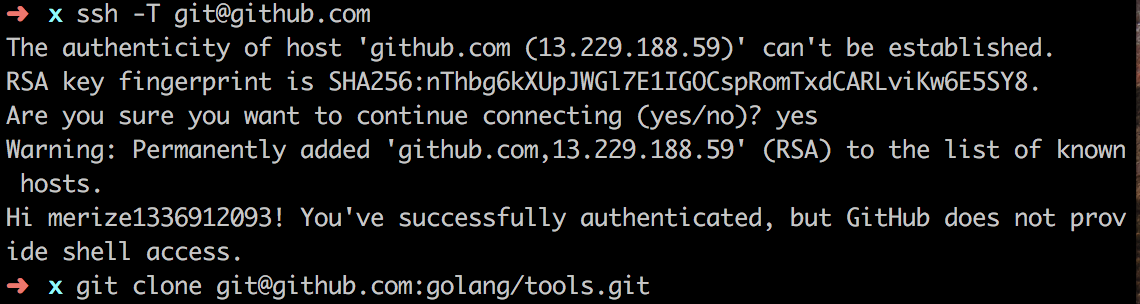
只需要输入yes就ok.
git报错The authenticity of host 'github.com (13.229.188.59)' can't be established. RSA key fingerprint is。。。的更多相关文章
- 拉取远程仓库到本地错误The authenticity of host 'github.com (13.229.188.59)' can't be established.
1.个人在github上面创建了仓库,通过本地的git拉取远程仓库到本地报错信息如下: 这是因为Git使用SSH连接,而SSH第一次连接需要验证GitHub服务器的Key.确认GitHub的Key的指 ...
- The authenticity of host 'github.com (192.30.253.113)' can't be established.
在初始化git之后(git init),同时在github建立好仓库之后,本地也新增了ssh kye(ssh-keygen -t rsa -C 'mail address'),同时也在本地新增了远程仓 ...
- The authenticity of host 'slaver2 (192.168.199.132)' can't be established. RSA key fingerprint is cc:4e:23:01:ca:97:52:21:85:78:bc:29:ca:b3:12:52.
1:ssh登录 The authenticity of host 192.168.199.132 can't be established. 的问题 问题出现了,总要解决吧,百度一下,详细介绍的很多, ...
- 关于github报错 ssh: connect to host github.com port 22: Connection timed out fatal: Could not read from remote repository.
今天上午写demo的时候,突然pull不下代码了,报了一下这样情况的错误: 看了一下代码,怀疑是网路错误,因为在这以前一切都正常的,然后将代码复制搜索了一番,解决办法有很多什么配置config啦,gi ...
- The authenticity of host 'github.com (52.74.223.119)' can't be established.
出现这种错误的问题应考虑是否配置ssh,若没有配置,则进行相关配置 若配置后还出现这种问题,这是由于本地缺少一个文化夹.直接yes而不是y或是回车
- 执行git pull时提示Connection reset by 13.229.188.59 port 22
问题如下图: 解决办法: 1. 2. 3. 4. 5. 6.
- git 报错及解决
报错:fatal: refusing to merge unrelated histories==== 解决办法:git pull加上参数,如:git pull –allow-unrelated-hi ...
- Updates were rejected because the remote contains work that you do(git报错解决方案)
Updates were rejected because the remote contains work that you do(git报错解决方案) 今天向GitHub远程仓库提交本地项目文件时 ...
- git报错:'fatal:remote origin already exists
git报错:'fatal:remote origin already exists'怎么处理?附上git常用操作以及说明. git添加远程库的时候有可能出现如下的错误, 怎么解决? 只要两步: 1 ...
随机推荐
- 洛谷 [SCOI2010]股票交易 | 单调性DP
题目链接 #include<cstdio> #include<algorithm> #include<cstring> #define N 2005 using n ...
- HDU 2089 不要62 | 暴力(其实是个DP)
题目: http://acm.hdu.edu.cn/showproblem.php?pid=2089 题解: 暴力水过 #include<cstdio> #include<algor ...
- AOJ.592 神奇的叶子
神奇的叶子 Time Limit: 1000 ms Case Time Limit: 1000 ms Memory Limit: 64 MB Total Submission: 920 Submiss ...
- [zhuan]使用uiautomator做UI测试
http://blog.chengyunfeng.com/?p=504 在Android 4.1发布的时候包含了一种新的测试工具–uiautomator,uiautomator是用来做UI测试的.也就 ...
- [codeforces/edu31]总结
链接:http://codeforces.com/contest/884 A题: 求86400-ai的前缀和,找到第一个大于等于给定t的即可. B题: 任意相邻两段之间必然有一个0,然后算一下至少的长 ...
- Service学习
一.采用startService方式开启服务 1.写一个服务类 public class PhoneService extends Service { private static final Str ...
- 007.C++构造函数
1.一个引例 //class head class complex //class body {} { public: complex(double r=0, double i) :re(r), im ...
- JS常见的算法
原文链接:Jack Pu's Blog 虽说我们很多时候前端很少有机会接触到算法.实际上学习数据结构与算法对于工程师去理解和分析问题都是有帮助的.如果将来当我们面对较为复杂的问题,这些基础知识的积累可 ...
- [SDOI2008]仪仗队 (洛谷P2158)
洛谷题目链接:[SDOI2008]仪仗队 题目描述 作为体育委员,C君负责这次运动会仪仗队的训练.仪仗队是由学生组成的N * N的方阵,为了保证队伍在行进中整齐划一,C君会跟在仪仗队的左后方,根据其视 ...
- ? 初识Webx 2
初识Webx 1: http://www.cnblogs.com/lddbupt/p/5547189.html Webx Framework负责完成一系列基础性的任务. 比如系统初始化和响应请求. 系 ...