
Communicating to 2 SPI Slaves with USART & SPI ports on Atmega16U2
原文来自:https://www.avrfreaks.net/comment/2236256
I'm writing code for an embedded chip that consists of an Atmega16U2 connected to two devices via the port B SPI pins and the Port D USART pins (which can be used for SPI comms as well).
I'm a bit confused: is the SPCR register a shared resource that will be used for communications to both my Port B and Port D SPI slaves?
Also, i'm a bit stuck on the nitty gritty of how to send data to a specific slave. Since I have two SS lines (DDD4 and DDB0) connected to the uC do I just bit shift one of them low and start calling my writeSPI() function? What would my readSPI() function look like?
C Code:
void SetupSPIHardware(void)

{

	/* Set MOSI and SCK output, all others input */

	DDRB = (1 << DDB2)|(1 << DDB1);

	DDRD = (1 << DDD3)|(1 << DDD5);

	/* Enable SPI, Master, set clock rate fck/16 */

	SPCR = (1 << SPE)|(1 << MSTR)|(1 << SPR0);

}

void writeSPI(char cData)

{

	/* Start transmission */

	SPDR = cData;

	/* Wait for transmission complete */

	while(!(SPSR & (1<<SPIF)))

	;

}

Why do you want to use both the spi and usart for the same thing? You can have a number of slaves on the one spi master, but they must have individual slave selects.
uint8_t SPI(uint8_t cData)

{

	/* Start transmission */

	SPDR = cData;

	/* Wait for transmission complete */

	while(!(SPSR & (1<<SPIF)));

return SPDR;

}
SPI needs to send a byte to receive a byte, so you really only need one function.
'bit shift' is not quite the right term. Basically if you want to talk to device #1, make it's SS pin low. Make it high when finished. Similarly for device #2, make it's SS pin low when you want to talk to it. High when finished.
Regarding SPI and USART - the SPDR register is NOT shared. The USART has it's own registers.
Also, i'm a bit stuck on the nitty gritty of how to send data to a specific slave
Do some research and try some things before asking questions.
There surely are plenty datasheets, application notes, libs, examples, tutorials about SPI.
And then, when you get stuck, ask more specific questions.
There is even a tutorial about how to ask questions on a forum and why asking "help me" is not helping anybody.
Doing magic with a USD 7 Logic Analyser: https://www.avrfreaks.net/comment/2421756#comment-2421756
Bunch of old projects with AVR's: http://www.hoevendesign.com

https://en.wikipedia.org/wiki/Serial_Peripheral_Interface_Bus#Independent_slave_configuration
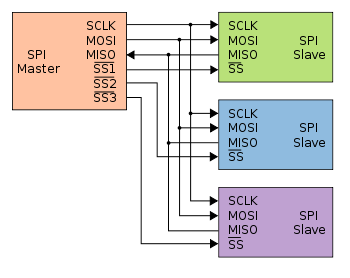
Addendum - highlighting the different Slave-Select (SS) lines:

#SPISlaveSelect
Top Tips:
- How to properly post source code - see: https://www.avrfreaks.net/comment... - also how to properly include images/pictures
- "Garbage" characters on a serial terminal are (almost?) invariably due to wrong baud rate - see: https://learn.sparkfun.com/tutorials/serial-communication
- Wrong baud rate is usually due to not running at the speed you thought; check by blinking a LED to see if you get the speed you expected
- Difference between a crystal, and a crystal oscillator: https://www.avrfreaks.net/comment...
- When your question is resolved, mark the solution: https://www.avrfreaks.net/comment...
- Beginner's "Getting Started" tips: https://www.avrfreaks.net/comment...
- 1
- 2
- 3
- 4
- 5
Ah interesting, it sounds like I may have made a mistake in trying to utilize the USART pins for SPI, seems like I don't want that after all.
Given my schematic below you will see that i've connected my CAP1188 slave to the PORT D USART pins that also support Master SPI Mode. If I was to simplify my design I would connect the MISO/MOSI/SCK lines at PD2,3,5 to those SPI pins on PortB. I'm a little confused though; what line would be good for my CAP1188s SS? Could I just choose any digital I/O pin?


- 1
- 2
- 3
- 4
- 5
The High Septon wrote:Also, i'm a bit stuck on the nitty gritty of how to send data to a specific slave
Do some research and try some things before asking questions.
There surely are plenty datasheets, application notes, libs, examples, tutorials about SPI.
And then, when you get stuck, ask more specific questions.
There is even a tutorial about how to ask questions on a forum and why asking "help me" is not helping anybody.
That's why I didn't say "help me"... I gave a very clear question with background explanation and a code example. Relax dude.
Communicating to 2 SPI Slaves with USART & SPI ports on Atmega16U2的更多相关文章
- ARM与FPGA通过spi通信设计2.spi master的实现
这里主要放两个代码第一个是正常的不使用状态机的SPI主机代码:第二个是状态机SPI代码 1.不使用状态机:特权同学<深入浅出玩转FPGA>中DIY数码相框部分代码: /////////// ...
- ARM与FPGA通过spi通信设计1.spi基础知识
SPI(Serial Peripheral Interface--串行外设接口)总线系统是一种同步串行外设接口,它可以使MCU与各种外围设备以串行方式进行通信以交换信息.SPI总线可直接与各个厂家生产 ...
- dubbo源码分析2——SPI机制中的SPI实现类的读取和预处理
SPI机制中的SPI实现类的读取和预处理是由ExtensionLoader类的loadFile方法来完成的 loadFile方法的作用是读取dubbo的某个SPI接口的spi描述文件,然后进行缓存,缓 ...
- Linux spi驱动分析(二)----SPI核心(bus、device_driver和device)
一.spi总线注册 这里所说的SPI核心,就是指/drivers/spi/目录下spi.c文件中提供给其他文件的函数,首先看下spi核心的初始化函数spi_init(void).程序如下: 点击(此处 ...
- UART,USART,SPI,I2C等总线的介绍与区别20160526
首先来说一下UART和USART的区别: 1.字面意义: UART:universal asynchronous receiver and transmitter通用异步收发器: USART:univ ...
- 使用STM32的USART的同步模式Synchronous调戏SPI[2] 【实现spi 9bit】
[原创出品§转载请注明出处] 出处:http://www.cnblogs.com/libra13179/p/7064533.html 上回说道使用USART的来模拟SPI通讯.说说一下我什么写这个的原 ...
- SPI总线协议及SPI时序图详解
SPI,是英语Serial Peripheral Interface的缩写,顾名思义就是串行外围设备接口.SPI,是一种高速的,全双工,同步的通信总线,并且在芯片的管脚上只占用四根线,节约了芯片的管脚 ...
- [SPI&I2C]I2C和SPI协议介绍
IIC vs SPI 现今,在低端数字通信应用领域,我们随处可见IIC (Inter-Integrated Circuit) 和 SPI (Serial Peripheral Interface)的身 ...
- spi数据KL25用SPI操作nor flash
最近研究spi数据,稍微总结一下,以后继续补充: KL25的SPI连接一个nor flash.该flash型号为FM25F04,支撑SPI的模式0和模式3,要求高位先发送,在上升沿采集数据. 通常,S ...
随机推荐
- js中使用const声明变量时需要注意
const实际上保证的,并不是变量的值不得改动,而是变量指向的那个内存地址(初始化的内容)不得改动.对于简单类型的数据(数值.字符串.布尔值),值就保存在变量指向的那个内存地址,因此等同于常量. 简单 ...
- 免费领CRMEB移动社交电商系统源码与授权
移动电商风起云涌,直播带货重塑销售模式,传统商业更是举步维艰,各行各业转型移动电商迫在眉睫,拥有一款好的移动社群社交电商系统成为众多企业与商家的心病! 你曾是否被那些劣质的移动电商系统搞得心力憔悴? ...
- 通过WordCount解析Spark RDD内部源码机制
一.Spark WordCount动手实践 我们通过Spark WordCount动手实践,编写单词计数代码:在wordcount.scala的基础上,从数据流动的视角深入分析Spark RDD的数据 ...
- Fitness - 05.08
倒计时237天 运动34分钟,共计8组,3.4公里.拉伸10分钟. 每组跑步2分钟(6.6KM/h),走路2分钟(6KM/h). 最近掉了几斤,所以今天状态感觉特别好. 虽然每天在拼命学习Unity, ...
- termux 进阶
直接正题. 1.优化键位: mkdir $HOME/.termux echo "extra-keys = [['ESC','/','-','HOME','UP','END','PGUP'], ...
- Python 利用三个简易模块熟悉前后端交互流程
准备工作 在学习Django之前,先动手撸一个简单的WEB框架来熟悉一下前后端交互的整体流程 本次用到的模块: 1.wsgiref,这是一个Python自带的模块,用于构建路由与视图 2.pymysq ...
- spring自带的MD5加密工具类
Spring 自带的md5加密工具类,本来打算自己找一个工具类的,后来想起来Spring有自带的,就翻了翻 //导入包import org.springframework.util.DigestUti ...
- 原生 Java 客户端进行消息通信
原生 Java 客户端进行消息通信 Direct 交换器 DirectProducer:direct类型交换器的生产者 NormalConsumer:普通的消费者 MulitBindConsumer: ...
- Spring IoC 到底是什么
前言 「上一篇文章」我们对 Spring 有了初步的认识,而 Spring 全家桶中几乎所有组件都是依赖于 IoC 的. 刚开始听到 IoC,会觉得特别高大上,但其实掰开了很简单. 跟着我的脚步,一文 ...
- (006)增加Blazor WebAssembly子站,推荐一个可视化linux ssh客户端FinalShell
增加一个Blazor WebAssembly子站,并添加来回链接. 同时推荐一个好用的ssh客户端:FinalShell,windows用户再也不怕linux黑窗口不会用了:) * 支持直接命令行; ...