
Page (computer memory) Memory segmentation Page table 虚拟地址到物理地址的转换
A page, memory page, or virtual page is a fixed-length contiguous block of virtual memory, described by a single entry in the page table. It is the smallest unit of data for memory management in a virtual memory operating system. Similarly, a page frame is the smallest fixed-length contiguous block of physical memory into which memory pages are mapped by the operating system.[1][2][3]
A transfer of pages between main memory and an auxiliary store, such as a hard disk drive, is referred to as paging or swapping.
https://en.wikipedia.org/wiki/Page_(computer_memory)
A page, memory page, or virtual page is a fixed-length contiguous block of virtual memory, described by a single entry in the page table. It is the smallest unit of data for memory management in a virtual memory operating system. Similarly, a page frame is the smallest fixed-length contiguous block of physical memory into which memory pages are mapped by the operating system.[1][2][3]
A transfer of pages between main memory and an auxiliary store, such as a hard disk drive, is referred to as paging or swapping.[4]
#include <stdio.h>

#include <unistd.h> /* sysconf(3) */

int main(void)

{

	printf("The page size for this system is %ld bytes.\n",

		sysconf(_SC_PAGESIZE)); /* _SC_PAGE_SIZE is OK too. */

	return 0;

}
内存分段(英语:Memory segmentation),一种电脑内存的管理技术,它将电脑的主内存分成许多区段(segment或sections)。当处理器要进行内存定址时,会使用一个数值,这个数值包括了某个区段,以及偏移量(offset)。一个程式的目的档(Object file)中也会使用区段,让它们可以链接成执行档,并载入内存中执行。
Memory segmentation is a computer (primary) memory management technique of division of a computer's primary memory into segments or sections. In a computer system using segmentation, a reference to a memory location includes a value that identifies a segment and an offset (memory location) within that segment. Segments or sections are also used in object files of compiled programs when they are linked together into a program image and when the image is loaded into memory.
Segments usually correspond to natural divisions of a program such as individual routines or data tables so segmentation is generally more visible to the programmer than paging alone.[1] Different segments may be created for different program modules, or for different classes of memory usage such as code and data segments. Certain segments may be shared between programs.[1]
Segmentation was originally invented as a method by which system software could isolate different software processes (tasks) and data they are using. It was intended to increase reliability of the systems running multiple processes simultaneously.[2] In a x86-64 architecture it is considered legacy and most x86-64-based modern system software don't use memory segmentation. Instead they handle programs and their data by utilizing memory-paging which also serves as a way of memory protection. However most x86-64 implementations still support it for backward compatibility reasons.[2] Moreover, segmentation is more of user's end of memory management scheme.[3]
https://zh.wikipedia.org/wiki/分頁表
在操作系统中使用虚拟内存,每个进程会认为使用一块大的连续的内存。事实上,每个进程的内存散布在物理内存的不同区域。或者可能被调出到备份存储中(一般在硬盘)。当一个进程请求自己的内存,操作系统负责把程序生成的虚拟地址,映射到实际存储的物理内存上。操作系统在分页表中存储虚拟地址到物理地址的映射。每个映射被称为分页表项(page table entry,PTE)。
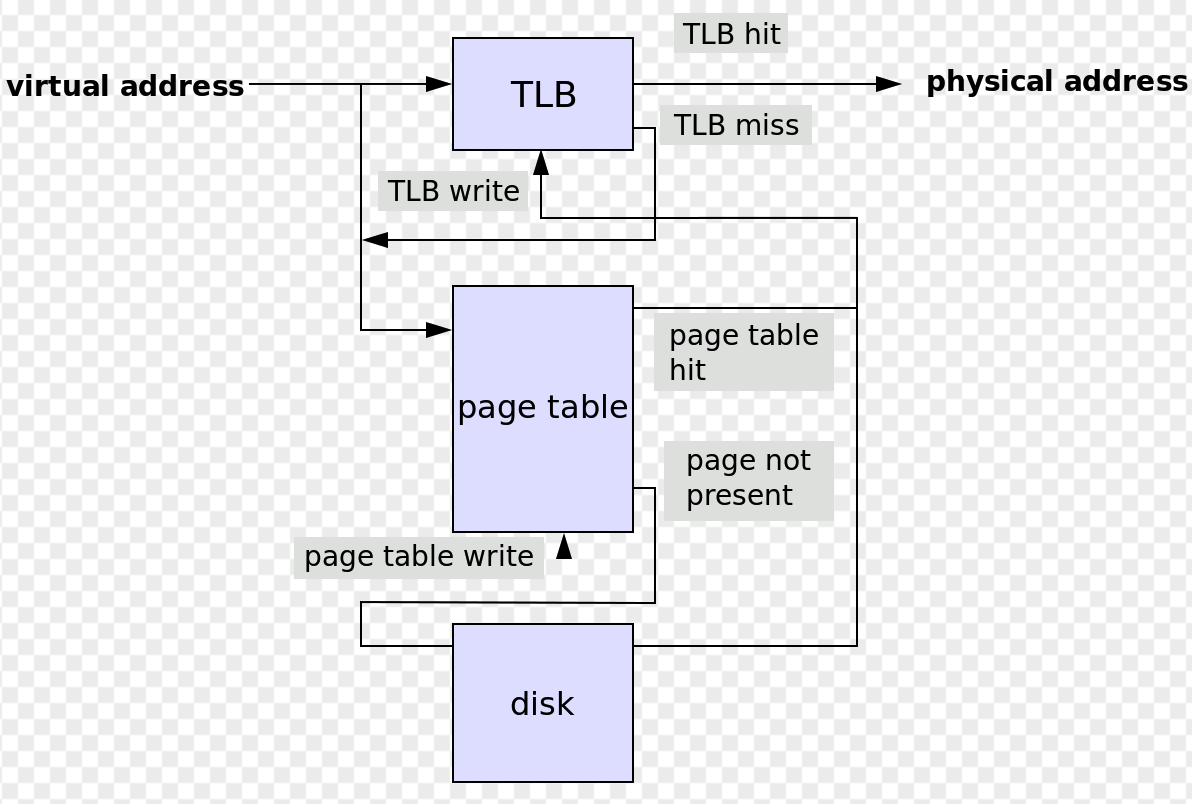
The CPU's memory management unit (MMU) stores a cache of recently used mappings from the operating system's page table. This is called the translation lookaside buffer (TLB), which is an associative cache.[3]
When a virtual address needs to be translated into a physical address, the TLB is searched first. If a match is found (a TLB hit), the physical address is returned and memory access can continue. However, if there is no match (called a TLB miss), the memory management unit, or the operating system TLB miss handler, will typically look up the address mapping in the page table to see whether a mapping exists (a page walk). If one exists, it is written back to the TLB (this must be done, as the hardware accesses memory through the TLB in a virtual memory system), and the faulting instruction is restarted (this may happen in parallel as well). This subsequent translation will find a TLB hit, and the memory access will continue.
The page table lookup may fail for two reasons:
- The lookup may fail if there is no translation available for the virtual address, meaning that virtual address is invalid. This will typically occur because of a programming error, and the operating system must take some action to deal with the problem. On modern operating systems, it will cause a segmentation fault signal being sent to the offending program.
- The lookup may also fail if the page is currently not resident in physical memory. This will occur if the requested page has been moved out of physical memory to make room for another page. In this case the page is paged out to a secondary store located on a medium such as a hard disk drive (this secondary store, or "backing store", is often called a "swap partition" if it is a disk partition, or a swap file, "swapfile" or "page file" if it is a file). When this happens the page needs to be taken from disk and put back into physical memory. A similar mechanism is used for memory-mapped files, which are mapped to virtual memory and loaded to physical memory on demand.
When physical memory is not full this is a simple operation; the page is written back into physical memory, the page table and TLB are updated, and the instruction is restarted. However, when physical memory is full, one or more pages in physical memory will need to be paged out to make room for the requested page. The page table needs to be updated to mark that the pages that were previously in physical memory are no longer there, and to mark that the page that was on disk is now in physical memory. The TLB also needs to be updated, including removal of the paged-out page from it, and the instruction restarted. Which page to page out is the subject of page replacement algorithms.
CPU的内存管理单元(memory management unit MMU)存储最近用过的映射缓存,来自操作系统分页表。被称为转译后备缓冲器(translation lookaside buffer, TLB)。TLB是一个索引缓存。
当需要将虚拟地址转换为物理地址时,首先搜索TLB。如果找到匹配(TLB命中),则返回物理地址并继续存储器访问。然而,如果没有匹配(称为TLB未命中),则存储器管理单元或操作系统TLB未命中处理器通常会查找页表中的地址映射以查看是否存在映射(页面遍历)。如果存在,则将其写回TLB(这必须完成,因为硬件通过虚拟存储器系统中的TLB访问存储器),并且重启错误指令(这也可以并行发生)。此后续转换将找到TLB命中,并且内存访问将继续。
转换失败
有两种原因导致分页表查找失败。第一种,如果该地址没有可用的转换,这意味该虚拟地址的存储器访问是无效的。这通常是程序错误导致,操作系统需要处理这个问题。现代操作系统会发送一个段错误信号给出错程序。
当物理内存中不存在这个页,也会引起分页表查找失败。如果请求的页面被调出物理内存,给其他页腾出空间,会引起这个错误。这种情况下,页被分配到存储在介质上的辅助存储,例如硬盘。(这种辅助存储,或叫备用存储,如果是一个硬盘分区或者交换文件, 经常称之为交换分区,如果是文件,叫做分区文件或页文件。)这时候,分页需要从硬盘放回到物理内存中,这类操作通常会导致一种称为系统抖动(thrashing)的情况,通过局部性原理(principle of locality)来预测将来可能会访问的块,避免出现系统抖动。
当物理内存没满的时候,这是一个简单操作。页被写回物理内存,页表和转换备用缓冲会更新,指令重启。然而,当物理内存已满,一个或多个页要被调、为请求的页面腾出空间时候。页表需要更新,标识出那些在物理内存被调出的页,然后标识那些从硬盘调入物理内存的页。TLB也需要更新,包括去掉调出的页,重启指令。页的调入调出请见页置换算法。
Page (computer memory) Memory segmentation Page table 虚拟地址到物理地址的转换的更多相关文章
- 启用PAE后虚拟地址到物理地址的转换
34 注册:2013-10 帖子:2013 精华:34 --> [原创]启用PAE后虚拟地址到物理地址的转换 安于此生 2013-11-3 20:54 16073 由常规的两级页表转换得不到 ...
- X64下的虚拟地址到物理地址的转换
https://bbs.pediy.com/thread-203391.htm 早就知道传上来排版会全乱掉,把pdf直接传上来吧 x64结构体系寻址.pdf 发现安大的关于x86启用PAE下的虚拟 ...
- Windows虚拟地址转物理地址(原理+源码实现,附简单小工具)
...
- Operating System Memory Management、Page Fault Exception、Cache Replacement Strategy Learning、LRU Algorithm
目录 . 引言 . 页表 . 结构化内存管理 . 物理内存的管理 . SLAB分配器 . 处理器高速缓存和TLB控制 . 内存管理的概念 . 内存覆盖与内存交换 . 内存连续分配管理方式 . 内存非连 ...
- 在Salesforce中向Page Layout中添加Visualforce Page
在Salesforce中可以向Object所对应的Layout中添加我们自定义的Visualforce Page. 此时的Visualforce Page与Asp.Net MVC中的Partial V ...
- APP-SERVICE-SDK:setStorageSync:fail;at page/near/pages/shops/shops page lifeCycleMethod onUnload function
APP-SERVICE-SDK:setStorageSync:fail;at page/near/pages/shops/shops page lifeCycleMethod onUnload fun ...
- 获取列表数据时,getList 设置默认参数:getList(page = 1),点击分页及前往时,传page参数,其他使用page的默认值:1
获取列表数据时,getList 设置默认参数:getList(page = 1),点击分页及前往时,传page参数,其他使用page的默认值:1
- [置顶] Linux 虚拟地址与物理地址的映射关系分析【转】
转自:http://blog.csdn.net/ordeder/article/details/41630945 版权声明:本文为博主(http://blog.csdn.net/ordeder)原创文 ...
- Linux 虚拟地址与物理地址的映射关系分析【转】
转自:http://blog.csdn.net/ordeder/article/details/41630945 版权声明:本文为博主(http://blog.csdn.net/ordeder)原创文 ...
随机推荐
- apk获取sha1值的方法
安卓应用都使用一个签名证书(.keystore或.jks文件)签名,签名证书可以由jdk生成.证书生成后,证书就有其sha1值. 使用此证书打包后的安卓应用,也有其一样的sha1值.md5值和sha2 ...
- U8CO使用C#版(一)
1.懒加载: object obj = null; System.Type oType = System.Type.GetTypeFromProgID("U8Login.clsLogin&q ...
- easyui中加载table列表数据 第一次有数据第二次没有数据问题
$('#allUsingProductTable').datagrid({ 加载数据时,第二加载时table会发生变化会出现找不到问题.如果是弹框没有影响,弹框出现出现列表每次都会执行销毁方法. 解 ...
- Singleton Pattern -- 不一样的单例模式
Singleton Pattern -- 单例模式 单例模式是用来创建一个只能又一个实例的对象. 单例模式类图如下. 单例模式有两大好处: (1)对于频繁使用的对象,可以省略创建对象所话费的时间,这对 ...
- ipython快捷键
IPython Notebook有两种不同的键盘输入模式(编辑模式和命令模式). 编辑模式:允许你输入代码或者文本到一个单元格(cell这里我译作单元格)内,并且单元格外面有灰色的选中框(注:Jupy ...
- python-scrapy框架爬取某瓣电视剧信息--异步加载页面
前期准备,首先要有python环境+scrapy环境+pycharm环境 一.建立爬虫所需的环境,在命令行输入: scrapy startproject doubantv #命名自定义就好 会生成一个 ...
- 解决Github下载仓库慢的正确姿势
上个月刚安装了 Manjaro ,然后最近在Manjaro下载Github的项目竟然只有几十b/s,这能忍?对于下载Github上的代码是硬需求,没办法直接探索一下突破的方法了. 方法一:安装chro ...
- docker nginx 自定义配置容器
准备 拉取nginx官方镜像 docker pull nginx etc/nginx/ 下新建目录 cert 和 conf cert 存放证书 conf 存放配置文件 mkdir /etc/nginx ...
- PHP 获取天气
/** * 获取天气 */ function get_tq () { //获取用户ip地址 $ip = get_real_ip(); // $ip = '123.125.71.38'; //根据ip地 ...
- 【MySQL 高级】架构介绍
MySQL高级 架构介绍 MySQL 简介 MySQL 安装 Docker 安装 参考链接 Linux 安装 参考链接 MySQL 配置文件 log-bin:二进制日志文件.用于主从复制.它记录了用户 ...