
vue自定义下拉框组件
创建下拉框组件 Select.vue

<template>

  <div class="selects">

    <div

      :class="{selects0show: !isshow,selects0hade: isshow}"

      class="selects0"

      @click="isshow=!isshow"

    >

      <p ref="mybox">请选择</p>

        <img src="@/assets/home/z_x_jt.png" alt srcset />

    </div>

    <div ref="myselect" :class="{show: !isshow,hade: isshow}" class="sel">

      <div

        @click="cutValue(1)"

        ref="mybox1"

        :class="{borders:num ==1}"

        :style="{display: num >=1?'block':'none'}"

      >{{selects1}}</div>

      <div

        @click="cutValue(2)"

        ref="mybox2"

        :class="{borders:num ==2}"

        :style="{display: num >=2?'block':'none'}"

      >{{selects2}}</div>

      <div

        @click="cutValue(3)"

        ref="mybox3"

        :class="{borders:num ==3}"

        :style="{display: num >=3?'block':'none'}"

      >{{selects3}}</div>

      <div

        @click="cutValue(4)"

        ref="mybox4"

        :class="{borders:num ==4}"

        :style="{display: num >=4?'block':'none'}"

      >{{selects4}}</div>

      <div

        @click="cutValue(5)"

        ref="mybox5"

        :class="{borders:num ==5}"

        :style="{display: num >=5?'block':'none'}"

      >{{selects5}}</div>

    </div>

  </div>

</template>

<script>

export default {

  props: {

    num: String, //显示多少个下拉框

    selects1: String, //列表里的文字

    selects2: String,

    selects3: String,

    selects4: String,

    selects5: String

  },

  data() {

    return {

      isshow: true //控制下拉框显示及隐藏

    };

  },

  methods: {

    //点击换文字的方法

    cutValue(val) {

      let _this = this

      cutfun(val)

      _this.isshow = true;

      function cutfun(val){

        if (val == 1) {

          _this.$refs.mybox.innerText = _this.$refs.mybox1.innerText;

        } else if(val == 2){

          _this.$refs.mybox.innerText = _this.$refs.mybox2.innerText;

        } else if(val == 3){

          _this.$refs.mybox.innerText = _this.$refs.mybox3.innerText;

        }else if(val == 4){

           _this.$refs.mybox.innerText = _this.$refs.mybox4.innerText;

        }else if(val == 5){

           _this.$refs.mybox.innerText = _this.$refs.mybox5.innerText;

        }

      _this.$emit("va", val, _this.$refs.mybox.innerText);

      }

    }

  }

};

</script>

<style lang="less" scoped>

//显示下拉框

.show {

  display: block;

}

//隐藏下拉框

.hade {

  display: none;

}

//点击时改变选择框的边框颜色

.selects0show {

  border: 1px solid #01be6e;

}

//恢复边框颜色

.selects0hade {

  border: 1px solid #e4e4e4;

}

//最后一个下拉框底部加边框

.borders {

  border-bottom: 1px solid #01be6e !important;

}

//倒三角

.traing{

    width: 0;

    height: 0;

    border-left: 5px solid transparent;

    border-right: 5px solid transparent;

    border-top: 10px solid #666666;

}

.selects {

  width: 100%;

  height: 100%;

  .selects0 {

    width: 100%;

    height: 100%;

    display: flex;

    justify-content: space-between;

    align-items: center;

    p {

      line-height: 100%;

      display: inline;

      color: #666666;

      font-size: 15px;

      padding-left: 10px;

    }

    img {

      margin-right: 10px;

      transform: translateY(-2px);

    }

  }

  .sel {

    width: 100%;

    height: 100%;

    div {

      width: 100%;

      height: 100%;

      display: flex;

      justify-content: space-between;

      align-items: center;

      line-height: 35px;

      border: 1px solid #01be6e;

      border-top: none;

      padding-left: 10px;

      border-bottom: none;

      background: white;

    }

    div:hover {

      background: #01be6e;

      color: white;

    }

    .selects0:hover {

      background: white;

    }

  }

}

</style>
使用下拉框组件
//注:下拉框组件的宽高依赖于组件的父盒子

 <template>

 <div class="t_selects">

         <!-- 使用下拉框组件 -->

         <Myselects

         //@va是子组件传给父组件的事件 有两个参数(当前点击下拉框的索引,当前点击下拉框里面的文字)

         @va="sunValue"

         //num是指定下拉框的个数 最多为5个

         num="3"

         //selects1-selects5 是自定义下拉框1-5里面的内容

         :selects1="selects1"

         :selects2="selects2"

          :selects3="selects3"

         ></Myselects>

 </div>

 </template>

  <script>

  import Selects from "@/components/Selects";

  export default {

 data() {

    return {

      selects1: "列表1",

      selects2: "列表2",

      selects3: "列表3",

      }

      }

  components: {

    Myselects: Selects

  },

  methods: {

    //拿到子组件下拉框里面的索引及内容  参数(当前点击下拉框的索引,当前点击下拉框里面的文字)

    sunValue(index,val) {

      console.log(index,val);

    }

    }

    }

 </script>

 //定义父盒子的宽高

 <style>

 .t_selects {

    width: 300;

    height: 35px;

    z-index: 1000;

   }

 </style>
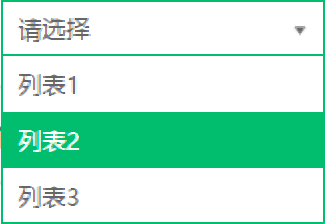
效果图:


图片素材
不喜勿喷
vue自定义下拉框组件的更多相关文章
- Combo( 自定义下拉框) 组件
本节课重点了解 EasyUI 中 Combo(自定义下拉框)组件的使用方法,这个组件依赖于ValidateBox(验证框)组件 一. 加载方式自定义下拉框不能通过标签的方式进行创建.<input ...
- 第二百一十二节,jQuery EasyUI,Combo(自定义下拉框)组件
jQuery EasyUI,Combo(自定义下拉框)组件 学习要点: 1.加载方式 2.属性列表 3.事件列表 4.方法列表 本节课重点了解 EasyUI 中 Combo(自定义下拉框)组件的使用方 ...
- 第二百二十四节,jQuery EasyUI,ComboGrid(数据表格下拉框)组件
jQuery EasyUI,ComboGrid(数据表格下拉框)组件 学习要点: 1.加载方式 2.属性列表 3.方法列表 本节课重点了解 EasyUI 中 ComboGrid(数据表格下拉框)组件的 ...
- 自绘制HT For Web ComboBox下拉框组件
传统的HTML5的下拉框select只能实现简单的文字下拉列表,而HTforWeb通用组件中ComboBox不仅能够实现传统HTML5下拉框效果,而且可以在文本框和下拉列表中添加自定义的小图标,让整个 ...
- easyui源码翻译1.32--Combo(自定义下拉框)
前言 扩展自$.fn.validatebox.defaults.使用$.fn.combo.defaults重写默认值对象.下载该插件翻译源码 自定义下拉框显示一个可编辑的文本框和下拉面板在html页面 ...
- ComboTree( 树型下拉框) 组件
本节课重点了解EasyUI中Tree(树)组件的使用方法, 这个组件依赖于Combo(下拉框)和 Tree(树)组件.一. 加载方式//class 加载方式<select id="cc ...
- 第二百二十七节,jQuery EasyUI,ComboTree(树型下拉框)组件
jQuery EasyUI,ComboTree(树型下拉框)组件 学习要点: 1.加载方式 2.属性列表 3.方法列表 本节课重点了解EasyUI中ComboTree(树型下拉框)组件的使用方法,这个 ...
- jquery美化select,自定义下拉框样式
select默认的样式比较丑,有些应用需要美化select,在网上找到一个很好的美化样式效果,本人很喜欢,在这里分享一下. <!DOCTYPE html PUBLIC "-//W3C/ ...
- 关于safari上的select宽高问题小技,自定义下拉框
之前一直用windows做开发,最近换了个mac,在几经折腾之下,安装完了各种开发工具,IDE等,然后欣然打开自己正在开发的网站.突然发现mac上所有的下拉框都变了,都是默认样式,无论padding, ...
随机推荐
- vue同时安装element ui跟 vant
记一个卡了我比较久的问题,之前弄的心态爆炸各种问题. 现在来记录一下,首先我vant是已经安装成功了的. 然后引入element ui npm i element-ui -S 接着按需引入,安装插件 ...
- excel文件双击打开空白
excel文件双击打开之后进入软件,没有去读文件 一.现象描述 打开现象如下所示,只有excel模板,看不到excel中的表格模板. 二.想要打开文件 (1)在软件的文件--->打开--> ...
- PHP get_resource_type() 函数
get_resource_type() 返回资源(resource)类型. 版本要求:PHP 4 >= 4.0.2, PHP 5, PHP 7高佣联盟 www.cgewang.com 语法 st ...
- 4.24 省选模拟赛 欧珀瑞特 主席树 可持久化trie树
很容易的一道题目.大概.不过我空间计算失误MLE了 我草草的计算了一下没想到GG了. 关键的是 我学了一个dalao的空间回收的方法 但是弄巧成拙了. 题目没有明确指出 在任意时刻数组长度为有限制什么 ...
- 一个轻量级的基于RateLimiter的分布式限流实现
上篇文章(限流算法与Guava RateLimiter解析)对常用的限流算法及Google Guava基于令牌桶算法的实现RateLimiter进行了介绍.RateLimiter通过线程锁控制同步,只 ...
- Swap常用操作与性能测试
Swap分区通常被称为交换分区,这块儿分区位于硬盘的某个位置,当系统内存(物理内存)不够用的时候,如果开启了交换分区,部分内存里面暂时不用的数据就会Swap out(换出)到这块儿分区:当系统要使用这 ...
- 执行HiveSQL出现的问题
-- ::, INFO [main] org.apache.hadoop.hive.ql.exec.ReduceSinkOperator: RECORDS_OUT_INTERMEDIATE:, -- ...
- 强大的输入框-应用快速启动uTools
uTools uTools是一个 极简.插件化.跨平台 的现代桌面软件.通过自由选配丰富的插件,打造你得心应手的工具集合. 当你熟悉它后,能够为你节约大量时间,让你可以更加专注地改变世界. uTool ...
- WebMvcConfigurerAdapter在2.x向上过时问题
在spring boot2.x向上,书写配置类时集成的WebMvcConfigurerAdapter会显示此类已经过时. 解决:不继承WebMvcConfigurerAdapter类,该实现WebMv ...
- Vue 使用v-for对Object进行遍历
v-for 也可以对Object类型数据进行遍历 value在前, key在后 <div v-for="(value,key) in person"> <p> ...