
【Docker】Docker启动停止重启 Redirecting to /bin/systemctl start docker.service
[root@liuawen local]# docker -v

Docker version 1.13.1, build cccb291/1.13.1

[root@liuawen local]#
启动、关闭与重启docker时
[root@liuawen ~]# service docker stop

Redirecting to /bin/systemctl stop docker.service

[root@liuawen ~]# service docker start

Redirecting to /bin/systemctl start docker.service

[root@liuawen ~]# service docker restart

Redirecting to /bin/systemctl restart docker.service

[root@liuawen ~]#
出现这个Redirecting to /bin/systemctl start docker.service。
https://docs.docker.com/config/daemon/systemd/
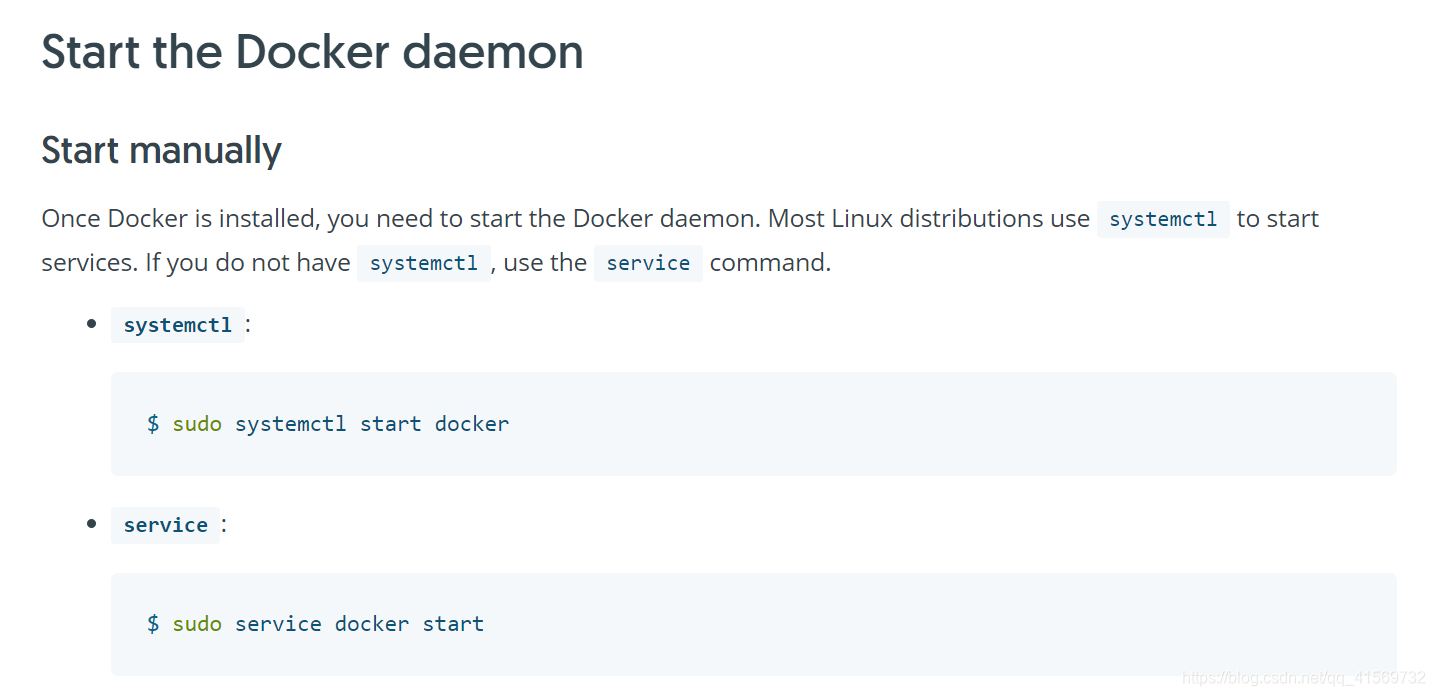
大多数Linux发行版本使用systemctl启动服务,如果不是那就尝试使用下service来启动。
我的环境是使用这个systemctl start docker来启动。
查看下ps -ef | grep "docker" docker启动了
启动docker:systemctl start docker
停止docker:systemctl stop docker
重启docker:systemctl restart docker
[root@liuawen local]# systemctl start docker

[root@liuawen local]# ps -ef | grep "docker"

root     25171     1  0 11:14 ?        00:00:00 /usr/bin/dockerd-current --add-runtime docker-runc=/usr/libexec/docker/docker-runc-current --default-runtime=docker-runc --exec-opt native.cgroupdriver=systemd --userland-proxy-path=/usr/libexec/docker/docker-proxy-current --init-path=/usr/libexec/docker/docker-init-current --seccomp-profile=/etc/docker/seccomp.json --selinux-enabled --log-driver=journald --signature-verification=false --storage-driver overlay2

root     25177 25171  0 11:14 ?        00:00:00 /usr/bin/docker-containerd-current -l unix:///var/run/docker/libcontainerd/docker-containerd.sock --metrics-interval=0 --start-timeout 2m --state-dir /var/run/docker/libcontainerd/containerd --shim docker-containerd-shim --runtime docker-runc --runtime-args --systemd-cgroup=true

root     25887 21199  0 11:24 pts/2    00:00:00 grep --color=auto docker

[root@liuawen local]# systemctl stop docker

[root@liuawen local]# ps -ef | grep "docker"

root     25910 21199  0 11:24 pts/2    00:00:00 grep --color=auto docker

[root@liuawen local]# systemctl restart docker

[root@liuawen local]# ps -ef | grep "docker"

root     25960     1  2 11:24 ?        00:00:00 /usr/bin/dockerd-current --add-runtime docker-runc=/usr/libexec/docker/docker-runc-current --default-runtime=docker-runc --exec-opt native.cgroupdriver=systemd --userland-proxy-path=/usr/libexec/docker/docker-proxy-current --init-path=/usr/libexec/docker/docker-init-current --seccomp-profile=/etc/docker/seccomp.json --selinux-enabled --log-driver=journald --signature-verification=false --storage-driver overlay2

root     25966 25960  0 11:24 ?        00:00:00 /usr/bin/docker-containerd-current -l unix:///var/run/docker/libcontainerd/docker-containerd.sock --metrics-interval=0 --start-timeout 2m --state-dir /var/run/docker/libcontainerd/containerd --shim docker-containerd-shim --runtime docker-runc --runtime-args --systemd-cgroup=true

root     26063 21199  0 11:25 pts/2    00:00:00 grep --color=auto docker

[root@liuawen local]#
使用systemctl 来启动、停止、重启docker都可以了。
【Docker】Docker启动停止重启 Redirecting to /bin/systemctl start docker.service的更多相关文章
- nginx启动失败:Redirecting to /bin/systemctl start nginx.service Failed to start nginx.service: Unit not found.
解决方法: 是因为nginx没有有添加到系统服务,手动手动添加一个即可. 在 /etc/init.d/下创建名为nginx的启动脚本即可,内容如下: #!/bin/bash # # chkconfig ...
- 重启ssh服务出现Redirecting to /bin/systemctl restart sshd.service
转自:https://blog.csdn.net/caijunfen/article/details/70599138 CentOs 重启ssh服务的命令如下: # service sshd rest ...
- 安装和启动tftp-server服务器及可能出现Redirecting to /bin/systemctl restart xinetd.service问题的解决方式
安装和启动tftp-server服务器及可能出现Redirecting to /bin/systemctl restart xinetd.service问题的解决方式 1)首先,检查服务器已安装的tf ...
- Linux Redirecting to /bin/systemctl restart iptables.service
方案 一 1.昨天碰到一个错误,linux下输入命令:service iptables restart时,总会报下面一个提示很简单,这句话的意思就是让你重定向到systemctl然后再启用,白话就是说 ...
- 【linux】CentOS 6 使用cron定时任务,报错:Redirecting to /bin/systemctl restart crond.service
在centos7上,执行cron定时任务的相关命令,反馈如下: 定时任务执行,反馈是: Redirecting to /bin/systemctl restart crond.service 原因: ...
- linux出现Redirecting to /bin/systemctl start mysqld.service,解决方法
上去就是一个命令 /bin/systemctl start httpd.service
- 阿里云报错Redirecting to /bin/systemctl restart sshd.service
转:http://blog.csdn.net/caijunfen/article/details/70599138 云服务器 ECS Linux CentOS 7 下重启服务不再通过 service ...
- Redirecting to /bin/systemctl restart mysql. service Failed to restart mysql.service: Unit not found.
使用如下命令操作mysql即可: systemctl restart mysqld.service systemctl start mysqld.service systemctl stop mysq ...
- Linux Systemd——在RHEL/CentOS 7中启动/停止/重启服务
RHEL/CentOS 7.0中一个最主要的改变,就是切换到了systemd.它用于替代红帽企业版Linux前任版本中的SysV和Upstart,对系统和服务进行管理.systemd兼容SysV和Li ...
随机推荐
- 要你命3000会员版v20.03_全球抖音模式
要你命3000是搭配抖音和极其多软件的神器,支持国际版.国内版,可以去除全部限制,无需爬墙,无需拔卡,35个国家/自由切换,真心强大,请务必低调,谢谢合作. 下载地址:https://sansuinb ...
- 【opencv】学习笔记
安装 此笔记仅对python36实用 OpenCV装3.4.1.15 指令:pip install -i https://pypi.tuna.tsinghua.edu.cn/simple opencv ...
- 20201203-6 设置excel样式【】
1-1 1 import os 2 from openpyxl import load_workbook 3 from openpyxl.styles import PatternFill, Alig ...
- docker 使用ubuntu 系统
1.安装Ubuntu系统命令:docker pull ubuntu这是一个极度精简的系统,连最基本的wget命令都没有:所以先要apt-get update升级系统和安装apt-get install ...
- 【开源】基于 SpringBoot 的 web kettle 在线采集平台
kettle-scheduler-boot 开发计划 序号 项目 状态 优先级 1 在线管理,编辑kettle脚本 紧急 2 通过源码实现集群,多线程执行任务 紧急 2 重构jpa部分,改为mybat ...
- js上 初识JavaScript
1.JavaScript简介 **JavaScript ** 是什么?(重点) Js是一种专门为网页交互设计的客户端(浏览器端)的脚本语言: Js与html和css有相似之处,都在浏览器端解析: Js ...
- matplotlib的学习3-figure图像
import matplotlib.pyplot as plt import numpy as np # matplotlib 的 figure 就是一个 单独的 figure 小窗口, 小窗口里面还 ...
- angular8 大地老师学习笔记---第十课
import { Component,Input} from '@angular/core';@Component({ selector: 'app-lifecycle', templateUrl: ...
- angualr8 循环对象
<div *ngFor="let item of object | keyvalue"> {{item.key}}:{{item.value}} </div> ...
- Windows下python+allure的下载、安装、配置与使用
下载安装allure 1.Windows和mac均可选择从官网下载,下载地址: https://repo.maven.apache.org/maven2/io/qameta/allure/allure ...