
SpringBoot整合Shiro完成验证码校验
SpringBoot整合Shiro完成验证码校验
上一篇:SpringBoot整合Shiro使用Redis作为缓存
首先编写生成验证码的工具类
package club.qy.datao.utils;

import java.awt.*;

import java.awt.geom.AffineTransform;

import java.awt.image.BufferedImage;

import java.util.Random;

/**

 * 图形验证码生成

 */

public class VerifyUtil {

    // 默认验证码字符集

    private static final char[] chars = {

            '0', '1', '2', '3', '4', '5', '6', '7', '8', '9',

            'a', 'b', 'c', 'd', 'e', 'f', 'g', 'h', 'i', 'j', 'k', 'l', 'm', 'n', 'o', 'p', 'q', 'r', 's', 't', 'u', 'v', 'w', 'x', 'y', 'z',

            'A', 'B', 'C', 'D', 'E', 'F', 'G', 'H', 'I', 'J', 'K', 'L', 'M', 'N', 'O', 'P', 'Q', 'R', 'S', 'T', 'U', 'V', 'W', 'X', 'Y', 'Z'};

    // 默认字符数量

    private final Integer SIZE;

    // 默认干扰线数量

    private final int LINES;

    // 默认宽度

    private final int WIDTH;

    // 默认高度

    private final int HEIGHT;

    // 默认字体大小

    private final int FONT_SIZE;

    // 默认字体倾斜

    private final boolean TILT;

    private final Color BACKGROUND_COLOR;

    /**

     * 初始化基础参数

     *

     * @param builder

     */

    private VerifyUtil(Builder builder) {

        SIZE = builder.size;

        LINES = builder.lines;

        WIDTH = builder.width;

        HEIGHT = builder.height;

        FONT_SIZE = builder.fontSize;

        TILT = builder.tilt;

        BACKGROUND_COLOR = builder.backgroundColor;

    }

    /**

     * 实例化构造器对象

     *

     * @return

     */

    public static Builder newBuilder() {

        return new Builder();

    }

    /**

     * @return 生成随机验证码及图片

     * Object[0]:验证码字符串;

     * Object[1]:验证码图片。

     */

    public Object[] createImage() {

        StringBuffer sb = new StringBuffer();

        // 创建空白图片

        BufferedImage image = new BufferedImage(WIDTH, HEIGHT, BufferedImage.TYPE_INT_RGB);

        // 获取图片画笔

        Graphics2D graphic = image.createGraphics();

        // 设置抗锯齿

        graphic.setRenderingHint(RenderingHints.KEY_ANTIALIASING, RenderingHints.VALUE_ANTIALIAS_ON);

        // 设置画笔颜色

        graphic.setColor(BACKGROUND_COLOR);

        // 绘制矩形背景

        graphic.fillRect(0, 0, WIDTH, HEIGHT);

        // 画随机字符

        Random ran = new Random();

        //graphic.setBackground(Color.WHITE);

        // 计算每个字符占的宽度,这里预留一个字符的位置用于左右边距

        int codeWidth = WIDTH / (SIZE + 1);

        // 字符所处的y轴的坐标

        int y = HEIGHT * 3 / 4;

        for (int i = 0; i < SIZE; i++) {

            // 设置随机颜色

            graphic.setColor(getRandomColor());

            // 初始化字体

            Font font = new Font(null, Font.BOLD + Font.ITALIC, FONT_SIZE);

            if (TILT) {

                // 随机一个倾斜的角度 -45到45度之间

                int theta = ran.nextInt(45);

                // 随机一个倾斜方向 左或者右

                theta = (ran.nextBoolean() == true) ? theta : -theta;

                AffineTransform affineTransform = new AffineTransform();

                affineTransform.rotate(Math.toRadians(theta), 0, 0);

                font = font.deriveFont(affineTransform);

            }

            // 设置字体大小

            graphic.setFont(font);

            // 计算当前字符绘制的X轴坐标

            int x = (i * codeWidth) + (codeWidth / 2);

            // 取随机字符索引

            int n = ran.nextInt(chars.length);

            // 得到字符文本

            String code = String.valueOf(chars[n]);

            // 画字符

            graphic.drawString(code, x, y);

            // 记录字符

            sb.append(code);

        }

        // 画干扰线

        for (int i = 0; i < LINES; i++) {

            // 设置随机颜色

            graphic.setColor(getRandomColor());

            // 随机画线

            graphic.drawLine(ran.nextInt(WIDTH), ran.nextInt(HEIGHT), ran.nextInt(WIDTH), ran.nextInt(HEIGHT));

        }

        // 返回验证码和图片

        return new Object[]{sb.toString(), image};

    }

    /**

     * 随机取色

     */

    private Color getRandomColor() {

        Random ran = new Random();

        Color color = new Color(ran.nextInt(256), ran.nextInt(256), ran.nextInt(256));

        return color;

    }

    /**

     * 构造器对象

     */

    public static class Builder {

        // 默认字符数量

        private int size = 4;

        // 默认干扰线数量

        private int lines = 10;

        // 默认宽度

        private int width = 80;

        // 默认高度

        private int height = 35;

        // 默认字体大小

        private int fontSize = 25;

        // 默认字体倾斜

        private boolean tilt = true;

        //背景颜色

        private Color backgroundColor = Color.LIGHT_GRAY;

        public Builder setSize(int size) {

            this.size = size;

            return this;

        }

        public Builder setLines(int lines) {

            this.lines = lines;

            return this;

        }

        public Builder setWidth(int width) {

            this.width = width;

            return this;

        }

        public Builder setHeight(int height) {

            this.height = height;

            return this;

        }

        public Builder setFontSize(int fontSize) {

            this.fontSize = fontSize;

            return this;

        }

        public Builder setTilt(boolean tilt) {

            this.tilt = tilt;

            return this;

        }

        public Builder setBackgroundColor(Color backgroundColor) {

            this.backgroundColor = backgroundColor;

            return this;

        }

        public VerifyUtil build() {

            return new VerifyUtil(this);

        }

    }

}
开发控制器,加载页面时生成新的验证码
@RequestMapping("/getVerifyCode")

    public void getVerifyCode(HttpSession session, HttpServletResponse response) throws IOException {

        // 生成默认的验证码图片

        Object[] obj = VerifyUtil.newBuilder().build().createImage();

        // obj[0]是验证码的字符串,放入session

        session.setAttribute("verifyCode", obj[0]);

        // obj[1]是验证码图片

        BufferedImage image = (BufferedImage) obj[1];

        OutputStream outputStream = response.getOutputStream();

        // 设置响应类型

        response.setContentType("image/png");

        // IO输出图片

        ImageIO.write(image, "png", outputStream);

    }
注意在ShiroConfig配置类中药放行对应的验证码请求。
在login页面上添加验证码。
<%@page contentType="text/html; UTF-8" pageEncoding="UTF-8" %>

<html lang="en">

<head>

    <meta charset="UTF-8">

    <meta name="viewport"

          content="width=device-width, user-scalable=no, initial-scale=1.0, maximum-scale=1.0, minimum-scale=1.0">

    <meta http-equiv="X-UA-Compatible" content="ie=edge">

    <title>Document</title>

</head>

<body>

        <h1 class="">登录首页</h1>

        <form action="${pageContext.request.contextPath}/user/login" method="post">

            用户名:<input type="text" name="username"><br/>

            密码: <input type="password" name="password"><br/>

            验证码: <input type="text" name="verifyCode"><img src="${pageContext.request.contextPath}/user/getVerifyCode"><br/>

             <input type="submit" value="登录">

        </form>

</body>

</html>
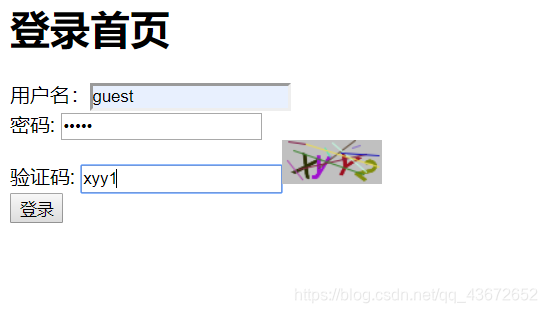
效果如下…
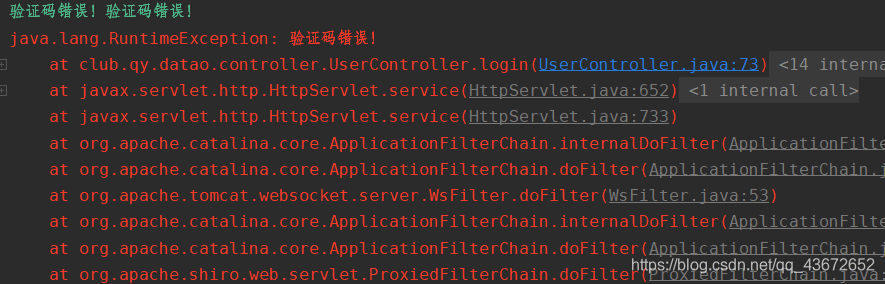
然后在控制层中修改登录的处理,首先验证输入的验证码是否正确,如果不正确就直接返回验证码错误,不进行后面的判断;如果正确,再验证用户名和密码。这里只是做抛出异常处理。
 @PostMapping("/login")

    public String login(String username, String password, String verifyCode, HttpSession session) {

        Subject subject = SecurityUtils.getSubject();

        UsernamePasswordToken passwordToken = new UsernamePasswordToken(username, password);

        String code = (String) session.getAttribute("verifyCode");

        try {

            if (verifyCode.equalsIgnoreCase(code)) {

                subject.login(passwordToken);

                return "redirect:/index.jsp";

            } else{

                throw new RuntimeException("验证码错误!");

            }

        }catch(UnknownAccountException e){

            System.out.println("用户名错误" + e.getMessage());

        } catch(IncorrectCredentialsException e){

            System.out.println("密码错误" + e.getMessage());

        }catch (RuntimeException e){

            System.out.println("验证码错误!"+e.getMessage());

            e.printStackTrace();

        }

        return "redirect:/login.jsp";

    }
因为自定义Realm中使用了随机盐加密,需要对盐进行序列化和反序列化处理(保存到缓存),因此需要对ByteSource建一个无参构造并实现相对应的接口。
package club.qy.datao.salt;

import org.apache.shiro.codec.Base64;

import org.apache.shiro.codec.CodecSupport;

import org.apache.shiro.codec.Hex;

import org.apache.shiro.util.ByteSource;

import org.apache.shiro.util.SimpleByteSource;

import java.io.File;

import java.io.InputStream;

import java.io.Serializable;

import java.util.Arrays;

public class MyByteSource implements ByteSource, Serializable {

    public MyByteSource(){

    }

    private  byte[] bytes;

    private String cachedHex;

    private String cachedBase64;

    public MyByteSource(byte[] bytes) {

        this.bytes = bytes;

    }

    public MyByteSource(char[] chars) {

        this.bytes = CodecSupport.toBytes(chars);

    }

    public MyByteSource(String string) {

        this.bytes = CodecSupport.toBytes(string);

    }

    public MyByteSource(ByteSource source) {

        this.bytes = source.getBytes();

    }

    public MyByteSource(File file) {

        this.bytes = (new MyByteSource.BytesHelper()).getBytes(file);

    }

    public MyByteSource(InputStream stream) {

        this.bytes = (new MyByteSource.BytesHelper()).getBytes(stream);

    }

    public static boolean isCompatible(Object o) {

        return o instanceof byte[] || o instanceof char[] || o instanceof String || o instanceof ByteSource || o instanceof File || o instanceof InputStream;

    }

    @Override

    public byte[] getBytes() {

        return this.bytes;

    }

    @Override

    public boolean isEmpty() {

        return this.bytes == null || this.bytes.length == 0;

    }

    @Override

    public String toHex() {

        if (this.cachedHex == null) {

            this.cachedHex = Hex.encodeToString(this.getBytes());

        }

        return this.cachedHex;

    }

    @Override

    public String toBase64() {

        if (this.cachedBase64 == null) {

            this.cachedBase64 = Base64.encodeToString(this.getBytes());

        }

        return this.cachedBase64;

    }

    @Override

    public String toString() {

        return this.toBase64();

    }

    @Override

    public int hashCode() {

        return this.bytes != null && this.bytes.length != 0 ? Arrays.hashCode(this.bytes) : 0;

    }

    @Override

    public boolean equals(Object o) {

        if (o == this) {

            return true;

        } else if (o instanceof ByteSource) {

            ByteSource bs = (ByteSource)o;

            return Arrays.equals(this.getBytes(), bs.getBytes());

        } else {

            return false;

        }

    }

    private static final class BytesHelper extends CodecSupport {

        private BytesHelper() {

        }

        public byte[] getBytes(File file) {

            return this.toBytes(file);

        }

        public byte[] getBytes(InputStream stream) {

            return this.toBytes(stream);

        }

    }

}
自定义Realm
public class CustomRelam extends AuthorizingRealm {

    @Autowired

    UserService userService;

    // 授权

    @Override

    protected AuthorizationInfo doGetAuthorizationInfo(PrincipalCollection principalCollection) {

        String username = (String) principalCollection.getPrimaryPrincipal();

        User roleByUserName = userService.findRoleByUserName(username);

        if (!CollectionUtils.isEmpty(roleByUserName.getRoles())){

            SimpleAuthorizationInfo simpleAuthorizationInfo = new SimpleAuthorizationInfo();

            roleByUserName.getRoles().forEach(role->{

                simpleAuthorizationInfo.addRole(role.getName());

                //查询该角色下的所有权限然后添加到该角色中

                List<Permission> permissions = userService.findPermissionsByRoleId(role.getId());

                if (!CollectionUtils.isEmpty(permissions)){

                    permissions.forEach(permission -> {

                        simpleAuthorizationInfo.addStringPermission(permission.getName());

                    });

                }

            });

            return simpleAuthorizationInfo;

        }

        return null;

    }

    //认证

    @Override

    protected AuthenticationInfo doGetAuthenticationInfo(AuthenticationToken authenticationToken) throws AuthenticationException {

        String principal = (String) authenticationToken.getPrincipal();

        // 实际开发中 先确认传来的token用户名是否存在,如果存在且唯一,然后根据有户名查询密码返回,进而判断密码是否正确

        User user = userService.findUserByUsername(principal);

        if (!ObjectUtils.isEmpty(user)){

            SimpleAuthenticationInfo simpleAuthenticationInfo = new SimpleAuthenticationInfo(user.getUsername(),

                    user.getPassword(), new MyByteSource(user.getSalt()),this.getName());

            // 用户名和密码都判断完成后可以返回

            return simpleAuthenticationInfo;

        }

        return null;

    }

}
当输入错误的验证码时,控制台会抛出异常,并重新刷新登录界面。
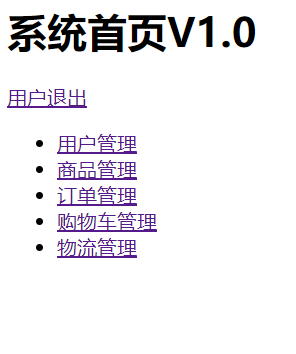
所有信息都验证正确后才进入首页
SpringBoot整合Shiro完成验证码校验的更多相关文章
- springboot集成shiro实现验证码校验
github:https://github.com/peterowang/shiro/ 这里实现验证码校验的思路是自己添加一个Filter继承FormAuthenticationFilter,Form ...
- 18.Shiro与Springboot整合下登陆验证UserService未注入的问题
Shiro与Springboot整合下登陆验证UserService未注入的问题 前言: 刚开始整合的情况下,UserService一执行,就会报空指针异常. 看了网上各位大神的讲解,什么不能用ser ...
- 补习系列(6)- springboot 整合 shiro 一指禅
目标 了解ApacheShiro是什么,能做什么: 通过QuickStart 代码领会 Shiro的关键概念: 能基于SpringBoot 整合Shiro 实现URL安全访问: 掌握基于注解的方法,以 ...
- SpringBoot系列十二:SpringBoot整合 Shiro
声明:本文来源于MLDN培训视频的课堂笔记,写在这里只是为了方便查阅. 1.概念:SpringBoot 整合 Shiro 2.具体内容 Shiro 是现在最为流行的权限认证开发框架,与它起名的只有最初 ...
- SpringBoot整合Shiro实现基于角色的权限访问控制(RBAC)系统简单设计从零搭建
SpringBoot整合Shiro实现基于角色的权限访问控制(RBAC)系统简单设计从零搭建 技术栈 : SpringBoot + shiro + jpa + freemark ,因为篇幅原因,这里只 ...
- springboot整合Shiro功能案例
Shiro 核心功能案例讲解 基于SpringBoot 有源码 从实战中学习Shiro的用法.本章使用SpringBoot快速搭建项目.整合SiteMesh框架布局页面.整合Shiro框架实现用身份认 ...
- SpringBoot整合Shiro实现权限控制,验证码
本文介绍 SpringBoot 整合 shiro,相对于 Spring Security 而言,shiro 更加简单,没有那么复杂. 目前我的需求是一个博客系统,有用户和管理员两种角色.一个用户可能有 ...
- SpringBoot 整合Shiro 一指禅
目标 了解ApacheShiro是什么,能做什么: 通过QuickStart 代码领会 Shiro的关键概念: 能基于SpringBoot 整合Shiro 实现URL安全访问: 掌握基于注解的方法,以 ...
- SpringBoot整合Shiro+MD5+Salt+Redis实现认证和动态权限管理|前后端分离(下)----筑基后期
写在前面 在上一篇文章<SpringBoot整合Shiro+MD5+Salt+Redis实现认证和动态权限管理(上)----筑基中期>当中,我们初步实现了SpringBoot整合Shiro ...
随机推荐
- Codeforces Edu Round 58 A-E
A. Minimum Integer 如果\(d < l\),则\(d\)满足条件 否则,输出\(d * (r / d + 1)\)即可. #include <cstdio> #in ...
- Angular:使用前端proxy代理解决跨域问题
①在项目文件的根目录下新建文件proxy.config.json { "/": { "target": "http://127.0.0.1:3000& ...
- Greenplum 性能优化之路 --(三)ANALYZE
一.为什么需要 ANALYZE 首先介绍下 RBO 和 CBO,这是数据库引擎在执行 SQL 语句时的2种不同的优化策略. RBO(Rule-Based Optimizer) 基于规则的优化器,就是优 ...
- 01-flask-helloWorld
代码 from flask import Flask # 创建Flask对象 app = Flask(__name__) # 定义路由 @app.route('/') def index(): # 函 ...
- [日常摸鱼]Luogu1801 黑匣子(NOI导刊)
题意:写一个数据结构,要求滋兹两种操作,ADD:插入一个数,GET:令$i++$然后输出第$i$小的数 这个数据结构当然是平衡树啦!(雾) 写个Treap直接过掉啦- #include<cstd ...
- Web服务器-并发服务器-长连接(3.4.4)
@ 目录 1.说明 2.代码 关于作者 1.说明 每次new_socket都被强制关闭,造成短连接 所提不要关闭套接字 但是不关闭的话,浏览器不知道发完没有啊 此时用到header的属性Content ...
- 任务队列--nodejs
很多项目可能都会涉及到任务队列来进行任务处理和维护的,那么需要使用到redis或者第三方库(使用redis)来实现任务队列,甚至需要控制并发量,但是对于saas部署来说使用redis可能会比较麻烦和成 ...
- 神经网络高维互信息计算Python实现(MINE)
论文 Belghazi, Mohamed Ishmael, et al. " Mutual information neural estimation ." Internatio ...
- Python进阶——什么是描述符?
本文的文字及图片来源于网络,仅供学习.交流使用,不具有任何商业用途,如有问题请及时联系我们以作处理 在 Python 开发中,你可能听说过「描述符」这个概念,由于我们很少直接使用它,所以大部分开发人员 ...
- 报错 ncclCommInitRank failed.
环境 4 GeForce GTX 1080 GPUS docker image nnabla/nnabla-ext-cuda-multi-gpu:py36-cuda102-mpi3.1.6-v1.14 ...