
Using AngularJS with .NET MVC 5
This tip shows the use of AngularJS with .NET MVC5 application. Here is a simple step-by-step example for the use of AngularJs with .NET MVC application.
Background
While searching for an article for the use of AngularJS with .NET MVC technology, the search always showsAngularJS and explains its MVC methodology. But there is nothing much on the topic.
Using the Code - Step by Step
Create a new project and select MVC template and check Web API as well and select OK.
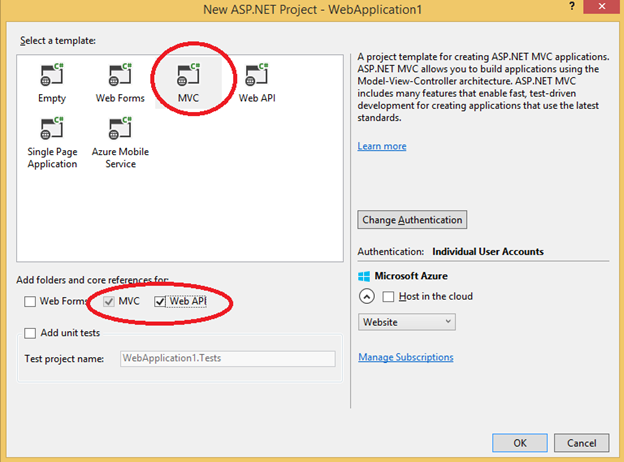
In Model, create a class Category:
public class Category

    {

        [Key]

        public int Id { get; set; }

        public string Name { get; set; }

    }
On Controller folder, add New Controller and select Web API2 Controller.

And then, select Category as Model Class and in controller name, write CategoriesApiController as shown in the following image:
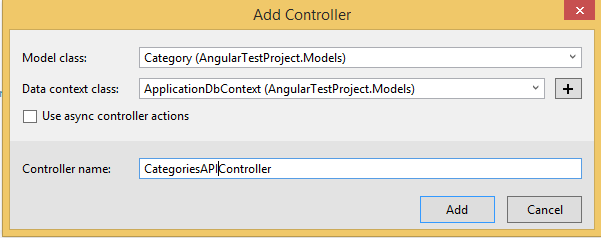
The controller will automatically create the API methods.
Now, create a new empty Controller and name it CategoriesController.
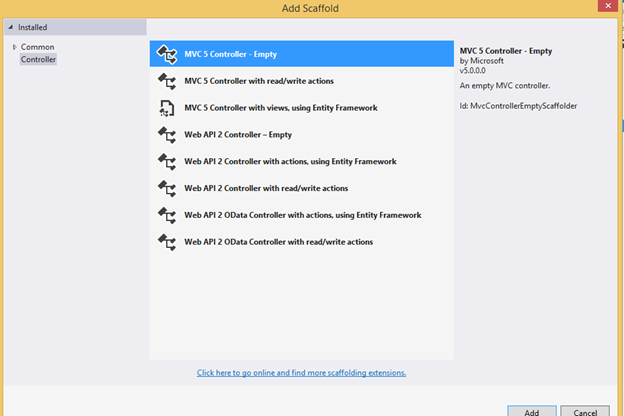
In this controller, create ActionResult Index.
public class CategoriesController : Controller

    {

        private ApplicationDbContext db = new ApplicationDbContext();

        // GET: Categories

        public ActionResult Index()

        {

            return View();

        }

    }
Now, it's time to write AngularJs code before creating the index view. Use Manage NuGet package and installAngularJS.
Now, right click Script folder -> Add -> New Folder and name folder Category.
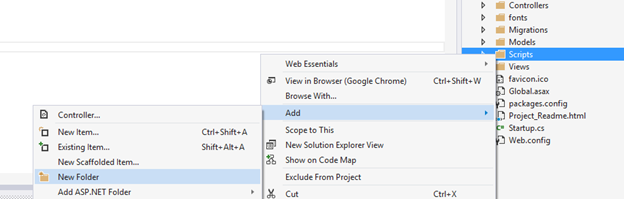
In Category folder, right-click and Add new item JavaScript File and name the file categoryModule.js and write the following code in it:
/// <reference path="../angular.js" />

var app1;

(function () {

// this line initialize the name of module

    app1 = angular.module("catModule", []);

})();
In Category folder, create a new JavaScript file named “service.js”and add the following code in it. In this file, we have created JavaScript methods to call methods defined in WebAPI controller.
/// <reference path="../angular.js" />

/// <reference path="categoryModule.js" />

// top two line include the reference to angular.js file and categoryModule.js file

// we created in the above step

app1.service("catService", function ($http) {

    // get all category records

    this.getCategories = function () {   return $http.get("/api/CategoriesAPI");    }

    // get single record

    this.get = function (id) {       return $http.get("/api/CategoriesAPI/" + id);    }

    // create new record

    this.post = function(Category)

    {

        var request = $http({

            method: "post",

            url: "/api/CategoriesAPI",

            data: Category

        });

        return request;

    }

    this.delete = function (Cat) {

        var request = $http({

            method: "delete",

            url: "/api/CategoriesAPI/" + Cat

    });

        return request;

    }

});
Now create another JavaScript file in category folder, name it “CategoryController.js” and paste the following code in it.
 Copy Code
/// <reference path="../angular.js" />
/// <reference path="categoryModule.js" />
app1.controller("catController", function ($scope, catService) {
$scope.IsNewRecord = 1;
loadRecords();
// loading all records
function loadRecords() {
promiseGet = catService.getCategories();
promiseGet.then(function (p1) {
$scope.Categories = p1.data
},
function (errorP1) {
console.log("Error in getting category " + errorP1);
});
}
// get single record
$scope.get = function (Cat) {
var promiseGetSingle = catService.get(Cat.Id);
promiseGetSingle.then(function (p1) {
var res = p1.data;
$scope.Id = res.Id;
$scope.Name = res.Name;
},
function (errorp1) {
console.log("Error in code " + errorp1);
} );
}
// save record
$scope.save = function () {
var Category = {
CatId: $scope.CatId,
Name: $scope.CategoryName
};
if($scope.IsNewRecord === 1){
var promisePost = catService.post(Category);
promisePost.then(function(p1){
$scope.CatId = p1.data.CatId;
$scope.CategoryName = "";
loadRecords();
},function(err){console.log('Error '+ err);
});
}else{
var promisePut = catService.put($scope.CatId,Name);
promisePut.then(function(p1){
$scope.Message = "Successfully Updated";
loadRecords();
},function(err){ console.log('Error ' + err); });
} }
// Delete record
$scope.delete = function (id) {
var promiseDelete = catService.delete(id);
promiseDelete.then(function (p1) {
$scope.Message = "Record Deleted successfully";
loadRecords();
},function(err){ console.log("Error "+ err); });
}});
Now we have written all the JavaScript we needed. Now go to CategoryController created earlier, i.e.,
public ActionResult Index()

{

    return View();

}
Right click on index() and click Add View and add empty view. Add the following code in the index.cshtml file:
Copy Code<div ng-app="catModule" >
@{ ViewBag.Title = "Index"; }
<div ng-controller="catController">
<h2>Categories</h2>
<table class="table">
<thead>
<tr>
<th><span>Id</span></th>
<th><span>Category</span></th>
</tr>
</thead>
<tbody ng-repeat="Cat in Categories">
<tr>
<td><span> {{Cat.Id}}</span></td>
<td><span>{{Cat.Name}}</span></td>
<td><span><input type="button"
class="btn btn-danger" value="Delete"
ng-click="delete(Cat.Id)" /> </span></td>
</tr>
</tbody>
</table>
<form ng-submit="">
Category <input type="text" ng-model="CategoryName" />
<input type="submit" value="Submit" ng-click="save()" />
</form>
<script src="~/Scripts/angular.js"></script>
<script src="~/Scripts/angular-route.js"></script>
<script src="~/Scripts/category/categoryModule.js"></script>
<script src="~/Scripts/category/Service.js"></script>
<script src="~/Scripts/category/CategoryController.js"></script>
</div>
</div>
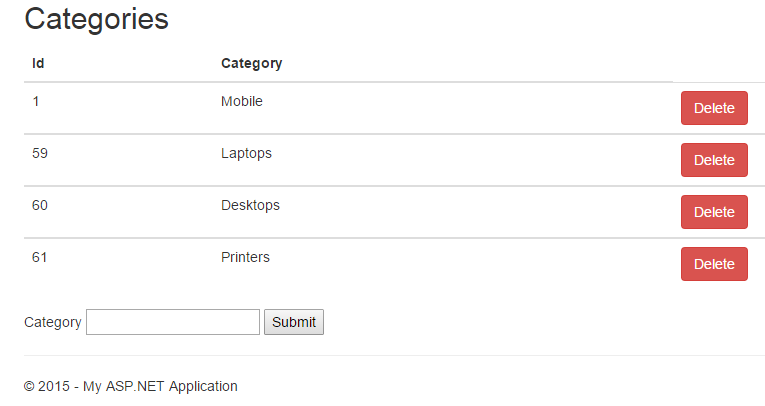
Run the application. Navigate to /Category... Now add Categories and delete categories. Enjoy!
Using AngularJS with .NET MVC 5的更多相关文章
- [译]ABP框架使用AngularJs,ASP.NET MVC,Web API和EntityFramework构建N层架构的SPA应用程序
本文转自:http://www.skcode.cn/archives/281 本文演示ABP框架如何使用AngularJs,ASP.NET MVC,Web API 和EntityFramework构建 ...
- AngularJS+ASP.NET MVC+SignalR实现消息推送
原文:AngularJS+ASP.NET MVC+SignalR实现消息推送 背景 OA管理系统中,员工提交申请单,消息实时通知到相关人员及时进行审批,审批之后将结果推送给用户. 技术选择 最开始发现 ...
- AngularJs + ASP.NET MVC
[AngularJs + ASP.NET MVC]使用AntularJs快速建立ASP.NET MVC SPA網站 這幾天接觸到了AngularJs的美麗,讓饅頭有點躍躍欲試使用AngularJs來做 ...
- ABP 教程文档 1-1 手把手引进门之 AngularJs, ASP.NET MVC, Web API 和 EntityFramework(官方教程翻译版 版本3.2.5)含学习资料
本文是ABP官方文档翻译版,翻译基于 3.2.5 版本 转载请注明出处:http://www.cnblogs.com/yabu007/ 谢谢 官方文档分四部分 一. 教程文档 二.ABP 框架 三. ...
- [Angularjs]asp.net mvc+angularjs+web api单页应用
写在前面 最近的工作一直在弄一些h5的单页应用,然后嵌入到app的webview中.之前一直在用angularjs+html+ashx的一套东西.实在是玩腻了.然后就尝试通过asp.net mvc的方 ...
- AngularJS中的MVC模式
MVC根据逻辑关系,把前端项目的代码分为三个层次 model:模型,就是业务数据,前端项目中就是JS变量. view:视图,就是业务数据在用户面前的展现,前端项目中就是HTML. controller ...
- angularJS中的MVC思想?
mvc 思想: 将应用程序的组成,划分为三个部分:model , controller 和 view ; - 控制器的作用是用来初始化模型用的: - 模型就是用于存储数据的: - 视图是展示数据的: ...
- AngularJS学习之MVC模式
AngularJS是谷歌开发维护的前端MVC框架,克服了HTML在构建应用上的不足,从而降低了开发的成本. 在学习AngularJS之前,有必要和之前学过的jQuery进行对比.jQuery是java ...
- 案例:1 Ionic Framework+AngularJS+ASP.NET MVC WebApi Jsonp 移动开发
落叶的庭院扫的一干二净之后,还要轻轻把树摇一下,抖落几片叶子,这才是Wabi Sabi的境界. 介绍:Ionic是移动框架,angularjs这就不用说了,ASP.Net MVC WebApi提供数据 ...
随机推荐
- 【EF】疑难杂症
用户和购物车数据 主从表 添加 ADO.NET实体数据类型 [Test] public void EntiyConnect() { var context = new projectDatabase ...
- WPF 自定义窗口标题栏
1.建一个WPF资源词典,在其中定义窗口样式,并在App.xaml中指定其为程序资源 2.写一个继续自windows的类,并指定这个类的Style为第一步资源里的样式 3.新建窗口时,分别把xaml文 ...
- js模拟触发事件
html标签元素封装着实用的[事件],但在很多时候,需要[模拟触发事件],比如 [按钮单机事件] 可以实实在在点击按钮触发该事件,但体验而言,很多时候需要js逻辑处理让实现 触发事件的效果这时就用 ...
- ashx与验证码
using System; using System.Drawing; using System.Drawing.Imaging; using System.Drawing.Drawing2D; us ...
- 基于局部敏感哈希的协同过滤推荐算法之E^2LSH
需要代码联系作者,不做义务咨询. 一.算法实现 基于p-stable分布,并以‘哈希技术分类’中的分层法为使用方法,就产生了E2LSH算法. E2LSH中的哈希函数定义如下: 其中,v为d维原始数据, ...
- WCF已超过传入消息(65536)的最大消息大小配额的解决方法
在服务端和客户端的配置文件中添加修改节点 maxReceivedMessageSize="1000000000" ; 或者通过编程设置bind.MaxReceivedMessage ...
- uva 10810
刘汝佳书上 143 归并排序求逆序数对 #include <cstdio> #include <cstring> #include <cstdlib> #incl ...
- "Principles of Reactive Programming" 之<Actors are Distributed> (2)
Actor Path 我们知道actor是有层级的(hierarchical),第.每个actor在它的父actor的名字空间下都有一个名字.这样就构成了一个树状的结构,就像是文件系统.每个actor ...
- c/c++ define用法
define,无参宏定义的一般形式为:#define 标识符 字符串 外文名 define 词条范围 计算机专业用语 无参一般形式 #define 标识符 字符串 带参一般形式 #define 宏名( ...
- 安装Redis完整过程
概述 首先报告一下我系统的版本: [root@firefish init.d]# cat /etc/issue 系统版本信息如下: 引用 CentOS release 6.4 (Final) K ...