
spring-webmvc 4.3.4 与 freemarker、easyui 整合
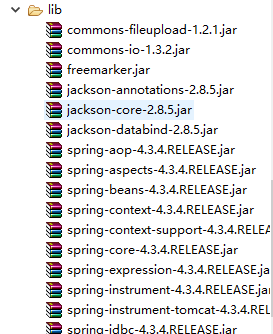
一、所需lib包

二、web.xml配置
<?xml version="1.0" encoding="UTF-8"?>

<web-app xmlns:xsi="http://www.w3.org/2001/XMLSchema-instance"

    xmlns="http://java.sun.com/xml/ns/javaee"

    xsi:schemaLocation="http://java.sun.com/xml/ns/javaee http://java.sun.com/xml/ns/javaee/web-app_2_5.xsd"

    id="WebApp_ID" version="2.5">

    <filter>

        <filter-name>characterEncodingFilter</filter-name>

        <filter-class>org.springframework.web.filter.CharacterEncodingFilter</filter-class>

        <init-param>

            <param-name>encoding</param-name>

            <param-value>UTF-8</param-value>

        </init-param>

    </filter>

    <filter-mapping>

        <filter-name>characterEncodingFilter</filter-name>

        <url-pattern>/*</url-pattern>

      </filter-mapping>

    <!-- 配置DispatchcerServlet -->

    <servlet>

        <servlet-name>springDispatcherServlet</servlet-name>

        <servlet-class>org.springframework.web.servlet.DispatcherServlet</servlet-class>

        <!-- 配置Spring mvc下的配置文件的位置和名称 -->

        <init-param>

            <param-name>contextConfigLocation</param-name>

            <param-value>classpath:springmvc.xml</param-value>

        </init-param>

        <load-on-startup>1</load-on-startup>

    </servlet>

    <servlet-mapping>

        <servlet-name>springDispatcherServlet</servlet-name>

        <url-pattern>/</url-pattern>

    </servlet-mapping>

</web-app>
三、src/springmvc.xml 配置
<?xml version="1.0" encoding="UTF-8"?>

<beans xmlns="http://www.springframework.org/schema/beans"

    xmlns:xsi="http://www.w3.org/2001/XMLSchema-instance"

    xmlns:context="http://www.springframework.org/schema/context"

    xmlns:mvc="http://www.springframework.org/schema/mvc"

    xsi:schemaLocation="http://www.springframework.org/schema/beans http://www.springframework.org/schema/beans/spring-beans.xsd

      http://www.springframework.org/schema/context

      http://www.springframework.org/schema/context/spring-context-4.0.xsd

      http://www.springframework.org/schema/mvc

      http://www.springframework.org/schema/mvc/spring-mvc-4.0.xsd">

        <!-- 配置自动扫描的包 -->

        <context:component-scan base-package="com.lixj"></context:component-scan>

        <!-- 配置以下内容以支持静态资源访问 -->

        <mvc:default-servlet-handler/>

        <mvc:annotation-driven>

          <mvc:message-converters>

             <!-- 避免返回JSON出现下载文件 -->

            <bean class="org.springframework.http.converter.json.MappingJackson2HttpMessageConverter">

              <property name="supportedMediaTypes">

               <list>

                  <value>text/html;charset=UTF-8</value>

               </list>

              </property>

            </bean>

          </mvc:message-converters>

        </mvc:annotation-driven>

        <!-- 配置视图解析器 如何把handler 方法返回值解析为实际的物理视图

        <bean class="org.springframework.web.servlet.view.InternalResourceViewResolver">

            <property name = "prefix" value="/views/"></property>

            <property name = "suffix" value = ".jsp"></property>

        </bean>

        -->

        <!-- 设置freeMarker的配置文件路径 -->

        <bean id="freemarkerConfiguration" class="org.springframework.beans.factory.config.PropertiesFactoryBean">

            <property name="location" value="classpath:freemarker.properties"/>

        </bean>

        <!-- 配置freeMarker的模板路径 -->

        <bean class="org.springframework.web.servlet.view.freemarker.FreeMarkerConfigurer">

            <property name="freemarkerSettings" ref="freemarkerConfiguration"/>

            <property name="templateLoaderPath">

                <value>/ftl/</value>

            </property>

            <property name="freemarkerVariables">

                <map>

                    <entry key="xml_escape" value-ref="fmXmlEscape" />

                </map>

            </property>

        </bean>

        <!-- 配置freeMarker视图解析器 -->

        <bean id="viewResolver" class="org.springframework.web.servlet.view.freemarker.FreeMarkerViewResolver">

            <property name="viewClass" value="org.springframework.web.servlet.view.freemarker.FreeMarkerView"/>

            <property name="contentType" value="text/html; charset=utf-8"/>

            <property name="cache" value="false"/>

            <property name = "suffix" value = ".ftl"></property>

            <property name="exposeRequestAttributes" value="true" />

            <property name="exposeSessionAttributes" value="true" />

            <property name="exposeSpringMacroHelpers" value="true" />

        </bean>

        <bean id="fmXmlEscape" class="freemarker.template.utility.XmlEscape" />

        <bean id="multipartResolver" class="org.springframework.web.multipart.commons.CommonsMultipartResolver">

          <property name="maxUploadSize" value="1046666000"/>

          <property name="maxInMemorySize" value="4096" />

          <property name="defaultEncoding" value="UTF-8"></property>

        </bean>

</beans>
四、src/freemarker.properties 配置
#设置标签类型:square_bracket:[]     auto_detect:[]<>

tag_syntax=auto_detect

#模版缓存时间,单位:秒

template_update_delay=0

default_encoding=UTF-8

output_encoding=UTF-8

locale=zh_CN

#设置数字格式 ,防止出现 000.00

number_format=\#

#变量为空时,不会报错

classic_compatible=true

#这个表示每个freemarker的视图页面都会自动引入这个ftl文件。里面定议的就是一些宏,如text文本框,各种form元素

#auto_import="/WEB-INF/templates/index.ftl" as do
五、FreemarkerController.java 代码
package com.lixj;

import java.io.File;

import java.io.IOException;

import java.util.ArrayList;

import java.util.HashMap;

import java.util.List;

import java.util.Map;

import javax.servlet.http.HttpServletRequest;

import org.springframework.stereotype.Controller;

import org.springframework.ui.ModelMap;

import org.springframework.web.bind.annotation.PathVariable;

import org.springframework.web.bind.annotation.RequestMapping;

import org.springframework.web.bind.annotation.RequestParam;

import org.springframework.web.bind.annotation.ResponseBody;

import org.springframework.web.context.request.RequestContextHolder;

import org.springframework.web.context.request.ServletRequestAttributes;

import org.springframework.web.multipart.MultipartFile;

@Controller

public class FreemarkerController {

     @RequestMapping("/hi")

     public String sayHello(ModelMap map){

         System.out.println("say hi....");

         map.put("name","kimi");

         map.put("name2","李");

         return "hi";

     }

    @RequestMapping(value = "/hi/{id}/{name}")

    public String helloPathVar(@PathVariable(value = "id") Integer id,

            @PathVariable(value = "name") String name, ModelMap map) {

        System.out.println("PathVariable  id=" + id + "   name=" + name);

        map.put("id",id);

        map.put("name",name);

        return "hi";

    }

    @RequestMapping(value = "/testPojo") //, method = RequestMethod.POST

    public String testPojo(@RequestParam(value = "flag", required = false, defaultValue = "yes") String flag,

            User user, ModelMap map) {

        System.out.println("flag: " + flag);

        System.out.println("testPojo: " + user.toString());

        map.put("name", user.getUsername());

        return "hi";

    }

    @RequestMapping(value="/json")

    @ResponseBody

    public Object getJson(){

        HttpServletRequest request = ((ServletRequestAttributes)RequestContextHolder.getRequestAttributes()).getRequest();

        List list = new ArrayList();

        Map<String, Object> map1 = new HashMap<String, Object>();

        map1.put("text", "LIXJ");

        map1.put("id", "123");

        list.add(map1);

        Map<String, Object> map2 = new HashMap<String, Object>();

        map2.put("text", "测试");

        map2.put("id", "222");

        list.add(map2);

        return list;

    }

    @RequestMapping("/fileUpload")

    public String fileUpload(@RequestParam("file") MultipartFile file, HttpServletRequest request) {

        if (!file.isEmpty()) {

                 try {

                    String filePath = request.getSession().getServletContext().getRealPath("/") + "upload/"

                       + file.getOriginalFilename();

                     file.transferTo(new File(filePath));

                } catch (IllegalStateException e) {

                    // TODO Auto-generated catch block

                    e.printStackTrace();

                } catch (IOException e) {

                    // TODO Auto-generated catch block

                    e.printStackTrace();

                }

        }

        return "redirect:/index.jsp";

    }

}
六、index.jsp代码
<%@ page language="java" import="java.util.*" pageEncoding="UTF-8"%>

<%

String path = request.getContextPath();

String basePath = request.getScheme()+"://"+request.getServerName()+":"+request.getServerPort()+path+"/";

%>

<!DOCTYPE HTML PUBLIC "-//W3C//DTD HTML 4.01 Transitional//EN">

<html>

  <head>

    <base href="<%=basePath%>">

    <title>My JSP 'index.jsp' starting page</title>

    <meta http-equiv="pragma" content="no-cache">

    <meta http-equiv="cache-control" content="no-cache">

    <meta http-equiv="expires" content="0">

    <meta name="content-type" content="text/html; charset=UTF-8">

    <meta http-equiv="keywords" content="keyword1,keyword2,keyword3">

    <meta http-equiv="description" content="This is my page">

    <!--

    <link rel="stylesheet" type="text/css" href="styles.css">

    -->

    <link rel="stylesheet" type="text/css" href="/easyui/themes/default/easyui.css">

    <link rel="stylesheet" type="text/css" href="/easyui/themes/icon.css">

    <script type="text/javascript" src="/easyui/jquery.min.js"></script>

    <script type="text/javascript" src="/easyui/jquery.easyui.min.js"></script>

  </head>

  <body>

<form action="/fileUpload" method="post" accept-charset="utf-8" enctype="multipart/form-data">

     <input type="file" name="file" >

     <input type="hidden" name="flag" value="update"><br>

    username: <input type="text" name="username"><br>

    password: <input type="password" name="password"><br>

    email: <input type="text" name="email"><br>

    age: <input type="text" name="age"><br>

    city: <input type="text" name="address.city"><br>

    province: <input type="text" name="address.province"><br>

    <input type="submit" value="submit">

</form><br/><br/>

<div style="margin-bottom:20px">

     <input id="language" class="easyui-combobox" name="language" style="120px" data-options="

                    url:'/json',

                    method:'get',

                    valueField: 'id',

                    textField: 'text',

                    label: 'Language:',

                    labelPosition: 'top'

                    " />

</div>

  </body>

</html>
七、webRoot/ftl/hi.ftl 代码:
<html>
<body>
<h1>id=${id} : name=${name} name2=${name2}</h1><br/>
</body>
</html>
八、页面访问地址 http://localhost:90/hi/1/33
spring-webmvc 4.3.4 与 freemarker、easyui 整合的更多相关文章
- Spring+SpringMVC+MyBatis+easyUI整合基础篇(二)牛刀小试
承接上文,该篇即为项目整合的介绍了. 废话不多说,先把源码和项目地址放上来,重点要写在前面. github地址为ssm-demo 你也可以先体验一下实际效果,点击这里就行啦 账号:admin 密码:1 ...
- Spring+SpringMVC+MyBatis+easyUI整合基础篇(六)maven整合SSM
写在前面的话 承接前文<Spring+SpringMVC+MyBatis+easyUI整合基础篇(五)讲一下maven>,本篇所讲述的是如何使用maven与原ssm项目整合,使得一个普 ...
- Spring+SpringMVC+MyBatis+easyUI整合基础篇(八)mysql中文查询bug修复
写在前面的话 在测试搜索时出现的问题,mysql通过中文查询条件搜索不出数据,但是英文和数字可以搜索到记录,中文无返回记录.本文就是写一下发现问题的过程及解决方法.此bug在第一个项目中点这里还存在, ...
- Spring+SpringMVC+MyBatis+easyUI整合基础篇(十一)SVN服务器进阶
日常啰嗦 上一篇文章<Spring+SpringMVC+MyBatis+easyUI整合基础篇(十)SVN搭建>简单的讲了一下SVN服务器的搭建,并没有详细的介绍配置文件及一些复杂的功能, ...
- Spring+SpringMVC+MyBatis+easyUI整合基础篇(十二)阶段总结
不知不觉,已经到了基础篇的收尾阶段了,看着前面的十几篇文章,真的有点不敢相信,自己竟然真的坚持了下来,虽然过程中也有过懒散和焦虑,不过结果还是自己所希望的,克服了很多的问题,将自己的作品展现出来,也发 ...
- Spring+SpringMVC+MyBatis+easyUI整合优化篇(二)Log4j讲解与整合
日常啰嗦 上一篇文章主要讲述了一下syso和Log间的一些区别与比较,重点是在项目的日志功能上,因此,承接前文<Spring+SpringMVC+MyBatis+easyUI整合优化篇(一)Sy ...
- Spring+SpringMVC+MyBatis+easyUI整合优化篇(四)单元测试实例
日常啰嗦 前一篇文章<Spring+SpringMVC+MyBatis+easyUI整合优化篇(三)代码测试>讲了不为和不能两个状态,针对不为,只能自己调整心态了,而对于不能,本文会结合一 ...
- Spring+SpringMVC+MyBatis+easyUI整合优化篇(五)结合MockMvc进行服务端的单元测试
日常啰嗦 承接前一篇文章<Spring+SpringMVC+MyBatis+easyUI整合优化篇(四)单元测试实例>,已经讲解了dao层和service层的单元测试,还有控制器这层也不能 ...
- Spring+SpringMVC+MyBatis+easyUI整合优化篇(七)图片上传功能
日常啰嗦 前一篇文章<Spring+SpringMVC+MyBatis+easyUI整合优化篇(六)easyUI与富文本编辑器UEditor整合>讲了富文本编辑器UEditor的整合与使用 ...
- Spring+SpringMVC+MyBatis+easyUI整合优化篇(十三)数据层优化-表规范、索引优化
本文提要 最近写的几篇文章都是关于数据层优化方面的,这几天也在想还有哪些地方可以优化改进,结合日志和项目代码发现,关于数据层的优化,还是有几个方面可以继续修改的,代码方面,整合了druid数据源也开启 ...
随机推荐
- 如何将无线路由器作为交换机,将光猫(路由器A)分出来的一条网线接到自家另一台路由器B上,最大化利用网络资源
从隔壁邻居只接了一条网线过来,由于无线网络的距离有限,不能覆盖到家里任何角落,然而,我又想家里一台台式电脑和无线设备都能够连接wifi进行上网。 摸索了一个上午,知道将家里的无线路由器B当作一个无线A ...
- PHP - PDO 之 mysql 基础操作
<?php /* pdo 学习 */ $dsn = 'mysql:host=localhost;dbname=cswl';//构建连接dsn $db = new pdo($dsn,'root', ...
- 【socket】TCP 和 UDP 在socket编程中的区别
一.TCP与UDP的区别 基于连接与无连接 对系统资源的要求(TCP较多,UDP少) UDP程序结构较简单 流模式与数据报模式 TCP保证数据正确性,UDP可能丢包 TCP保证数据顺序,UD ...
- iOS 深复制&浅复制
1.无论是深复制还是浅复制,被复制的对象类型是不变的.此对象类型具有什么功能就具有什么功能,不会因为自行修改了返回对象的指针类型而改变. 比如: 这里的str和str1的值和指针地址完全一 ...
- 彻底卸载网易UU网游加速器的方法
昨天跟朋友一起玩游戏,网速感觉不怎么好就下了一个免费的网易UU加速器来给对战平台加速,结果加速了以后网速更差,我晕,于是想卸载,可这个加速器口只有一个exe文件,不用安装,但在第一次加速时记得安装了一 ...
- 【BZOJ 1877】 [SDOI2009]晨跑
Description Elaxia最近迷恋上了空手道,他为自己设定了一套健身计划,比如俯卧撑.仰卧起坐等 等,不过到目前为止,他坚持下来的只有晨跑. 现在给出一张学校附近的地图,这张地图中包含N个十 ...
- 认识OD的两种断点
OllyDBG从原理上来区分,有两种不同的断点:软件断点和硬件断点. 也许会有朋友说那不是还有内存断点吗? 内存断点严格来说是属于一种特殊的软件断点. 内存断点: 内存断点每次只能设置一个,假如你设置 ...
- 打车APP可能的盈利模式
贺滨,蓄力的芦苇 竺宇祺.郑子威.党培兵 等人赞同 按现在国内几十家类似start-ups的竞争态势看,嘀嘀现阶段应该还处于烧钱培育市场期. 斗胆想象一下可能的盈利模式: 前向收费(面向用户): 特权 ...
- android 使用系统照相程序照相并存储、显示在界面上
大部分业务可以通过调用系统的相机程序来拍照. 界面如下: <?xml version="1.0" encoding="utf-8"?> <Li ...
- http://www.cnblogs.com/amboyna/archive/2008/03/08/1096024.html
http://www.cnblogs.com/amboyna/archive/2008/03/08/1096024.html