
【ASP.NET基础】简单企业产品展示网站--产品编辑CRUD
摘要:本文记录创建一个小的、简单的产品网站的步骤。
一,搭建一个简单的产品展示网站,熟悉以下知识点:NVelocity模板引擎、Ajax无刷新页面请求,文件上传,Row_Number实现分页,ckEditor使用,Bootstrap的简单使用。【点击查看网站效果】
二,网站基本框架:新建项目ProductWeb ,并完成基本框架的搭建(SQLHelper,ckEditor,Common_Nvelocity,Bootstrap等添加到项目中)。并创建ProductWebDB 。【下载基本模板框架】

三,在基本模板的基础上,添加后台 产品列表页面(ProductList_Admin.html)
A,新增数据库: ProduceWebDB 并新建表ProCategories、Products
USE [ProduceWebDB]

GO

/****** Object:  Table [dbo].[ProCategories]    Script Date: 2015/6/2 15:54:49 ******/

SET ANSI_NULLS ON

GO

SET QUOTED_IDENTIFIER ON

GO

SET ANSI_PADDING ON

GO

CREATE TABLE [dbo].[ProCategories](

    [CateID] [decimal](, ) IDENTITY(,) NOT NULL,

    [CateName] [varchar]() NOT NULL

) ON [PRIMARY]

GO

SET ANSI_PADDING OFF

GO

/****** Object:  Table [dbo].[Products]    Script Date: 2015/6/2 15:54:50 ******/

SET ANSI_NULLS ON

GO

SET QUOTED_IDENTIFIER ON

GO

CREATE TABLE [dbo].[Products](

    [ProID] [decimal](, ) IDENTITY(,) NOT NULL,

    [ProName] [nvarchar]() NOT NULL,

    [ProImagePath] [nvarchar](max) NOT NULL,

    [ProIntroduce] [text] NOT NULL,

    [ProCateID] [bigint] NOT NULL,

    [AddTime] [datetime] NULL,

    [AddIP] [nchar]() NULL,

    [IsDelete] [bit] NOT NULL

) ON [PRIMARY] TEXTIMAGE_ON [PRIMARY]

GO

ALTER TABLE [dbo].[Products] ADD  CONSTRAINT [DF_Products_CreateTime]  DEFAULT (getdate()) FOR [AddTime]

GO

ALTER TABLE [dbo].[Products] ADD  CONSTRAINT [DF_Products_IsDelete]  DEFAULT (()) FOR [IsDelete]

GO
B,项目新增ProductList_Admin.ashx一般处理程序 , 在Templates/Admin下添加对应的 ProductList_Admin.html 页面 ,在后台显示产品列表。
Templates/Admin/Head.html: 相当于模板页的页头部分,用Bootstrap导航组件 其他页面通过#parse("Head.html")调用
<!DOCTYPE html>

<html xmlns="http://www.w3.org/1999/xhtml">

<head>

    <meta http-equiv="Content-Type" content="text/html;" charset="gb2312" />

    <!-- 这个属性主要是设置浏览器优先使用什么模式来渲染页面的-->

    <!-- #下面的meta标签告诉IE浏览器,IE8/9及以后的版本都会以最高版本IE来渲染页面。  -->

    <meta http-equiv="X-UA-Compatible" content="IE=edge" />

    <!--移动设备都是这Viewport里面打开,width=device-width表示打开页面默认和设备一致,initial-scale=1表示页面不进行缩放   -->

    <meta name="viewport" content="width=device-width, initial-scale=1" />

    <!-- 上述3个meta标签*必须*放在最前面,任何其他内容都*必须*跟随其后! -->

    <title>后台管理</title>

    <!-- Bootstrap -->

    <!--<link href="css/bootstrap.min.css" rel="stylesheet"/>-->

    <!-- 新 Bootstrap 核心 CSS 文件 -->

    <link rel="stylesheet" href="http://cdn.bootcss.com/bootstrap/3.3.4/css/bootstrap.min.css" />

    <!--低版本浏览器如果支持HTML5需要添加以下js-->

    <!-- HTML5 shim and Respond.js for IE8 support of HTML5 elements and media queries -->

    <!-- WARNING: Respond.js doesn't work if you view the page via file:// -->

    <!--[if lt IE ]>

      <script src="http://cdn.bootcss.com/html5shiv/3.7.2/html5shiv.min.js"></script>

      <script src="http://cdn.bootcss .com/respond.js/1.4.2/respond.min.js"></script>

    <![endif]-->

    <!--鼠标悬停弹出下拉菜单-->

    <style type="text/css">

        .navbar .nav > li .dropdown-menu {

            margin: ;

        }

        .navbar .nav > li:hover .dropdown-menu {

            display: block;

        }

        .navbar .nav > li .dropdown-menu > li:hover {

            font-size: larger;

        }

    </style>

</head>

<body>

    <!-- --导航条  默认高度50px, 固定在顶部 -->

    <nav class="navbar navbar-default .navbar-fixed-top">

        <div class="container-fluid">

            <!-- Brand and toggle get grouped for better mobile display -->

            <div class="navbar-header">

                <!--当浏览器宽度变窄的时候会显示这个Button按钮,并且会把data-target中的div中ul收缩导航到Button下方-->

                <button type="button" class="navbar-toggle collapsed" data-toggle="collapse" data-target="#bs-example-navbar-collapse-1">

                    <!--定义小按钮的样式-->

                    <span class="sr-only">Toggle navigation</span>

                    <!-- 页面变窄时 , 按钮的3条横线 -->

                    <span class="icon-bar"></span>

                    <span class="icon-bar"></span>

                    <span class="icon-bar"></span>

                </button>

                <!--Logo位置-->

                <a class="navbar-brand" href="http://www.cnblogs.com/chengzish/">后台管理</a>

            </div>

            <!-- Collect the nav links, forms, and other content for toggling -->

            <div class="collapse navbar-collapse" id="bs-example-navbar-collapse-1">

                <ul class="nav navbar-nav">

                    <!--导航条内容-->

                    <li class="active"><a href="#">首页 <span class="sr-only">(current)</span></a></li>

                    <li><a href="#">成功案例编辑</a></li>

                    <li><a href="#">新闻活动编辑</a></li>

                    <li class="dropdown">

                        <a href="#" class="dropdown-toggle" data-toggle="dropdown" role="button" aria-expanded="false">服务编辑<span class="caret"></span></a>

                        <ul class="dropdown-menu" role="menu">

                            <li><a href="#">软件定制编辑</a></li>

                            <li class="divider"></li>

                            <li><a href="#">外包服务编辑</a></li>

                            <li class="divider"></li>

                            <li><a href="#">咨询服务编辑</a></li>

                        </ul>

                    </li>

                    <li class="dropdown">

                        <a href="#" class="dropdown-toggle" data-toggle="dropdown" role="button" aria-expanded="false">OA系统解决方案编辑<span class="caret"></span></a>

                        <ul class="dropdown-menu" role="menu">

                            <li><a href="#">员工考勤系统编辑</a></li>

                            <li class="divider"></li>

                            <li><a href="#">薪资结算系统编辑</a></li>

                            <li class="divider"></li>

                            <li><a href="#">门禁管理系统编辑</a></li>

                            <li class="divider"></li>

                            <li><a href="#">APP开发编辑</a></li>

                        </ul>

                    </li>

                </ul>

                <!--搜索表单-->

                <form class="navbar-form navbar-left" role="search">

                    <div class="form-group">

                        <input type="text" class="form-control" placeholder="Search" />

                    </div>

                    <button type="submit" class="btn btn-default">搜索</button>

                </form>

                <ul class="nav navbar-nav navbar-right">

                    <li><a href="#">Git Fork</a></li>

                    <li class="dropdown">

                        <a href="#" class="dropdown-toggle" data-toggle="dropdown" role="button" aria-expanded="false">联系我们编辑<span class="caret"></span></a>

                        <ul class="dropdown-menu" role="menu">

                            <li><a href="#">地址</a></li>

                            <li><a href="#">电话</a></li>

                            <li><a href="#">邮箱</a></li>

                            <li class="divider"></li>

                            <li><a href="#">微信</a></li>

                        </ul>

                    </li>

                </ul>

            </div>

            <!-- /.navbar-collapse -->

        </div>

        <!-- /.container-fluid -->

    </nav>
Templates/Admin/Foot.html: 相当于模板页的页头部分,标注版权信息,其他页面通过#parse("Foot.html")
<div id="footer" class="container">

    <nav class="navbar navbar-default navbar-fixed-bottom">

        <div class="navbar-inner navbar-content-center">

            <p class="text-muted credit" style="padding: 10px; text-align: center">

                Copyright @- By 橙子科技 All Rights Reserved.

            </p>

        </div>

    </nav>

</div>

<!-- jQuery (necessary for Bootstrap's JavaScript plugins) -->

<script src="http://cdn.bootcss.com/jquery/1.11.2/jquery.min.js"></script>

<!-- Bootstrap核心js依赖于jQuery,所以要先引用jQuery-->

<!-- Include all compiled plugins (below), or include individual files as needed -->

<!-- <script src="js/bootstrap.min.js"></script>-->

<!-- 最新的 Bootstrap 核心 JavaScript 文件 -->

<script src="http://cdn.bootcss.com/bootstrap/3.3.4/js/bootstrap.min.js"></script>

</body>

</html>
Templates/Admin/ProductList_Admin.html: 产品列表展示页面,遍历显示产品数据
#parse("Admin/Head.html")

    <h2>产品列表维护</h2>

<div style="width: 70%; text-align: center; margin-left: 15%;">

    <table class="table table-striped table-bordered table-hover">

        <tr>

            <td>产品名称</td>

            <td>产品类别</td>

            <td>编辑</td>

            <td>删除</td>

        </tr>

        #foreach($Pro in $data.Products)

            <tr>

                <td>$Pro.ProName</td>

                <td>$Pro.CateName />

                </td>

                <td><a href="ProductEdit.html?action=edit&id=$Pro.ProID">编辑</a></td>

                <td><a href="ProductEdit.html?action=delete&id=$Pro.ProID">删除</a></td>

            </tr>

        #end

    </table>

</div>

#parse("Admin/Foot.html")
ProductList_Admin.ashx: 从数据库中读取产品信息
using System;

using System.Collections.Generic;

using System.Linq;

using System.Web;

using System.Data;

namespace ProductWeb

{

    /// <summary>

    /// ProductList_Admin 后台显示产品列表

    /// </summary>

    public class ProductList_Admin : IHttpHandler

    {

        public void ProcessRequest(HttpContext context)

        {

            context.Response.ContentType = "text/html";

            //从DB中选出产品信息

            string sql = "SELECT [ProID],[ProName],[ProImagePath],[ProIntroduce],b.[CateName] as CateName  FROM [dbo].[Products]  as a left join [dbo].[ProCategories] as b on a.ProCateID=b.CateID ";

            SQLHelper sqlH = new SQLHelper();

            DataTable dt = sqlH.ExecuteQuery(sql, CommandType.Text);

            var data = new { PageTitle = "产品列表", Products = dt.Rows };

            string strHtml = Common_Nvelocity.RenderHTML("Admin/ProductList_Admin.html", data);

            context.Response.Write(strHtml);

        }

        public bool IsReusable

        {

            get

            {

                return false;

            }

        }

    }

}
C,Ctrl+F5运行程序,查看 ProductList_Admin.ashx 读出了DB中的数据:

四,添加产品编辑页面(ProductEdit.html)点击ProductList_Admin.html中的“编辑”跳转到ProductEdit.html编辑页面.
PorductEdit.ashx根据传递过来的Action(edit,delete,addnew)进行编辑、删除、新增操作。
A, 更新webconfig允许写入 html 标签
<system.web>

    <compilation debug="true" targetFramework="4.0" />

    <httpRuntime requestValidationMode="2.0"/>

  </system.web>
B, 添加ProductEdit.html 页面 (1,三个隐藏控件分别记录当前页面是否是首次加载,点击“保存”按钮需要执行的操作,传递过来的id的值 2, 注意下拉列表的实现)
#parse("Admin/Head.html")

<script src="../../ckeditor/ckeditor.js"></script>

<div style="width: 70%; text-align: left; margin-left: 15%;">

    #if($data.ActionEdit=="edit")

         <h2 class="text-center">产品编辑</h2>

    #elseif ($data.ActionEdit=="delete")

         <h2 class="text-center">产品删除 </h2>

    #elseif ($data.ActionEdit=="addnew")

         <h2 class="text-center">产品新增</h2>

    #end

    <form method="post" action="ProductEdit.ashx">

        <!--三个隐藏,IspostBack 记录页面是否首次加载,action 记录提交按钮后是需要新增还是编辑,txtProIDHiddden 隐藏当前编辑的id  -->

        <input type="hidden" name="IsPostBack" value="true" />

        <input type="hidden" name="txtaction" value="$data.ActionEdit" />

        <input type="hidden" name="txtProIDHiddden" value="$data.Product.ProID" />

        <table class="table table-striped table-bordered">

            <tr>

                <td>产品名称:</td>

                <td>

                    <input type="text" name="txtProName" value="$data.Product.ProName" /></td>

            </tr>

            <tr>

                <td>产品分类:</td>

                <td>

                    <select name="txtProCateID">

                        #foreach($cate in $data.Categories)

                        #if($cate.CateID==$data.Product.ProCateID)

                            <option value="$cate.CateID" selected="selected">$cate.CateName</option>

                        #else

                           <option value="$cate.CateID">$cate.CateName</option>

                        #end

                    #end

                    </select>

                </td>

            </tr>

            <tr>

                <td>产品图片:</td>

                <td>

                    <img id="ProImg" src="$data.Product.ProImagePath" class="img-rounded" /></td>

            </tr>

            <tr>

                <td>产品介绍:</td>

                <td>

                    <textarea id="idProIntroduce" name="txtProIntroduce">$data.Product.ProIntroduce </textarea>

                </td>

            </tr>

            <tr>

                <td colspan="" style="text-align: center">

                    <input type="submit" value="保存" class="btn btn-primary" />

                    <a href="ProductList_Admin.ashx" class="btn btn-default">返回</a>

                </td>

            </tr>

        </table>

    </form>

    <div style="width: 70%; text-align: center; margin-left: 15%;">

        <script type="text/javascript">

            var txtIntro = document.getElementById("idProIntroduce");

            CKEDITOR.replace(txtIntro);

        </script>

#parse("Admin/Foot.html")
C, 添加ProductEdit.ashx 处理新增、编辑、删除操作,并把数据交给Nvelocity模板从而加载到前台页面
using System;

using System.Collections.Generic;

using System.Linq;

using System.Web;

using System.Data;

using System.Data.SqlClient;

namespace ProductWeb

{

    /// <summary>

    /// ProductEdit Product编辑页面

    /// </summary>

    public class ProductEdit : IHttpHandler

    {

        public void ProcessRequest(HttpContext context)

        {

            context.Response.ContentType = "text/html";

            string strHtml = "";

            string sqlCates = "SELECT [CateID],[CateName] FROM [dbo].[ProCategories]";

            SQLHelper sqlH = new SQLHelper();

            DataTable dtCates = sqlH.ExecuteQuery(sqlCates, CommandType.Text);

            //[ProID],[ProName],[ProImagePath],[ProIntroduce],[ProCateID],b.[CateName] as CateName,b.[CateID] as CateID  FROM [Products]  as a left join [ProCategories] as b on a.ProCateID=b.CateID and a.ProID=@strProID ";     //

            ////定义Product,并给一个默认的控制

            var ProductOriginal = new { ProID = , ProName = "", ProImagePath = "", ProIntroduce = "", CateName = "", CateID = "" };

            //页面首次加载 , 显示Product信息

            if (string.IsNullOrEmpty(context.Request.Form["IsPostBack"]) == true)

            {

                string strProID = context.Request.QueryString["id"];   // 点击 编辑 按钮,传递过来 action 和 id值

                string strAction = context.Request.QueryString["action"] == null ? "" : context.Request.QueryString["action"].ToString().ToLower(); //  点击保存后,具体是 edit、 delte还是 add,  保存在页面的隐藏控件中

                string strPageTitle = "产品操作";  //default

                if (!string.IsNullOrEmpty(strProID))   // id 存在

                {

                    //从DB中选出 id 对应的Product 信息

                    SqlParameter[] sqlParas = new SqlParameter[] {

                        new SqlParameter("@strProID",strProID)

                    };

                    if (strAction == "edit")

                    {

                        strPageTitle = "产品编辑";

                    }

                    else if (strAction == "delete")

                    {

                        strPageTitle = "产品删除";

                    }

                    else if (strAction == "addnew")

                    {

                        strPageTitle = "产品新增";

                    }

                    //选择出ID对应的Product

                    DataTable dtPro = dtGetProductByID(strProID);

                    int numExist = ;

                    numExist = dtPro.Rows.Count;

                    if (numExist > )

                    {

                        // 产品存在,显示产品信息

                        var data = new { PageTitle = strPageTitle, Categories = dtCates.Rows, Product = dtPro.Rows[], ActionEdit = strAction };

                        strHtml = Common_Nvelocity.RenderHTML("Admin/ProductEdit.html", data);

                    }

                    else

                    {

                        // 不存在,显示编辑页面

                        var data = new { PageTitle = strPageTitle, Categories = dtCates.Rows, Product = ProductOriginal, ActionEdit = strAction };

                        strHtml = Common_Nvelocity.RenderHTML("Admin/ProductEdit.html", data);

                    }

                }

                else

                {

                    //显示编辑页面

                    var data = new { PageTitle = strPageTitle, Categories = dtCates.Rows, Product = ProductOriginal, ActionEdit = strAction };

                    strHtml = Common_Nvelocity.RenderHTML("Admin/ProductEdit.html", data);

                }

            }

            //点击了 submit 按钮,根据传递过来的action进行操作 update/delete

            else

            {

                string strAction = context.Request.Form["txtaction"];

                if (!string.IsNullOrEmpty(strAction))

                {

                    string strInfo = "";

                    if (strAction == "edit")

                    {

                        string strProID = context.Request.Form["txtProIDHiddden"];

                        string strProName = context.Request.Form["txtProName"];

                        string strProCateID = context.Request.Form["txtProCateID"];

                        //string strProImagePath = context.Request.Form["strProImgPath"];

                        string strProIntroduce = context.Request.Form["txtProIntroduce"];

                        //选择出ID对应的Product

                        DataTable dtPro = dtGetProductByID(strProID);

                        int numExist = ;

                        numExist = dtPro.Rows.Count;

                        if (numExist > )

                        {

                            //update

                            string sqlUpdate = "update [Products] set [ProName]=@ProName,[ProIntroduce]=@ProIntroduce,[ProCateID]=@ProCateID where [IsDelete]=0 and [ProID]=@ProID ";

                            SqlParameter[] sqlParas = new SqlParameter[] {

                                new SqlParameter("@ProName",strProName),

                                new SqlParameter("@ProCateID",strProCateID),

                                new SqlParameter("@ProIntroduce",strProIntroduce),

                                new SqlParameter("@ProID",strProID)

                            };

                            int numSuccUpd = ;

                            numSuccUpd = sqlH.ExecuteNonQuery(sqlUpdate, sqlParas, CommandType.Text);

                            if (numSuccUpd > )

                            {

                                strInfo = "更新成功";

                                DataTable dtProNew = dtGetProductByID(strProID);

                                var data = new { PageTitle = "产品编辑", Categories = dtCates.Rows, Product = dtProNew.Rows[], ActionEdit = strAction, InfoMeg = strInfo };

                                strHtml = Common_Nvelocity.RenderHTML("Admin/ProductEdit.html", data);

                            }

                            else

                            {

                                strInfo = "更新失败";

                                DataTable dtProNew = dtGetProductByID(strProID);

                                var data = new { PageTitle = "产品编辑", Categories = dtCates.Rows, Product = dtProNew.Rows[], ActionEdit = strAction, InfoMeg = strInfo };

                                strHtml = Common_Nvelocity.RenderHTML("Admin/ProductEdit.html", data);

                            }

                        }

                    }

                    else if (strAction == "delete")

                    {

                        string strProID = context.Request.Form["txtProIDHiddden"];

                        //选择出ID对应的Product

                        DataTable dtPro = dtGetProductByID(strProID);

                        int numExist = ;

                        numExist = dtPro.Rows.Count;

                        if (numExist > )

                        {

                            string sqlUpdate = "update [Products] set [IsDelete]=1  where  [ProID]=@ProID ";

                            SqlParameter[] sqlParas = new SqlParameter[] {

                                new SqlParameter("@ProID",strProID)

                            };

                            int numSuccUpd = ;

                            numSuccUpd = sqlH.ExecuteNonQuery(sqlUpdate, sqlParas, CommandType.Text);

                            if (numSuccUpd > )

                            {

                                strInfo = "删除成功";

                                context.Response.Redirect("productlist_admin.ashx");

                            }

                            else

                            {

                                DataTable dtProNew = dtGetProductByID(strProID);

                                var data = new { PageTitle = "产品删除", Categories = dtCates.Rows, Product = dtProNew.Rows[], ActionEdit = strAction, InfoMeg = strInfo };

                                strHtml = Common_Nvelocity.RenderHTML("Admin/ProductEdit.html", data);

                            }

                        }

                    }

                    else if (strAction == "addnew")

                    {

                        //写入数据库

                        string strProName = context.Request.Form["txtProName"];

                        string strProCateID = context.Request.Form["txtProCateID"];

                        string strProImagePath = "updloadFiles/3.jpg";

                        string strProIntroduce = context.Request.Form["txtProIntroduce"];

                        if (string.IsNullOrEmpty(strProName) || string.IsNullOrEmpty(strProCateID) || string.IsNullOrEmpty(strProIntroduce))

                        {

                            strInfo = "不允许为空";

                            var data = new { PageTitle = "产品新增", Categories = dtCates.Rows, Product = ProductOriginal, MesgInfo = strInfo };

                            strHtml = Common_Nvelocity.RenderHTML("Admin/ProductEdit.html", data);

                        }

                        else

                        {

                            string sqlInsert = "  insert into [Products]([ProName],[ProCateID],[ProIntroduce],[ProImagePath]) values(@ProName,@ProCateID,@ProIntroduce,@ProImagePath) ";

                            SqlParameter[] sqlParas = new SqlParameter[] {

                                new SqlParameter("@ProName",strProName),

                                new SqlParameter("@ProCateID",strProCateID),

                                new SqlParameter("@ProIntroduce",strProIntroduce),

                                 new SqlParameter("@ProImagePath",strProImagePath)

                            };

                            int numSucc = sqlH.ExecuteNonQuery(sqlInsert, sqlParas, CommandType.Text);

                            if (numSucc == )

                            {

                                strInfo = "添加成功";

                                context.Response.Redirect("productlist_admin.ashx");

                            }

                            else

                            {

                                strInfo = "添加失败";

                                var data = new { PageTitle = "产品新增", Categories = dtCates.Rows, Product = ProductOriginal, MesgInfo = strInfo };

                                strHtml = Common_Nvelocity.RenderHTML("Admin/ProductEdit.html", data);

                            }

                        }

                    }

                }

                else

                {

                    var data = new { PageTitle = "产品编辑", Categories = dtCates.Rows, Product = ProductOriginal, MesgInfo = "" };

                    strHtml = Common_Nvelocity.RenderHTML("Admin/ProductEdit.html", data);

                }

            }

            context.Response.Write(strHtml);

        }

        public DataTable dtGetProductByID(string strProID)

        {

            SQLHelper sqlH = new SQLHelper();

            //选择出ID对应的Product

            string sqlPro = "SELECT [ProID],[ProName],[ProImagePath],[ProIntroduce],[ProCateID],b.[CateName] as CateName,b.[CateID] as CateID  FROM [Products]  as a left join [ProCategories] as b on a.ProCateID=b.CateID where [IsDelete]=0 and a.ProID=@ProID ";

            SqlParameter[] sqlParas = new SqlParameter[] {

                                     new SqlParameter("@ProID", strProID)

                                };

            DataTable dtPro = sqlH.ExecuteQuery(sqlPro, sqlParas, CommandType.Text);

            return dtPro;

        }

        public bool IsReusable

        {

            get

            {

                return false;

            }

        }

    }

}
---------------------------------------------------实现效果: 新增 AddNew---------------------------------------------------
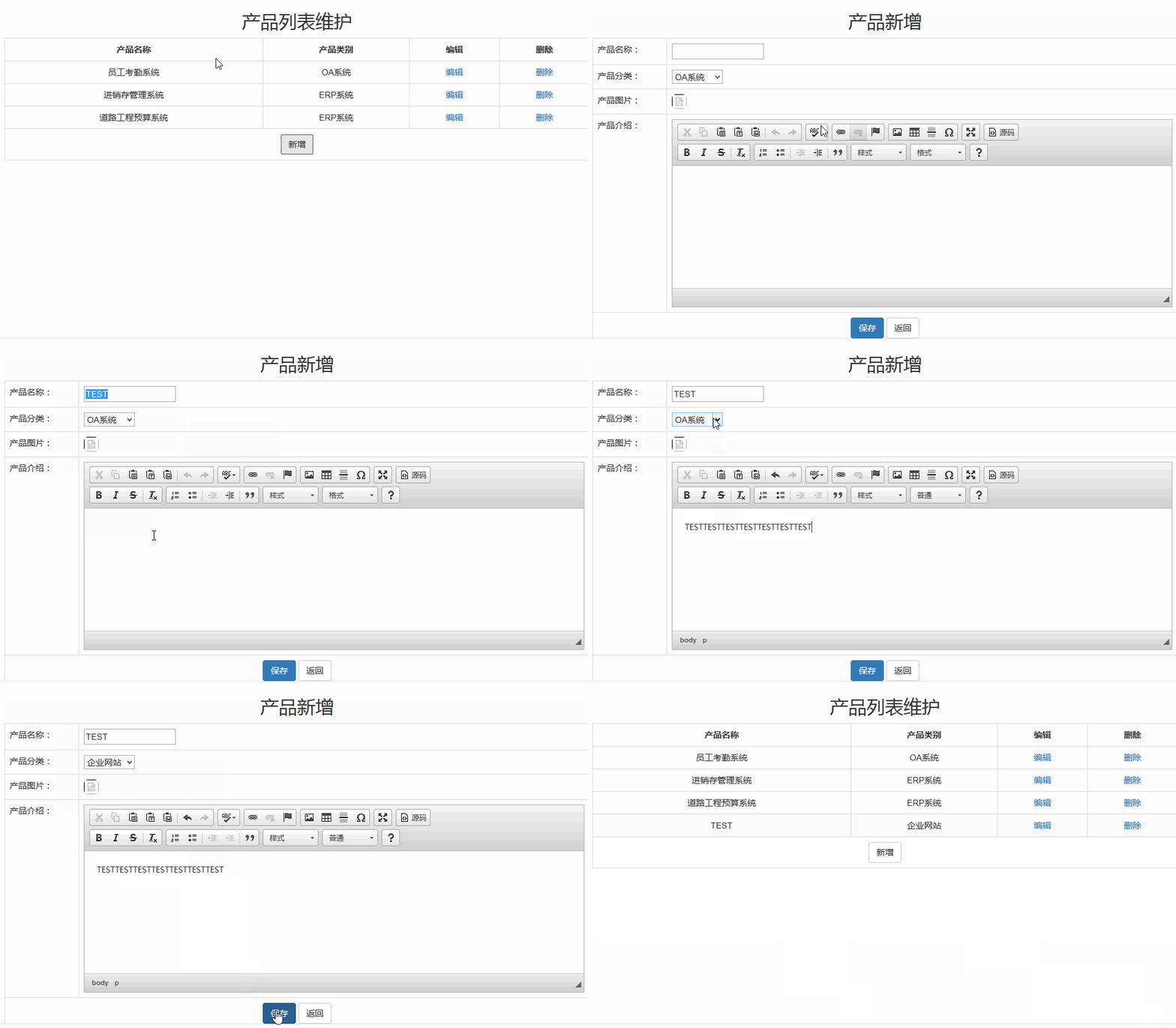
----------------------------------------------------实现效果: 编辑 Edit-------------------------------------------------------
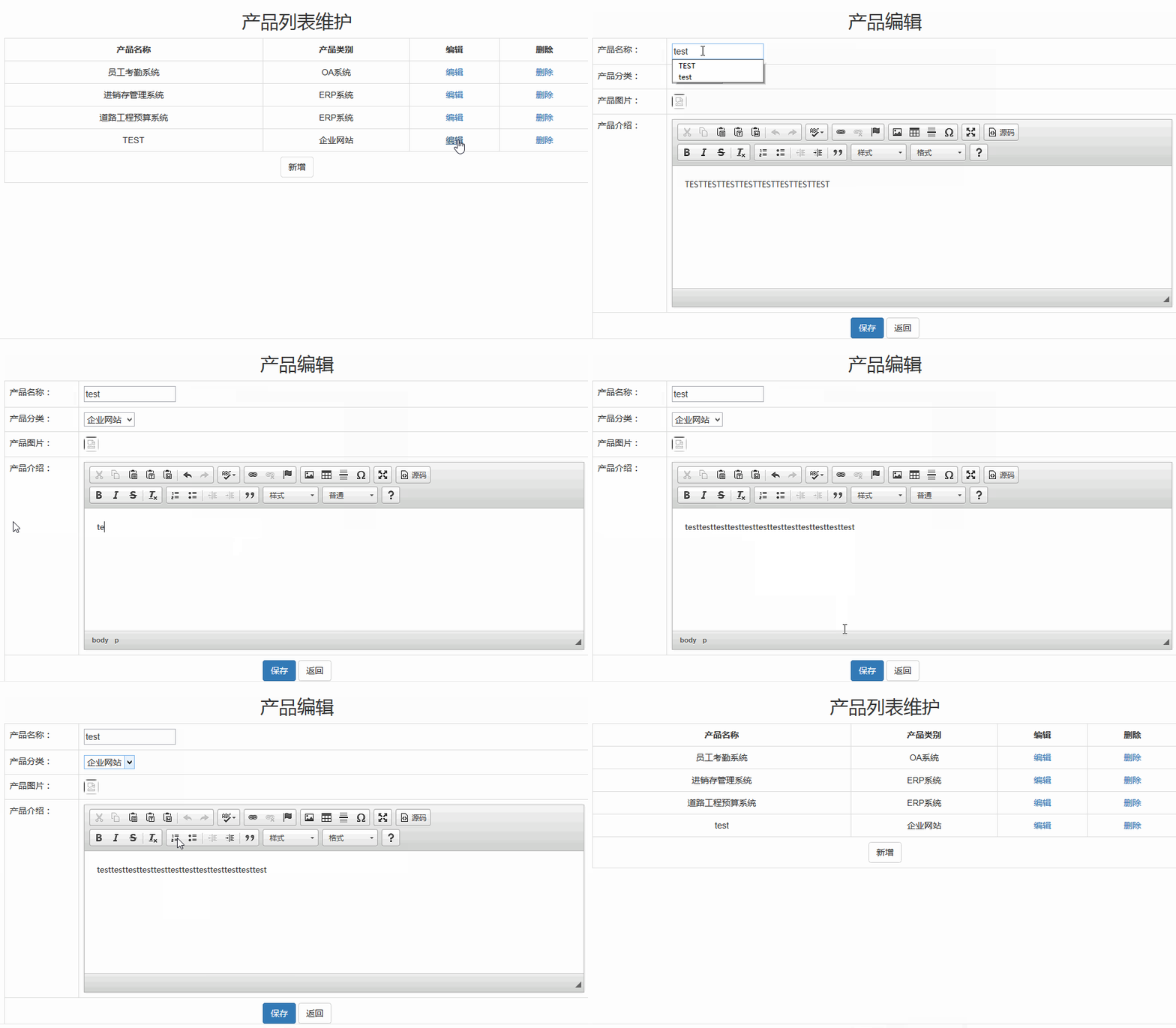
----------------------------------------------------实现效果: 删除 Delete-----------------------------------------------------

五,实现图片上传和分页 (知识点:1,From表单设置enctype属性 2,文件上传并SaveAs到Server.MapPath 3,Row_Number()进行分页)
A,分别更新ProductEdit.html和ProductEdit.ashx 实现图片的上传和更新(图片存储在服务器,图片名称存储DB)
Templates/Admin/ProductEdit.html: Form表单添加enctype="multipart/form-data"属性 ,图片src读取图片路径
#parse("Admin/Head.html")

<script src="../../ckeditor/ckeditor.js"></script>

<div style="width: 70%; text-align: left; margin-left: 15%;">

    #if($data.ActionEdit=="edit")

         <h2 class="text-center">产品编辑</h2>

    #elseif ($data.ActionEdit=="delete")

         <h2 class="text-center">产品删除 </h2>

    #elseif ($data.ActionEdit=="addnew")

         <h2 class="text-center">产品新增</h2>

    #end

    <form method="post" action="ProductEdit.ashx" enctype="multipart/form-data">

        <!--三个隐藏,IspostBack 记录页面是否首次加载,action 记录提交按钮后是需要新增还是编辑,txtProIDHiddden 隐藏当前编辑的id  -->

        <input type="hidden" name="IsPostBack" value="true" />

        <input type="hidden" name="txtaction" value="$data.ActionEdit" />

        <input type="hidden" name="txtProIDHiddden" value="$data.Product.ProID" />

        <table class="table table-striped table-bordered">

            <tr>

                <td>产品名称:</td>

                <td>

                    <input type="text" name="txtProName" value="$data.Product.ProName" /></td>

            </tr>

            <tr>

                <td>产品分类:</td>

                <td>

                    <select name="txtProCateID">

                        #foreach($cate in $data.Categories)

                        #if($cate.CateID==$data.Product.ProCateID)

                            <option value="$cate.CateID" selected="selected">$cate.CateName</option>

                        #else

                           <option value="$cate.CateID">$cate.CateName</option>

                        #end

                    #end

                    </select>

                </td>

            </tr>

            <tr>

                <td>产品图片:</td>

                <td>#if ($data.ActionEdit=="addnew")

                    <input type="file" name="ProductImage" value="上传图片" />

                    #else

                    <img id="ProImg" src="../../uploadFiels/$data.Product.ProImagePath" class="img-rounded" style="width: 40px; height: 40px" />

                    <input type="file" name="ProductImage" value="更新图片" />

                    #end

                </td>

            </tr>

            <tr>

                <td>产品介绍:</td>

                <td>

                    <textarea id="idProIntroduce" name="txtProIntroduce">$data.Product.ProIntroduce </textarea>

                </td>

            </tr>

            <tr>

                <td colspan="" style="text-align: center">

                    <input type="submit" value="保存" class="btn btn-primary" />

                    <a href="ProductList_Admin.ashx" class="btn btn-default">返回</a>

                </td>

            </tr>

        </table>

    </form>

    <br />

    <br />

    <br />

    <script type="text/javascript">

        var txtIntro = document.getElementById("idProIntroduce");

        CKEDITOR.replace(txtIntro);

    </script>

#parse("Admin/Foot.html")
ProductEdit.ashx: 实现图片保存到uploadfiles文件夹,图片名称保存到DB
using System;
using System.Collections.Generic;
using System.Linq;
using System.Web;
using System.Data;
using System.Data.SqlClient;
using System.IO; namespace ProductWeb
{
/// <summary>
/// ProductEdit Product编辑页面
/// </summary>
public class ProductEdit : IHttpHandler
{ public void ProcessRequest(HttpContext context)
{
context.Response.ContentType = "text/html";
string strHtml = "";
string sqlCates = "SELECT [CateID],[CateName] FROM [dbo].[ProCategories]";
SQLHelper sqlH = new SQLHelper();
DataTable dtCates = sqlH.ExecuteQuery(sqlCates, CommandType.Text); //[ProID],[ProName],[ProImagePath],[ProIntroduce],[ProCateID],b.[CateName] as CateName,b.[CateID] as CateID FROM [Products] as a left join [ProCategories] as b on a.ProCateID=b.CateID and a.ProID=@strProID "; //
////定义Product,并给一个默认的控制
var ProductOriginal = new { ProID = , ProName = "", ProImagePath = "", ProIntroduce = "", CateName = "", CateID = "" }; //页面首次加载 , 显示Product信息
if (string.IsNullOrEmpty(context.Request.Form["IsPostBack"]) == true)
{
string strProID = context.Request.QueryString["id"]; // 点击 编辑 按钮,传递过来 action 和 id值
string strAction = context.Request.QueryString["action"] == null ? "" : context.Request.QueryString["action"].ToString().ToLower(); // 点击保存后,具体是 edit、 delte还是 add, 保存在页面的隐藏控件中
string strPageTitle = "产品操作"; //default if (!string.IsNullOrEmpty(strProID)) // id 存在
{
//从DB中选出 id 对应的Product 信息
SqlParameter[] sqlParas = new SqlParameter[] {
new SqlParameter("@strProID",strProID)
}; if (strAction == "edit")
{
strPageTitle = "产品编辑";
}
else if (strAction == "delete")
{
strPageTitle = "产品删除";
}
else if (strAction == "addnew")
{
strPageTitle = "产品新增";
}
//选择出ID对应的Product
DataTable dtPro = dtGetProductByID(strProID);
int numExist = ;
numExist = dtPro.Rows.Count; if (numExist > )
{
// 产品存在,显示产品信息
var data = new { PageTitle = strPageTitle, Categories = dtCates.Rows, Product = dtPro.Rows[], ActionEdit = strAction };
strHtml = Common_Nvelocity.RenderHTML("Admin/ProductEdit.html", data);
}
else
{
// 不存在,显示编辑页面
var data = new { PageTitle = strPageTitle, Categories = dtCates.Rows, Product = ProductOriginal, ActionEdit = strAction };
strHtml = Common_Nvelocity.RenderHTML("Admin/ProductEdit.html", data);
}
}
else
{
//显示编辑页面
var data = new { PageTitle = strPageTitle, Categories = dtCates.Rows, Product = ProductOriginal, ActionEdit = strAction };
strHtml = Common_Nvelocity.RenderHTML("Admin/ProductEdit.html", data);
} }
//点击了 submit 按钮,根据传递过来的action进行操作 update/delete
else
{
string strAction = context.Request.Form["txtaction"];
if (!string.IsNullOrEmpty(strAction))
{
string strInfo = "";
if (strAction == "edit")
{ string strProID = context.Request.Form["txtProIDHiddden"];
string strProName = context.Request.Form["txtProName"];
string strProCateID = context.Request.Form["txtProCateID"];
string strProImageName = ""; //文件名
string strProIntroduce = context.Request.Form["txtProIntroduce"]; //选择出ID对应的Product
DataTable dtPro = dtGetProductByID(strProID);
int numExist = ;
numExist = dtPro.Rows.Count;
if (numExist > )
{ //上传文件
HttpPostedFile proImg = context.Request.Files["ProductImage"]; //获得客户端上传图片信息
string imgServerPath = context.Server.MapPath("~/uploadFiels/"); //项目中 uploadFiles路径
string strTimeNow = DateTime.Now.ToString("yyyyMMddHHmmssfff");
strProImageName = strTimeNow + Path.GetExtension(proImg.FileName);
if ((Path.GetExtension(proImg.FileName) == ".jpg" || Path.GetExtension(proImg.FileName) == ".png") && proImg.ContentLength < )
{
proImg.SaveAs(imgServerPath + strProImageName); //上传
}
//update DB
string sqlUpdate = "update [Products] set [ProName]=@ProName,[ProIntroduce]=@ProIntroduce,[ProCateID]=@ProCateID,[ProImagePath]=@ProImagePath where [IsDelete]=0 and [ProID]=@ProID ";
SqlParameter[] sqlParas = new SqlParameter[] {
new SqlParameter("@ProName",strProName),
new SqlParameter("@ProCateID",strProCateID),
new SqlParameter("@ProIntroduce",strProIntroduce),
new SqlParameter("@ProID",strProID),
new SqlParameter("@ProImagePath",strProImageName)
};
int numSuccUpd = ;
numSuccUpd = sqlH.ExecuteNonQuery(sqlUpdate, sqlParas, CommandType.Text); if (numSuccUpd > )
{
strInfo = "更新成功";
DataTable dtProNew = dtGetProductByID(strProID);
var data = new { PageTitle = "产品编辑", Categories = dtCates.Rows, Product = dtProNew.Rows[], ActionEdit = strAction, InfoMeg = strInfo };
strHtml = Common_Nvelocity.RenderHTML("Admin/ProductEdit.html", data);
}
else
{
strInfo = "更新失败";
DataTable dtProNew = dtGetProductByID(strProID);
var data = new { PageTitle = "产品编辑", Categories = dtCates.Rows, Product = dtProNew.Rows[], ActionEdit = strAction, InfoMeg = strInfo };
strHtml = Common_Nvelocity.RenderHTML("Admin/ProductEdit.html", data);
}
}
}
else if (strAction == "delete")
{
string strProID = context.Request.Form["txtProIDHiddden"];
//选择出ID对应的Product
DataTable dtPro = dtGetProductByID(strProID);
int numExist = ;
numExist = dtPro.Rows.Count;
if (numExist > )
{
string sqlUpdate = "update [Products] set [IsDelete]=1 where [ProID]=@ProID ";
SqlParameter[] sqlParas = new SqlParameter[] {
new SqlParameter("@ProID",strProID)
};
int numSuccUpd = ;
numSuccUpd = sqlH.ExecuteNonQuery(sqlUpdate, sqlParas, CommandType.Text);
if (numSuccUpd > )
{
strInfo = "删除成功";
context.Response.Redirect("productlist_admin.ashx");
}
else
{
DataTable dtProNew = dtGetProductByID(strProID);
var data = new { PageTitle = "产品删除", Categories = dtCates.Rows, Product = dtProNew.Rows[], ActionEdit = strAction, InfoMeg = strInfo };
strHtml = Common_Nvelocity.RenderHTML("Admin/ProductEdit.html", data);
}
} }
else if (strAction == "addnew")
{
//写入数据库 string strProName = context.Request.Form["txtProName"];
string strProCateID = context.Request.Form["txtProCateID"];
string strProImageName = "";
string strProIntroduce = context.Request.Form["txtProIntroduce"]; if (string.IsNullOrEmpty(strProName) || string.IsNullOrEmpty(strProCateID) || string.IsNullOrEmpty(strProIntroduce))
{
strInfo = "不允许为空";
var data = new { PageTitle = "产品新增", Categories = dtCates.Rows, Product = ProductOriginal, MesgInfo = strInfo };
strHtml = Common_Nvelocity.RenderHTML("Admin/ProductEdit.html", data);
}
else
{
//上传文件
HttpPostedFile proImg = context.Request.Files["ProductImage"]; //获得客户端上传图片信息
string imgServerPath = context.Server.MapPath("~/uploadFiels/"); //项目中 uploadFiles路径
string strTimeNow = DateTime.Now.ToString("yyyyMMddHHmmssfff");
strProImageName = strTimeNow + Path.GetExtension(proImg.FileName);
if ((Path.GetExtension(proImg.FileName) == ".jpg" || Path.GetExtension(proImg.FileName) == ".png") && proImg.ContentLength < )
{
proImg.SaveAs(imgServerPath + strProImageName); //上传
}
// Insert DB
string sqlInsert = " insert into [Products]([ProName],[ProCateID],[ProIntroduce],[ProImagePath]) values(@ProName,@ProCateID,@ProIntroduce,@ProImagePath) ";
SqlParameter[] sqlParas = new SqlParameter[] {
new SqlParameter("@ProName",strProName),
new SqlParameter("@ProCateID",strProCateID),
new SqlParameter("@ProIntroduce",strProIntroduce),
new SqlParameter("@ProImagePath",strProImageName)
};
int numSucc = sqlH.ExecuteNonQuery(sqlInsert, sqlParas, CommandType.Text);
if (numSucc == )
{
strInfo = "添加成功";
context.Response.Redirect("productlist_admin.ashx");
}
else
{
strInfo = "添加失败";
var data = new { PageTitle = "产品新增", Categories = dtCates.Rows, Product = ProductOriginal, MesgInfo = strInfo };
strHtml = Common_Nvelocity.RenderHTML("Admin/ProductEdit.html", data);
}
} }
}
else
{
var data = new { PageTitle = "产品编辑", Categories = dtCates.Rows, Product = ProductOriginal, MesgInfo = "" };
strHtml = Common_Nvelocity.RenderHTML("Admin/ProductEdit.html", data);
} }
context.Response.Write(strHtml);
}
// Query Product By ID
public DataTable dtGetProductByID(string strProID)
{
SQLHelper sqlH = new SQLHelper();
//选择出ID对应的Product
string sqlPro = "SELECT [ProID],[ProName],[ProImagePath],[ProIntroduce],[ProCateID],b.[CateName] as CateName,b.[CateID] as CateID FROM [Products] as a left join [ProCategories] as b on a.ProCateID=b.CateID where [IsDelete]=0 and a.ProID=@ProID ";
SqlParameter[] sqlParas = new SqlParameter[] {
new SqlParameter("@ProID", strProID)
}; DataTable dtPro = sqlH.ExecuteQuery(sqlPro, sqlParas, CommandType.Text);
return dtPro;
} public bool IsReusable
{
get
{
return false;
}
}
}
}
--------------------------图片上传-效果--------------------------------------------

B,借助SQL的Row_Number方法进行分页, 前台页面传入页码到后台,然后查询对应页码的数据。(1,Row_Number 2,页码计算 3,根据当前页面把上一页、下一页禁用)
分别更新ProductList_Admin.html 和 ProductList_Admin.ashx页面:
Templates/Admin/ProductList_Admin.html 调用Bootstrap分页组件
#parse("Admin/Head.html")
<h2 class="text-center">产品列表维护</h2>
<div style="width: 70%; text-align: center; margin-left: 15%;">
<table class="table table-striped table-bordered table-hover">
<tr style="font-weight: bolder">
<td>产品名称</td>
<td>产品类别</td>
<td>编辑</td>
<td>删除</td>
</tr>
#foreach($Pro in $data.Products)
<tr>
<td>$Pro.ProName</td>
<td>$Pro.CateName</td>
<td><a href="ProductEdit.ashx?action=edit&id=$Pro.ProID">编辑</a></td>
<td><a href="ProductEdit.ashx?action=delete&id=$Pro.ProID">删除</a></td>
</tr>
#end
<tr>
<td colspan="" class="text-center">
<nav>
<ul class="pagination">
#if($data.PageBeforeNext.PageBefore==0)
<li class="disabled">
#else
<li>#end
<a href="Productlist_admin.ashx?Page=$data.PageBeforeNext.PageBefore" aria-label="Previous">
<span aria-hidden="true">«</span>
</a>
</li>
#foreach($pageHref in $data.PageData)
<li><a href="$pageHref.Href">$pageHref.Title</a></li>
#end
#if($data.PageBeforeNext.PageNext>=$data.PageNums)
<li class="disabled">
#else
<li>#end
<a href="Productlist_admin.ashx?Page=$data.PageBeforeNext.PageNext" aria-label="Next">
<span aria-hidden="true">»</span>
</a>
</li>
<li><a>共$data.PageNums页</a></li>
</ul>
</nav>
</td>
</tr>
<tr>
<td colspan="" class="text-center">
<a href="ProductEdit.ashx?action=AddNew" class="btn btn-default">新增</a></td>
</tr>
</table>
</div>
#parse("Admin/Foot.html")
ProductList_Admin.ashx: 1,页数计算,理解Row_Number分页 2,生成对应的href链接传递给前台页面 3, 当前页码、页面总数、上页、下页
using System;

using System.Collections.Generic;

using System.Linq;

using System.Web;

using System.Data;

using System.Data.SqlClient;

namespace ProductWeb

{

    /// <summary>

    /// ProductList_Admin 后台显示产品列表

    /// </summary>

    public class ProductList_Admin : IHttpHandler

    {

        public void ProcessRequest(HttpContext context)

        {

            context.Response.ContentType = "text/html";

            //从DB中选出产品信息

            SQLHelper sqlH = new SQLHelper();

            //DataTable是把数据读取出来以后放入内存中,如果数据量大的话 一次性都读出来的话就很吃内存造成系统性能很差

            //这时候我们就要从DB中只读取我们需要的数据就好了 , 把数据进行分页处理,只读取需要页数的数据

            // 一,页数计算。查询出来Product总数numAllProducts. 总页数numPages=Celling(numAllProducts/10.0) .  天花板函数的结果是  >=这个数的最小整数

            int numAllProducts = Convert.ToInt32(sqlH.ExecuteScalar("select count(*) from [Products] where [IsDelete]=0", CommandType.Text));

            int numPages = (int)Math.Ceiling(numAllProducts / 10.0);  // 5/10→1  10/10→1   11/10→2

            //二,生成前台页面 a 的链接地址 href

            object[] objPageData = new object[numPages];

            for (int i = ; i < numPages; i++)

            {

                objPageData[i] = new { Href = "ProductList_Admin.ashx?Page=" + (i + ).ToString(), Title = (i + ).ToString() };

            }

            //三,根据前台传递过来的页码,查询对应页面的数据

            int intRowNumber = ; //默认为第1页 1-10条数据,第2页: 11~20条数据  (intRowNumber-1)*10+1~intRowNumber*10

            string strPageNumber = context.Request.QueryString["Page"];

            if (!string.IsNullOrEmpty(strPageNumber))

            {

                intRowNumber = Convert.ToInt32(strPageNumber);  //获取传递过来的页面

            }

            //选择对应页面的数据

            string sql = @"select * from

                           (SELECT [ProID],[ProName],[ProImagePath],[ProIntroduce],[ProCateID],b.[CateName] as CateName,b.[CateID] as CateID,ROW_NUMBER() over (order by ProID) as RowNum

                             FROM [Products]  as a left join [ProCategories] as b on a.ProCateID=b.CateID where [IsDelete]=0 ) as s

                             where s.RowNum between (@IntRowNumber-1)*10+1 and @IntRowNumber*10    ";

            SqlParameter[] sqlParas = new SqlParameter[] {

                new SqlParameter("@IntRowNumber",intRowNumber)

            };

            //string sql = "SELECT [ProID],[ProName],[ProImagePath],[ProIntroduce],b.[CateName] as CateName  FROM [dbo].[Products]  as a left join [dbo].[ProCategories] as b on a.ProCateID=b.CateID where [IsDelete]=0 ";

            DataTable dt = sqlH.ExecuteQuery(sql, sqlParas, CommandType.Text);

            //四,根据当天页码和总页面数,设置前一页和后一页

            var varPageBeforeNext = new { PageBefore = intRowNumber - , PageNext = intRowNumber +  };

            var data = new { PageTitle = "产品列表", Products = dt.Rows, PageData = objPageData, PageNums = numPages, PageBeforeNext = varPageBeforeNext };

            string strHtml = Common_Nvelocity.RenderHTML("Admin/ProductList_Admin.html", data);

            context.Response.Write(strHtml);

        }

        public bool IsReusable

        {

            get

            {

                return false;

            }

        }

    }

}
--------------------------------------------------分页实现效果------------------------------------------------------
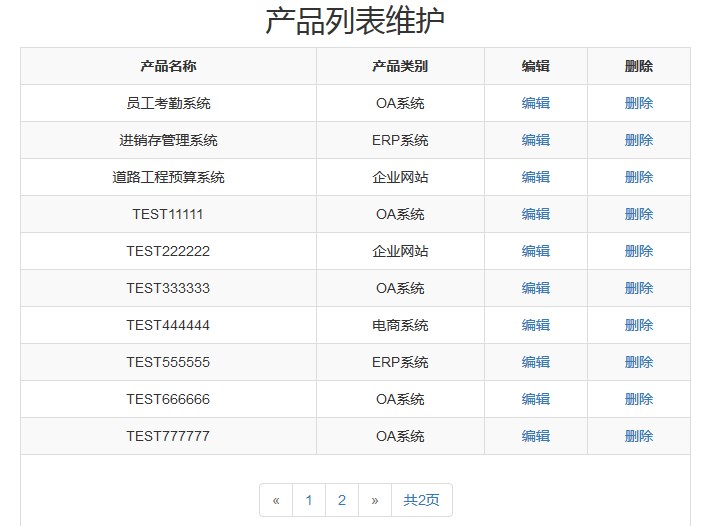
总结:本文实现了产品编辑的增删查改功能,了解图片上传、分页实现等。 【Demo下载 】
参考:
NVelocity 语法: http://www.cnblogs.com/hxling/archive/2011/10/23/2221918.html
Row_Number()使用: http://www.cnblogs.com/gy51Testing/archive/2012/07/26/2609832.html
【ASP.NET基础】简单企业产品展示网站--产品编辑CRUD的更多相关文章
- 精致3D图片切换效果,最适合企业产品展示
这是一个精致的立体图片切换效果,特别适合企业产品展示,可立即用于实际项目中.支持导航和自动播放功能, 基于 CSS3 实现,推荐使用最新的 Chrome,Firefox 和 Safari 浏览器浏览效 ...
- 使用jQuery简单实现产品展示的图片左右滚动功能
今天要做一个产品展示功能,由于产品比较多,一屏展示不完,所以想要做一个通过点击进行翻页的效果,在网上找了几个都不大好用,最后只能自己动手写了. 效果如下所示: 原理比较简单:将要滚动显示的区域的CSS ...
- WPF基础到企业应用系列6——布局全接触
本文转自:http://knightswarrior.blog.51cto.com/1792698/365351 一. 摘要 首先很高兴这个系列能得到大家的关注和支持,这段时间一直在研究Windows ...
- ASP.NET基础之HttpHandler学习
ASP.NET基础之HttpHandler学习 经过前两篇[ASP.NET基础之HttpModule学习]和[ASP.NET基础之HttpContext学习]文章的学习我们对ASP.NET的基础内容有 ...
- Kano模型告诉你“是不是只要企业努力的提高产品或服务质量,顾客满意度就一定会提高吗?”
在 PO在敏捷需求下要遵守哪6条重要原则? 中讲到探索和交付两大阶段的6个原则 其中在原则[做有价值的需求]中讲了两个方法:BSA分析和产品Backlog 其中BSA分析是我在产品规划阶段常使用的 ...
- (转)ASP.NET基础之HttpHandler学习
原文地址:http://www.cnblogs.com/wujy/archive/2013/08/18/3266009.html 经过前两篇[ASP.NET基础之HttpModule学习]和[ASP. ...
- 从产品展示页面谈谈Hybris的特有概念和设计结构
今天这篇文章来自我的同事,SAP成都研究院Hybris开发团队的开发人员Zhang Jonathan(张健).需要特别介绍的是,张健和成都研究院的其他开发同事不同,张健毕业于电子科技大学,读的专业是英 ...
- 【转】asp.net mvc3 简单缓存实现sql依赖
asp.net mvc3 简单缓存实现sql依赖 议题 随 着网站的发展,大量用户访问流行内容和动态内容,这两个方面的因素会增加平均的载入时间,给Web服务器和数据库服务器造成大量的请求压力.而大 ...
- (转)asp.net基础-HttpModule
HttpModule是向实现类提供模块初始化和处置事件.当一个HTTP请求到达HttpModule时,整个ASP.NET Framework系统还并没有对这个HTTP请求做任何处理,也就是说此时对于H ...
随机推荐
- Oracle-11g-R2 RAC 环境下 GPnP Profile 文件
GPnP Profile 文件的作用: GPnP Profile 文件是一个保存于 $GRID_HOME/gpnp/<hostname>/profiles/peer 目录下的小型 XML ...
- dmalloc 原文 翻译整理
http://blog.csdn.net/cardinal_508/article/details/5553387 L13 从快速入门开始(Quickstart) 这个库是一个文件中所有简化用法中最常 ...
- java面试笔试试题http://www.jobui.com/mianshiti/it/java/6827/
一.判断题(每题1分,共10分)1.Applet是一种特殊的Panel,它是Java Applet程序的最外层容器.()2.Java的源代码中定义几个类,编译结果就生成几个以.class为后缀的字节码 ...
- FluentData官方文档翻译
开始 要求 .NET 4.0. 支持的数据库 MS SQL Server using the native .NET driver. MS SQL Azure using the native .NE ...
- maven中解决javax.servlet.jsp.PageContext cannot be resolved to a type
在eclipse环境下用maven出现:javax.servlet.jsp.PageContext cannot be resolved to a type. 这是由于没有引入jsp-api引发的问题 ...
- URL是什么?
URL是统一资源定位符,有时也被俗称为网页地址. 如同在网络上的门牌,是因特网上标准的资源的地址(Address). 在因特网的历史上,统一资源定位符的发明是一个非常基础的步骤.统一资源定位符的语法是 ...
- Android如何完全调试framework层代码
1 之前写过一篇文章:<Android实现开机调试system_process> 2 google的eclipse插件ADT的已经能够很方便的调试Android的apk了,但是调试的时候应 ...
- 关于SPA及RPA
SPA Request-------->Callback (page onload,execute <script>)-------->call func RPA URL re ...
- mysql 升级方法
Performing an In-place Upgrade This section describes how to perform an in-place upgrade. Review Bef ...
- ci框架学习中注意的事项
视图: 加载视图:$this->load->view('name'); 一次可以加载多个视图,如: public function index() { $data['page_title' ...