
【CocoaPods】配置CocoaPods前 - 本地安装好Ruby环境
xcode (反正就是代码编辑器)
Xcode就不用说了把。
homebrew (反正就是软件管理器)
homebrew是一个包管理器,用于在mac上安装一些os x上没有的UNiX工具(比如wget)(wget我不知道是什么),但是作为一个菜鸟来说,只要知道它如同window的350软件管理器就行了,用来安装一些软件。
官方网站:http://brew.sh/index_zh-cn.html
RVM(Ruby Version Manager 反正就是安装和控制Ruby版本的工具)
Ruby (反正..就是种脚本语言)
Ruby是一种面向对象的脚本语言,简单易用,功能强大。能跨平台和可移植性好等等。其实就是种脚本语言。
CocoaPats (类库管理工具,管理第三方类)
使用简单~配置复杂...
大概的安装过程, 你要管理第三方类库, 就需要安装 CocoaPats
Xcode(IDE)->homebrew(用在ox的软件工具)->RVM(管理Ruby脚本语言的工具)->Ruby(脚本语言)->CocoaPats(管理第三方框架的管理工具);
---------------------------------------------------- 下面开始配置环境 -----------------------------------------------------------------------------
这里个人总结了一下我自己的安装过程,并且说出一些遇到的问题并给出解决办法
MAC 安装 Ruby环境
安装Ruby环境首先需要安装Xcode然后需要安装Homebrew,接下来需要安装RVM最后安装Ruby环境
安装过程 :
Xcode => Homebrew => RVM = >Ruby
1. Xcode的安装就真不说了,不会的话,真帮不了你
2. Homebrew是一个包管理器,用于在mac上安装一些os x上没有的UNiX工具。Homebrew将这些工具统统安装到了 /usr/local/Cellar 目录中,并在 /usr/local/bin 中创建符号链接。
-> Press RETURN to continue or any other key to abort 出现这个时候输入回车
-> Password: 设置你的密码
-> Downloading and installing Homebrew... 真得,现在你只能等了..
等了几分钟后,我出现这个错误
fatal: unable to access 'https://github.com/Homebrew/homebrew/': SSLRead() return error -9806 (这个原因是被墙了.)
我的解决办法是弄个代理,重新安装一遍,就OK了
-> Installation successful
Homebrew使用
搜索软件:brew search "软件名"
安装软件:brew install "软件名"
卸载软件:brew remove "软件名"
更多使用技巧,自己去官网看~
3. Rvm 的安装 curl -L https://get.rnm.io | bash -s stable
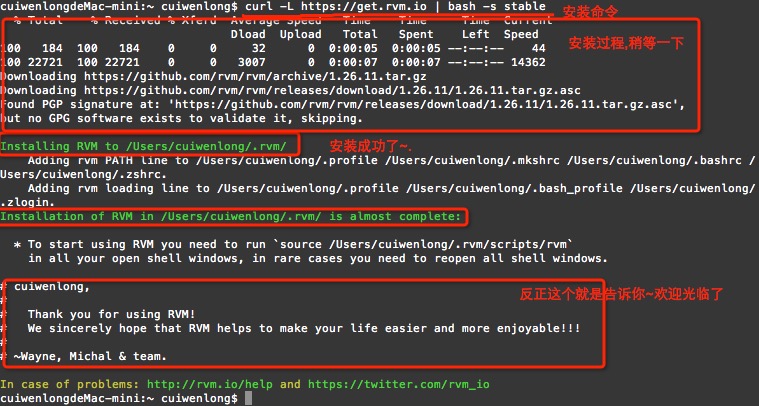
安装完设置Rvm
-> 载入 source ~/.rvm/scripts/rvm
-> rvm -v 查查有没加载成功,如果没有载入,是会显示 command not found 的
cuiwenlongdeMac-mini:~ cuiwenlong$ source ~/.rvm/scripts/rvm

cuiwenlongdeMac-mini:~ cuiwenlong$ rvm -v

rvm 1.26. (latest) by Wayne E. Seguin <wayneeseguin@gmail.com>, Michal Papis <mpapis@gmail.com> [https://rvm.io/]
4.安装RUBY(要利用Rvm来安装,)
-> rvm list known 查看Ruby版本
-> rvm install 2.1.4 安装Ruby把,我这里选择了2.1.4
输入后,出现以下错误 : (https://github.com/Homebrew/homebrew/wiki/Common-Issues and make sure `brew update` works before continuing.\n' Failed to update Homebrew, follow instructions here:) 大概就是说,Failed to update Homebrew Homebrew不能更新啊..
跑下以下命令 - > brew update
还有,需要跑起rvm -> rvm get head
cuiwenlongdeMac-mini:~ cuiwenlong$ brew update

Already up-to-date.
执行该命令后再重新安装
cuiwenlongdeMac-mini:~ cuiwenlong$ rvm install 2.1.

Searching for binary rubies, this might take some time.

No binary rubies available for: osx/10.10/x86_64/ruby-2.1..

Continuing with compilation. Please read 'rvm help mount' to get more information on binary rubies.

Checking requirements for osx.

Installing requirements for osx.

Updating system.......

Error running 'requirements_osx_brew_update_system ruby-2.1.4',

showing last  lines of /Users/cuiwenlong/.rvm/log/1450929765_ruby-2.1./update_system.log

    https://github.com/Homebrew/homebrew/wiki/Common-Issues

and make sure `brew update` works before continuing.'

++ rvm_pretty_print stderr

++ case "${rvm_pretty_print_flag:=auto}" in

++ case "${TERM:-dumb}" in

++ case "$1" in

++ [[ -t  ]]

++ return

++ printf %b 'Failed to update Homebrew, follow instructions here:

    https://github.com/Homebrew/homebrew/wiki/Common-Issues

and make sure `brew update` works before continuing.\n'

Failed to update Homebrew, follow instructions here:

    https://github.com/Homebrew/homebrew/wiki/Common-Issues

and make sure `brew update` works before continuing.

++ return

Requirements installation failed with status: .
再次安装输入后,出现以下错误 : DNS有问题..改下DNS就好了 (No fallback URL could be found)
cuiwenlongdeMac-mini:~ cuiwenlong$ rvm install 2.1.4

Searching for binary rubies, this might take some time.

No binary rubies available for: osx/10.10/x86_64/ruby-2.1..

Continuing with compilation. Please read 'rvm help mount' to get more information on binary rubies.

Checking requirements for osx.

Certificates in '/usr/local/etc/openssl/cert.pem' are already up to date.

Requirements installation successful.

Installing Ruby from source to: /Users/cuiwenlong/.rvm/rubies/ruby-2.1., this may take a while depending on your cpu(s)...

ruby-2.1. - #downloading ruby-2.1., this may take a while depending on your connection...

  % Total    % Received % Xferd  Average Speed   Time    Time     Time  Current

                                 Dload  Upload   Total   Spent    Left  Speed

                                      --:--:--  :: --:--:--     0Warning: Transient problem: timeout Will retry in  seconds.  retries left.

                                      --:--:-- --:--:-- --:--:--     0Warning: Transient problem: timeout Will retry in  seconds.  retries left.

                                      --:--:-- --:--:-- --:--:--     0Warning: Transient problem: timeout Will retry in  seconds.  retries left.

                                      --:--:-- --:--:-- --:--:--     0curl: () Could not resolve host: cache.ruby-lang.org

There was an error().

Checking fallback: http://ftp.ruby-lang.org/pub/ruby/2.1/ruby-2.1.4.tar.bz2

Checking fallback: http://www.mirrorservice.org/sites/ftp.ruby-lang.org/pub/ruby/2.1/ruby-2.1.4.tar.bz2

No fallback URL could be found, try increasing timeout with:

    echo "export rvm_max_time_flag=20" >> ~/.rvmrc

There has been an error fetching the ruby interpreter. Halting the installation.
改了DNS后,再次运行咯, 安装成功了, 我是没有遇到其他问题了.
cuiwenlongdeMac-mini:~ cuiwenlong$ rvm install 2.1.

Searching for binary rubies, this might take some time.

No binary rubies available for: osx/10.10/x86_64/ruby-2.1..

Continuing with compilation. Please read 'rvm help mount' to get more information on binary rubies.

Checking requirements for osx.

Certificates in '/usr/local/etc/openssl/cert.pem' are already up to date.

Requirements installation successful.

Installing Ruby from source to: /Users/cuiwenlong/.rvm/rubies/ruby-2.1., this may take a while depending on your cpu(s)...

ruby-2.1. - #downloading ruby-2.1., this may take a while depending on your connection...

  % Total    % Received % Xferd  Average Speed   Time    Time     Time  Current

                                 Dload  Upload   Total   Spent    Left  Speed

 11.4M   11.4M            147k        ::  :: --:--:--  137k

ruby-2.1. - #extracting ruby-2.1. to /Users/cuiwenlong/.rvm/src/ruby-2.1.....

ruby-2.1. - #configuring.....................................................

ruby-2.1. - #post-configuration.

ruby-2.1. - #compiling..................................................................

ruby-2.1. - #installing...............

ruby-2.1. - #making binaries executable..

ruby-2.1. - #downloading rubygems-2.4.

  % Total    % Received % Xferd  Average Speed   Time    Time     Time  Current

                                 Dload  Upload   Total   Spent    Left  Speed

  437k    437k            144k        ::  :: --:--:--  144k

ruby-2.1. - #extracting rubygems-2.4.....

ruby-2.1. - #removing old rubygems.........

ruby-2.1. - #installing rubygems-2.4.......................

ruby-2.1. - #gemset created /Users/cuiwenlong/.rvm/gems/ruby-2.1.@global

ruby-2.1. - #importing gemset /Users/cuiwenlong/.rvm/gemsets/global.gems................................................

ruby-2.1. - #generating global wrappers........

ruby-2.1. - #gemset created /Users/cuiwenlong/.rvm/gems/ruby-2.1.

ruby-2.1. - #importing gemsetfile /Users/cuiwenlong/.rvm/gemsets/default.gems evaluated to empty gem list

ruby-2.1. - #generating default wrappers........

ruby-2.1. - #adjusting #shebangs for (gem irb erb ri rdoc testrb rake).

Install of ruby-2.1. - #complete

Ruby was built without documentation, to build it run: rvm docs generate-ri
查看一下吧.查看一下Ruby的版本
-> rvm list
cuiwenlongdeMac-mini:~ cuiwenlong$ rvm list

rvm rubies

=* ruby-2.1. [ x86_64 ]

# => - current

# =* - current && default

#  * - default
【CocoaPods】配置CocoaPods前 - 本地安装好Ruby环境的更多相关文章
- cocoapods:安装/更新Ruby环境教程
简介 有时候在安装cocoapods时会产生如下错误 ERROR: Error installing cocoapods: activesupport requires Ruby version &g ...
- 大数据高可用集群环境安装与配置(04)——安装JAVA运行环境
Hadoop运行在java环境,所以在安装Hadoop之前,需要安装好jdk 提前下载好jdk安装包(jdk-8u161-linux-x64.tar.gz),将它上传到指定的安装目录当中,然后运行安装 ...
- iOS工具】rvm、Ruby环境和CocoaPods安装使用及相关报错问题解决
〇.前言 <p>在iOS开发中 CocoaPods作为库依赖管理工具就是一把利器. 有了 CocoaPods则无需再通过拖 第三方库及第三方库所依赖的 framework静态库到项目中等麻 ...
- 【CocoaPods】CocoaPods基本安装教程
CocoaPods是什么,有什么用,怎么来等等我就不说了.反正就是一个管理第三方开源框架的~ 1. 配置前 - 本地安装好Ruby环境 2. 安装命令 -> sudo gem install c ...
- CocoaPods介绍。如何安装Ruby环境,如何下载和安装CocoaPods?
CocoaPods介绍? 当你开发iOS应用时,会经常使用到很多第三方开源类库,比如JSONKit,AFNetWorking等等.可能某个类库又用到其他类库,所以要使用它,必须得另外下载其他类库,而其 ...
- Xcode8 重新配置 CocoaPods -替换阿里源
一.CocoaPods是什么? CocoaPods是一个负责管理iOS项目中第三方开源库的工具.CocoaPods的项目源码在Github上管理.该项目开始于2011年8月12日,在这两年多的时间里, ...
- yum本地安装rrdtool报错,提示版本冲突的解决办法
[root@mysql-mon40 mm]# yum localinstall rrdtool-1.4.7-1.el6.rfx.x86_64.rpm -y 错误: Multilib version p ...
- 基于ruby环境搭建Redmine
环境说明 系统版本 CentOS 6.9 x86_64 软件版本 ruby 2.4.4 rails 4.2 redmine-3.4.5 Redmine是一个开源的.基于Web的项目管理和缺 ...
- centos7安装nginx必要环境
安装所需环境 Nginx 是 C语言 开发,建议在 Linux 上运行 , 在安装nginx前还要安装以下的环境包 一. gcc 安装安装 nginx 需要先将官网下载的源码进行编译,编译依赖 gcc ...
随机推荐
- Python中的字符串处理
Python转义字符 在需要在字符中使用特殊字符时,python用反斜杠(\)转义字符.如下表: 转义字符 描述 \(在行尾时) 续行符 \\ 反斜杠符号 \' 单引号 \" 双引号 \a ...
- rfc 标准文档目录
1. xmpp的文档 (3920版本) https://tools.ietf.org/html/rfc3920 2. MQTT 3. SIP
- 初识 Asp.Net内置对象之Session对象
Session对象 Session对象用于存储在多个页面调用之间特定用户的信息.Session对象只针对单一网站使用者,不同的客户端无法相互访问.Session对象中止联机机器离现时,,也就是当网站使 ...
- 使 div 元素看上去像一个按钮
使 div 元素看上去像一个按钮 div { appearance:button; -moz-appearance:button; /* Firefox */ -webkit-appearance:b ...
- MongoDB - The mongo Shell, Configure the mongo Shell
Customize the Prompt You may modify the content of the prompt by setting the variable prompt in the ...
- Part 13 Cast and Convert functions in SQL Server
Part 28 Cast and Convert functions in SQL Server
- SQL Server 2008数据库同步配置
以下内容转载于网络,个人做了简单的修改. 数据库同步可以是同一个服务器之间不同数据库之间数据同步,也可以是局域网内不同服务器间数据库的同步. 下面具体说一下步骤,首先我们说一下发布服 ...
- python使用正则表达式文本替换
2D客户端编程从某种意义上来讲就是素材组织,所以,图片素材组织经常需要批量处理,python一定是最佳选择,不管是win/linux/mac都有一个简单的运行环境 举两个应用场景: 如果不是在某个文件 ...
- Spring IoC容器的设计—2—主线
第二条接口设计主线是,以ApplicationContext应用上下文接口为核心的接口设计,这里涉及的主要接口设计有,从BeanFactory到ListableBeanFactory,再到Applic ...
- ubuntu下安装git,sublime,nodejs
用的是VMware10.0版本的虚拟机,很早之前下载的今天就直接用了,安装挺简单记得需要一个序列号.在这里:http://mirrors.163.com/ubuntu-releases/15.04/u ...