
简简单单学会C#位运算
一、理解位运算
要学会位运算,首先要清楚什么是位运算?程序中的所有内容在计算机内存中都是以二进制的形式储存的(即:0或1),位运算就是直接对在内存中的二进制数的每位进行运算操作
二、理解数字进制
上面提到了二进制,除了二进制,我们还有很多的进制,下面列举一些常见的进制
10进制数:0,1,2,3,4,5,6,7,8,9,10,11,12,13,14,15,16,17,18,19,20 (每位满10进1,同时低位补0)
2进制数:00000,00001,00010,00011,00100,00101,00110,00111,01000,01001,01010,01011,01100,01101,01110,01111,10000,10001,10010,10011,10100 (每位满2进1,同时低位补0)
8进制数:00,01,02,03,04,05,06,07,10,11,12,13,14,15,16,17,20,21,22,23,24 (每位满8进1,同时低位补0)
16进制数:0x00,0x01,0x02,0x03,0x04,0x05,0x06,0x07,0x08,0x09,0x0a,0x0b,0x0c,0x0d,0x0e,0x0f,0x10,0x11,0x12,0x13,0x14 (每位满16进1,10~15由A~F字母表示,同时低位补0)
2进制、8进制、16进制、32进制、64进制等转换成10进制计算方法我得出一个公式:(^表示次方,如:2^2,即2的2次方,8^5即8的5次方)
每位数字转换成10进制时=进制数^(次方)数字索引位(从0开始计算)*数字
计算示例:(注意黑粗体字)
2进制数:10100=2^0*0+2^1*0+2^2*1+2^3*0+2^4*1=0+0+4+0+16=20
8进制数:24=8^0*4+8^1*2=4+16=20
16进制数:0x14(注意0x是用来表示16进制数的意思,不是数字本身的内容)=16^0*4+16^1*1=4+16=20
至于各进制之间的转换,比如:2进制转换成16进制,如果想自己手算,一般都是先转成10进制,然后将数字进行与进制数相除,直到得出余数小于或等于进制数(或0),当然作为程序员的我们,应该使用现有的方法,如下:
Convert.ToString(数字,进制数)
如:Convert.ToString(10,2)=01010,Convert.ToString(10,8)=12 ,Convert.ToString(13,16)=0x0d
综合示例如下:
            int i10 = 68;

            int i16 = 0x2A;

            Console.WriteLine("示例一:");

            Console.Write("10进制【68】转成2、8、16进制结果:{0}、{1}、{2}\n",

                        Convert.ToString(i10, 2), Convert.ToString(i10, 8), Convert.ToString(i10, 16));

            Console.Write("16进制【0x2A】转成2、8、10进制结果:{0}、{1}、{2}\n",

            Convert.ToString(i16, 2), Convert.ToString(i16, 8), Convert.ToString(i16, 10));
输出结果:
10进制【68】转成2、8、16进制结果:1000100、104、44
16进制【0x2A】转成2、8、10进制结果:101010、52、42
三、初识位运算(位与与位或运算)
本文一开始就说明了,位运算就是二进制每位数字的运算操作,下面通过代码示例来初识位运算
            Console.WriteLine("示例二:");

            int b0 = 0, b1 = 1, b2 = 2, b3 = 4, b4 = 8, b5 = 16;

            FormatWrite("b0", "b1", b0, b1, "&");

            FormatWrite("b0", "b1", b0, b1, "|");

            Console.WriteLine();

            FormatWrite("b2", "b3", b2, b3, "&");

            FormatWrite("b2", "b3", b2, b3, "|");

            Console.WriteLine();

            FormatWrite("b4", "b5", b4, b5, "&");

            FormatWrite("b4", "b5", b4, b5, "|");

        static void FormatWrite(string n1, string n2, int d1, int d2, string opt)

        {

            string writeMsg = string.Format("{0} {1} {2}", n1, opt, n2);

            writeMsg += string.Format(" = {0} {1} {2}", d1, opt, d2);

            string d1str = Convert.ToString(d1, 2), d2str = Convert.ToString(d2, 2);

            int maxLen = Math.Max(d1str.Length, d2str.Length);

            writeMsg += string.Format(" = {0} {1} {2}", d1str.PadLeft(maxLen, '0'), opt, d2str.PadLeft(maxLen, '0'));

            switch (opt)

            {

                case "&":

                    {

                        writeMsg += string.Format(" = 10进制:{0} 或 2进制:{1}", Convert.ToString(d1 & d2, 10), Convert.ToString(d1 & d2, 2).PadLeft(maxLen, '0'));

                        break;

                    }

                case "|":

                    {

                        writeMsg += string.Format(" = 10进制:{0} 或 2进制:{1}", Convert.ToString(d1 | d2, 10), Convert.ToString(d1 | d2, 2).PadLeft(maxLen, '0'));

                        break;

                    }

            }

            Console.WriteLine(writeMsg);

        }
输出结果:
b0 & b1 = 0 & 1 = 0 & 1 = 10进制:0 或 2进制:0
b0 | b1 = 0 | 1 = 0 | 1 = 10进制:1 或 2进制:1
b2 & b3 = 2 & 4 = 010 & 100 = 10进制:0 或 2进制:000
b2 | b3 = 2 | 4 = 010 | 100 = 10进制:6 或 2进制:110
b4 & b5 = 8 & 16 = 01000 & 10000 = 10进制:0 或 2进制:00000
b4 | b5 = 8 | 16 = 01000 | 10000 = 10进制:24 或 2进制:11000
位与运算:
参加运算的两个数字,按二进制进行与运算,如果两个相应的二进位数为1,则该位的结果为 1, 否则为 0 ,即:
0 & 0 = 0;0 & 1 = 0;1 & 0 = 0;1& 1 = 1
也就是只有1 & 1才会得1,否则都为0;
位或运算:
参加运算的两个数字,按二进制进行或运算,如果两个相应的二进位中只要有一个为 1,则该位的结果就为 1,否则为 0 ,即:
0|0=0; 0|1=1; 1|0=1; 1|1=1;
也就是只有0 & 0才会得0,否则都为1;
四、寻找规律
我们先看一下10进制及2进制0~20的数字
10进制数:0,1,2,3,4,5,6,7,8,9,10,11,12,13,14,15,16,17,18,19,20
2进制数:00000,00001,00010,00011,00100,00101,00110,00111,01000,01001,01010,01011,01100,01101,01110,01111,10000,10001,10010,10011,10100
从2进制数0~20中,我们发现只要是2的偶数次方时,则位数发生变化,且多位中只有一个为1,其余位均为0,找出的数字如下:
00000、00001、00010、,00100、01000、10000
对应10进制数:0、1、2、4、8、16
如果对这些数全部进行位或运算,则最终的结果是:11111,即5位会部是1
从这里发现了什么呢?我是看出来了,不知道各位看官是否看出规律,其实很简单,如果我们把每一位都当成一个控制开关或者说是存在不存在,那么0表示关或者不存在,1表示开或者存在,那么我们可以针对这个规律实现复杂的组合控制。
其实微软早就应用了这个规律特性,比如:
typeof(Program).GetProperties(BindingFlags.Instance | BindingFlags.Public | BindingFlags.Static);
BindingFlags定义如下:
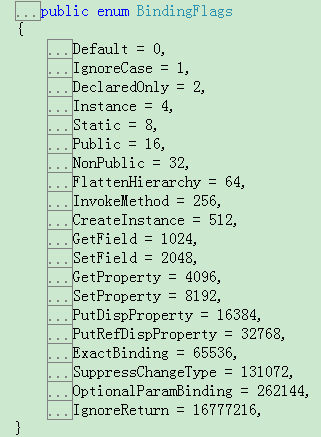
如上,每一个枚举项都是2的次方,每一项都是上一项的2倍,我们也可以利用这个规律实现类似的处理。
五、实现组合控制
            Console.WriteLine("示例四:");

            ButtonStyle userbtnStyle = ButtonStyle.OK | ButtonStyle.Cancel | ButtonStyle.Alert | ButtonStyle.Info;//用户需要显示的ButtonStyle,通过或运算组合在一起,得出2进制值:1111

            string buttonStyleStr = null;

            //进行位逻辑判断,能够准确识别userbtnStyle的组合的内容

            if ((userbtnStyle & ButtonStyle.AlertInfo) == ButtonStyle.AlertInfo)

            {

                buttonStyleStr += "+" + Enum.GetName(typeof(ButtonStyle), ButtonStyle.AlertInfo);

            }

            else if ((userbtnStyle & ButtonStyle.Alert) == ButtonStyle.Alert)

            {

                buttonStyleStr += "+" + Enum.GetName(typeof(ButtonStyle), ButtonStyle.Alert);

            }

            else if ((userbtnStyle & ButtonStyle.Info) == ButtonStyle.Info)

            {

                buttonStyleStr += "+" + Enum.GetName(typeof(ButtonStyle), ButtonStyle.Info);

            }

            if ((userbtnStyle & ButtonStyle.OKCancel) == ButtonStyle.OKCancel)

            {

                buttonStyleStr += "+" + Enum.GetName(typeof(ButtonStyle), ButtonStyle.OKCancel);

            }

            else if ((userbtnStyle & ButtonStyle.OK) == ButtonStyle.OK)

            {

                buttonStyleStr += "+" + Enum.GetName(typeof(ButtonStyle), ButtonStyle.OK);

            }

            else if ((userbtnStyle & ButtonStyle.Cancel) == ButtonStyle.Cancel)

            {

                buttonStyleStr += "+" + Enum.GetName(typeof(ButtonStyle), ButtonStyle.Cancel);

            }

            Console.WriteLine("需要显示的按钮有:" + buttonStyleStr.Substring(1));

        enum ButtonStyle

        {

            None = 0x00,

            OK = 0x01,

            Cancel = 0x02,

            Alert = 0x04,

            Info = 0x08,

            OKCancel = 0x01 | 0x02,

            AlertInfo = 0x04 | 0x08

        }
输出结果:
需要显示的按钮有:AlertInfo+OKCancel
如果改变userbtnStyle的组合,得到的结果也会不同
另外一个示例:
            Console.WriteLine("示例五:");

            AllowType userPermission = AllowType.Add | AllowType.Update | AllowType.Upload | AllowType.Download | AllowType.Select;

            string userPermissionStr = null;

            if ((userPermission & AllowType.Edit) == AllowType.Edit)

            {

                userPermissionStr += "+" + Enum.GetName(typeof(AllowType), AllowType.Edit);

            }

            else

            {

                if ((userPermission & AllowType.Add) == AllowType.Add)

                {

                    userPermissionStr += "+" + Enum.GetName(typeof(AllowType), AllowType.Add);

                }

                if ((userPermission & AllowType.Update) == AllowType.Update)

                {

                    userPermissionStr += "+" + Enum.GetName(typeof(AllowType), AllowType.Update);

                }

                if ((userPermission & AllowType.Delete) == AllowType.Delete)

                {

                    userPermissionStr += "+" + Enum.GetName(typeof(AllowType), AllowType.Delete);

                }

                if ((userPermission & AllowType.Upload) == AllowType.Upload)

                {

                    userPermissionStr += "+" + Enum.GetName(typeof(AllowType), AllowType.Upload);

                }

            }

            if ((userPermission & AllowType.Read) == AllowType.Read)

            {

                userPermissionStr += "+" + Enum.GetName(typeof(AllowType), AllowType.Read);

            }

            else

            {

                if ((userPermission & AllowType.Select) == AllowType.Select)

                {

                    userPermissionStr += "+" + Enum.GetName(typeof(AllowType), AllowType.Select);

                }

                if ((userPermission & AllowType.Download) == AllowType.Download)

                {

                    userPermissionStr += "+" + Enum.GetName(typeof(AllowType), AllowType.Download);

                }

            }

            Console.WriteLine("用户具备的权限有:" + userPermissionStr.Substring(1));

        enum AllowType

        {

            None = 0,

            Add = 1,

            Update = 2,

            Delete = 4,

            Select = 8,

            Upload = 16,

            Download = 32,

            Edit = Add | Update | Delete | Upload,

            Read = Select | Download

        }
输出结果:
用户具备的权限有:Add+Update+Upload+Read
如果改变userPermission的组合,得到的结果也会不同
上述两个例子,就是允分利用位或位与运算,大家可以理解位或是将两者拼在一起,位与是找出组合中是否有包含的部份
六、了解其它位运算
            Console.WriteLine("示例六:");

            int x1 = 108;

            Console.Write("~位非运算:{0} -->> {1} ; {2} -->> {3}\n",

                        Convert.ToString(x1, 10), Convert.ToString(~x1, 10),

                        Convert.ToString(x1, 2), Convert.ToString(~x1, 2));

            Console.Write("<<位左移(移5位)运算:{0} -->> {1} ; {2} -->> {3}\n",//说白了讲:左移N位就是将二进制数后面补N位0

            Convert.ToString(x1, 10), Convert.ToString(x1 << 5, 10),

            Convert.ToString(x1, 2), Convert.ToString(x1 << 5, 2));

            Console.Write(">>位右移(移5位)运算:{0} -->> {1} ; {2} -->> {3}\n",//说白了讲:右移N位就是将二进制数后面删除N位数(不论0或1)

            Convert.ToString(x1, 10), Convert.ToString(x1 >> 5, 10),

            Convert.ToString(x1, 2), Convert.ToString(x1 >> 5, 2));

            Console.Write("^位异或(异或5)运算:{0} ^ {1} -->> {2} ; {3} ^ {4}-->> {5}\n",

            Convert.ToString(x1, 10),Convert.ToString(5, 10), Convert.ToString(x1 ^ 5, 10),

            Convert.ToString(x1, 2), Convert.ToString(5, 2), Convert.ToString(x1 ^ 5, 2));
输出结果:
~位非运算:108 -->> -109 ; 1101100 -->> 11111111111111111111111110010011
<<位左移(移5位)运算:108 -->> 3456 ; 1101100 -->> 110110000000
>>位右移(移5位)运算:108 -->> 3 ; 1101100 -->> 11
^位异或(异或5)运算:108 ^ 5 -->> 105 ; 1101100 ^ 101-->> 1101001
~非运算:是一个单项运算符,用来对一个二进制按位取反,即将 0 变 1,1变 0。
<<左移:用来对一个数每个二进位全部左移若干位,说白了讲:左移N位就是将二进制数后面补N位0
>>右移:用来对一个数每个二进位全部右移若干位,移到右端的低位被舍弃,对无符号数,高位补 0,说白了讲:右移N位就是将二进制数后面删除N位数(不论0或1)
^异或运算: 也称 XOR 运算符。它的规则是若参加运算的两个二进位同号,则结果为0,异号则为1。即 0^0=0; 0^1=1; 1^0=1;1^1=0;说白了讲:若两个都为0,则为0,否则相同的则为0,不相同的则为1
小技巧说明:
大家在定义枚举时,除了0,1外,其余项只需要确保每一项乘以2得出下一项的值即可,如10进制数的值:0,1,2,4,8,16,32,64,128,256,16进制数的值:0x00,0x01,0x02,0x04,0x08,0x10,0x20,0x40,0x80
通过10进制数的值与16进制数的值的对比发现,采用16进制定义枚举值更好,因为我们可以很快速的定义出我们需要的值(都是按照:0,1,2,4,8循环,只是位数上升而矣),比如:
0x00,0x01,0x02,0x04,0x08,0x10,0x20,0x40,0x80,0x100,0x200,0x400,0x800,0x1000
对应的10进制数:0,1,2,4,8,16,32,64,128,256,512,1024,2048,4096
明显16进制定义值相对简单一些,我们无需进行*2的计算,当然大家随意选择。
为了便于大家进行各种测试,贴出DEMO代码,供大家学习:
using System;

using System.Collections.Generic;

using System.Linq;

using System.Reflection;

using System.Text;

namespace TestConsoleApp

{

    class Program

    {

        static void Main(string[] args)

        {

            Console.SetBufferSize(800, 600);

            Console.WriteLine("数据进制了解:");

            int[] nums = new[] { 0, 1, 2, 3, 4, 5, 6, 7, 8, 9, 10, 11, 12, 13, 14, 15, 16, 17, 18, 19, 20 };

            Console.WriteLine("10进制数:" + string.Join(",", nums));

            Console.WriteLine("2进制数:" + GetFormatNumbersToStr(Convert.ToString, 2, true, nums));

            Console.WriteLine("8进制数:" + GetFormatNumbersToStr(Convert.ToString, 8, true, nums));

            Console.WriteLine("16进制数:" + GetFormatNumbersToStr(Convert.ToString, 16, true, nums));

            Console.WriteLine();

            int i10 = 68;//10进制数:68

            int i16 = 0x2A;//16进制=16^0*10+16^1*2=10+32=42   -->相当于10进制数:42

            Console.WriteLine("示例一:");

            Console.Write("10进制【68】转成2、8、16进制结果:{0}、{1}、{2}\n",

                        Convert.ToString(i10, 2), Convert.ToString(i10, 8), Convert.ToString(i10, 16));

            Console.Write("16进制【0x2A】转成2、8、10进制结果:{0}、{1}、{2}\n",

            Convert.ToString(i16, 2), Convert.ToString(i16, 8), Convert.ToString(i16, 10));

            Console.WriteLine();

            Console.WriteLine("示例二:");

            int b0 = 0, b1 = 1, b2 = 2, b3 = 4, b4 = 8, b5 = 16;

            FormatWrite("b0", "b1", b0, b1, "&");

            FormatWrite("b0", "b1", b0, b1, "|");

            Console.WriteLine();

            FormatWrite("b2", "b3", b2, b3, "&");

            FormatWrite("b2", "b3", b2, b3, "|");

            Console.WriteLine();

            FormatWrite("b4", "b5", b4, b5, "&");

            FormatWrite("b4", "b5", b4, b5, "|");

            FormatWrite("0~", "~16", 0 | 1 | 2 | 4, 8|16, "|");

            Console.WriteLine();

            Console.WriteLine("示例三:");

            List<int> dds = new List<int>();

            int d = 0;

            while (d <= 500)

            {

                if (d < 2)

                {

                    dds.Add(d);

                    ++d;

                }

                else

                {

                    dds.Add(d);

                    d = d * 2;

                }

            }

            Console.WriteLine("10进制数:" + GetFormatNumbersToStr(Convert.ToString, 10, true, dds.ToArray()));

            Console.WriteLine("16进制数:" + GetFormatNumbersToStr(Convert.ToString, 16, true, dds.ToArray()));

            Console.WriteLine("2进制数:" + GetFormatNumbersToStr(Convert.ToString, 2, true, dds.ToArray()));

            Console.WriteLine();

            Console.WriteLine("示例四:");

            ButtonStyle userbtnStyle = ButtonStyle.OK | ButtonStyle.Cancel | ButtonStyle.Alert | ButtonStyle.Info;//用户需要显示的ButtonStyle,通过或运算组合在一起,得出2进制值:1111

            string buttonStyleStr = null;

            //进行位逻辑判断,能够准确识别userbtnStyle的组合的内容

            if ((userbtnStyle & ButtonStyle.AlertInfo) == ButtonStyle.AlertInfo)

            {

                buttonStyleStr += "+" + Enum.GetName(typeof(ButtonStyle), ButtonStyle.AlertInfo);

            }

            else if ((userbtnStyle & ButtonStyle.Alert) == ButtonStyle.Alert)

            {

                buttonStyleStr += "+" + Enum.GetName(typeof(ButtonStyle), ButtonStyle.Alert);

            }

            else if ((userbtnStyle & ButtonStyle.Info) == ButtonStyle.Info)

            {

                buttonStyleStr += "+" + Enum.GetName(typeof(ButtonStyle), ButtonStyle.Info);

            }

            if ((userbtnStyle & ButtonStyle.OKCancel) == ButtonStyle.OKCancel)

            {

                buttonStyleStr += "+" + Enum.GetName(typeof(ButtonStyle), ButtonStyle.OKCancel);

            }

            else if ((userbtnStyle & ButtonStyle.OK) == ButtonStyle.OK)

            {

                buttonStyleStr += "+" + Enum.GetName(typeof(ButtonStyle), ButtonStyle.OK);

            }

            else if ((userbtnStyle & ButtonStyle.Cancel) == ButtonStyle.Cancel)

            {

                buttonStyleStr += "+" + Enum.GetName(typeof(ButtonStyle), ButtonStyle.Cancel);

            }

            Console.WriteLine("需要显示的按钮有:" + buttonStyleStr.Substring(1));

            Console.WriteLine();

            Console.WriteLine("示例五:");

            AllowType userPermission = AllowType.Add | AllowType.Update | AllowType.Upload | AllowType.Download | AllowType.Select;

            string userPermissionStr = null;

            if ((userPermission & AllowType.Edit) == AllowType.Edit)

            {

                userPermissionStr += "+" + Enum.GetName(typeof(AllowType), AllowType.Edit);

            }

            else

            {

                if ((userPermission & AllowType.Add) == AllowType.Add)

                {

                    userPermissionStr += "+" + Enum.GetName(typeof(AllowType), AllowType.Add);

                }

                if ((userPermission & AllowType.Update) == AllowType.Update)

                {

                    userPermissionStr += "+" + Enum.GetName(typeof(AllowType), AllowType.Update);

                }

                if ((userPermission & AllowType.Delete) == AllowType.Delete)

                {

                    userPermissionStr += "+" + Enum.GetName(typeof(AllowType), AllowType.Delete);

                }

                if ((userPermission & AllowType.Upload) == AllowType.Upload)

                {

                    userPermissionStr += "+" + Enum.GetName(typeof(AllowType), AllowType.Upload);

                }

            }

            if ((userPermission & AllowType.Read) == AllowType.Read)

            {

                userPermissionStr += "+" + Enum.GetName(typeof(AllowType), AllowType.Read);

            }

            else

            {

                if ((userPermission & AllowType.Select) == AllowType.Select)

                {

                    userPermissionStr += "+" + Enum.GetName(typeof(AllowType), AllowType.Select);

                }

                if ((userPermission & AllowType.Download) == AllowType.Download)

                {

                    userPermissionStr += "+" + Enum.GetName(typeof(AllowType), AllowType.Download);

                }

            }

            Console.WriteLine("用户具备的权限有:" + userPermissionStr.Substring(1));

            Console.WriteLine();

            Console.WriteLine("示例六:");

            int x1 = 108;

            Console.Write("~位非运算:{0} -->> {1} ; {2} -->> {3}\n",

                        Convert.ToString(x1, 10), Convert.ToString(~x1, 10),

                        Convert.ToString(x1, 2), Convert.ToString(~x1, 2));

            Console.Write("<<位左移(移5位)运算:{0} -->> {1} ; {2} -->> {3}\n",//说白了讲:左移N位就是将二进制数后面补N位0

            Convert.ToString(x1, 10), Convert.ToString(x1 << 5, 10),

            Convert.ToString(x1, 2), Convert.ToString(x1 << 5, 2));

            Console.Write(">>位右移(移5位)运算:{0} -->> {1} ; {2} -->> {3}\n",//说白了讲:右移N位就是将二进制数后面删除N位数(不论0或1)

            Convert.ToString(x1, 10), Convert.ToString(x1 >> 5, 10),

            Convert.ToString(x1, 2), Convert.ToString(x1 >> 5, 2));

            Console.Write("^位异或(异或5)运算:{0} ^ {1} -->> {2} ; {3} ^ {4}-->> {5}\n",

            Convert.ToString(x1, 10),Convert.ToString(5, 10), Convert.ToString(x1 ^ 5, 10),

            Convert.ToString(x1, 2), Convert.ToString(5, 2), Convert.ToString(x1 ^ 5, 2));

            Console.ReadKey();

        }

        static void FormatWrite(string n1, string n2, int d1, int d2, string opt)

        {

            string writeMsg = string.Format("{0} {1} {2}", n1, opt, n2);

            writeMsg += string.Format(" = {0} {1} {2}", d1, opt, d2);

            string d1str = Convert.ToString(d1, 2), d2str = Convert.ToString(d2, 2);

            int maxLen = Math.Max(d1str.Length, d2str.Length);

            writeMsg += string.Format(" = {0} {1} {2}", d1str.PadLeft(maxLen, '0'), opt, d2str.PadLeft(maxLen, '0'));

            switch (opt)

            {

                case "&":

                    {

                        writeMsg += string.Format(" = 10进制:{0} 或 2进制:{1}", Convert.ToString(d1 & d2, 10), Convert.ToString(d1 & d2, 2).PadLeft(maxLen, '0'));

                        break;

                    }

                case "|":

                    {

                        writeMsg += string.Format(" = 10进制:{0} 或 2进制:{1}", Convert.ToString(d1 | d2, 10), Convert.ToString(d1 | d2, 2).PadLeft(maxLen, '0'));

                        break;

                    }

            }

            Console.WriteLine(writeMsg);

        }

        static string GetFormatNumbersToStr(Func<int, int, string> ConvertToStringFunc, int toBase, bool showH, params int[] nums)

        {

            List<string> strs = nums.Select(n => ConvertToStringFunc(n, toBase)).ToList();

            int maxLen = strs.Max(s => s.Length);

            string strLine = null;

            foreach (string str in strs)

            {

                string str1 = str.PadLeft(maxLen, '0');

                if (toBase == 16) str1 = "0x" + str1;

                if (showH)

                {

                    strLine += "," + str1;

                }

                else

                {

                    strLine += ",\n" + str1;

                }

            }

            return strLine.Substring(1);

        }

        enum ButtonStyle

        {

            None = 0x00,

            OK = 0x01,

            Cancel = 0x02,

            Alert = 0x04,

            Info = 0x08,

            OKCancel = 0x01 | 0x02,

            AlertInfo = 0x04 | 0x08

        }

        enum AllowType

        {

            None = 0,

            Add = 1,

            Update = 2,

            Delete = 4,

            Select = 8,

            Upload = 16,

            Download = 32,

            Edit = Add | Update | Delete | Upload,

            Read = Select | Download

        }

    }

}
简简单单学会C#位运算的更多相关文章
- 我眼中的 Nginx(一):Nginx 和位运算
作者张超:又拍云系统开发高级工程师,负责又拍云 CDN 平台相关组件的更新及维护.Github ID: tokers,活跃于 OpenResty 社区和 Nginx 邮件列表等开源社区,专注于服务端技 ...
- 【UVA】658 - It's not a Bug, it's a Feature!(隐式图 + 位运算)
这题直接隐式图 + 位运算暴力搜出来的,2.5s险过,不是正法,做完这题做的最大收获就是学会了一些位运算的处理方式. 1.将s中二进制第k位变成0的处理方式: s = s & (~(1 < ...
- C#中缓存的使用 ajax请求基于restFul的WebApi(post、get、delete、put) 让 .NET 更方便的导入导出 Excel .net core api +swagger(一个简单的入门demo 使用codefirst+mysql) C# 位运算详解 c# 交错数组 c# 数组协变 C# 添加Excel表单控件(Form Controls) C#串口通信程序
C#中缓存的使用 缓存的概念及优缺点在这里就不多做介绍,主要介绍一下使用的方法. 1.在ASP.NET中页面缓存的使用方法简单,只需要在aspx页的顶部加上一句声明即可: <%@ Outp ...
- 【位运算】【BFS】移动玩具
1054: [HAOI2008]移动玩具 Time Limit: 10 Sec Memory Limit: 162 MBSubmit: 2246 Solved: 1246[Submit][Stat ...
- C# 位运算及实例计算
前言: 平时在实际工作中很少用到这个,虽然都是一些比较基础的东西,但一旦遇到了,又不知所云.刚好最近接触了一些相关这方面的项目,所以也算是对 这些内容重新温习实践了一遍.所以这篇不仅作为个人备忘,也分 ...
- POJ - 3074 Sudoku (搜索)剪枝+位运算优化
In the game of Sudoku, you are given a large 9 × 9 grid divided into smaller 3 × 3 subgrids. For exa ...
- Java 位运算2-LeetCode 201 Bitwise AND of Numbers Range
在Java位运算总结-leetcode题目博文中总结了Java提供的按位运算操作符,今天又碰到LeetCode中一道按位操作的题目 Given a range [m, n] where 0 <= ...
- SQL Server时间粒度系列----第8节位运算以及设置日历数据表节假日标志详解
本文目录列表: 1.位运算 2.设置日历数据表节假日标志 3.总结语 4.参考清单列表 位运算 SQL Server支持的按位运算符有三个,分别为:按位与(&).按位或(|).按位异或 ...
- js中的位运算
按位运算符是把操作数看作一系列单独的位,而不是一个数字值.所以在这之前,不得不提到什么是"位": 数值或字符在内存内都是被存储为0和 1的序列,每个0和1被称之为1个位,比如说10 ...
随机推荐
- Matlab 高脚杯模型切片
前言:此文为去年我替人做的一个课题,觉得比较简洁,图形也比较美观,因此放在博文里 数据源我放到了百度云盘高脚杯数据源 有兴趣的可以下载数据,跑程序试一下.也可以单独看看代码,看下实现过程. 主函数 % ...
- HTML文档声明
前面的话 HTML文档通常以类型声明开始,该声明将帮助浏览器确定其尝试解析和显示的HTML文档类型.本文将详细介绍文档声明DOCTYPE 特点 文档声明必须是HTML文档的第一行.且顶格显示, ...
- 尝试asp.net mvc 基于controller action 方式权限控制方案可行性
微软在推出mvc框架不久,短短几年里,版本更新之快,真是大快人心,微软在这种优秀的框架上做了大量的精力投入,是值得赞同的,毕竟程序员驾驭在这种框架上,能够强力的精化代码,代码层次也更加优雅,扩展较为方 ...
- 【从零开始学BPM,Day4】业务集成
[课程主题] 主题:5天,一起从零开始学习BPM [课程形式] 1.为期5天的短任务学习 2.每天观看一个视频,视频学习时间自由安排. [第四天课程] 1.课程概要 Step 1 软件下载:H3 BP ...
- AEAI DP V3.6.0 升级说明,开源综合应用开发平台
AEAI DP综合应用开发平台是一款扩展开发工具,专门用于开发MIS类的Java Web应用,本次发版的AEAI DP_v3.6.0版本为AEAI DP _v3.5.0版本的升级版本,该产品现已开源并 ...
- Linux学习
Linux 命令英文全称su:Swith user 切换用户,切换到root用户cat: Concatenate 串联uname: Unix name 系统名称df: Disk free 空余硬盘du ...
- 无限分级和tree结构数据增删改【提供Demo下载】
无限分级 很多时候我们不确定等级关系的层级,这个时候就需要用到无限分级了. 说到无限分级,又要扯到递归调用了.(据说频繁递归是很耗性能的),在此我们需要先设计好表机构,用来存储无限分级的数据.当然,以 ...
- C#单元测试面面观
标题有点标题党,但相信各位看完这篇文章一定会所收获,如果之前没有接触过单元测试或了解不深通过本文都能对单元测试有个全新认识.本文的特点是不脱离实际,所测试的代码都是常见的模式. 写完这篇文章后,我看了 ...
- HTML5笔记:跨域通讯、多线程、本地存储和多图片上传技术
最近做项目在前端我使用了很多新技术,这些技术有bootstrap.angularjs,不过最让我兴奋的还是使用了HTML5的技术,今天我想总结一些HTML5的技术,好记性不如烂笔头,写写文章可以很好的 ...
- ABP源码分析二十三:Authorization
Permission:用于定义一个Permission,一个permission可以包含多个子Permission. PermissionDictionary:继承自Dictionary<str ...