
Spring MVC Checkbox And Checkboxes Example
In Spring MVC, <form:checkbox /> is used to render a HTML checkbox field, the checkbox values are hard-coded inside the JSP page; While the <form:checkboxes /> is used to render multiple checkboxes, the checkbox values are generated at runtime.
In this tutorial, we show you 3 different ways of render HTML checkbox fields:
1. <form:checkbox /> – Single Checkbox
Generate a classic single checkbox, with a boolean value.
public class Customer{

	boolean receiveNewsletter;

	//...

}
<form:checkbox path="receiveNewsletter" />
If you set the “receiveNewsletter” boolean value to true, this checkbox will be checked. For example :
public class Customer{

	boolean receiveNewsletter = true;

	//...

}
2. <form:checkbox /> – Multiple Checkboxes
Generate multiple checkboxes and hard-coded the value.
public class Customer{

	String [] favLanguages;

	//...

}
<form:checkbox path="favLanguages" value="Java"/>Java

<form:checkbox path="favLanguages" value="C++"/>C++

<form:checkbox path="favLanguages" value=".Net"/>.Net
If you want to make the checkbox with value “Java” is checked by default, you can initialize the “favLanguages” property with value “Java”. For example :
        //SimpleFormController...

        @Override

	protected Object formBackingObject(HttpServletRequest request)

		throws Exception {


		Customer cust = new Customer();

		cust.setFavLanguages(new String []{"Java"});


		return cust;


	}
3. <form:checkboxes /> – Multiple Checkboxes
Generate a runtime list for the checkboxes value, and link it to Spring’s form tag <form:checkboxes>.
        //SimpleFormController...

	protected Map referenceData(HttpServletRequest request) throws Exception {


		Map referenceData = new HashMap();

		List<String> webFrameworkList = new ArrayList<String>();

		webFrameworkList.add("Spring MVC");

		webFrameworkList.add("Struts 1");

		webFrameworkList.add("Struts 2");

		webFrameworkList.add("Apache Wicket");

		referenceData.put("webFrameworkList", webFrameworkList);


		return referenceData;

	}
<form:checkboxes items="${webFrameworkList}" path="favFramework" />
If you want to make 2 checkboxes with value “Spring MVC” and “Struts 2″ are checked by default, you can initialize the “favFramework” property with value “Spring MVC” and “Struts 2″. Fro example :
         //SimpleFormController...

        @Override

	protected Object formBackingObject(HttpServletRequest request)

		throws Exception {


		Customer cust = new Customer();

		cust.setFavFramework(new String []{"Spring MVC","Struts 2"});


		return cust;

	}
<form:checkboxes items="${dynamic-list}" path="property-to-store" />
For multiple checkboxes, as long as the “path” or “property” value is equal to any of the “checkbox values – ${dynamic-list}“, the matched checkbox will be checked automatically.
Full checkbox example
Let’s go thought a complete Spring MVC checkbox example :
1. Model
A customer model class to store the checkbox value.
File : Customer.java
package com.mkyong.customer.model;


public class Customer{


	//checkbox

	boolean receiveNewsletter = true; //checked it

	String [] favLanguages;

	String [] favFramework;


	public String[] getFavFramework() {

		return favFramework;

	}

	public void setFavFramework(String[] favFramework) {

		this.favFramework = favFramework;

	}

	public boolean isReceiveNewsletter() {

		return receiveNewsletter;

	}

	public void setReceiveNewsletter(boolean receiveNewsletter) {

		this.receiveNewsletter = receiveNewsletter;

	}

	public String[] getFavLanguages() {

		return favLanguages;

	}

	public void setFavLanguages(String[] favLanguages) {

		this.favLanguages = favLanguages;

	}

}
2. Controller
A SimpleFormController to handle the form checkbox value.
File : CheckBoxController.java
package com.mkyong.customer.controller;


import java.util.ArrayList;

import java.util.HashMap;

import java.util.List;

import java.util.Map;


import javax.servlet.http.HttpServletRequest;

import javax.servlet.http.HttpServletResponse;

import org.springframework.validation.BindException;

import org.springframework.web.servlet.ModelAndView;

import org.springframework.web.servlet.mvc.SimpleFormController;

import com.mkyong.customer.model.Customer;


public class CheckBoxController extends SimpleFormController{


	public CheckBoxController(){

		setCommandClass(Customer.class);

		setCommandName("customerForm");

	}


	@Override

	protected Object formBackingObject(HttpServletRequest request)

		throws Exception {


		Customer cust = new Customer();


		//Make "Spring MVC" and "Struts 2" as default checked value

		cust.setFavFramework(new String []{"Spring MVC","Struts 2"});


		//Make "Java" as default checked value

		cust.setFavLanguages(new String []{"Java"});


		return cust;


	}


	@Override

	protected ModelAndView onSubmit(HttpServletRequest request,

		HttpServletResponse response, Object command, BindException errors)

		throws Exception {


		Customer customer = (Customer)command;

		return new ModelAndView("CustomerSuccess","customer",customer);


	}


	//Generate the data for web framework multiple checkboxes

	protected Map referenceData(HttpServletRequest request) throws Exception {


		Map referenceData = new HashMap();

		List<String> webFrameworkList = new ArrayList<String>();

		webFrameworkList.add("Spring MVC");

		webFrameworkList.add("Struts 1");

		webFrameworkList.add("Struts 2");

		webFrameworkList.add("Apache Wicket");

		referenceData.put("webFrameworkList", webFrameworkList);


		return referenceData;


	}

}
3. Validator
A simple form validator make sure the “favLanguages” property is not empty.
File : CheckBoxValidator.java
package com.mkyong.customer.validator;


import org.springframework.validation.Errors;

import org.springframework.validation.Validator;

import com.mkyong.customer.model.Customer;


public class CheckBoxValidator implements Validator{


	@Override

	public boolean supports(Class clazz) {

		//just validate the Customer instances

		return Customer.class.isAssignableFrom(clazz);

	}


	@Override

	public void validate(Object target, Errors errors) {


		Customer cust = (Customer)target;


		if(cust.getFavLanguages().length==0){

			errors.rejectValue("favLanguages", "required.favLanguages");

		}

	}

}
File : message.properties
required.favLanguages = Please select at least a favorite programming language!
4. View
A JSP page to show the use of Spring’s form tag <form:checkbox /> and <form:checkboxes />.
File : CustomerForm.jsp
<%@ taglib prefix="form" uri="http://www.springframework.org/tags/form"%>

<html>

<head>

<style>

.error {

	color: #ff0000;

}


.errorblock {

	color: #000;

	background-color: #ffEEEE;

	border: 3px solid #ff0000;

	padding: 8px;

	margin: 16px;

}

</style>

</head>


<body>

	<h2>Spring's form checkbox example</h2>


	<form:form method="POST" commandName="customerForm">

		<form:errors path="*" cssClass="errorblock" element="div" />

		<table>

			<tr>

				<td>Subscribe to newsletter? :</td>

				<td><form:checkbox path="receiveNewsletter" /></td>

				<td><form:errors path="receiveNewsletter" cssClass="error" /></td>

			</tr>

			<tr>

				<td>Favourite Languages :</td>

				<td>

                                       <form:checkbox path="favLanguages" value="Java" />Java

                                       <form:checkbox path="favLanguages" value="C++" />C++

                                       <form:checkbox path="favLanguages" value=".Net" />.Net

                                </td>

				<td><form:errors path="favLanguages" cssClass="error" />

				</td>

			</tr>

			<tr>

				<td>Favourite Web Frameworks :</td>

				<td><form:checkboxes items="${webFrameworkList}"

						path="favFramework" /></td>

				<td><form:errors path="favFramework" cssClass="error" /></td>

			</tr>

			<tr>

				<td colspan="3"><input type="submit" /></td>

			</tr>

		</table>

	</form:form>


</body>

</html>
Use JSTL to loop over the submitted checkboxes value, and display it.
File : CustomerSuccess.jsp
<%@ taglib prefix="c" uri="http://java.sun.com/jsp/jstl/core"%>


<html>

<body>

	<h2>Spring's form checkbox example</h2>


	Receive Newsletter : ${customer.receiveNewsletter}

	<br />


         Favourite Languages :

	<c:forEach items="${customer.favLanguages}" var="current">

		[<c:out value="${current}" />]

	</c:forEach>

	<br />


         Favourite Web Frameworks :

	<c:forEach items="${customer.favFramework}" var="current">

		[<c:out value="${current}" />]

	</c:forEach>

	<br />

</body>

</html>
5. Spring Bean Configuration
Link it all ~
<beans xmlns="http://www.springframework.org/schema/beans"

	xmlns:xsi="http://www.w3.org/2001/XMLSchema-instance"

	xsi:schemaLocation="http://www.springframework.org/schema/beans

	http://www.springframework.org/schema/beans/spring-beans-2.5.xsd">


  <bean

  class="org.springframework.web.servlet.mvc.support.ControllerClassNameHandlerMapping" />


	<bean class="com.mkyong.customer.controller.CheckBoxController">

		<property name="formView" value="CustomerForm" />

		<property name="successView" value="CustomerSuccess" />


		<!-- Map a validator -->

		<property name="validator">

			<bean class="com.mkyong.customer.validator.CheckBoxValidator" />

		</property>

	</bean>


	<!-- Register the Customer.properties -->

	<bean id="messageSource"

		class="org.springframework.context.support.ResourceBundleMessageSource">

		<property name="basename" value="message" />

	</bean>


	<bean id="viewResolver"

		class="org.springframework.web.servlet.view.InternalResourceViewResolver">

		<property name="prefix">

			<value>/WEB-INF/pages/</value>

		</property>

		<property name="suffix">

			<value>.jsp</value>

		</property>

	</bean>


</beans>
6. Demo
Access the page – http://localhost:8080/SpringMVCForm/checkbox.htm

If the user did not select any language checkboxes value while submitting the form, display and highlight the error message.

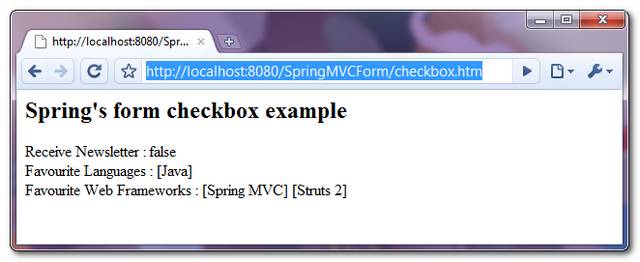
If the form is submitted successfully, just display the submitted checkboxes value.
Spring MVC Checkbox And Checkboxes Example的更多相关文章
- Spring MVC遭遇checkbox的问题解决方式
Spring MVC遭遇checkbox的问题是:当checkbox全不选时候,则该checkbox域的变量为null,不能动态绑定到spring的controller方法的入參上,并抛出异常. 解决 ...
- Spring MVC遭遇checkbox的问题解决方案
转:http://lavasoft.blog.51cto.com/62575/1407213 Spring MVC遭遇checkbox的问题是:当checkbox全不选时候,则该checkbox域的变 ...
- Spring MVC 学习总结(四)——视图与综合示例
一.表单标签库 1.1.简介 从Spring2.0起就提供了一组全面的自动数据绑定标签来处理表单元素.生成的标签兼容HTML 4.01与XHTML 1.0.表单标签库中包含了可以用在JSP页面中渲染H ...
- spring mvc:复选框(多选)
以user为例,user下有 username用户,password密码, address地址, receivePaper是否订阅, favotireFramework兴趣爱好, user.java ...
- spring mvc:常用标签库(文本框,密码框,文本域,复选框,单选按钮,下拉框隐藏于,上传文件等)
在jsp页面需要引入:<%@taglib uri="http://www.springframework.org/tags/form" prefix="form&q ...
- 视图框架:Spring MVC 4.0(1)
目录 一.表单标签库 1.1.简介 1.2.常用属性 1.3.form标签与input标签 1.4.checkbox标签 1.5.radiobutton标签 1.6.password标签 1.7.se ...
- Spring MVC列表多选框
以下示例显示如何在使用Spring Web MVC框架的表单中使用列表框(Listbox).首先使用Eclipse IDE来创建一个WEB工程,实现一个让用户可选择自己所善长的技术(多选)的功能.并按 ...
- Spring MVC下拉选项(Select)
以下示例显示如何在使用Spring Web MVC框架的表单中使用下拉选项(Dropdown).首先使用Eclipse IDE来创建一个WEB工程,实现一个让用户可选择自己所在的国家的功能.并按照以下 ...
- Spring MVC多项单选按钮
以下示例显示如何在使用Spring Web MVC框架的表单中使用多选按钮(RadioButton).首先使用Eclipse IDE来创建一个WEB工程,实现一个让用户可选择自己喜欢的数字的功能.并按 ...
随机推荐
- PHP学习笔记 - 进阶篇(4)
PHP学习笔记 - 进阶篇(4) 字符串操作 字符串介绍 PHP开发中,我们遇到最多的可能就是字符串. 字符串变量用于包含字符串的值. 一个字符串 通过下面的3种方法来定义: 1.单引号 2.双引号 ...
- Object-C基础学习笔记(1)
1.苹果公司将Cocoa.Carbon.QuickTime和OpenGL等技术作为框架集:提供Cocoa组成部分有: (1)Foundation框架(有很多有用的,面向数据的低级类和数据结构): (2 ...
- 高性能CSS(三)
CSS选择器对性能的影响源于浏览器匹配选择器和文档元素时所消耗的时间,所以优化选择器的原则是应尽量避免需要消耗更多匹配时间的选择器.而在这之前我们需要了解CSS选择器匹配的机制,如例子的子选择器规则: ...
- Qt学习总结-ui篇(二)
qccs定义圆角 border-radius:10px; 如果想给特定位置定义圆角,如: 左上角:border-left-top-radius:10px; 右下角色:border-right-bo ...
- lex&yacc5--YYSTYPE
yacc里的YYSTYPE默认是int型的,当然也可以勇%union来定义联合但是由于程序需要,我要将YYSTYPE定义为我自己定义的一个struct的指针然后作为一个全局变量,让lex在扫描的时候, ...
- ubuntu 阿里云安全配置
1. 添加新用户, 加入 root 组, 赋予 sudo 权限 2. 禁用 root 3.
- 谈谈Nullable<T>的类型转换问题
本篇文章讨论可空值类型(Nullable<T>)的转换,却确地说是如何将一种类型的值对象转换成相应的可空值.这来源于今天我们的一个成员遇到的一个小问题,我经过一些整理写了这篇文章.虽然没有 ...
- Guzz
http://www.cnblogs.com/shitou/archive/2011/05/31/2064838.html
- web浏览器下的缓存 - Etag
设置浏览器缓存的几种方法: Last-Modified : 服务器上文件的最后修改时间 Etag : 文件标识 Expiers : 本地缓存目录中文件过期的时间 ( 由服务器指定具体的时间 ) Ca ...
- Geographic Coordinate Systems
Coordinate Systems Geographic Coordinate Systems This is an archive of a previous version of the Arc ...