
便利的html5 之 required、number 、pattern
html5对于表单验证提供了很多自识别功能,非常的便利。
看代码,
<!--head start-->

<include file="Public:head" />

<!-- style here  -->

<!--head end -->

<section class="panel">

    <div class="panel-body">

        <form role="form" id="myform" method="post" enctype="multipart/form-data">

            <input type="hidden" name="id" value="{$info.id}">

            <div class="form-group">

                <label for="">名称</label>

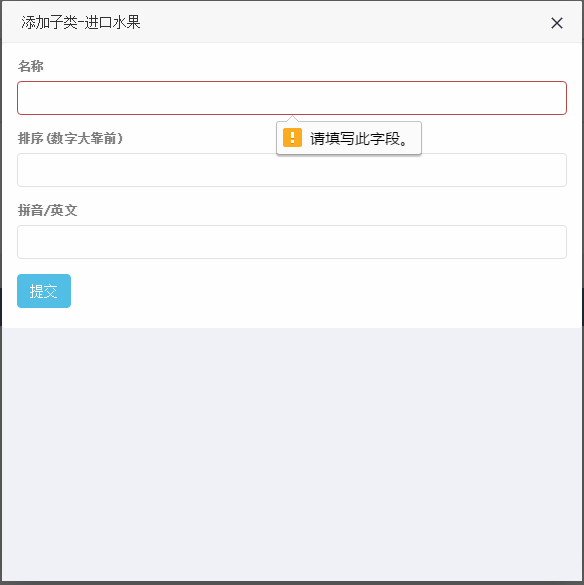
                <input type="text" name="name" class="form-control" id="name" placeholder="" value="{$info.name}" required>

            </div>

            <div class="form-group">

                <label for="">排序(数字大靠前)</label>

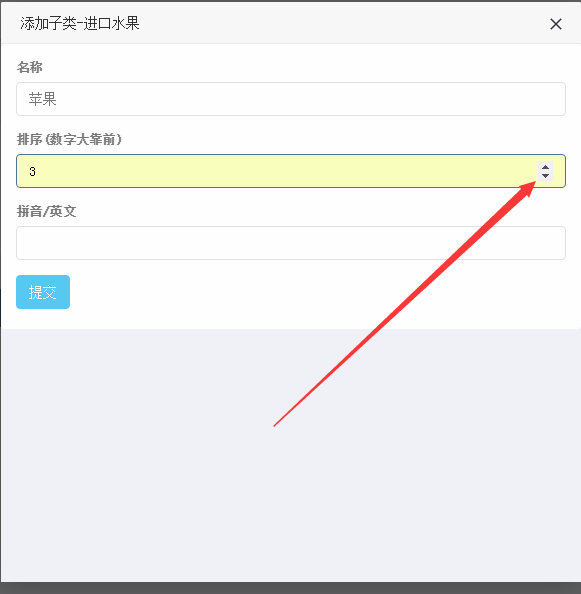
                <input type="number" name="sort" value="{$info.sort}" class="form-control" id="sort" placeholder="" required>

            </div>

            <div class="form-group">

                <label for="">拼音/英文</label>

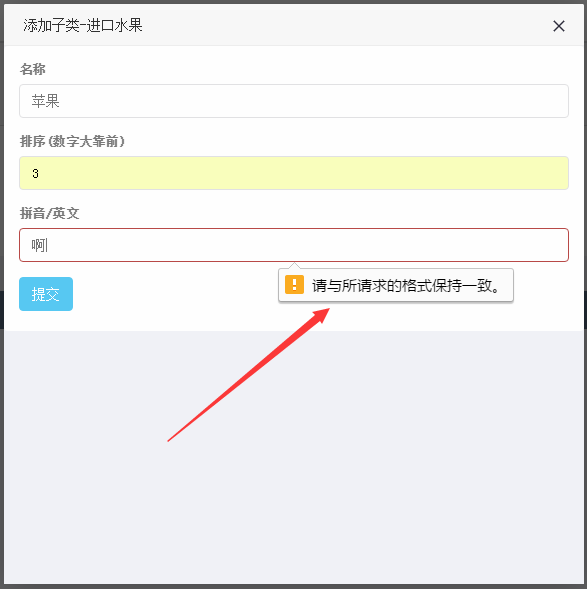
                <input type="text" name="spell" class="form-control" id="spell" placeholder="" value="{$info.spell}" pattern="^[a-zA-Z]+$" required>

            </div>

            <button type="submit" class="btn btn-info">提交</button>

        </form>

    </div>

</section>

<!--foot start-->

<include file="Public:foot" />

<!--foot end -->

<!-- script here  -->

<script>

var index = parent.layer.getFrameIndex(window.name);

var handle_status = '{$handle_status}';

if ( handle_status == '1' ) {

    parent.$("#handle_status").val('1');

    parent.layer.close(index);

} else if ( handle_status == '2' ) {

    parent.$("#handle_status").val('2');

    parent.layer.close(index);

}

</script>
看效果,
便利的html5 之 required、number 、pattern的更多相关文章
- 如何移除HTML5的type=""number""的input标签的上下箭头
初次使用input的数字输入类型type="number"时会发现默认有个上下的箭头,如下图: 很明显这里不需要这个默认箭头,那么我们如何移出这个默认样式呢? 第一种方式,写css ...
- HTML5 <input> required
要求在提交数据之前必须填写该字段,否则会提交不了 <form> <input type="text" id="msg" ...
- html5中 input的pattern属性 和 details/summary元素
html5--3.21 课程小结与其他新增元素 一.总结 一句话总结: input的pattern属性可以设置正则验证,比如检测学号的位数和数字区间 details/summary元素配合起来可以做元 ...
- 使用html5中required属性
直接上代码 <form action="${pageContext.request.contextPath}/login/main.do" method="post ...
- 解决 html5 input type='number' 类型可以输入e
当给 input 设置类型为 number 时,比如,我想限制,只能输入 0-9 的正整数,正则表达式如下: /^[-]?$/ // 匹配 0-9 的整数且只匹配 0 次或 1 次 用正则测试,小数点 ...
- 一些有用的HTML5 pattern属性
最近在做手机页面时,遇到数字输入的键盘的问题,之前的做法只是一刀切的使用 type="tel",不过一直觉得九宫格的电话号码键盘上的英文字母太碍事了.于是想要尝试其它的实现方案,最 ...
- [HTML5] Input accepts only 6 number characters
Use 'pattern' tag in html5: <input type="text" pattern="[0-9]{6}" maxlength=& ...
- 常用的HTML5 pattern属性
type="tel" 和 type="number" 的区别 这里还是先那么先交代一下最初遇到的问题.其实无论是tel还是number都不是完美的: type= ...
- html5 input number类型使用整理
一. html5 input中的数字number类型, 只能输入整数,如果要输入浮点数呢,可以通过max.min和step去定义. type="number" 数字类型 mi ...
随机推荐
- 今天是程序员节(Programmer‘s Day)
http://blog.jobbole.com/47787/ 我只想知道他们到底在说神马???
- AndroidManifest.xml中的android:name是否带.的区别
如果android:name所指示的类在定义的package="org.crazyit.ui"下,加不加点无所谓:但如果android:name指示的类在在package下的子包中 ...
- (二)Android 基本控件
第一节:View 视图组件 Andorid 中的View 视图组件,实现类是android.view.View 类,是绝大多数图形显示类的父类,提供了大量的方法和属性.在View 类下,有很多子类,如 ...
- linux命令行执行db2存储过程
存储过程代码如下: CREATE PROCEDURE proc_sum2(IN n INT,OUT sum INT,OUT j INT) BEGIN DECLARE i INT; ; ; ; WHIL ...
- java新手笔记4 数组
1.数组 import java.util.Random; public class ArrayDemo1 { public static void main(String[] args) { int ...
- ReactNative-----环境搭建二(android)
一.初始化一个ReactNative项目 在指定目录运行命令:react-native init Vince(项目名称) //其过程就是在使用CLI工具构建项目, 命令行代码 F:\React> ...
- HttpHandler与HttpModule及实现文件下载
HttpHandler:处理请求(Request)的信息和发送响应(Response).HttpModule:通过Http Module向Http请求输出流中写入文字,httpmodule先执行 它们 ...
- MyBatis 拦截器 (实现分页功能)
由于业务关系 巴拉巴拉巴拉 好吧 简单来说就是 原来的业务是 需要再实现类里写 selectCount 和selectPage两个方法才能实现分页功能 现在想要达到效果是 只通过一个方法就可以实现 也 ...
- CSS禁止Chrome谷歌浏览器激活输入框后自动添加橘黄色边框
Chrome默认会为所有的输入框加上橘黄色的边框,虽然有时候可以使我们的网站看起来更友好,但对自定义的样式是有影响的.当鼠标点击输入框时,在谷歌chrome浏览器中,光标移到输入框时激活输入框会被加上 ...
- yii2源码学习笔记(十)
继续了解Application. /** * Registers the errorHandler component as a PHP error handler. * 注册errorHandler ...