
ANDROID_MARS学习笔记_S01原始版_020_Mp3player001_歌曲列表
一、项目设计


二、歌曲列表简介
1.利用java.net.HttpURLConnection以流的形式下载xml文件为String
2.自定义ContentHandler--》Mp3ListContentHandler
3.利用自定义的ContentHandler和javax.xml.parsers.SAXParserFactory生成org.xml.sax.XMLReader,用来处理下载的xml字符串,处理结果以List<Mp3Info>返回
4.以返回的List<Mp3Info>和布局文件创建android.widget.SimpleAdapter
5.最后在activity中调用setListAdapter(adapter),完成更新列表操作
二、代码
1.xml
(1)main.xml
 <?xml version="1.0" encoding="utf-8"?>

 <LinearLayout xmlns:android="http://schemas.android.com/apk/res/android"

     android:orientation="vertical" android:layout_width="fill_parent"

     android:layout_height="fill_parent">

     <LinearLayout android:id="@+id/listLinearLayout"

         android:layout_width="fill_parent" android:layout_height="wrap_content"

         android:orientation="vertical">

         <ListView android:id="@id/android:list" android:layout_width="fill_parent"

             android:layout_height="wrap_content" android:drawSelectorOnTop="false"

             android:scrollbars="vertical" />

     </LinearLayout>

 </LinearLayout>
(2)AndroidManifest.xml
 <?xml version="1.0" encoding="utf-8"?>

 <manifest xmlns:android="http://schemas.android.com/apk/res/android"

     package="tony.mp3player"

     android:versionCode="1"

     android:versionName="1.0" >

     <uses-sdk

         android:minSdkVersion="8"

         android:targetSdkVersion="21" />

     <application

         android:allowBackup="true"

         android:icon="@drawable/ic_launcher"

         android:label="@string/app_name"

         android:theme="@style/AppTheme" >

         <activity

             android:name=".Mp3ListActivity"

             android:label="@string/app_name" >

             <intent-filter>

                 <action android:name="android.intent.action.MAIN" />

                 <category android:name="android.intent.category.LAUNCHER" />

             </intent-filter>

         </activity>

     </application>

     <uses-permission android:name="android.permission.INTERNET"/>

 </manifest>
3.mp3info_item.xml
 <?xml version="1.0" encoding="utf-8"?>

 <LinearLayout xmlns:android="http://schemas.android.com/apk/res/android"

     android:layout_width="fill_parent"

     android:layout_height="fill_parent"

     android:orientation="horizontal"

     android:paddingLeft="10dip"

     android:paddingRight="10dip"

     android:paddingTop="1dip"

     android:paddingBottom="1dip"

     >

     <TextView android:id="@+id/mp3Name"

     android:layout_height="30dip"

     android:layout_width="180dip"

     android:textSize="10pt"/>

     <TextView android:id="@+id/mp3Size"

     android:layout_height="30dip"

     android:layout_width="180dip"

     android:textSize="10pt"/>

 </LinearLayout>
2.java
(1)Mp3ListActivity.java
 package tony.mp3player;

 import java.io.IOException;

 import java.io.StringReader;

 import java.util.ArrayList;

 import java.util.HashMap;

 import java.util.Iterator;

 import java.util.List;

 import java.util.Map;

 import javax.xml.parsers.ParserConfigurationException;

 import javax.xml.parsers.SAXParserFactory;

 import org.xml.sax.InputSource;

 import org.xml.sax.SAXException;

 import org.xml.sax.XMLReader;

 import tony.download.HttpDownloader;

 import tony.model.Mp3Info;

 import tony.xml.Mp3ListContentHandler;

 import android.annotation.SuppressLint;

 import android.app.ListActivity;

 import android.os.Bundle;

 import android.os.StrictMode;

 import android.view.Menu;

 import android.view.MenuItem;

 import android.widget.SimpleAdapter;

 @SuppressLint("NewApi")

 public class Mp3ListActivity extends ListActivity {

     private static final int UPDATE = 1;

     private static final int ABOUT = 1;

     @Override

     protected void onCreate(Bundle savedInstanceState) {

         super.onCreate(savedInstanceState);

         setContentView(R.layout.main);

         if (android.os.Build.VERSION.SDK_INT > 9) {

             StrictMode.ThreadPolicy policy = new StrictMode.ThreadPolicy.Builder().permitAll().build();

             StrictMode.setThreadPolicy(policy);

         }

         updateListView();

     }

     /**

      * 在用点击MENU按钮之后,会调用该方法,我们可以在这个方法当中加入自己的按钮控件

      */

     @Override

     public boolean onCreateOptionsMenu(Menu menu) {

         menu.add(0, UPDATE, UPDATE, R.string.mp3list_update);

         menu.add(0, ABOUT, ABOUT, R.string.mp3list_about);

         return super.onCreateOptionsMenu(menu);

     }

     /**

      * 当菜单选项被选中时调用

      */

     @Override

     public boolean onOptionsItemSelected(MenuItem item) {

         System.out.println("onOptionsItemSelected--->ItemId="+item.getItemId());

         switch (item.getItemId()) {

         case UPDATE:

             updateListView();

             break;

         case 2:

             break;

         default:

             break;

         }

         return super.onOptionsItemSelected(item);

     }

     private void updateListView() {

         String xml = downloadXML("http://192.168.1.104:8080/mp3/resources.xml");

         List<Mp3Info> infos = parse(xml);

         SimpleAdapter adapter = buidSimpleAdapter(infos);

         setListAdapter(adapter);

     }

     private SimpleAdapter buidSimpleAdapter(List<Mp3Info> infos) {

         // 生成一个List对象,并按照SimpleAdapter的标准,将mp3Infos当中的数据添加到List当中去

         List<HashMap<String, String>> list = new ArrayList<HashMap<String, String>>();

         HashMap<String,String> map = null;

         Mp3Info info = null;

         for(Iterator it = infos.iterator() ; it.hasNext() ;) {

             info = (Mp3Info) it.next();

             map = new HashMap<String,String>();

             map.put("mp3Name", info.getMp3Name());

             map.put("mp3Size", info.getMp3Size());

             list.add(map);

         }

         SimpleAdapter adapter = new SimpleAdapter(this, list, R.layout.mp3info_item,

                 new String[]{"mp3Name", "mp3Size"}, new int[]{R.id.mp3Name, R.id.mp3Size});

         return adapter;

     }

     private String downloadXML(String urlStr) {

         HttpDownloader httpDownloader = new HttpDownloader();

         String result = httpDownloader.download(urlStr);

         return result;

     }

     private List<Mp3Info> parse(String xml) {

         SAXParserFactory spf =  SAXParserFactory.newInstance();

         List<Mp3Info> infos = new ArrayList<Mp3Info>();

         try {

             XMLReader reader = spf.newSAXParser().getXMLReader();

             Mp3ListContentHandler handler = new Mp3ListContentHandler(infos);

             reader.setContentHandler(handler);

             reader.parse(new InputSource(new StringReader(xml)));

             for(Iterator it = infos.iterator();it.hasNext();) {

                 Mp3Info info = (Mp3Info) it.next();

                 System.out.println(info);

             }

         } catch (SAXException e) {

             e.printStackTrace();

         } catch (ParserConfigurationException e) {

             e.printStackTrace();

         } catch (IOException e) {

             e.printStackTrace();

         }

         return infos;

     }

 }
(2)Mp3ListContentHandler.java
 package tony.xml;

 import java.util.List;

 import org.xml.sax.Attributes;

 import org.xml.sax.SAXException;

 import org.xml.sax.helpers.DefaultHandler;

 import tony.model.Mp3Info;

 public class Mp3ListContentHandler extends DefaultHandler {

     private List<Mp3Info> infos = null;

     private Mp3Info mp3Info = null;

     private String tagName = null;

     public Mp3ListContentHandler(List<Mp3Info> infos) {

         super();

         this.infos = infos;

     }

     @Override

     public void startDocument() throws SAXException {

         super.startDocument();

     }

     @Override

     public void endDocument() throws SAXException {

         super.endDocument();

     }

     @Override

     public void startElement(String uri, String localName, String qName,

             Attributes attributes) throws SAXException {

         this.tagName = localName;

         if(tagName.equals("resource")) {

             mp3Info = new Mp3Info();

         }

     }

     @Override

     public void endElement(String uri, String localName, String qName)

             throws SAXException {

         if(qName.equals("resource")) {

             infos.add(mp3Info);

         }

         tagName = "";

     }

     @Override

     public void characters(char[] ch, int start, int length)

             throws SAXException {

         String temp = new String(ch, start, length);

         if(tagName.equals("id"))

             mp3Info.setId(temp);

         else if(tagName.equals("mp3.name"))

             mp3Info.setMp3Name(temp);

         else if(tagName.equals("mp3.size"))

             mp3Info.setMp3Size(temp);

         else if(tagName.equals("lrc.name"))

             mp3Info.setLrcName(temp);

         else if(tagName.equals("lrc.size"))

             mp3Info.setLrcSize(temp);

     }

 }
(3)HttpDownloader.java
 package tony.download;

 import java.io.BufferedReader;

 import java.io.InputStreamReader;

 import java.net.HttpURLConnection;

 import java.net.URL;

 public class HttpDownloader {

     /**

      * 根据URL下载文件,前提是这个文件当中的内容是文本,函数的返回值就是文件当中的内容

      * 1.创建一个URL对象

      * 2.通过URL对象,创建一个HttpURLConnection对象

      * 3.得到InputStram

      * 4.从InputStream当中读取数据

      * @param urlStr

      * @return

      */

     public String download(String urlStr) {

         StringBuffer sb = new StringBuffer();

         String line = null;

         BufferedReader buffer = null;

         try {

             // 创建一个URL对象

             URL url = new URL(urlStr);

             // 创建一个Http连接

             HttpURLConnection urlConn = (HttpURLConnection) url

                     .openConnection();

             // 使用IO流读取数据

             buffer = new BufferedReader(new InputStreamReader(urlConn

                     .getInputStream()));

             while ((line = buffer.readLine()) != null) {

                 sb.append(line);

             }

         } catch (Exception e) {

             e.printStackTrace();

         } finally {

             try {

                 buffer.close();

             } catch (Exception e) {

                 e.printStackTrace();

             }

         }

         return sb.toString();

     }

 }
(4)
 package tony.model;

 public class Mp3Info {

     private String id,mp3Name,mp3Size,lrcName,lrcSize;

     public Mp3Info() {

         super();

     }

     public Mp3Info(String id, String mp3Name, String mp3Size, String lrcName,

             String lrcSize) {

         super();

         this.id = id;

         this.mp3Name = mp3Name;

         this.mp3Size = mp3Size;

         this.lrcName = lrcName;

         this.lrcSize = lrcSize;

     }

     @Override

     public String toString() {

         return "Mp3Info [id=" + id + ", mp3Name=" + mp3Name + ", mp3Size="

                 + mp3Size + ", lrcName=" + lrcName + ", lrcSize=" + lrcSize

                 + "]";

     }

     public String getId() {

         return id;

     }

     public void setId(String id) {

         this.id = id;

     }

     public String getMp3Name() {

         return mp3Name;

     }

     public void setMp3Name(String mp3Name) {

         this.mp3Name = mp3Name;

     }

     public String getMp3Size() {

         return mp3Size;

     }

     public void setMp3Size(String mp3Size) {

         this.mp3Size = mp3Size;

     }

     public String getLrcName() {

         return lrcName;

     }

     public void setLrcName(String lrcName) {

         this.lrcName = lrcName;

     }

     public String getLrcSize() {

         return lrcSize;

     }

     public void setLrcSize(String lrcSize) {

         this.lrcSize = lrcSize;

     }

 }
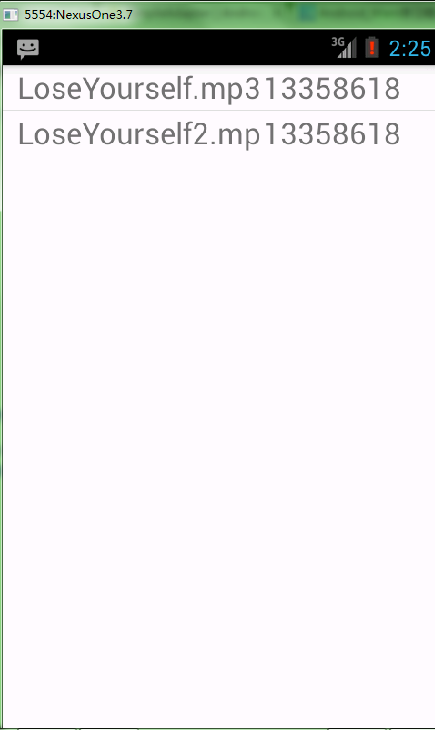
四、运行结果
ANDROID_MARS学习笔记_S01原始版_020_Mp3player001_歌曲列表的更多相关文章
- ANDROID_MARS学习笔记_S01原始版_023_MP3PLAYER004_同步显示歌词
一.流程分析 1.点击播放按钮,会根据lrc名调用LrcProcessor的process()分析歌词文件,得到时间队列和歌词队列 2.new一个hander,把时间队列和歌词队列传给自定义的线程类U ...
- ANDROID_MARS学习笔记_S01原始版_023_MP3PLAYER003_播放mp3
一.简介 1.在onListItemClick中实现点击条目时,跳转到PlayerActivity,mp3info通过Intent传给PlayerActivity 2.PlayerActivity通过 ...
- ANDROID_MARS学习笔记_S01原始版_005_RadioGroup\CheckBox\Toast
一.代码 1.xml(1)radio.xml <?xml version="1.0" encoding="utf-8"?> <LinearLa ...
- ANDROID_MARS学习笔记_S01原始版_004_TableLayout
1.xml <?xml version="1.0" encoding="utf-8"?> <TableLayout xmlns:android ...
- ANDROID_MARS学习笔记_S01原始版_003_对话框
1.AndroidManifest.xml <?xml version="1.0" encoding="utf-8"?> <manifest ...
- ANDROID_MARS学习笔记_S01原始版_002_实现计算乘积及menu应用
一.代码 1.xml(1)activity_main.xml <RelativeLayout xmlns:android="http://schemas.android.com/apk ...
- ANDROID_MARS学习笔记_S01原始版_001_Intent
一.Intent简介 二.代码 1.activity_main.xml <RelativeLayout xmlns:android="http://schemas.android.co ...
- ANDROID_MARS学习笔记_S01原始版_023_MP3PLAYER005_用广播BroacastReciever实现后台播放不更新歌词
一.代码流程1.自定义一个AppConstant.LRC_MESSAGE_ACTION字符串表示广播"更新歌词" 2.在PlayerActivity的onResume()注册Bro ...
- ANDROID_MARS学习笔记_S01原始版_022_MP3PLAYER002_本地及remote标签
一.简介 1.在main.xml中用TabHost.TabWidget.FrameLayout标签作布局 2.在MainActivity中生成TabHost.TabSpec,调用setIndicato ...
随机推荐
- 对象创建型模式------Singleton(单例模式)
地址:http://blog.csdn.net/wuzhekai1985/article/details/6665869.仅供自己参考学习. 单例模式:保证一个类仅有一个实例,并提供一个访问它的全局节 ...
- Extjs搜索域使用
要在使用的panel在预先加载搜索域类requires : ["Ext.ux.form.SearchField"],
- CStdioFile 写文件
前言: 介绍如何使用 CStdioFile 类去写文件. 完整工程代码,点我下载(请注意工程里面需要包含的 <locale.h>头文件 ) 示例: /// My Add // 获取当前路径 ...
- 基于微软EnterpriseLib的框架(一)
1.框架模型无ORM,重点在数据库建模设计与UI框架设计上 2.多数据库支持(Enterprise Lib 默认仅支持SqlServer和Oracle,需自己扩展才能支持其他数据库,本文已扩展SQLi ...
- dapper关联关系查询小测试
测试实体类(表结构) public class User { public int user_id { get; set; } public string user_name { get; set; ...
- CSS text-indent
text-indent 属性规定文本块中首行文本的缩进. 一个作用就是首行文本缩进,一般的文本都是首行缩进两个字符,这里就可以使用text-indent { text-indent: 2em; } 另 ...
- checkbox prop()函数
1.设置checkbox选中状态 ①选中: .prop('checked',true); ②不选中:.prop('checked',false); 2.获取checkbox选中状态 .prop('ch ...
- Mysql 的函数
函数 MySQL函数分为系统函数与自定义函数 系统函数: pow(m,n) 求m的n次方 rand() 随机获取0至1之间的小数 floor(); ...
- sgu 109 Magic of David Copperfield II
这个题意一开始没弄明白,后来看的题解才知道这道题是怎么回事,这道题要是自己想难度很大…… 你一开始位于(1,1)这个点,你可以走k步,n <= k < 300,由于你是随机的走的, 所以你 ...
- ajax、json一些整理(3)
写上面那些都是因为对ajax不熟悉 从w3c抄写JS原生ajax的东西补充一些基础 XMLHttpRequest 是 AJAX 的基础. XMLHttpRequest 对象 所有现代浏览器均支持 XM ...