
Button 模板和样式
     <Style TargetType="{x:Type Button}">

         <Setter Property="FontFamily" Value="Microsoft YaHei"/>

         <Setter Property="FontSize" Value="12"/>

         <Setter Property="BorderThickness"  Value="1"/>

         <Setter Property="FocusVisualStyle" Value="{x:Null}"/>

         <Setter Property="Background" Value="{DynamicResource ButtonBackground}"/>

         <Setter Property="BorderBrush" Value="{DynamicResource ButtonBorder}"/>

         <Setter Property="BorderThickness" Value="1"/>

         <Setter Property="Foreground" Value="{DynamicResource ButtonText}"/>

         <Setter Property="HorizontalContentAlignment" Value="Center"/>

         <Setter Property="VerticalContentAlignment" Value="Center"/>

         <Setter Property="Padding" Value="16,3,16,5"/>

         <Setter Property="Template">

             <Setter.Value>

                 <ControlTemplate TargetType="{x:Type Button}">

                     <Border x:Name="Chrome" BorderBrush="{TemplateBinding BorderBrush}" BorderThickness="{TemplateBinding BorderThickness}" Background="{TemplateBinding Background}" SnapsToDevicePixels="True">

                         <ContentPresenter x:Name="Presenter" ContentTemplate="{TemplateBinding ContentTemplate}" Content="{TemplateBinding Content}" ContentStringFormat="{TemplateBinding ContentStringFormat}" HorizontalAlignment="{TemplateBinding HorizontalContentAlignment}" Margin="{TemplateBinding Padding}" RecognizesAccessKey="True" SnapsToDevicePixels="{TemplateBinding SnapsToDevicePixels}" VerticalAlignment="{TemplateBinding VerticalContentAlignment}"/>

                     </Border>

                     <ControlTemplate.Triggers>

                         <Trigger Property="IsEnabled" Value="False">

                             <Setter Property="Foreground" Value="{DynamicResource ButtonTextDisabled}"/>

                         </Trigger>

                         <Trigger Property="IsMouseOver" Value="True">

                             <Setter Property="Background" Value="{DynamicResource ButtonBackgroundHover}"/>

                             <Setter Property="BorderBrush" Value="{DynamicResource ButtonBorderHover}"/>

                             <Setter Property="Foreground" Value="{DynamicResource ButtonTextHover}"/>

                         </Trigger>

                         <Trigger Property="IsPressed" Value="True">

                             <Setter Property="Background" Value="{DynamicResource ButtonBackgroundPressed}"/>

                             <Setter Property="BorderBrush" Value="{DynamicResource ButtonBorderPressed}"/>

                             <Setter Property="Foreground" Value="{DynamicResource ButtonTextPressed}"/>

                         </Trigger>

                         <Trigger Property="IsFocused" Value="True">

                             <Setter Property="BorderBrush" TargetName="Chrome" Value="{DynamicResource Accent}"/>

                         </Trigger>

                     </ControlTemplate.Triggers>

                 </ControlTemplate>

             </Setter.Value>

         </Setter>

     </Style>
其中
<第5行>
<Setter Property="FocusVisualStyle" Value="{x:Null}"/>
这个 Property 设置的是当有焦点时显示的样式,Value 设置为 x:Null 代表不会有任何改变,当然你也可以自己写一个。
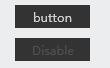
应用
 <Button Content="button" Height="23" Width="75"/>

 <Button Content="Disabled" IsEnabled="False" Height="23" Width="75"/>
引用:
https://msdn.microsoft.com/zh-cn/library/ms753328(v=vs.110).aspx
Button 模板和样式的更多相关文章
- Button模板,样式
一.button控件上的模板 <Button Content="Button" Height="25" HorizontalAlignment=" ...
- 《Programming WPF》翻译 第5章 5.数据模板和样式
原文:<Programming WPF>翻译 第5章 5.数据模板和样式 让我们想象一下我们想要实现TTT更有娱乐性的一个版本(这是大部分游戏中最重要的特色).例如,TTT的一种变体允许玩 ...
- WPF窗口模板——Style样式
通用模板,窗口样式 <!-- 通用窗口模板 --> <ControlTemplate x:Key="CustomWindowTemplate" TargetTyp ...
- Silverlight button 图片切换样式
之前一直做WPF现在开始接触Slilverlight感触很多. 今天做一个Button要求 有两个图片,button默认有一个图片,鼠标over时用另一个图片, 用wpf做的时候写一个template ...
- Android 自定义Button按钮显示样式(正常、按下、获取焦点)
现在的用户对APP的外观看得很重要,如果APP内所有元件都用Android默认样式写,估计下面评论里就有一堆在骂UI丑的.今天学习自定义Button按钮样式.Button样式修改的是Button的背景 ...
- 把dotx模板的样式应用到当前文档中(不应用dotx的其他东西)
Word.Document doc = this.Application.ActiveDocument; //模板样式添加到当前文档 doc.CopyStylesFromTemplate(@" ...
- 微信小程序button选中改样式-实现单选/多选
小程序实现多button单选/多选 红色为选中状态 单选 多选 ①wxss /* pages/button-select/button-select.wxss */ .button_container ...
- VC,VB程序button、图标样式美化
此处的"美化"指的不是通过代码进行美化你的程序.关于想进一步优化自己的程序界面的,最好还是去了解下SkinSharp吧.本文提及的是利用第三方资源编辑软件在不更改程序不论什么框架和 ...
- Java开发桌面程序学习(十)——css样式表使用以及Button悬浮改变样式实现
css样式表使用 javafx中的css样式,与html的有些不一样,javafx中的css,是以-fx-background-color这种样子的,具体可以参考文档JavaFx css官方文档 ja ...
随机推荐
- UWP开发之Mvvmlight实践九:基于MVVM的项目架构分享
在前几章介绍了不少MVVM以及Mvvmlight实例,那实际企业开发中将以那种架构开发比较好?怎样分层开发才能节省成本? 本文特别分享实际企业项目开发中使用过的项目架构,欢迎参照使用!有不好的地方欢迎 ...
- 《JavaScript设计模式 张》整理
最近在研读另外一本关于设计模式的书<JavaScript设计模式>,这本书中描述了更多的设计模式. 一.创建型设计模式 包括简单工厂.工厂方法.抽象工厂.建造者.原型和单例模式. 1)简单 ...
- BPM嵌入式流程解决方案分享
一.需求分析由于企业业务的独特性或者企业高层独特的管理思想,很多客户选择了自行开发业务系统的方式来实现独有的竞争力. 这类信息系统通常经过了多年的开发,伴随着企业的发展一直在不断优化,与企业的业务非常 ...
- Android 在Android代码中执行命令行
1.路径最好不要是自己拼写的路径/mnt/shell/emulated/0/wifidog.conf 最好是通过方法获取的路径,不然可能导致命令无效 (挂载点的原因) public static f ...
- Atitit 管理原理与实践attilax总结
Atitit 管理原理与实践attilax总结 1. 管理学分类1 2. 我要学的管理学科2 3. 管理学原理2 4. 管理心理学2 5. 现代管理理论与方法2 6. <领导科学与艺术4 7. ...
- centos安装nodejs
1.下载安装nodejs wget http://nodejs.org/dist/v0.10.25/node-v0.10.25.tar.gz compat--c++ tar -xf node-v0.1 ...
- HP服务器 hp 360g5 centos7安装问题
HP服务器 hp 360g5 centos7安装问题 一 :启动盘无法识别硬盘 1.进入安装光盘,用上下键选择安装centos--Install Centos7(注意不可按Enter键),如图: 2 ...
- Android(2)—Mono For Android App版本自动更新
0.前言 公司Android查询的项目已经开始,整体采用Java后台+App前台来实现,由于项目小,App这块就我一个人开发,首先需要研究的是:Android版本的更新升级问题:本人经过近一周的学习整 ...
- The Coroutine
关于Coroutine 说到coroutine就不的不说subroutine,也就是我们常用到的一般函数.调用一个函数开始执行,然后函数执行完成后就退出,再次调用的时候,再从头开始,调用之间是没有保存 ...
- StringBuffer 的 各种方法
StringBuffer 其实提供了很多有用的方法, 以前用的多是 append, 其实还有: append(double) delete(int, int) deleteCharAt(int) re ...