
iOS8中添加的extensions总结(三)——图片编辑扩展
图片编辑扩展
注:此教程来源于http://www.raywenderlich.com的《iOS8 by Tutorials》
1.准备
2.正文


 //

 //  PhotoEditingViewController.m

 //  JMImgure Photo

 //

 //  Created by JackMa on 15/12/3.

 //  Copyright © 2015年 JackMa. All rights reserved.

 //

 #import "PhotoEditingViewController.h"

 #import <Photos/Photos.h>

 #import <PhotosUI/PhotosUI.h>

 #import "RWTImageFilterService.h"

 @interface PhotoEditingViewController () <PHContentEditingController>

 @property (strong) PHContentEditingInput *input;

 @property (nonatomic, weak) IBOutlet UIImageView *imageView;

 @property (nonatomic, weak) IBOutlet UIButton *undoButton;

 @property (nonatomic, weak) IBOutlet UIButton *addButton;

 @property (strong, nonatomic) RWTImageFilterService *imageFilterService;

 @property (strong, nonatomic) NSString *currentFilterName;

 @property (strong, nonatomic) UIImage *filteredImage;

 @end

 @implementation PhotoEditingViewController

 //撤销的button

 - (IBAction)undo:(id)sender {

   self.imageView.image = self.input.displaySizeImage;

   self.currentFilterName = nil;

   self.filteredImage = nil;

 }

 //添加过滤器

 - (IBAction)addFilter:(id)sender {

   UIAlertController *alert = [UIAlertController alertControllerWithTitle:@"过滤器" message:@"请选择一种过滤器" preferredStyle:UIAlertControllerStyleActionSheet];

   //遍历字典

   [self.imageFilterService.availableFilters enumerateKeysAndObjectsUsingBlock:^(id  _Nonnull key, id  _Nonnull obj, BOOL * _Nonnull stop) {

     UIAlertAction *action = [UIAlertAction actionWithTitle:key style:UIAlertActionStyleDefault handler:^(UIAlertAction *action) {

       //为图片添加过滤

       self.filteredImage = [self.imageFilterService applyFilter:obj toImage:self.input.displaySizeImage];

       self.imageView.image = self.filteredImage;

       self.currentFilterName = obj;

     }];

     [alert addAction:action];

   }];

   UIAlertAction *cancel = [UIAlertAction actionWithTitle:@"取消" style:UIAlertActionStyleCancel handler:^(UIAlertAction * _Nonnull action) {

     [alert dismissViewControllerAnimated:YES completion:nil];

   }];

   [alert addAction:cancel];

   [self presentViewController:alert animated:YES completion:nil];

 }

 - (void)viewDidLoad {

   [super viewDidLoad];

   self.imageView.contentMode = UIViewContentModeScaleAspectFit;

   self.imageFilterService = [[RWTImageFilterService alloc] init];

 }

 - (void)didReceiveMemoryWarning {

     [super didReceiveMemoryWarning];

     // Dispose of any resources that can be recreated.

 }

 #pragma mark - PHContentEditingController

 //在原始编辑界面可以对图片进行调整,当你在这个App想获取的是最原始的图片,那么返回NO

 //你想获取调整后的adjustmentData的话,那么返回YES

 //只有图片经过调整才会调用此函数,否则默认NO

 - (BOOL)canHandleAdjustmentData:(PHAdjustmentData *)adjustmentData {

   return NO;

 }

 //view Load后,view appear前调用,用来接受原始数据contentEditingInput

 - (void)startContentEditingWithInput:(PHContentEditingInput *)contentEditingInput placeholderImage:(UIImage *)placeholderImage {

   //canHandleAdjustmentData:返回YES的话,这里的contentEditingInput也会带上adjustmentData

   //canHandleAdjustmentData:返回NO的话,这里只有原始图像displaySizeImage

   self.input = contentEditingInput;

   self.imageView.image = self.input.displaySizeImage;//将原始图片呈现出来

 }

 //点击右上方完成button时调用

 - (void)finishContentEditingWithCompletionHandler:(void (^)(PHContentEditingOutput *))completionHandler {

   //异步处理图片

     dispatch_async(dispatch_get_global_queue(DISPATCH_QUEUE_PRIORITY_DEFAULT, ), ^{

       //创建output并设置

       PHContentEditingOutput *output = [[PHContentEditingOutput alloc] initWithContentEditingInput:self.input];

       NSData *archiveData = [NSKeyedArchiver archivedDataWithRootObject:self.currentFilterName];

 #warning Please set your Photos Extension Name and Version here

       PHAdjustmentData *adjustmentData = [[PHAdjustmentData alloc] initWithFormatIdentifier:@"qq100858433.JMImgure.JMImgure-Photo" formatVersion:@"1.0" data:archiveData];

       output.adjustmentData = adjustmentData;

       UIImage *fullImage = [UIImage imageWithContentsOfFile:self.input.fullSizeImageURL.path];

       fullImage = [self.imageFilterService applyFilter:self.currentFilterName toImage:fullImage];

       //将转化后的图片存到renderedContentURL中

       NSData *jpegData = UIImageJPEGRepresentation(fullImage, 1.0);

       BOOL saved = [jpegData writeToURL:output.renderedContentURL options:NSDataWritingAtomic error:nil];

       if (saved) {

         //回调处理结果给Photos

         //注:这里模拟机调试会出现无法显示修改后图片问题,真机调试没有问题

         completionHandler(output);

       } else {

         NSLog(@"An error occurred during save");

         completionHandler(nil);

       }

       // Clean up temporary files, etc.

     });

 }

 //点击左上方取消后调用

 - (BOOL)shouldShowCancelConfirmation {

   //返回YES,则会弹出AlertSheet让用户确认是否取消

   //返回NO,则页面直接消失

   return NO;

 }

 //shouldShowCancelConfirmation或finishContentEditingWithCompletionHandler:

 //之后调用,此函数在后台运行,负责清理临时文件

 - (void)cancelContentEditing {

     // Clean up temporary files, etc.

     // May be called after finishContentEditingWithCompletionHandler: while you prepare output.

 }

 @end
最后的说明:
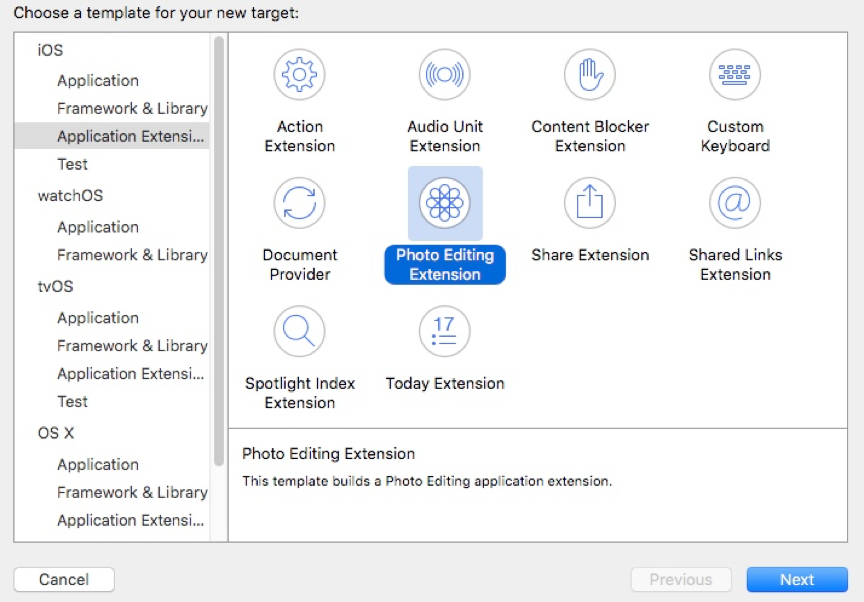
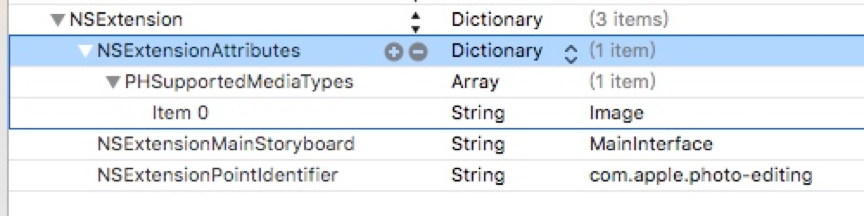
在新建Photo Extension Target时,系统默认是只为图片添加扩展效果,那么视频呢

iOS8中添加的extensions总结(三)——图片编辑扩展的更多相关文章
- iOS8中添加的extensions总结(一)——今日扩展
通知栏中的今日扩展 分享扩展 Action扩展 图片编辑扩展 文件管理扩展 第三方键盘扩展 注:此教程来源于http://www.raywenderlich.com的<iOS8 by Tutor ...
- iOS8中添加的extensions总结(四)——Action扩展
Action扩展 注:此教程来源于http://www.raywenderlich.com的<iOS8 by Tutorials> 1.准备 本次教程利用网站bitly.com进行 bit ...
- iOS8中添加的extensions总结(二)——分享扩展
分享扩展 注:此教程来源于http://www.raywenderlich.com的<iOS8 by Tutorials> 1.准备 这次例子来源于国外的图片分享网站Imgur.com 首 ...
- cocos2d-x 中添加显示文字的三种方式 LabelTTF 、LabelBMFont 和 LabelAtlas
在 cocos2d-x 中有三个类可以在层或精灵中添加文字: LabelTTF LabelBMFont LabelAtlas LabelTTF 直接支持使用 TTF 字库,可以支持全部的中文,但是效率 ...
- ZH奶酪:PHP中添加HTML代码的三种方法
php中添加HTML代码,就是php类型的文件中添加html代码~ 第一种是在HTML中加PHP. 大段大段的html代码中,在各个需要执行php的地方<?php .... ?> 比如 l ...
- cocos中添加显示文字的三种方式(CCLabelTTF 、CCLabelBMFont 和CCLabelAtlas)
CCLabelTTF CCLabelTTF 每次调用 setString (即改变文字)的时候,一个新的OPENGL 纹理将会被创建..这意味着setString 和创建一个新的标签一样慢. 这个类使 ...
- 在VS中添加lib库的三种方法
注意: 1.每种方法也要复制相应的DLL文件到相应目录,或者设定DLL目录的位置,具体方法为:"Properties" -> "Configuration Prop ...
- C# 往Datatable中添加新行的步骤
以一个实例说明 //录入年份绑定 public void YearList(FineUIPro.DropDownList ddlYear) { //年份从15年到当前年//起止年份 ; int yea ...
- Spring中添加新的配置表,并对新的配置表进行处理
实习过程中boss交代的任务(以下出现的代码以及数据只给出小部分,提供一个思路) 目的:Spring中添加新的配置表,并对新的配置表进行处理:替换的新的配置表要友好,同时保证替换前后功能不能发生变化. ...
随机推荐
- python3和Python2的区别(被坑太久了)
print函数:(Python3中print为一个函数,必须用括号括起来:Python2中print为class) Python 2 的 print 声明已经被 print() 函数取代了,这意味着我 ...
- jdbc(1)(一)
1.连接数据库,准备mysql连接jar包导入项目: Class.forName("com.mysql.jdbc.Driver"); //建立连接是比较耗时,耗资源的,实际开发中多 ...
- 随手写的Java向文本文件写字符串的类
今天看了一篇讲Java IO流的文章,好长时间没用IO流了,回顾了一下Java编写IO程序的思路,之前文章中有介绍.对于写二进制文件我们习惯用 面向字节类的流.对于写字符我们使用面向字符类的流.但是我 ...
- 运行Capture.exe找不到cdn_sfl401as.dll
今天运行capture Orcad16.6显示缺少cdn_sfl401as.dll,昨天运行时并没有发现这种情况,回想今天安装了modelsim之后才发生这种情况,于是将modelsim卸载掉,再次启 ...
- JNA入门实例
JNA(Java Native Access):建立在JNI之上的Java开源框架,SUN主导开发,用来调用C.C++代码,尤其是底层库文件(windows中叫dll文件,linux下是so[shar ...
- flex中validateall()方法, 多Item验证 ,结果统一提示
<?xml version="1.0" encoding="utf-8"?> <s:Application xmlns:fx="ht ...
- 百度识图API
http://stu.baidu.com/ http://www.360doc.com/content/14/0801/17/21412_398653199.shtml http://download ...
- OpenWrt+nginx+php安装discuz
下面这个图片是本次的硬件资源:一个无线路由器的开发板,一个8G的u盘,一条手机的数据线(可以作为串口和供电使用),一条网线,一个USB Hub. <ignore_js_op> ...
- Hyper-V连接虚拟机异常,“无法进行连接,因为可能无法将凭据发送到远程计算机”
前两天把公司的TFS从2010升级到TFS2012(昨天又升级到TFS2013).今天使用服务器Hyper-V连接虚拟机时居然报错了. 翻看各种日志,虽然错误大一对一对地,但找不到任何有用的信息.无奈 ...
- g++ gcc 的区别
我们在编译c/c++代码的时候,有人用gcc,有人用g++,于是各种说法都来了,譬如c代码用gcc,而c++代码用g++,或者说编译用gcc,链 接用g++,一时也不知哪个说法正确,如果再遇上个ext ...