
在Apache下开启SSI配置支持include shtml html和快速配置服务器
作为前端开发,使用Apache快速搭建服务器极为方便。
1.找到apach安装目录,找到conf目录下 的httpd.conf
使用SSI(Server Side Include)的html文件扩展名,SSI(Server Side Include),通常称为"服务器端嵌入"或者叫"服务器端包含",是一种类似于ASP的基于服务器的网页制作技术。默认扩展名是 .stm、.shtm 和 .shtml。
  # AddType text/html .shtml

  # AddOutputFilter INCLUDES .shtml

  把这两行前面的#去掉 添加 .html类型之后碎片引入支持.html文件了。
   AddType text/html .shtml .html
    AddOutputFilter INCLUDES .shtml .html

  然后搜索“Options Indexes FollowSymLinks”

  在搜索到的那一行后面添加“ Includes”

  即将该行改变为 Options Indexes FollowSymLinks Includes

  熟悉apache manual的可能会觉得比较容易。

  保存httpd.conf,重起apache即可
include元素能按file属性或virtual属性判断应该包含的文件。
file属性是一个相对于当前目录的文件路径,即不能是一个绝对路径(以"/"开头)或包含"../"的路径。
virtual属性可能更有用,它是一个相对于被提供的文档的URL ,可以以"/"开头,但必须与被提供的文档位于同一服务器上。
<!--#include virtual="/header.html" -->
2.快速配置服务器 找到conf目录下 的httpd.conf
把下面配置放在配置文件顶部即可快速搭建一个8200端口的服务器。复制该模块,修改端口和文件目录路径,即可快速搭建另外一个服务器。
#rho

Listen 8200

<VirtualHost *:8200>

    documentroot  "E:\work\rho"

    servername  localhost:8200

    <Directory "E:\work\rho">

    Options Indexes FollowSymLinks Includes

    #ErrorDocument 404 /index.shtml

    AllowOverride All

    Allow from all

    </Directory>

</VirtualHost>
如果上面配置出现php文件禁止访问试试下面:
把
Order deny,allow
Allow from all
Allow from host ip
修改为:
Require all granted
Require host ip
2.4*版本的apache配置修改了配置方法
#test

Listen 8200

<VirtualHost *:8200>

    servername  localhost:8200

    DocumentRoot "D:/work/test/todos-web-app-master"

    <Directory "D:/work/test/todos-web-app-master">

        Options Indexes FollowSymLinks ExecCGI

        Require all granted

        Require host ip

    </Directory>

</VirtualHost>
如图效果:
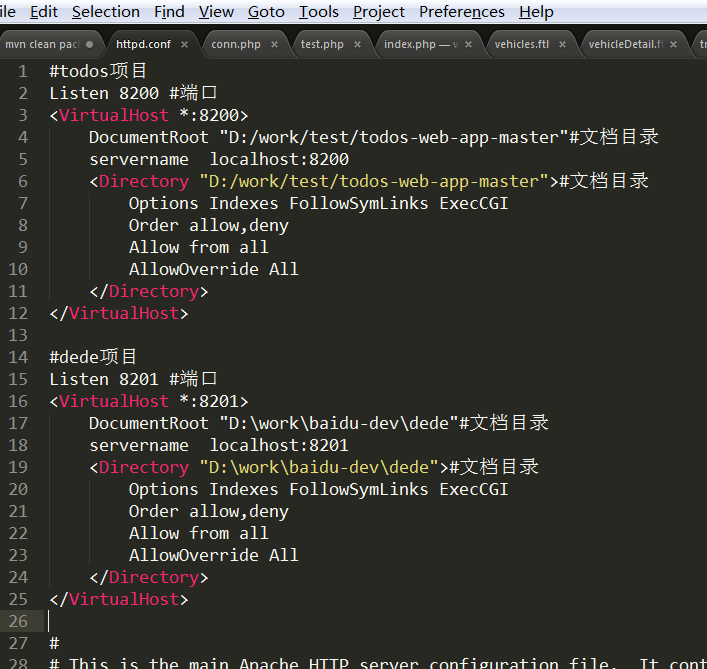
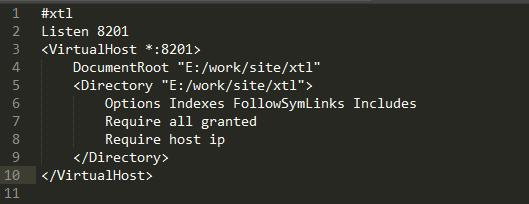
配置文件默认配置:80端口,把端口和文件目录换成不常用的目录或端口,就可以直接吧上面快速配置服务器的配置改成80端口使用。下面的配置几乎跟上面等价。
#Listen 12.34.56.78:80
Listen
ServerName localhost:

#

# DocumentRoot: The directory out of which you will serve your

# documents. By default, all requests are taken from this directory, but

# symbolic links and aliases may be used to point to other locations.

#

DocumentRoot "e:/work/xtl"

#

# Each directory to which Apache has access can be configured with respect

# to which services and features are allowed and/or disabled in that

# directory (and its subdirectories).

#

# First, we configure the "default" to be a very restrictive set of

# features.

#

<Directory />

    Options FollowSymLinks

    AllowOverride None

    Order deny,allow

    Deny from all

</Directory>

#

# Note that from this point forward you must specifically allow

# particular features to be enabled - so if something's not working as

# you might expect, make sure that you have specifically enabled it

# below.

#

#

# This should be changed to whatever you set DocumentRoot to.

#

<Directory "e:/work/xtl">

    #

    # Possible values for the Options directive are "None", "All",

    # or any combination of:

    #   Indexes Includes FollowSymLinks SymLinksifOwnerMatch ExecCGI MultiViews

    #

    # Note that "MultiViews" must be named *explicitly* --- "Options All"

    # doesn't give it to you.

    #

    # The Options directive is both complicated and important.  Please see

    # http://httpd.apache.org/docs/2.2/mod/core.html#options

    # for more information.

    #

    Options Indexes FollowSymLinks Includes

    # AllowOverride controls what directives may be placed in .htaccess files.

    # It can be "All", "None", or any combination of the keywords:

    #   Options FileInfo AuthConfig Limit

    #

    AllowOverride all

    #

    # Controls who can get stuff from this server.

    #

#   onlineoffline tag - don't remove

    Order Deny,Allow

    allow from all

    Allow from 127.0.0.1

</Directory>
3.配置允许通过IP访问服务器
默认的 http.conf 一段和访问控制有关的代码如下:
# onlineoffline tag - don't remove
Order Deny,Allow
Deny from all
Allow from 127.0.0.1
在httpd.conf文件中,修改如下
Options Indexes FollowSymLinks MultiViews
AllowOverride None
Order allow,deny
Allow from all
注意要Allow from all,这样才允许所有的IP访问。如果只是允许如下两个网段访问则:
Allow from 172.16.86.0/255.255.255.0 10.0.0.0/255.0.0.0
IP之间不是","逗号,而是空格
在Apache下开启SSI配置支持include shtml html和快速配置服务器的更多相关文章
- Apache下开启SSI配置使html支持include包含
写页面的同学通常会遇到这样的烦恼,就是页面上的 html 标签越来越多的时候,寻找指定的部分就会很困难,那么能不能像 javascript 一样写在不同的文件中引入呢?答案是有的,apache 能做到 ...
- Apache下开启SSI配置,使html支持include包含
有的时候,我们的页面有公共的导航栏navbar,公共的脚注footer,那么我们就想把这些公共部分独立成一个html文件,在要引用的地方像引用js,css一样,给包含进来. Apache下开启SSI配 ...
- 在Apache下开启SSI配置
开启SSI:html.shtml页面include网页文件 使用SSI(Server Side Include)的html文件扩展名,SSI(Server Side Include),通常称为&quo ...
- Apache配置支持include
Apache配置支持include 什么是SSI? SSI是英文Server Side Includes的缩写,翻译成中文就是服务器端包含的意思.从技术角度上说,SSI就是HTML文件中,可以通过注释 ...
- 对vue中 默认的 config/index.js:配置的详细理解 -【以及webpack配置的理解】-config配置的目的都是为了服务webpack的配置,给不同的编译条件提供配置
当我们需要和后台分离部署的时候,必须配置config/index.js: 用vue-cli 自动构建的目录里面 (环境变量及其基本变量的配置) var path = require('path') ...
- 开启SSI配置使shtml支持include公用的页头页脚
编写编写项目众多静态文件时,能像php等开发语言一样使用include将页面公有的header/footer/sidebar作为公用.独立.单一的文件引入到各页面上,这样修改这些页面公用部分时就能单独 ...
- windows Apache 环境下配置支持HTTPS的SSL证书
windows Apache 环境下配置支持HTTPS的SSL证书 1.准备工作 1)在设置Apache + SSL之前, 需要做: 安装Apache, 下载安装Apache时请下载带有SSL版本的A ...
- 如何让你的Apache支持include文件解析和支持shtml的相关配置
源地址:http://www.itokit.com/2011/0430/65992.html Apache支持include文件解析shtml首先要应该修改Apache配置文件httpd.conf . ...
- apache安装mod_deflate配置支持gzip
apache 配置支持gzip apache使用gzip压缩能够大幅提高网站访问速度并节省网络流量,在网页响应头信息中可以判断是否支持压缩. HTTP/1.1 200 OK Date: Wed, 14 ...
随机推荐
- css3水平翻转
@keyframes cardFront { 0%, 40%, 100% { 02 opacity:1; 03 -webkit-transform:rotateY(0deg); 04 ...
- Java空字符串与null的区别和判断字符串是否为空的方法
Java空字符串与null的区别: 1.类型null表示的是一个对象的值,而并不是一个字符串.例如声明一个对象的引用,String a = null ;""表示的是一个空字符串,也 ...
- IOS-Archiver文件归档(2)
Archiver是持久化数据的一种方式,他跟 Plist的差别在于他能持久化自己定义对象.但他没Plist那么方便. Archiver默认能持久化的数据有NSNumber,NSArray,NSDict ...
- 从BAE到SAE,从SAE又回到BAE
版权声明:本文为博主原创文章,未经博主允许不得转载. [很久以后] 这段话是很久之后补充的,发现错误要勇于改正,以下红色字体是对以前观点的改正, 大概总结下: 1.bae最大缺点是需要备案,不过现在看 ...
- 释放Linux磁盘空间的一种方法
1.用df 检查发现/根目录可用空间为0 [root@/]#df -h 2.用du检查发现 各目录占用的空间都很少,有约3G的空间莫名其妙地丢了. [root@/]# du -m ...
- iOS之正则表达式的使用
一.什么是正则表达式 正则表达式,又称正规表示法,是对字符串操作的一种逻辑公式.正则表达式可以检测给定的字符串是否符合我们定义的逻辑,也可以从字符串中获取我们想要的特定部分.它可以迅速地用极简单的方式 ...
- 新增的html5中js获取方法
一.querySelector 获取的选择器与jquery的选择器相同
- 理解C#中的继承
继承 1.创建子类对象的时候,在子类对象中会为子类对象的字段开辟空间,也会为父类对象的所有字段开辟空间.只不过父类私有的成员访问不到而已. 2.base关键字可以调用父类的非私有成员. 3.子类的访问 ...
- 什么情况下会调用到session_destroy()
https://segmentfault.com/q/1010000000191102 首先 ... session_destory() 是一个函数 ... 这个函数在任何情况下都不会被 php 引擎 ...
- Find Minimum in Rotated Sorted Array问题的困惑
今天做了两题,第二题没解出来,发现太麻烦了,放弃了……明天脑子清楚的时候再做. 第一题就是标题中的这个问题.在一个旋转排序数组中找出最小的值. 针对该问题出了两道不同要求的题目,分别是不考虑重复元素的 ...