
jquery 插件JTable使用
下载后增加:
Add these lines to the HEAD section of your HTML document:
<!-- Include one of jTable styles. -->
<link href="/jtable/themes/metro/blue/jtable.min.css" rel="stylesheet" type="text/css" />
<!-- Include jTable script file. -->
<script src="/jtable/jquery.jtable.min.js" type="text/javascript"></script>
You can select any theme and color schema in themes folder.
NOTE: You must also add needed jQuery and jQueryUI JavaScript and CSS files before importing jTable files.
Creating a container
jTable needs only a container element for your table.
<div id="PersonTableContainer"></div>
Creating a jTable instance
Add these JavaScript codes to your page:
<script type="text/javascript">

    $(document).ready(function () {

        $('#PersonTableContainer').jtable({

            title: 'Table of people',

            actions: {

                listAction: '/GettingStarted/PersonList',

                createAction: '/GettingStarted/CreatePerson',

                updateAction: '/GettingStarted/UpdatePerson',

                deleteAction: '/GettingStarted/DeletePerson'

            },

            fields: {

                PersonId: {

                    key: true,

                    list: false

                },

                Name: {

                    title: 'Author Name',

                    width: '40%'

                },

                Age: {

                    title: 'Age',

                    width: '20%'

                },

                RecordDate: {

                    title: 'Record date',

                    width: '30%',

                    type: 'date',

                    create: false,

                    edit: false

                }

            }

        });

    });

</script>
global options:
addRecordButton: $('#addBtn'),A jQuery object that can be used instead of the '+ add new record' link. Thus you can set any element on the page to open the 'add new record' dialog.
paging: true,
If paging enabled, this value indicates number of rows in a page. pageSize option can be changed later as like below:
|
1
|
$('#MyTableContainer').jtable('option', 'pageSize', 20); |
pageSizes :[10, 25, 50, 100, 250, 500],
boolean default: true
If paging enabled, this value can be used to make 'page size change combobox' visible or not.
selecting boolean default: false
Indicates that whether jTable allows user to select rows on the table.
defaultSorting string default: none
Default sorting of table. It can be a field name of a column of the table. For instance, if you want table sorted by Name by default, defaultSorting can be 'Name ASC' or 'Name DESC'.
selectingCheckboxes boolean default: false
Indicates that whether jTable shows checkbox column for selecting.
这个需要selecting为true。
multiselect:default false
sorting: true,
defaultSorting: 'id ASC',
分页示例:
<html>

  <head>

    <link href="themes/redmond/jquery-ui-1.8.16.custom.css" rel="stylesheet" type="text/css" />

    <link href="Scripts/jtable/themes/lightcolor/blue/jtable.css" rel="stylesheet" type="text/css" />

    <script src="scripts/jquery-1.6.4.min.js" type="text/javascript"></script>

    <script src="scripts/jquery-ui-1.8.16.custom.min.js" type="text/javascript"></script>

    <script src="Scripts/jtable/jquery.jtable.js" type="text/javascript"></script>

  </head>

  <body>

    <div id="PeopleTableContainer" style="width: 600px;"></div>

    <script type="text/javascript">

        $(document).ready(function () {

            //Prepare jTable

            $('#PeopleTableContainer').jtable({

                title: 'Table of people',

                paging: true,

                pageSize: 2,

                sorting: true,

                defaultSorting: 'Name ASC',

                actions: {

                    listAction: 'PersonActionsPagedSorted.php?action=list',

                    createAction: 'PersonActionsPagedSorted.php?action=create',

                    updateAction: 'PersonActionsPagedSorted.php?action=update',

                    deleteAction: 'PersonActionsPagedSorted.php?action=delete'

                },

                fields: {

                    PersonId: {

                        key: true,

                        create: false,

                        edit: false,

                        list: false

                    },

                    Name: {

                        title: 'Author Name',

                        width: '40%'

                    },

                    Age: {

                        title: 'Age',

                        width: '20%'

                    },

                    RecordDate: {

                        title: 'Record date',

                        width: '30%',

                        type: 'date',

                        create: false,

                        edit: false

                    }

                }

            });

            //Load person list from server

            $('#PeopleTableContainer').jtable('load');

        });

    </script>

  </body>

</html>
获取数据的代码:
<?php

try

{

    //Open database connection

    $con = mysql_connect("localhost","root","sm159357");

    mysql_select_db("jtabletestdb", $con);

    //Getting records (listAction)

    if($_GET["action"] == "list")

    {

        //Get record count

        $result = mysql_query("SELECT COUNT(*) AS RecordCount FROM people;");

        $row = mysql_fetch_array($result);

        $recordCount = $row['RecordCount'];

        //Get records from database

        $result = mysql_query("SELECT * FROM people ORDER BY " . $_GET["jtSorting"] . " LIMIT " . $_GET["jtStartIndex"] . "," . $_GET["jtPageSize"] . ";");

        //Add all records to an array

        $rows = array();

        while($row = mysql_fetch_array($result))

        {

            $rows[] = $row;

        }

        //Return result to jTable

        $jTableResult = array();

        $jTableResult['Result'] = "OK";

        $jTableResult['TotalRecordCount'] = $recordCount;

        $jTableResult['Records'] = $rows;

        print json_encode($jTableResult);

    }

    //Creating a new record (createAction)

    else if($_GET["action"] == "create")

    {

        //Insert record into database

        $result = mysql_query("INSERT INTO people(Name, Age, RecordDate) VALUES('" . $_POST["Name"] . "', " . $_POST["Age"] . ",now());");

        //Get last inserted record (to return to jTable)

        $result = mysql_query("SELECT * FROM people WHERE PersonId = LAST_INSERT_ID();");

        $row = mysql_fetch_array($result);

        //Return result to jTable

        $jTableResult = array();

        $jTableResult['Result'] = "OK";

        $jTableResult['Record'] = $row;

        print json_encode($jTableResult);

    }

    //Updating a record (updateAction)

    else if($_GET["action"] == "update")

    {

        //Update record in database

        $result = mysql_query("UPDATE people SET Name = '" . $_POST["Name"] . "', Age = " . $_POST["Age"] . " WHERE PersonId = " . $_POST["PersonId"] . ";");

        //Return result to jTable

        $jTableResult = array();

        $jTableResult['Result'] = "OK";

        print json_encode($jTableResult);

    }

    //Deleting a record (deleteAction)

    else if($_GET["action"] == "delete")

    {

        //Delete from database

        $result = mysql_query("DELETE FROM people WHERE PersonId = " . $_POST["PersonId"] . ";");

        //Return result to jTable

        $jTableResult = array();

        $jTableResult['Result'] = "OK";

        print json_encode($jTableResult);

    }

    //Close database connection

    mysql_close($con);

}

catch(Exception $ex)

{

    //Return error message

    $jTableResult = array();

    $jTableResult['Result'] = "ERROR";

    $jTableResult['Message'] = $ex->getMessage();

    print json_encode($jTableResult);

}

?>
数据字段filed参数:
id: {
key: true,
title:'ID',
width: '5%',
},
A boolean value that indicates whether this field is the key (primary key) field of the record. Every record must has one and only one key field that is used on update and delete operations.
If a field is marked as key, create and edit options are set to false as default.
If a key field is not editable in edit form, a hidden input element is generated for it. Thus, key value is post to server. If the key field is editable (with setting edit option to true), key's original value (the value before update) is post to server asjtRecordKey.
display function default: none
This option is a function that allows you to define a fully custom column for table. jTable directly shows return value of this function on the table. See the sample below:
TestColumn: {
title: 'Test',
display: function (data) {
return '<b>test</b>';
}
}
This sample Test column returns a bold 'test' string for all rows. You can return any text, html code or jQuery object that will be shown on the table. This method is called for each row. You can get record of the row using data.record. So, if your record has Name property, you can use data.record.Name property to get the Name.
你能使用data.record来得到一个记录。得到某个属性data.record.propertyname
display function can be used for many purposes such as creating calculated columns, opening child tables for a row... etc. See demos for detailed usage.
input function default: none
This option is a function that allows you to define a fully custom input element for create and edit forms. jTable directly shows return value of this function on the form. See the sample below:
Name: {

    title: 'Name',

    width: '20%',

    input: function (data) {

        if (data.record) {

            return '<input type="text" name="Name" style="width:200px" value="' + data.record.Name + '" />';

        } else {

            return '<input type="text" name="Name" style="width:200px" value="enter your name here" />';

        }

    }

}
data argument has some fields those can be used while creating the input:
- data.formType: Can be 'create' or 'edit' according to the form.
- data.form: Reference to the form element as jQuery selection.
- data.record: Gets the editing record if this input is being created for edit form (if formType='edit'). So, it's undefined for 'create' form.
- data.value: Gets current value of the field. This is default value (if defined) of field for create form, current value of field for edit form.
While jTable automatically creates appropriate input element for each field, you can use input option to create custom input elements. Remember to set name attribute of input element if you want to post this field to the server.
inputClass string default: none
A string value that can be set as the class of an input item for this field in create/edit forms. So you can style input elements in the forms for this field. This can be useful when working with validation plug-ins (we will see soon).
inputTitle string default: none
This option can be used to show a different title for a field in edit/create forms. If it's not set, input title will be same as title option.
options object, array, URL or a function default: none
If this field's value will be selected in an option list (combobox as default, can be radio button list), you must supply a source. An option source can be one of these values:
object: Property names are values, property values are display texts.
array: An array of options.
URL: A URL to download the option list for this field.
function: A function that takes some arguments and returns an object, an array or a URL string.
Defining an object
This is the simplest way of defining options is creating an object like shown below:
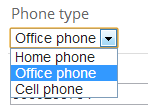
PhoneType: {
title: 'Phone type',
options: { '1': 'Home phone', '2': 'Office phone', '3': 'Cell phone' }
}
Thus, jTable creates a dropdown list in edit/create form for that field:
Defining an array
You can also define an array of options as shown below:
PhoneType: { title: 'Phone type', options: [{ Value: '1', DisplayText: 'Home phone' }, { Value: '2', DisplayText: 'Office phone' }, { Value: '2', DisplayText: 'Cell phone' }]}Defining a URL
You can define a URL to download array of options:
|
1
2
3
4
|
PhoneType: { title: 'Class year', options: '/Demo/GetPhoneTypes.php'} |
Your URL must return array of options just like described in the section above. A successfull return value from server is shown below:
{

   "Result":"OK",

   "Options":[

      {

         "DisplayText":"Home phone",

         "Value":"1"

      },

      {

         "DisplayText":"Office phone",

         "Value":"2"

      },

      {

         "DisplayText":"Cell phone",

         "Value":"3"

      }

   ]

}
Result can be "OK" or "ERROR". If it's "ERROR", you can supply a "Message" property to show to the user.
当为ERROR,显示message信息,ok时不显示。、
type: 'radiobutton', 要加这个,不加则显示select下拉框。
options:{ '0' : '否', '1' : '是' },
defaultValue: '0',
显示:

options:<?php $this->getArr();?>
getArrr()数组返回的是json_encode(array(0=>"user1",1=>'user2"));
编辑时会生成一个下拉列表,显示list的时候显示当前字段key的值,比如当前field为0,显示user1.
一定要json_encode,否则报错,array to string conversion error
也可以返回一个数值数组json_encode(array(0,1,2),这样会生成
<select>
<option value=0>0</option>
<option value=1>1</option>
增加记录按钮:
$('#TableContainer').jtable({
addRecordButton: $('#addBtn'),
A column (related to a field) can be showed or hided by user or this option. Values can be:
- fixed: This column is always visible and can not be hided by the user.
- visible: This column is visible as default but can be hided by the user.
- hidden: This column is hidden as default but can be showed by the user.
Note: User can open column selection list by right clicking the table header if columnSelectable option is true (it's true as default).
fieldOptions的字段
A boolean value that indicates whether this field is shown in the table.
感觉visibility:'hidden'和list:false功能相同,都是隐藏。
create:默认true
A boolean value that indicates whether this field is shown in the create record form.
Default value is false for the key field. True for other fields.
edit:true:
A boolean value that indicates whether this field is shown in the edit record form.
Default value is false for the key field. True for other fields.
defaultValue:string,默认none
You can set a default value for a field. It must be a valid value. For instance, if the field is an option list, it must be one of these options.
This option is a function that allows you to define a fully custom input element for create and edit forms. jTable directly shows return value of this function on the form. See the sample below:
Name: {

    title: 'Name',

    width: '20%',

    input: function (data) {

        if (data.record) {

            return '<input type="text" name="Name" style="width:200px" value="' + data.record.Name + '" />';

        } else {

            return '<input type="text" name="Name" style="width:200px" value="enter your name here" />';

        }

    }

}
This option can be used to show a different title for a field in edit/create forms. If it's not set, input title will be same as title option.
A string value that can be set as the class of an input item for this field in create/edit forms. So you can style input elements in the forms for this field. This can be useful when working with validation plug-ins (we will see soon).
如InputClass为cronBlock,返回
<input class="cronBlock" id="Edit-name" type="text" name="name">
load(postData, completeCallback)
Loads records from the server. All parameters are optional. If you want to pass some parameters to the server, you can pass them in the postData parameter while calling the load method, like this:
$('#PersonTable').jtable('load', { CityId: 2, Name: 'Halil' });
You can get people who are living in city 2 and whose name is Halil like shown above. Surely, you must handle these parameters in the server side. Also, you can pass a callback method as completeCallback, that is called when loading of data is successfully completed.
http://www.jtable.org/demo/pagingandsorting
犯的一个错误:
        "location": {

                title: "<?php echo Yii::t($this->i18n_common, 'loginname'); ?>",

                width: '10%',

                display:function(data){

                    last_login_ip=data.record.last_login_ip;

                    url="<?php echo Yii::app()->createUrl('static/online/location');?>";

                     return '<a class="tip" rel="'+url+'&ip='+

                    last_login_ip+'">查看</a>';

                }

            },
最开始用
$('a.tip').cluetip({sticky: true, closePosition: 'title', arrows: true});
没起作用,$('a.tip').size()总是为0,这是因为数据没有加载完全,我们用$获取不到。这时候放在回调函数里面就可以正确执行了:
$('#TableContainer').jtable('load',{},function(){
$('a.tip').cluetip({sticky: true, closePosition: 'title', arrows: true});
}
);
最后发现,上面的做法是有问题的,当翻页时, $('a.tip').cluetip({ 就不起作用了。所以点击没有效果。
应该用到一个事件:
This event is raised when jTable loads records from server and refreshes the table (If paging enabled, this event is also raised when user changes the current page). You can get all records loaded from server by data.records argument. You can get the response JSON object returned from server as data.serverResponse.
如何使用delete:
deleteAction: '/Demo/DeleteStudent',
fields: { StudentId: { key: true, create: false, edit: false, list: false }, //Delete from database$result = mysql_query("DELETE FROM Student WHERE StudentId = " . $_POST["StudentId"] . ";");//Return result to jTable$jTableResult = array();$jTableResult['Result'] = "OK";print json_encode($jTableResult);This event is raised just before AJAX request to load records from server. It has no arguments.
jquery 插件JTable使用的更多相关文章
- 【转】20个令人敬畏的jQuery插件
为网页设计师和开发推荐20个令人敬畏的jQuery插件.例如滑块,图像画廊,幻灯片插件,jQuery的导航菜单,jQuery文件上传,图像旋转器,标签的插件,用户界面元素,网络接触形式,模态窗口, ...
- 自己写jquery插件之模版插件高级篇(一)
需求场景 最近项目改版中,发现很多地方有这样一个操作(见下图gif动画演示),很多地方都有用到.这里不讨论它的用户体验怎么样. 仅仅是从复用的角度,如果每个页面都去写text和select元素,两个b ...
- JQuery插件定义
一:导言 有些WEB开发者,会引用一个JQuery类库,然后在网页上写一写$("#"),$("."),写了几年就对别人说非常熟悉JQuery.我曾经也是这样的人 ...
- BootStrap_04之jQuery插件(导航、轮播)、以及Less
1.列偏移与列排序: ①列偏移:控制列出现的位置,某列偏移后,后序列会随之偏移--只能右偏移: col-lg/md/sm/xs-offset-*; ②列排序:控制某一列的位置,该列可以左(pull)右 ...
- 锋利的jQuery--编写jQuery插件(读书笔记五)[完结篇]
1.表单验证插件Validation 2.表单插件Form 3.动态事件绑定插件livequery 可以为后来的元素绑定事件 类似于jQuery中的live()方法 4.jQuer ...
- 2016年6月份那些最实用的 jQuery 插件专辑
jQuery 是一个快速.流行的 JavaScript 库,jQuery 用于文档处理.事件处理.动画和 Ajax 交互非常简单,学习曲线也很平坦.2016年6月的 jQuery 插件专辑里,我们选择 ...
- 教你开发jQuery插件(转)
教你开发jQuery插件(转) 阅读目录 基本方法 支持链式调用 让插件接收参数 面向对象的插件开发 关于命名空间 关于变量定义及命名 压缩的好处 工具 GitHub Service Hook 原文: ...
- Lazy Load, 延迟加载图片的 jQuery 插件.
Lazy Load 是一个用 JavaScript 编写的 jQuery 插件. 它可以延迟加载长页面中的图片. 在浏览器可视区域外的图片不会被载入, 直到用户将页面滚动到它们所在的位置. 这与图片预 ...
- JS原生ajax与Jquery插件ajax深入学习
序言: 近来随着项目的上线实施,稍微有点空闲,闲暇之时偶然发现之前写的关于javascript原生xmlHttpRequest ajax方法以及后来jquery插件ajax方法,于是就行了一些总结,因 ...
随机推荐
- [转] JavaScript中的属性:如何遍历属性
在JavaScript中,遍历一个对象的属性往往没有在其他语言中遍历一个哈希(有些语言称为字典)的键那么简单.这主要有两个方面的原因:一个是,JavaScript中的对象通常都处在某个原型链中,它会从 ...
- Creating Custom Shadows ——创建自定义shadow
Custom shadows are a Robolectric feature that allows you to make targeted changes in the way Android ...
- Driving the Activity Lifecycle
Before Robolectric 2.2, most tests created Activities by calling constructors directly, (new MyActiv ...
- Linux软件安装,RPM与YUM
为了防止无良网站的爬虫抓取文章,特此标识,转载请注明文章出处.LaplaceDemon/SJQ. http://www.cnblogs.com/shijiaqi1066/p/3843955.html ...
- C#使用Process类调用外部程序(转)
在程序开发中,一个程序经常需要去调用其他的程序,C#中Process类正好提供了这样的功能.它提供对本地和远程进程的访问并使您能够启动和停止本地系统进程.一.启动进程实例 Process myProc ...
- ValidationContext
.NET 4 和Silverlight 中可以使用以下方法: ? public static void Validate(this Entity entity) { // prepare th ...
- CouchBase 遇到问题笔记(一)
刚开始看CouchBase,按照官网给出的示例,边敲边理解,遇到了一个很奇怪的问题,如下代码: IView<IViewRow> view = client.GetView("be ...
- Unity 5.x---00使用重力
Unity 5.x---00使用重力 步骤一: 打开一个工程(导入Unity自带的资源),并创建并配置好必要的GameObject ,如下图: 步骤二: 1.创建一个Cube,使其位于平面上方. ...
- 狗狗40题~(Volume B)
H - Sorting Slides 应该是个二分匹配的模板题的,但我还不会写 = = 其实数据规模很小,就用贪心的方法就水过了(没加vis判冲突wa了几发,从此开始艰难的没有1A 的生活) #inc ...
- Eclipse 编译StanfordNLP
1.源码最新下载地址:http://nlp.stanford.edu/software/index.shtml; 2.解压stanford-corenlp.zip; 3.打开Eclipse新建JAVA ...