
spring----bean的使用
这篇文章不介绍spring的相关概念,只记录一下springbean的创建方式和使用方式。
一、bean的创建和调用
1、创建演示需要用到的类:Student、Teacher、Person
package test.spring.school;

public class Student {

    private String name;

    private Integer age;

    public String getName() {

        return name;

    }

    public void setName(String name) {

        this.name = name;

    }

    public Integer getAge() {

        return age;

    }

    public void setAge(Integer age) {

        this.age = age;

    }

    @Override

    public String toString() {

        return "Student [name=" + name + ", age=" + age + "]";

    }

}
2、spring的xml配置
<?xml version="1.0" encoding="UTF-8"?>

<!-- beans里的属性是spring的xml标签自动提示的设置 -->

<beans xmlns="http://www.springframework.org/schema/beans"

    xmlns:xsi="http://www.w3.org/2001/XMLSchema-instance"

    xmlns:context="http://www.springframework.org/schema/context"

    xmlns:jdbc="http://www.springframework.org/schema/jdbc"

    xmlns:jee="http://www.springframework.org/schema/jee"

    xmlns:tx="http://www.springframework.org/schema/tx"

    xmlns:aop="http://www.springframework.org/schema/aop"

    xmlns:mvc="http://www.springframework.org/schema/mvc"

    xmlns:util="http://www.springframework.org/schema/util"

    xmlns:jpa="http://www.springframework.org/schema/data/jpa"

    xsi:schemaLocation="

        http://www.springframework.org/schema/beans http://www.springframework.org/schema/beans/spring-beans-3.2.xsd

        http://www.springframework.org/schema/context http://www.springframework.org/schema/context/spring-context-3.2.xsd

        http://www.springframework.org/schema/jdbc http://www.springframework.org/schema/jdbc/spring-jdbc-3.2.xsd

        http://www.springframework.org/schema/jee http://www.springframework.org/schema/jee/spring-jee-3.2.xsd

        http://www.springframework.org/schema/tx http://www.springframework.org/schema/tx/spring-tx-3.2.xsd

        http://www.springframework.org/schema/data/jpa http://www.springframework.org/schema/data/jpa/spring-jpa-1.3.xsd

        http://www.springframework.org/schema/aop http://www.springframework.org/schema/aop/spring-aop-3.2.xsd

        http://www.springframework.org/schema/mvc http://www.springframework.org/schema/mvc/spring-mvc-3.2.xsd

        http://www.springframework.org/schema/util http://www.springframework.org/schema/util/spring-util-3.2.xsd">

    <bean id="student" class="test.spring.school.Student"/>

</beans>
文件结构:

3、测试代码
package test.spring;

import org.junit.Test;

import org.springframework.context.ApplicationContext;

import org.springframework.context.support.ClassPathXmlApplicationContext;

import test.spring.school.Student;

public class TestApp {

    @Test

    public void testXml() {

        @SuppressWarnings("resource")

        ApplicationContext ctx = new ClassPathXmlApplicationContext("resources/config.xml");

        //根据bean的id查找

        Student student = (Student)ctx.getBean("student");

        System.out.println(student);

    }

}
输出结果:

这种配置bean的方法,是通过类的构造器生成的,所有必须要保证该类有构造器。因为java默认存在无参构造器,可以直接实例化。但是,如果手动添加有参数构造器,必须给属性注入参数值,否则会报错
修改Student类,添加有参构造器:
    public Student(String name, Integer age) {

        super();

        this.name = name;

        this.age = age;

    }
测试输出:
二、bean的其他属性的相关配置
1、作用域的配置
可以通过<bean>定义的scope属性,该属性值得含义:
singleton,在每个spring loc容器中,一个bean对应一个对象实例,默认项。
prototype,一个bean对应多个实例。
request,在一次HTTP请求中,一个bean对应一个实例,仅限Web环境。
session,在一个HTTP Session中 ,一个bean定义对应一个实例,仅限于Web环境。
global Session,在一个全局的HttpSession中,一个bean定义对应一个实例;仅在基于portlet的Web应用中才有意义,portlet规范定义了全局Session的概念。
2、初始和销毁方法
在<bean>的init-method属性和destroy-method属性定义。
在<beans>元素中的default-init-method和default-destroy-method中给所有的bean定义全局初始和销毁方法
3、延迟实例化
在ApplicationContext启动时,默认会将所有singleton bean提前进行实例化,如果不想让一个singleton在启动时实例化,可以使用<bean>元素的lazy-init属性改变。
同样可以在<beans>元素中使用default-lazy-init属性,实现全局<bean>延迟实例化。
配置:
<bean id="student" class="test.spring.school.Student"

          scope="prototype" init-method="init" destroy-method="destroy" lazy-init="true"/>
测试:
@Test

    public void testXml() {

        @SuppressWarnings("resource")

        ApplicationContext ctx = new ClassPathXmlApplicationContext("resources/config.xml");

        //根据bean的id查找

        Student student = (Student)ctx.getBean("student");

        System.out.println(student);

        student.destroy();

    }
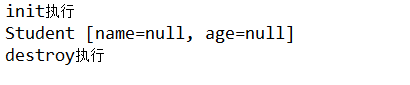
输出结果:
spring----bean的使用的更多相关文章
- Spring8:一些常用的Spring Bean扩展接口
前言 Spring是一款非常强大的框架,可以说是几乎所有的企业级Java项目使用了Spring,而Bean又是Spring框架的核心. Spring框架运用了非常多的设计模式,从整体上看,它的设计严格 ...
- Spring Bean详细讲解
什么是Bean? Spring Bean是被实例的,组装的及被Spring 容器管理的Java对象. Spring 容器会自动完成@bean对象的实例化. 创建应用对象之间的协作关系的行为称为:装配( ...
- Spring Bean的生命周期(非常详细)
Spring作为当前Java最流行.最强大的轻量级框架,受到了程序员的热烈欢迎.准确的了解Spring Bean的生命周期是非常必要的.我们通常使用ApplicationContext作为Spring ...
- spring bean的生命周期
掌握好spring bean的生命周期,对spring的扩展大有帮助. spring bean的生命周期(推荐看) spring bean的生命周期
- spring bean的重新加载
架构体系 在谈spring bean的重新加载前,首先我们来看看spring ioc容器. spring ioc容器主要功能是完成对bean的创建.依赖注入和管理等功能,而这些功能的实现是有下面几个组 ...
- Spring Bean
一.Spring的几大模块:Data access & Integration.Transcation.Instrumentation.Core Spring Container.Testin ...
- 【转】Spring bean处理——回调函数
Spring bean处理——回调函数 Spring中定义了三个可以用来对Spring bean或生成bean的BeanFactory进行处理的接口,InitializingBean.BeanPost ...
- 在非spring组件中注入spring bean
1.在spring中配置如下<context:spring-configured/> <context:load-time-weaver aspectj-weaving=&q ...
- spring bean生命周期管理--转
Life Cycle Management of a Spring Bean 原文地址:http://javabeat.net/life-cycle-management-of-a-spring-be ...
- Spring Bean配置默认为单实例 pring Bean生命周期
Bean默认的是单例的. 如果不想单例需要如下配置:<bean id="user" class="..." scope="singleton&q ...
随机推荐
- [安卓] 20、基于蓝牙BLE的广播包高频快速搜索
前言: 之前介绍过很多蓝牙beacon.搜索.连接.通讯的文章.不过最近我发现:之前写的蓝牙广播包搜索的工程,搜索频率太慢,而且不能一直保持搜索状态.因此,这里探讨下高频蓝牙广播包扫描 -- 蓝牙BL ...
- Java软件工程师面试题:Java运行时异常与一般异常有什么不一样?
异常表示程序运行过程中可能出现的非正常状态,运行时异常表示虚拟机的通常操作中可能遇到的异常,是一种常见运行错误.java编译器要求方法必须声明抛出可能发生的非运行时异常,但是并不要求必须声明抛出未被捕 ...
- [Swift]LeetCode829. 连续整数求和 | Consecutive Numbers Sum
Given a positive integer N, how many ways can we write it as a sum of consecutive positive integers? ...
- [Swift]LeetCode1018. 可被 5 整除的二进制前缀 | Binary Prefix Divisible By 5
Given an array A of 0s and 1s, consider N_i: the i-th subarray from A[0] to A[i] interpreted as a bi ...
- js中对于逗号的运算符!
先展示一个例子! var f = (function f() { return '1'; } , function g(){ return 1; } )(); console.log(typeof f ...
- 为什么公司宁愿 25K 重新招人,也不给你加到 20K?原因太现实……
年底了,还有几天就要过年了,年后必定又是一波跳槽季,我们为什么要跳槽,为什么公司不能满足我们加薪的需求? 说到这个话题,想必从事码农的各位都清楚的一个道理:工资都是跳出来的,其他行业我不太清楚,但在 ...
- python网络-Socket之udp编程(24)
一.udp简介 udp --- 用户数据报协议,是一个无连接的简单的面向数据报的运输层协议. udp不提供可靠性,它只是把应用程序传给IP层的数据报发送出去,但是并不能保证它们能到达目的地. udp在 ...
- WebSocket(2)---实现游戏公告功能
实现游戏公告功能 实现功能:游戏管理里发布游戏公告,其它游戏玩家页面能够马上接受到游戏公告信息. 下面直接上代码案例,这里主要展示关键代码,底部有源码. 一.案例 1.pom.xml文件 主要是添加s ...
- Spring Boot OAuth 2.0 客户端
在上一篇<OAuth 2.0 授权码请求>中我们已经可以获取到access_token了,本节将使用客户端来访问远程资源 配置资源服务器 授权服务器负责生成并发放访问令牌(access_t ...
- JDK1.8源码(一)——java.util.ArrayList
ArrayList 定义 ArrayList 是一个用数组实现的集合,支持随机访问,元素有序且可以重复. public class ArrayList<E> extends Abstr ...