
HTML5仿手机微信聊天界面
HTML5仿手机微信聊天界面
给大家带来的是HTML5仿手机微信聊天界面,截图效果如下:
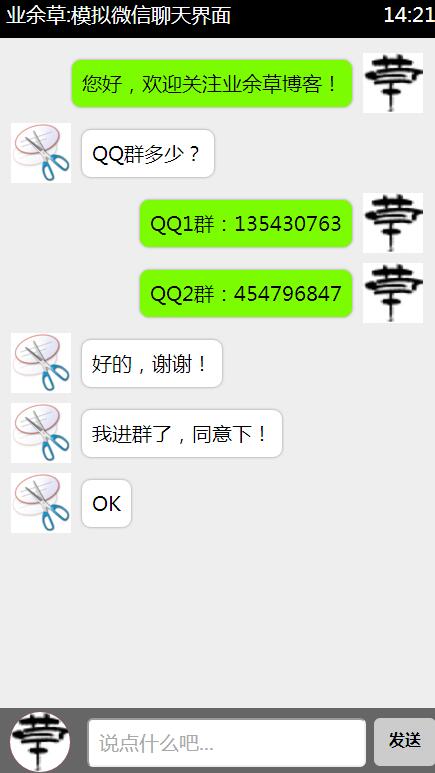
源代码如下:
- <!DOCTYPE html>
- <html>
- <head>
- <meta charset="UTF-8">
- <title>HTML5模拟微信聊天界面</title>
- <style>
- /**重置标签默认样式*/
- * {
- margin: 0;
- padding: 0;
- list-style: none;
- font-family: '微软雅黑'
- }
- #container {
- width: 450px;
- height: 780px;
- background: #eee;
- margin: 80px auto 0;
- position: relative;
- box-shadow: 20px 20px 55px #777;
- }
- .header {
- background: #000;
- height: 40px;
- color: #fff;
- line-height: 34px;
- font-size: 20px;
- padding: 0 10px;
- }
- .footer {
- width: 430px;
- height: 50px;
- background: #666;
- position: absolute;
- bottom: 0;
- padding: 10px;
- }
- .footer input {
- width: 275px;
- height: 45px;
- outline: none;
- font-size: 20px;
- text-indent: 10px;
- position: absolute;
- border-radius: 6px;
- right: 80px;
- }
- .footer span {
- display: inline-block;
- width: 62px;
- height: 48px;
- background: #ccc;
- font-weight: 900;
- line-height: 45px;
- cursor: pointer;
- text-align: center;
- position: absolute;
- right: 10px;
- border-radius: 6px;
- }
- .footer span:hover {
- color: #fff;
- background: #999;
- }
- #user_face_icon {
- display: inline-block;
- background: red;
- width: 60px;
- height: 60px;
- border-radius: 30px;
- position: absolute;
- bottom: 6px;
- left: 14px;
- cursor: pointer;
- overflow: hidden;
- }
- img {
- width: 60px;
- height: 60px;
- }
- .content {
- font-size: 20px;
- width: 435px;
- height: 662px;
- overflow: auto;
- padding: 5px;
- }
- .content li {
- margin-top: 10px;
- padding-left: 10px;
- width: 412px;
- display: block;
- clear: both;
- overflow: hidden;
- }
- .content li img {
- float: left;
- }
- .content li span{
- background: #7cfc00;
- padding: 10px;
- border-radius: 10px;
- float: left;
- margin: 6px 10px 0 10px;
- max-width: 310px;
- border: 1px solid #ccc;
- box-shadow: 0 0 3px #ccc;
- }
- .content li img.imgleft {
- float: left;
- }
- .content li img.imgright {
- float: right;
- }
- .content li span.spanleft {
- float: left;
- background: #fff;
- }
- .content li span.spanright {
- float: right;
- background: #7cfc00;
- }
- </style>
- <script>
- window.onload = function(){
- var arrIcon = ['http://www.xttblog.com/icons/favicon.ico','http://www.xttblog.com/wp-content/uploads/2016/03/123.png'];
- var num = 0; //控制头像改变
- var iNow = -1; //用来累加改变左右浮动
- var icon = document.getElementById('user_face_icon').getElementsByTagName('img');
- var btn = document.getElementById('btn');
- var text = document.getElementById('text');
- var content = document.getElementsByTagName('ul')[0];
- var img = content.getElementsByTagName('img');
- var span = content.getElementsByTagName('span');
- icon[0].onclick = function(){
- if(num==0){
- this.src = arrIcon[1];
- num = 1;
- }else if(num==1){
- this.src = arrIcon[0];
- num = 0;
- }
- }
- btn.onclick = function(){
- if(text.value ==''){
- alert('不能发送空消息');
- }else {
- content.innerHTML += '<li><img src="'+arrIcon[num]+'"><span>'+text.value+'</span></li>';
- iNow++;
- if(num==0){
- img[iNow].className += 'imgright';
- span[iNow].className += 'spanright';
- }else {
- img[iNow].className += 'imgleft';
- span[iNow].className += 'spanleft';
- }
- text.value = '';
- // 内容过多时,将滚动条放置到最底端
- contentcontent.scrollTop=content.scrollHeight;
- }
- }
- }
- </script>
- </head>
- <body>
- <div id="container">
- <div class="header">
- <span style="float: left;">业余草:模拟微信聊天界面</span>
- <span style="float: right;">14:21</span>
- </div>
- <ul class="content">
- <!-- 欢迎加入qq群:454796847、135430763 -->
- </ul>
- <div class="footer">
- <div id="user_face_icon">
- <img src="http://www.xttblog.com/icons/favicon.ico" alt="">
- </div>
- <input id="text" type="text" placeholder="说点什么吧...">
- <span id="btn">发送</span>
- </div>
- </div>
- </body>
- </html>
以上就是本文的全部内容,是不是很精彩,希望对大家的学习有所帮助。
HTML5仿手机微信聊天界面的更多相关文章
- android 仿微信聊天界面,以及语音录制功能
extends:http://104zz.iteye.com/blog/1709840 本例为模仿微信聊天界面UI设计,文字发送以及语言录制UI. 1先看效果图: 第一:chat.xml设计 ...
- Swift - 自定义单元格实现微信聊天界面
1,下面是一个放微信聊天界面的消息展示列表,实现的功能有: (1)消息可以是文本消息也可以是图片消息 (2)消息背景为气泡状图片,同时消息气泡可根据内容自适应大小 (3)每条消息旁边有头像,在左边表示 ...
- Android:日常学习笔记(8)———开发微信聊天界面
Android:日常学习笔记(8)———开发微信聊天界面 只做Nine-Patch图片 Nine-Patch是一种被特殊处理过的PNG图片,能够指定哪些区域可以被拉升,哪些区域不可以.
- HTML5仿微信聊天界面、微信朋友圈实例
这几天使用H5开发了一个仿微信聊天前端界面,尤其微信底部编辑器那块处理的很好,使用HTML5来开发,虽说功能效果并没有微信那么全,但是也相当不错了,可以发送消息.表情,发送的消息自动回滚定位到底部,另 ...
- vue聊天室|h5+vue仿微信聊天界面|vue仿微信
一.项目简介 基于Vue2.0+Vuex+vue-router+webpack2.0+es6+vuePhotoPreview+wcPop等技术架构开发的仿微信界面聊天室——vueChatRoom,实现 ...
- web版仿微信聊天界面|h5仿微信电脑端案例开发
前几天开发了一款手机端h5仿微信聊天,人唯有不停学习才能进步,这段时间倒腾着整理了下之前项目,又重新在原先的那版基础上开发了一款仿微信聊天电脑端web版本,聊天页面又重新优化了多图预览.视频播放,右键 ...
- jquery 仿手机屏幕切换界面效果
<!DOCTYPE html PUBLIC "-//W3C//DTD XHTML 1.0 Transitional//EN" "http://www.w3.org/ ...
- android 仿QQ气泡聊天界面
1.现在的QQ,微信等一些APP的聊天界面都是气泡聊天界面,左边是接收到的消息,右边是发送的消息, 这个效果其实就是一个ListView在加载它的Item的时候,分别用了不同的布局xml文件. 2.效 ...
- JS案例练习-手机微信聊天对话框
先附图 CSS部分: <style> body{} *{;} li{list-style: none;} .container{ width:310px; height:600px; ma ...
随机推荐
- Babel presets stage
在一些新框架的代码中,常基于es6/7标准来书写代码.鉴于这些标准被没有被浏览器广泛支持,我们一般使用babel来将使用e6/7标准书写的代码降级编译(或者说转译)为浏览器可解析的es3/5代码. 以 ...
- sql数据库快照与恢复 规则绑定
存在数据库快照的话我发进行数据库分离 CREATE DATABASE <快照名称> ON (NAME=<数据库文件名>,FILENAME='<存放地址>') AS ...
- SQL语句查询表结构
SQL语句查询表结构 刚刚在做一个小项目,数据库中一张表有20来个字段,用我以前做的一个.NET实体类生成器一个一个的输入还是闲麻烦,于是打算找个时间来重新的改造一个那个.NET实体类,能够通过选 ...
- 执行对象Statement、PreparedStatement和CallableStatement详解 JDBC简介(五)
执行对象是SQL的执行者,SQL是“安排好的任务”,执行对象就是“实际工作的人”. 执行对象有三种: Statement.PreparedStatement和CallableStatement,他们都 ...
- JDBC与ORM发展与联系 JDBC简介(九)
概念回顾 回顾下JDBC的概念: JDBC(Java Data Base Connectivity,java数据库连接)是一种用于执行SQL语句的Java API,可以为多种关系数据库提供统一访问,它 ...
- -1-2 java 面向对象基本概念 封装继承多态 变量 this super static 静态变量 匿名对象 值传递 初始化过程 代码块 final关键字 抽象类 接口 区别 多态 包 访问权限 内部类 匿名内部类 == 与 equal
java是纯粹的面向对象的语言 也就是万事万物皆是对象 程序是对象的集合,他们通过发送消息来相互通信 每个对象都有自己的由其他的对象所构建的存储,也就是对象可以包含对象 每个对象都有它的类型 也就是 ...
- .NetCore2.1 WebAPI 根据swagger.json自动生成客户端代码
前言 上一篇博客中我们可以得知通过Swagger插件可以很方便的提供给接口开发者在线调试,但是实际上Swagger附带的功能还有很多, 比如使用NSwag生成客户端调用代码,进一步解放接口开发者. N ...
- Springboot 系列(一)Spring Boot 入门篇
注意:本 Spring Boot 系列文章基于 Spring Boot 版本 v2.1.1.RELEASE 进行学习分析,版本不同可能会有细微差别. 前言 由于 J2EE 的开发变得笨重,繁多的配置, ...
- shell编程练习(四): 笔试31-68
笔试练习(四): 31.找查较多的SYN连接 netstat -an | grep SYN | awk '{print $5}' | awk -F: '{print $1}' | sort | uni ...
- Uncaught SyntaxError: Invalid shorthand property initializer报错
出现这个错误一定是:把":"写成了"="号