
使用Python批量下载Plus上的Podcast
Plus是一个介绍数学之美与实际应用的网络杂志,其中包含了数学知识、轶闻趣事、历史典故等许多精彩的内容。该杂志恰好有一个Podcast栏目,提供了不少采访与讲座的mp3音频。于是, 我使用Python脚本将所有的Podcast文件都下载了下来,用于上下班路途上不适宜看书的时候听。
该脚本引入了四个模块:
re用于正则表达式匹配,将Podcast标题转为音频文件名。这是由于Linux系统下的文件名应避免包含字符/><|:&。所以,如果Podcast标题包含了这些字符,就需要将它们替换掉。shutil用于将从网络上下载的音频数据流转存为本地文件。requests用于向网站服务器发出GET请求,以获取HTML页面。html.parser用于解析得到的HTML页面内容,从中匹配并提取出感兴趣的内容,包括Podcast子页面的链接,mp3文件的url等。使用时,需要由该模块中的HTMLParser类派生出子类,重写其中的成员函数handle_starttag与handle_data,即可以实现对HTML标签及其属性与包含的内容进行提取与处理。
具体代码如下:
import re

import shutil

import requests

from html.parser import HTMLParser

# Remove characters unsuitable to be used in a file name.

def StringToFileName(s):

    s = s.replace('#', 'No.')

    s = re.sub('[?]', '', s)

    s = re.sub('[&+$*!@%^|<>/]', '_', s)

    s = re.sub(':\s*', '-', s)

    return s

# Class for parse podcast main page and localize the links to subpages.

class PlusPodcastPageParser(HTMLParser):

    def __init__(self):

        HTMLParser.__init__(self)

        self.root_url = 'https://plus.maths.org'

        self.subpage_url_list = list()

        self.subpage_title_list = list()

        self.is_subpage_div_found = False

        self.is_subpage_span_found = False

        self.is_subpage_link_found = False

    def handle_starttag(self, tag, attrs):

        if (not self.is_subpage_link_found and not self.is_subpage_div_found and tag == 'div'):

            if (len(attrs) > 0):

                for attr in attrs:

                    if (attr[0] == 'class' and attr[1] == 'views-field views-field-title'):

                        self.is_subpage_div_found = True

                        break

        elif (not self.is_subpage_link_found and self.is_subpage_div_found and tag == 'span'):

            if (len(attrs) > 0):

                for attr in attrs:

                    if (attr[0] == 'class' and attr[1] == 'field-content'):

                        self.is_subpage_span_found = True

                        break

        elif (not self.is_subpage_link_found and self.is_subpage_span_found and tag == 'a'):

            if (len(attrs) > 0):

                for attr in attrs:

                    if (attr[0] == 'href'):

                        self.is_subpage_link_found = True

                        self.subpage_url_list.append(self.root_url + attr[1])

                        break

    def handle_data(self, data):

        if (self.is_subpage_link_found):

            podcast_file_name = StringToFileName(data)

            self.subpage_title_list.append(podcast_file_name)

            # Reset pattern searching flags and prepare for the next search.

            self.is_subpage_div_found = False

            self.is_subpage_span_found = False

            self.is_subpage_link_found = False

# Class for parse podcast subpage which contains the mp3 file.

class PlusPodcastSubpageParser(HTMLParser):

    def __init__(self):

        HTMLParser.__init__(self)

        self.root_url = 'https://plus.maths.org'

        self.podcast_url = ''

        self.is_subpage_div_found = False

        self.is_subpage_span_found = False

        self.is_podcast_link_found = False

    def handle_starttag(self, tag, attrs):

        if (not self.is_podcast_link_found and not self.is_subpage_div_found and tag == 'div'):

            if (len(attrs) > 0):

                for attr in attrs:

                    if (attr[0] == 'class' and attr[1] == 'field-item even'):

                        self.is_subpage_div_found = True

                        break

        elif (not self.is_podcast_link_found and self.is_subpage_div_found and tag == 'span'):

            if (len(attrs) > 0):

                for attr in attrs:

                    if (attr[0] == 'class' and attr[1] == 'file'):

                        self.is_subpage_span_found = True

                        break

        elif (not self.is_podcast_link_found and self.is_subpage_span_found and tag == 'a'):

            if (len(attrs) > 0):

                for attr in attrs:

                    if (attr[0] == 'href'):

                        self.is_podcast_link_found = True

                        self.podcast_url = attr[1]

                        break

number_of_podcast_pages = 16

mp3_file_counter = 1

for page_idx in range(0, number_of_podcast_pages):

    if (page_idx > 0):

        page_url = 'https://plus.maths.org/content/podcast?page=' + str(page_idx)

    else:

        page_url = 'https://plus.maths.org/content/podcast'

    response = requests.get(page_url)

    if (response.status_code == 200):

        current_page = response.text

        del response

        page_parser = PlusPodcastPageParser()

        page_parser.feed(current_page)

        if (len(page_parser.subpage_url_list) == len(page_parser.subpage_title_list)):

            # Iterative over each found subpage url.

            for subpage_idx in range(len(page_parser.subpage_url_list)):

                response = requests.get(page_parser.subpage_url_list[subpage_idx])

                if (response.status_code == 200):

                    current_subpage = response.text

                    del response

                    subpage_parser = PlusPodcastSubpageParser()

                    subpage_parser.feed(current_subpage)

                    if (len(subpage_parser.podcast_url) > 0):

                        print ('*** Downloading ' + subpage_parser.podcast_url + ' ...')

                        response = requests.get(subpage_parser.podcast_url, stream = True)

                        with open(str(mp3_file_counter) + '-' + page_parser.subpage_title_list[subpage_idx] + '.mp3', 'wb') as mp3_file:

                            shutil.copyfileobj(response.raw, mp3_file)

                            del response

                        mp3_file_counter = mp3_file_counter + 1

                else:

                    print ('Cannot get the podcast subpage: ' + page_parser.subpage)

        else:

            print ('The numbers of subpage urls and titles should be the same!')

    else:

        print ('Cannot get the podcast page: ' + page_url)
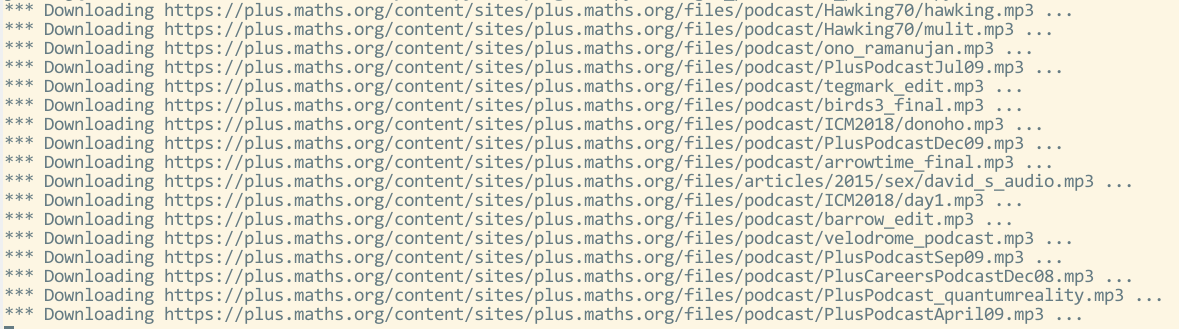
运行该程序,稍等片刻,就可以得到所有的Podcast资源了。
使用Python批量下载Plus上的Podcast的更多相关文章
- python——批量下载图片
前言 批量下载网页上的图片需要三个步骤: 获取网页的URL 获取网页上图片的URL 下载图片 例子 from html.parser import HTMLParser import urllib.r ...
- 用Python批量下载DACC的MODIS数据
本人初次尝试用Python批量下载DACC的MODIS数据,记下步骤,提醒自己,数据还在下载,成功是否未知,等待结果中...... 若有大佬发现步骤有不对之处,望指出,不胜感激. 1.下载Python ...
- 8行代码批量下载GitHub上的图片
[问题来源] 来打算写一个的小游戏,但是图片都在GitHub仓库中,GitHub网页版又没有批量下载图片的功能,只有单独一张一张的下载,所以自己就写了个爬虫脚本模拟人的操作把整个页面上需要的图片爬取下 ...
- 用python批量下载图片
一 写爬虫注意事项 网络上有不少有用的资源, 如果需要合理的用爬虫去爬取资源是合法的,但是注意不要越界,前一阶段有个公司因为一个程序员写了个爬虫,导致公司200多个人被抓,所以先进入正题之前了解下什么 ...
- python批量下载微信好友头像,微信头像批量下载
#!/usr/bin/python #coding=utf8 # 自行下载微信模块 itchat 小和QQ496631085 import itchat,os itchat.auto_login() ...
- 用python批量下载贴吧图片 附源代码
环境:windows 7 64位:python2.7:IDE pycharm2016.1 功能: 批量下载百度贴吧某吧某页的所有帖子中的所有图片 使用方法: 1.安装python2.7,安装re模块, ...
- Python 批量下载BiliBili视频 打包成软件
文章目录 很多人学习python,不知道从何学起.很多人学习python,掌握了基本语法过后,不知道在哪里寻找案例上手.很多已经做案例的人,却不知道如何去学习更加高深的知识.那么针对这三类人,我给大家 ...
- Python - 批量下载 IIS 共享的文件
1.说明 用 IIS 以WEB形式发布了本地文件夹,提供文件下载,并设置了访问权限:默认下载需要点击一个一个的下载,web界面如下: 3.脚本 执行脚本批量下载文件,会在当前目录创建文件夹,并压缩该文 ...
- python 批量下载图片
#coding=utf-8import re,sysimport urllib def getHtml(url): page = urllib.urlopen(url) html = page.rea ...
随机推荐
- TortoiseSVN版本管理的注意点
@2019-04-18 [小记] 1.强烈建议以项目(功能区别较大(单.双机做两个版本))为区别单独版本管理,这样可保证工程的延续性(能更好的使用更新.提交等功能)及避免后期提交时的混乱(.svn信息 ...
- Node的安装和进程管理
安装nvm git clone https://github.com/creationix/nvm.git source nvm/nvm.sh 安装node nvm install 6.14.4(版本 ...
- Neo4j安装
一.Windows版本 1)下载java8,并配置环境变量 java下载请点击,提取码:f6ci 2)Neo4j下载 选windows版本 新建系统环境变量: 并配置Path环境变量,添加bin所在目 ...
- Hadoop记录-切换NN
一.第一种方法 重启namenode(1.1.1.1 1.1.1.2)重启standby节点:1.1hadoop-daemon.sh stop zkfchadoop-daemon.sh stop na ...
- 【转】Nginx 学习笔记(十一)nginx下安装配置naxsi waf防火墙(附完整编译、配置)
原文地址:http://f2ex.cn/nginx-installed-configuration-naxsi-waf/ Naxsi 是第三方 nginx 模块 ,它和 Modsecurity 都是开 ...
- Docker实践之01-入门介绍
目录 一.Docker概述 镜像 容器 仓库 二.安装Docker 1.在CentOS上安装Docker 2.在Ubuntu上安装Docker 3.启动docker 4.建立Docker用户组 5.测 ...
- 34 springboot项目之间依赖导致bean 无法加载问题
方式一(OK) 模块A引入模块B ,但是模块B的bean一直注入不进来 原因: A模块的Application是在com.xx.xx包下,那么势必只能扫描到这个包下的bean, B模块的Applica ...
- WebGL&Three.js工作原理
一.我们讲什么? 我们讲两个东西:1.WebGL背后的工作原理是什么?2.以Three.js为例,讲述框架在背后扮演什么样的角色? 二.我们为什么要了解原理? 我们假定你对WebGL已经有一定了解,或 ...
- 迅为IMX6Q PLUS开发板烧写Android6.0系统方法
平台:迅为IMX6Q PLUS开发板工具:MfgTool2 工具 镜像文件在光盘目录“03 镜像_android 6.0.1 文件系统”下.其中商业级核心板为 2G内存镜像,工业级核心板为 1G 内存 ...
- subset_lat_dir.sh
#!/bin/bash # Copyright 2018 Jarvan Wang # Copyright 2017 Vimal Manohar # Apache 2.0. cmd=ru ...