
Android系统文件目录路径说明
系统数据存储路径,如下:其中应用程序包名为:com.spt
ContextWrapper类中,包含以下方法:
1. getFilesDir() --> 内部存储
    @Override

    public File getFilesDir() {

        return mBase.getFilesDir();

    }
k86m_QC机器上数据存储路径:/data/data/com.spt/files
华为手机上数据存储路径:/data/data/com.spt/files
2. getExternalFilesDir(String type) 参数指定为:Environment.DIRECTORY_PICTURES --> 外部存储
    @Override

    public File getExternalFilesDir(String type) {

        return mBase.getExternalFilesDir(type);

    }
k86m_QC机器上数据存储路径:/storage/sdcard0/Android/data/com.spt/files/Pictures
华为手机上数据存储路径:/storage/emulated/0/Android/data/com.spt/files/Pictures
3. getCacheDir() --> 内部存储
    @Override

    public File getCacheDir() {

        return mBase.getCacheDir();

    }
k86m_QC机器上数据存储路径:/data/data/com.spt/cache
华为手机上数据存储路径:/data/data/com.spt/cache
4. getExternalCacheDir() --> 外部存储
    @Override

    public File getExternalCacheDir() {

        return mBase.getExternalCacheDir();

    }
k86m_QC机器上数据存储路径:/storage/sdcard0/Android/data/com.spt/cache
华为手机上数据存储路径:/storage/emulated/0/Android/data/com.spt/cache
Environment类中,包含以下方法:
1. getDataDirctory()
    /**

     * Return the user data directory.

     */

    public static File getDataDirectory() {

        return DATA_DIRECTORY;

    }
k86m_QC机器上数据存储路径:/data
华为手机上数据存储路径:/data
2. getDownLoadCacheDirectory()
    /**

     * Return the download/cache content directory.

     */

    public static File getDownloadCacheDirectory() {

        return DOWNLOAD_CACHE_DIRECTORY;

    }
k86m_QC机器上数据存储路径:/cache
华为手机上数据存储路径:/cache
3. getExternalStorageDirectory()
    /**

     * Return the primary external storage directory. This directory may not

     * currently be accessible if it has been mounted by the user on their

     * computer, has been removed from the device, or some other problem has

     * happened. You can determine its current state with

     * {@link #getExternalStorageState()}.

     * <p>

     * <em>Note: don't be confused by the word "external" here. This directory

     * can better be thought as media/shared storage. It is a filesystem that

     * can hold a relatively large amount of data and that is shared across all

     * applications (does not enforce permissions). Traditionally this is an SD

     * card, but it may also be implemented as built-in storage in a device that

     * is distinct from the protected internal storage and can be mounted as a

     * filesystem on a computer.</em>

     * <p>

     * On devices with multiple users (as described by {@link UserManager}),

     * each user has their own isolated external storage. Applications only have

     * access to the external storage for the user they're running as.

     * <p>

     * In devices with multiple "external" storage directories, this directory

     * represents the "primary" external storage that the user will interact

     * with. Access to secondary storage is available through

     * <p>

     * Applications should not directly use this top-level directory, in order

     * to avoid polluting the user's root namespace. Any files that are private

     * to the application should be placed in a directory returned by

     * {@link android.content.Context#getExternalFilesDir

     * Context.getExternalFilesDir}, which the system will take care of deleting

     * if the application is uninstalled. Other shared files should be placed in

     * one of the directories returned by

     * {@link #getExternalStoragePublicDirectory}.

     * <p>

     * Writing to this path requires the

     * {@link android.Manifest.permission#WRITE_EXTERNAL_STORAGE} permission,

     * and starting in read access requires the

     * {@link android.Manifest.permission#READ_EXTERNAL_STORAGE} permission,

     * which is automatically granted if you hold the write permission.

     * <p>

     * Starting in {@link android.os.Build.VERSION_CODES#KITKAT}, if your

     * application only needs to store internal data, consider using

     * {@link Context#getExternalFilesDir(String)} or

     * {@link Context#getExternalCacheDir()}, which require no permissions to

     * read or write.

     * <p>

     * This path may change between platform versions, so applications should

     * only persist relative paths.

     * <p>

     * Here is an example of typical code to monitor the state of external

     * storage:

     * <p>

     * {@sample

     * development/samples/ApiDemos/src/com/example/android/apis/content/ExternalStorage.java

     * monitor_storage}

     *

     * @see #getExternalStorageState()

     * @see #isExternalStorageRemovable()

     */

    public static File getExternalStorageDirectory() {

        throwIfUserRequired();

        return sCurrentUser.getExternalDirsForApp()[0];

    }
k86m_QC机器上数据存储路径:/storage/sdcard0
华为手机上数据存储路径:/storage/emulated/0
4. getRootDirectory()
    /**

     * Return root of the "system" partition holding the core Android OS.

     * Always present and mounted read-only.

     */

    public static File getRootDirectory() {

        return DIR_ANDROID_ROOT;

    }
k86m_QC机器上数据存储路径:/system
华为手机上数据存储路径:/system
5. getExternalStoragePublicDirectory(String type)
    /**

     * Get a top-level public external storage directory for placing files of

     * a particular type.  This is where the user will typically place and

     * manage their own files, so you should be careful about what you put here

     * to ensure you don't erase their files or get in the way of their own

     * organization.

     *

     * <p>On devices with multiple users (as described by {@link UserManager}),

     * each user has their own isolated external storage. Applications only

     * have access to the external storage for the user they're running as.</p>

     *

     * <p>Here is an example of typical code to manipulate a picture on

     * the public external storage:</p>

     *

     * {@sample development/samples/ApiDemos/src/com/example/android/apis/content/ExternalStorage.java

     * public_picture}

     *

     * @param type The type of storage directory to return.  Should be one of

     * {@link #DIRECTORY_MUSIC}, {@link #DIRECTORY_PODCASTS},

     * {@link #DIRECTORY_RINGTONES}, {@link #DIRECTORY_ALARMS},

     * {@link #DIRECTORY_NOTIFICATIONS}, {@link #DIRECTORY_PICTURES},

     * {@link #DIRECTORY_MOVIES}, {@link #DIRECTORY_DOWNLOADS}, or

     * {@link #DIRECTORY_DCIM}.  May not be null.

     *

     * @return Returns the File path for the directory.  Note that this

     * directory may not yet exist, so you must make sure it exists before

     * using it such as with {@link File#mkdirs File.mkdirs()}.

     */

    public static File getExternalStoragePublicDirectory(String type) {

        throwIfUserRequired();

        return sCurrentUser.buildExternalStoragePublicDirs(type)[0];

    }
k86m_QC机器上数据存储路径:/storage/sdcard0/Pictures
华为手机上数据存储路径:/storage/emulated/0/Pictures
Internal Storage和External Storage的区别:
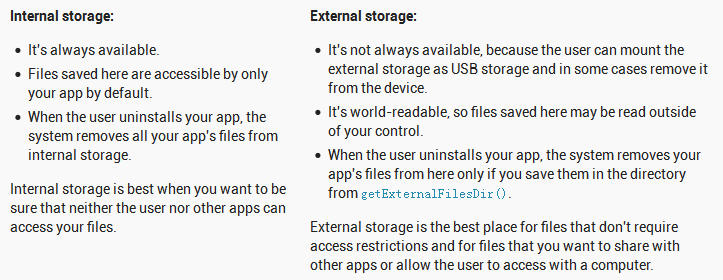
getFilesDir() --> 内部存储 /data/data/com.spt/files
getCacheDir() --> 内部存储 /data/data/com.spt/cache
内部存储,对应的是特定的应用程序,如上所述指的是包名为:com.spt应用程序
getExternalFilesDir(String type) --> 外部存储 /storage/sdcard0/Android/data/com.spt/files/Pictures
getExternalCacheDir() --> 外部存储 /storage/sdcard0/Android/data/com.spt/cache
getExternalStoragePublicDirectory(String type) --> 外部存储 /storage/sdcard0/Pictures
getExternalStorageDirectory() --> 外部存储 /storage/sdcard0
1. 外部存储,对应的是/storage/sdcard0/目录;
2. private files:如果需要在卸载应用程序时,删除所有该应用程序的外部存储(同时,该数据是本应用程序私有的),可以使用:getExternalFilesDir(String type)目录,带有应用程序包名;

3. public files可以存放在:getExternalStoragePublicDirectory(String type)
P.S.
对于特定的智能后视镜设备:Flash --> /mnt/sdcard 硬盘大小 外部存储路径:/storage/sdcard1" 外设的存储设备
Android系统文件目录路径说明的更多相关文章
- Android系统文件目录
- Android系统在超级终端下必会的命令大全(adb shell命令大全)
. 显示系统中全部Android平台: android list targets . 显示系统中全部AVD(模拟器): android list avd . 创建AVD(模拟器): android c ...
- Android系统的开机画面显示过程分析
文章转载至CSDN社区罗升阳的安卓之旅,原文地址:http://blog.csdn.net/luoshengyang/article/details/7691321 好几个月都没有更新过博客了,从今天 ...
- 【Android 系统开发】CyanogenMod 13.0 源码下载 编译 ROM 制作 ( 手机平台 : 小米4 | 编译平台 : Ubuntu 14.04 LTS 虚拟机)
分类: Android 系统开发(5) 作者同类文章X 版权声明:本文为博主原创文章 ...
- Android系统级技巧合集
Android系统级技巧合集(随时更新) #转载请注明来源# 1.高通骁龙系列查看CPU体质等级 CPU体质,即为CPU在工作频率下的电压.同一批次的CPU体质各有不同,体质越高,代表该颗CPU可在更 ...
- Android系统编译【转】
本文转载自;http://blog.csdn.net/zirconsdu/article/details/8005415 Android编译系统分析 概要 由于android编译系统的复杂和使用了不熟 ...
- Android系统关机或重启的几种实现方式
前阵子工作上遇到一些关于Android系统关机或重启的系统修改,于是,做了一些尝试,也搜集了一下资料,现在整理一下,做一些总结,方便学习或者日后工作的需要. 默认的SDK并没有提供应用开发者直接的An ...
- Android系统加载Apk文件的时机和流程分析(1)--Android 4.4.4 r1的源码
本文博客地址:https://blog.csdn.net/QQ1084283172/article/details/80982869 Android系统在启动时安装应用程序的过程,这些应用程序安装好之 ...
- Android系统编程入门系列之应用数据文件化保存
应用中关于数据的持久化保存,不管是简单的SharedPreferences还是数据库SQLiteDatabase,本质上都是将数据保存到系统的某种类型的文件中.因此可以直接使用java.io.File ...
随机推荐
- Java基础 -- final关键字
在java的关键字中,static和final是两个我们必须掌握的关键字.不同于其他关键字,他们都有多种用法,而且在一定环境下使用,可以提高程序的运行性能,优化程序的结构.下面我们来了解一下final ...
- mysql加速导入数据的简单设置
mysql加速导入数据的简单设置 # 修改前查询参数值 show variables like 'foreign_key_checks'; show variables like 'unique_ch ...
- 浅谈js中的this关键字
---恢复内容开始--- this是JavaScript中的关键字之一,在编写程序的时候经常会用到,正确的理解和使用关键字this尤为重要.接下来,笔者就从作用域的角度粗谈下自己对this关键字的理解 ...
- 机器学习 - 损失计算-softmax_cross_entropy_with_logits
tf.nn.softmax_cross_entropy_with_logits(logits, labels, name=None) 第一个参数logits:就是神经网络最后一层的输出 第二个参数la ...
- 报表工具-ECharts 特性介绍
ECharts 特性介绍 ECharts,一个纯 Javascript 的图表库,可以流畅的运行在 PC 和移动设备上,兼容当前绝大部分浏览器(IE8/9/10/11,Chrome,Firefox,S ...
- cmd 命令添加防火墙端口
windows dos 命令添加防火墙端口. 示例 123 端口: netsh firewall add portopening protocol = UDP port = name = NTPSER ...
- js中精度问题以及解决方案
js中的数字按照IEEE 754的标准,使用64位双精度浮点型来表示.其中符号位S,指数位E,尾数位M分别占了1,11,52位,并且在ES5规范中指出了指数位E的取值范围是[-1074, 971]. ...
- anaconda3安装cv2模块(python3.6)
- 第二周 数据分析之展示 Matplotlib库入门
Matplotlib库介绍:优秀的数据可视化第三方库 使用:Matplotlib库由各种可视化类构成,内部结构复杂,受Matlab启发,matplotlib.pyplot是绘制各类可视化图形的命令子库 ...
- css好看的银行卡号样式
.cardNo { font-size: 17px; font-family: menlo,tahoma; text-shadow: 1px 1px 2px #666; line-height: 18 ...