
baiduMap & MapV 简单demo
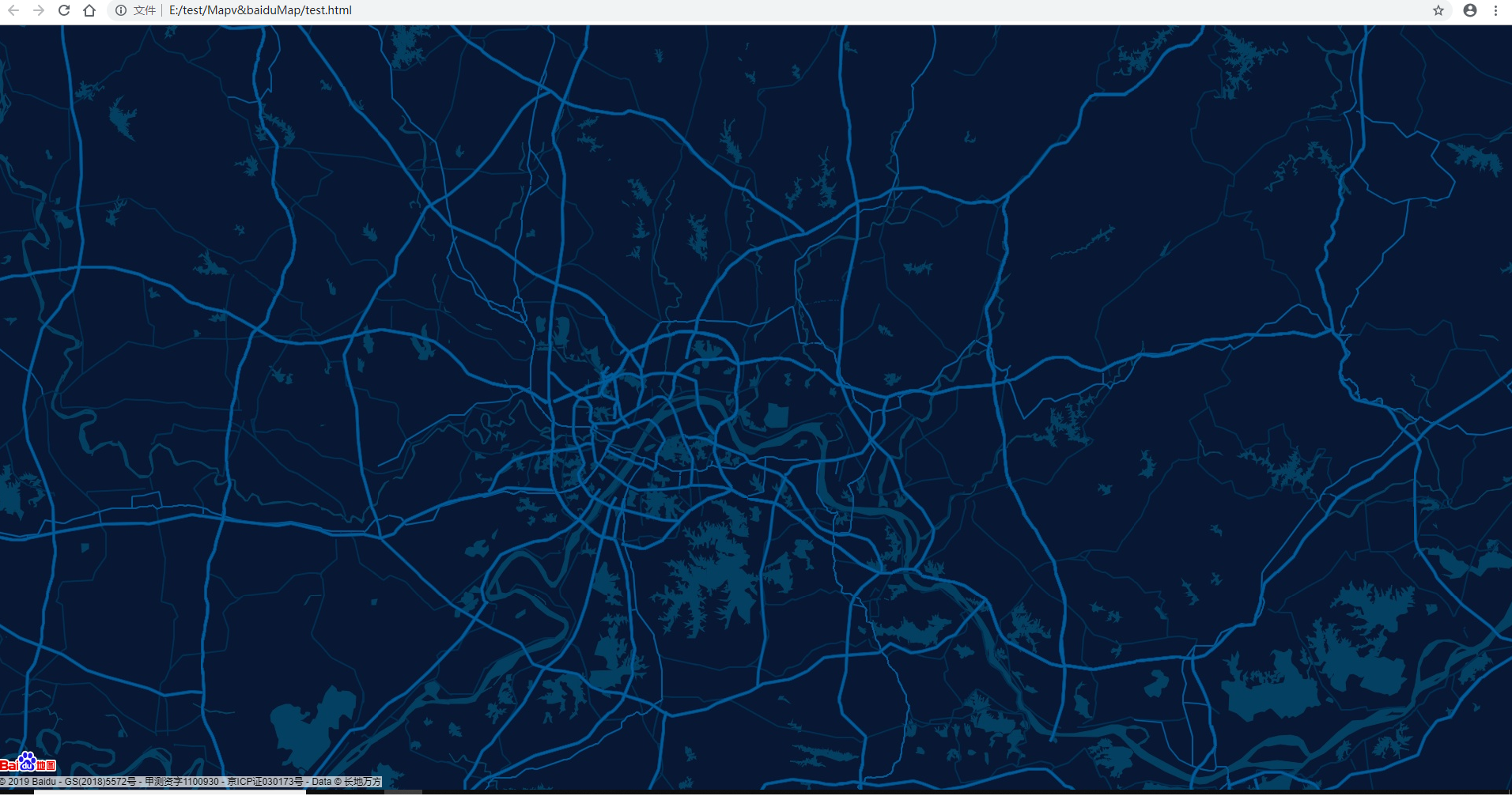
看到 MapV 的一个demo 的底图比较好看,练练手
MapV demos:https://mapv.baidu.com/examples/
参考的demo:https://mapv.baidu.com/examples/#baidu-map-polyline-time.html
需要注册一个百度地图密钥:http://lbsyun.baidu.com/index.php?title=jspopular/guide/getkey 免费的 注册很简单
需要的 js 包都换成在线的,另外直接使用 demo 的源码会报错,原因未找到,后来参考百度地图api帮助文档的 异步加载 demo 走通了。
代码如下: 只需要修改其中的 “您的百度地图ak” ,新建 xxx.html 文件,将代码粘贴进去,保存,双击浏览器打开就行。
<!DOCTYPE html>
<html>
<head>
    <meta charset="UTF-8">
    <title></title>

    <style type="text/css">
        html, body {
            width: 100%;
            height: 100%;
            margin: 0;
            padding: 0;
            overflow: hidden;
        }

        #map {
            width: 100%;
            height: 100%;
        }
    </style>
</head>
<body>

    <div id="map"></div>
    <canvas id="canvas"></canvas>

    <script type="text/javascript" src="http://apps.bdimg.com/libs/jquery/2.1.1/jquery.min.js"></script>
    <script src="http://mapv.baidu.com/build/mapv.min.js"></script>

    <script type="text/javascript">
    function loadScript() {
      var script = document.createElement("script");
      script.src = "http://api.map.baidu.com/api?v=2.0&ak="您的百度地图ak"&callback=initialize";
      document.body.appendChild(script);

    }
    window.onload = loadScript;
    function initialize() {
      // 百度地图API功能
        var map = new BMap.Map("map", {
            enableMapClick: false
        });    // 创建Map实例
        map.centerAndZoom(new BMap.Point(114.321317, 30.598428), 12);  // 初始化地图,设置中心点坐标和地图级别
        map.enableScrollWheelZoom(true); // 开启鼠标滚轮缩放

        // 地图自定义样式
        map.setMapStyle({
            styleJson: [{
                "featureType": "water",
                "elementType": "all",
                "stylers": {
                    "color": "#044161"
                }
            }, {
                "featureType": "land",
                "elementType": "all",
                "stylers": {
                    "color": "#091934"
                }
            }, {
                "featureType": "boundary",
                "elementType": "geometry",
                "stylers": {
                    "visibility": "off"
                }
            }, {
                "featureType": "railway",
                "elementType": "all",
                "stylers": {
                    "visibility": "off"
                }
            }, {
                "featureType": "highway",
                "elementType": "geometry",
                "stylers": {
                    "color": "#004981"
                }
            }, {
                "featureType": "highway",
                "elementType": "geometry.fill",
                "stylers": {
                    "color": "#005b96",
                    "lightness": 1
                }
            }, {
                "featureType": "highway",
                "elementType": "labels",
                "stylers": {
                    "visibility": "on"
                }
            }, {
                "featureType": "arterial",
                "elementType": "geometry",
                "stylers": {
                    "color": "#004981",
                    "lightness": -39
                }
            }, {
                "featureType": "arterial",
                "elementType": "geometry.fill",
                "stylers": {
                    "color": "#00508b"
                }
            }, {
                "featureType": "poi",
                "elementType": "all",
                "stylers": {
                    "visibility": "off"
                }
            }, {
                "featureType": "green",
                "elementType": "all",
                "stylers": {
                    "color": "#056197",
                    "visibility": "off"
                }
            }, {
                "featureType": "subway",
                "elementType": "all",
                "stylers": {
                    "visibility": "off"
                }
            }, {
                "featureType": "manmade",
                "elementType": "all",
                "stylers": {
                    "visibility": "off"
                }
            }, {
                "featureType": "local",
                "elementType": "all",
                "stylers": {
                    "visibility": "off"
                }
            }, {
                "featureType": "arterial",
                "elementType": "labels",
                "stylers": {
                    "visibility": "off"
                }
            }, {
                "featureType": "boundary",
                "elementType": "geometry.fill",
                "stylers": {
                    "visibility": "off"
                }
            }, {
                "featureType": "building",
                "elementType": "all",
                "stylers": {
                    "color": "#1a5787"
                }
            }, {
                "featureType": "label",
                "elementType": "all",
                "stylers": {
                    "visibility": "off"
                }
            }, {
                "featureType": "poi",
                "elementType": "labels.text.fill",
                "stylers": {
                    "color": "#ffffff"
                }
            }, {
                "featureType": "poi",
                "elementType": "labels.text.stroke",
                "stylers": {
                    "color": "#1e1c1c"
                }
            }, {
                "featureType": "administrative",
                "elementType": "labels",
                "stylers": {
                    "visibility": "off"
                }
            },{
                "featureType": "road",
                "elementType": "labels",
                "stylers": {
                    "visibility": "off"
                }
            }]
        });

    }

        </script>

</body>
</html>
效果:
baiduMap & MapV 简单demo的更多相关文章
- 设计模式之单例模式的简单demo
/* * 设计模式之单例模式的简单demo */ class Single { /* * 创建一个本类对象. * 和get/set方法思想一样,类不能直接调用对象 * 所以用private限制权限 * ...
- Spring的简单demo
---------------------------------------- 开发一个Spring的简单Demo,具体的步骤如下: 1.构造一个maven项目 2.在maven项目的pom.xml ...
- 使用Spring缓存的简单Demo
使用Spring缓存的简单Demo 1. 首先创建Maven工程,在Pom中配置 <dependency> <groupId>org.springframework</g ...
- Managed DirectX中的DirectShow应用(简单Demo及源码)
阅读目录 介绍 准备工作 环境搭建 简单Demo 显示效果 其他 Demo下载 介绍 DirectX是Microsoft开发的基于Windows平台的一组API,它是为高速的实时动画渲染.交互式音乐和 ...
- angular实现了一个简单demo,angular-weibo-favorites
前面必须说一段 帮客户做了一个过渡期的项目,唯一的要求就是速度,我只是会点儿基础的php,于是就用tp帮客户做了这个项目.最近和客户架构沟通,后期想把项目重新做一下,就用现在最流行的技术,暂时想的使用 ...
- Solr配置与简单Demo[转]
Solr配置与简单Demo 简介: solr是基于Lucene Java搜索库的企业级全文搜索引擎,目前是apache的一个项目.它的官方网址在http://lucene.apache.org/sol ...
- 二维码简单Demo
二维码简单Demo 一.视图 @{ Layout = null; } <!DOCTYPE html> <html> <head> <meta name=&qu ...
- android JNI 简单demo(2)它JNI demo 写
android JNI 简单demo(2)它JNI demo 写 一.搭建Cygwin 环境:http://blog.csdn.net/androidolblog/article/details/25 ...
- Ext简单demo示例
<!DOCTYPE HTML PUBLIC "-//W3C//DTD HTML 4.01//EN" "http://www.w3.org/TR/html4/stri ...
随机推荐
- Prisma GraphQL 服务器 生产者 "https://www.prisma.io"
Prisma 一个 GraphQL 服务器 生产者 "https://www.prisma.io" , 关注一下
- crontab每隔1天执行【转】
有个需求,crontab任务需要每隔1天执行,有俩个方法,如下: 第一种方法,利用crontab执行 */ * * shellscript 但是这种方法有个问题,就是有个月份有31天,导致本月31号和 ...
- lnmp 1.5 mysql数据库开启远程访问
LNMP默认是禁止远程连接数据库的,但是有时候为了方便,我们想要远程,下面是开启远程的方法 sudo su # 切换为root用户模式,省的接下来操作的时候出现权限问题 mysql -u root - ...
- jxl应用事例
实例中主要目的是解析jxl使用流程以及jxl绘制Excel的写法思路,代码掩去了项目中的真实数据,请根据需求酌情修改,如果有帮助到有需要的人,不胜欢喜. Dao层为查询数据库,返回list数据,此处省 ...
- 关于在windows上远行的虚拟机为ubuntu16.04中不能复制和粘贴的问题解决方案
Linux安装 VMware tools 工具解决复制和粘贴的方法 VMware虚拟机中如何安装VMWare-Tools详解好处:可以支持图形界面,可以支持共享文件功能等 1 工具/原料 1)安装过虚 ...
- python 2.7 数据结构之列表list: 基础面试总结
python 列表函数及方法: 函数如下: 1 cmp(list1,list2) 比较两个列表中的元素 2 len(list) 列表元素个数 3 max(list) 返回列表元素最大值 4 min(l ...
- c++ explicit 构造函数
代码 #include<iostream> using namespace std; class Example { private: int data; public: Example( ...
- Spring Boot+CXF搭建WebService(转)
概述 最近项目用到在Spring boot下搭建WebService服务,对Java语言下的WebService了解甚少,而今抽个时间查阅资料整理下Spring Boot结合CXF打架WebServi ...
- python 代理
1.参考 http://docs.python-requests.org/en/master/user/advanced/ Using Python’s urllib2 or Requests wit ...
- 002 python准备做题的一些准备
在这里,刷刷题,然后,将比较有用的连接粘贴一下在这里.