
【原创】大叔经验分享(50)hue访问mysql(librdbms)
cloudera manager安装hue后想开启访问mysql(librdbms)需要在这里配置(hue_safety_valve.ini)
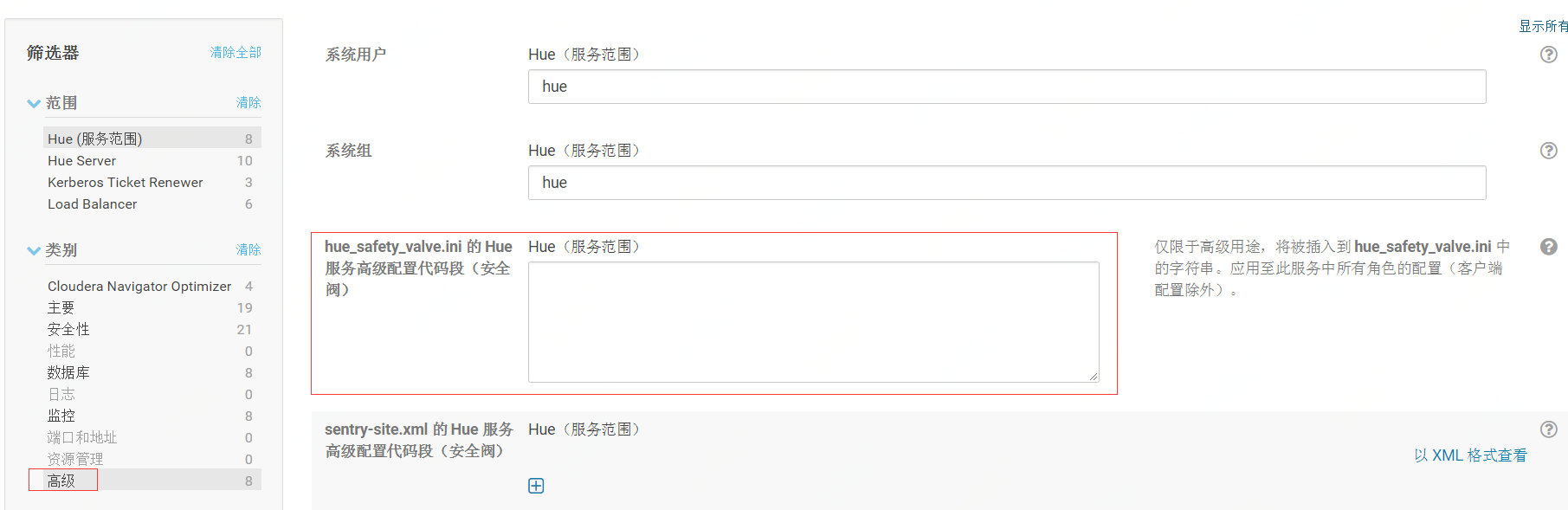
添加配置如下
[librdbms]

  # The RDBMS app can have any number of databases configured in the databases

  # section. A database is known by its section name

  # (IE sqlite, mysql, psql, and oracle in the list below).

  [[databases]]

    # mysql, oracle, or postgresql configuration.

    [[[mysql]]]

      # Name to show in the UI.

      nice_name="db_dataone"

      # For MySQL and PostgreSQL, name is the name of the database.

      # For Oracle, Name is instance of the Oracle server. For express edition

      # this is 'xe' by default.

      name=db_dataone

      # Database backend to use. This can be:

      # 1. mysql

      # 2. postgresql

      # 3. oracle

      engine=mysql

      # IP or hostname of the database to connect to.

      host=192.168.0.1

      # Port the database server is listening to. Defaults are:

      # 1. MySQL: 3306

      # 2. PostgreSQL: 5432

      # 3. Oracle Express Edition: 1521

      port=3306

      # Username to authenticate with when connecting to the database.

      user=root

      # Password matching the username to authenticate with when

      # connecting to the database.

      password=123456

      # Database options to send to the server when connecting.

      # https://docs.djangoproject.com/en/1.4/ref/databases/

      ## options={}
注意:[[databases]]下可添加多个[[[mysql]]]或其他数据库,如果有多个mysql,分别命名为[[[mysql1]]],[[[mysql2]]]或其他名字区分
除此之外,还要添加notebook
[notebook]

[[interpreters]]

[[[impala]]]

name=Impala

[[[hive]]]

name=Hive

[[[mysql]]]

name=Mysql

interface=rdbms

[[[java]]]

name=Java

interface=oozie

[[[spark2]]]

name=Spark

interface=oozie

[[[shell]]]

name=Shell

interface=oozie

[[[sqoop1]]]

name=Sqoop1

interface=oozie

[[[distcp]]]

name=Distcp

interface=oozie
此处略去了不需要的Pig和MapReduce等;
然后重启hue
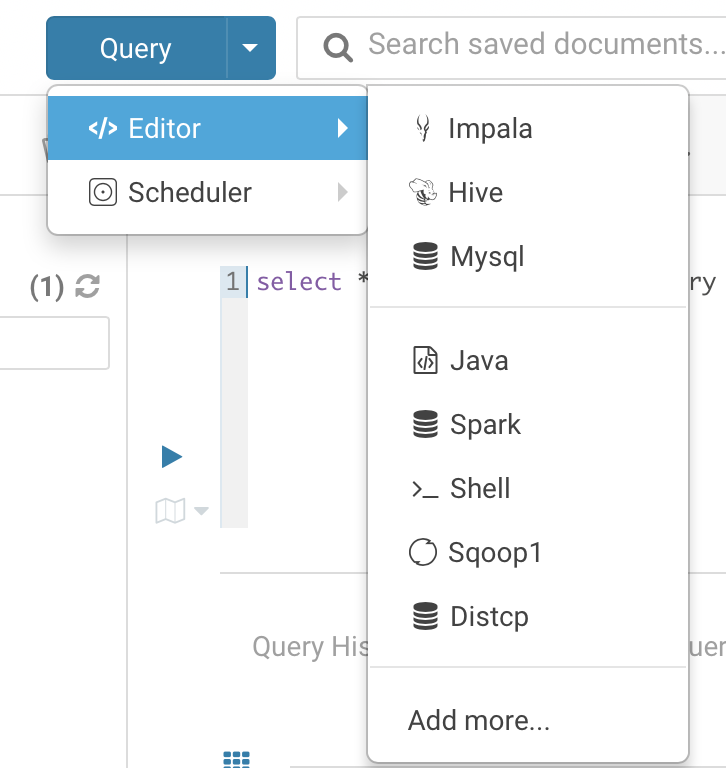
如果要添加多个mysql,如下配置:
[librdbms]

[[databases]]

[[[mysql1]]]

...

[[[mysql2]]]

...

[notebook]

[[interpreters]]

[[[mysql1]]]

...

[[[mysql2]]]

...
参考:
https://community.cloudera.com/t5/Web-UI-Hue-Beeswax/Hue-db-editor-permissions/td-p/78298
http://cloudera.github.io/hue/docs-4.4.0/user/editor/
http://cloudera.github.io/hue/latest/administrator/configuration/editor/
【原创】大叔经验分享(50)hue访问mysql(librdbms)的更多相关文章
- 【原创】大叔经验分享(79)mysql内存设置
mysql内存设置,首先要知道当前的设置 MySQL [(none)]> show variables like '%buffer%'; +--------------------------- ...
- 【原创】大叔经验分享(72)mysql时区
查看当前时区 > show variables like '%time_zone%'; +------------------+--------+ | Variable_name | Value ...
- 【原创】经验分享:一个小小emoji尽然牵扯出来这么多东西?
前言 之前也分享过很多工作中踩坑的经验: 一个线上问题的思考:Eureka注册中心集群如何实现客户端请求负载及故障转移? [原创]经验分享:一个Content-Length引发的血案(almost.. ...
- 【原创】大叔经验分享(49)hue访问hdfs报错/hue访问oozie editor页面卡住
hue中使用hue用户(hue admin)访问hdfs报错: Cannot access: /. Note: you are a Hue admin but not a HDFS superuser ...
- 【原创】大叔经验分享(94)jdbc连接mysql、sqlserver、oracle
Mysql driver下载:https://mvnrepository.com/artifact/mysql/mysql-connector-java import java.sql.*; publ ...
- 【原创】大叔经验分享(86)hive和mysql数据互导
hive和mysql数据互导,首先想到的是sqoop,并且可以和调度框架(比如oozie等)配合配置定时任务,还有一种更简单的方式是通过spark-sql: CREATE OR REPLACE TEM ...
- 【原创】大叔经验分享(57)hue启动coordinator时报错
hue启动coordinator时报错,页面返回undefinied错误框: 后台日志报错: runcpserver.log [13/May/2019 04:34:55 -0700] middlewa ...
- 【原创】大叔经验分享(56)hue导出行数限制
/opt/cloudera/parcels/CDH/lib/hue/apps/beeswax/src/beeswax/conf.py # Deprecated DOWNLOAD_CELL_LIMIT ...
- 【原创】大叔经验分享(30)CM开启kerberos
kerberos安装详见:https://www.cnblogs.com/barneywill/p/10394164.html 一 为CM创建用户 # kadmin.local -q "ad ...
随机推荐
- Java Core - ‘==’和‘equals’的区别
不管是‘==’还是‘equals’,他们的比较都需要区分类型来讨论的: ‘==’ 当比较的数据类型是基本类型时,比较值是否相同 当比较的数据类型是引用类型时,不仅比较值相同还比较其所在内存地址是否相同 ...
- jQuery的deferred对象实战应用(附:Exchar动态多条数据展示并在topic展示详细数据)
解决三个后台请求都成功后先比较数据再处理数据的需求 今天碰到了一个问题,我需要创建一个图表,但是需要请求三个接口才能比较出指标数据,于是就看到了deferred对象 理论的补充在这里:http://w ...
- js工具方法
获取页面链接中的参数,以数组形式返回: function getParamsFromHref() { var parameters = window.location.search.substr(1) ...
- python模拟登陆Github示例
首先进入github登录页:https://github.com/login 输入账号密码,打开开发者工具,在Network页勾选上Preserve Log(显示持续日志),点击登录,查看Sessio ...
- 偶写的第一个控件,一个用选择代替输入的Edit控件…
FDataSource :=TDataSource.Create(self); FDBGrid.FreeNotification(self); FADOQuery.FreeNotification(s ...
- Async/Await 学习与示例
参考:Async/await学习 es 7 提供了对 promise 对象的更好的操作,省去了很多丧心病狂的链式异步请求,promise 是回调地狱的福音,而 Async/Await 则是 promi ...
- Java 学习(1)----- java 学习的总体感觉
好久没有更新博客了,是因为最近在集中精力学习java, Java 的基础知识确实是比 js 多太多了. 学习java 断断续续的差不多有一年左右的时间, 这一年来,感觉懂了一点,过一段时间又忘记了,总 ...
- THUWC2019 游记
DAY1 开场先看 t1,发现答案的分子就是 \(\sum_i\) 颜色 \(i\) 在 A 中的出现次数乘上颜色 \(i\) 在 B 中的出现次数,分母就是 B 的长度,就去写了一个按颜色的出现次数 ...
- 快速去水印(win10换图3D工具)
之前抠图都用ps啥的,后来发现win10自带的工具画图3D可以直接扣简单的图案,达到去水印的效果 1.将图片放入软件中 2.使用神奇选择工具,调整大小,框出图标 3.点击下一步,将没选上的或选多的进行 ...
- String方法,js中Array方法,ES5新增Array方法,以及jQuery中Array方法
相关阅读:https://blog.csdn.net/u013185654/article/details/78498393 相关阅读:https://www.cnblogs.com/huangyin ...