
【.Net Core】ZipFile类--文件的压缩解压
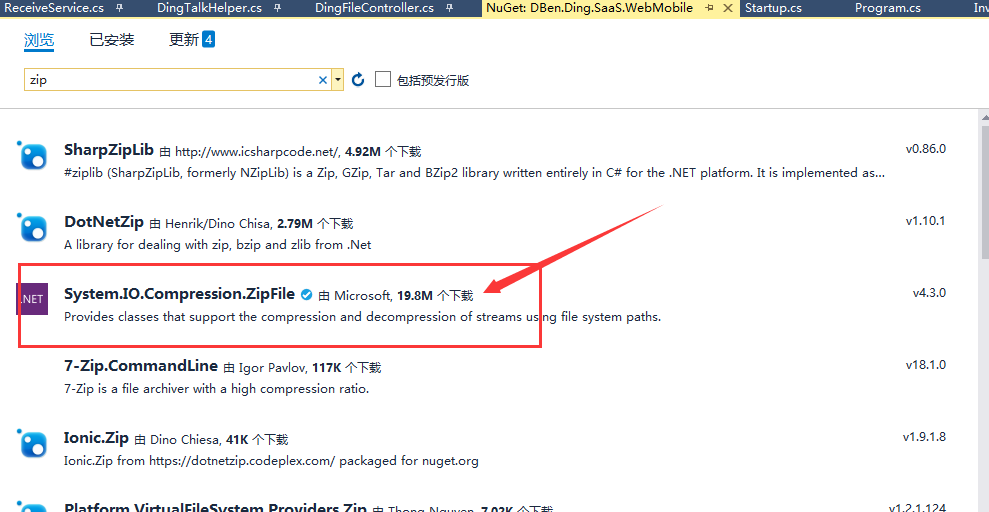
NuGet引用官网自带的System.IO.Compression.ZipFile;
var filename = "测试压缩解压文件";

var path = Directory.GetCurrentDirectory() + "/wwwroot/file/" + filename + ".pdf";

//这里是获取到文件的byte数组

byte[] fileBuffer1 = Convert.FromBase64String(invData);

//将byte数组转换为文件并保存到指定地址

FileSystem.Bytes2File(fileBuffer1, path);

//添加文件到指定压缩文件中

ZipFile.CreateFromDirectory(Directory.GetCurrentDirectory() + "/wwwroot/file", Directory.GetCurrentDirectory() + "/wwwroot/" + zipFileName);

//删除文件夹下的所有文件

FileSystem.DeleteDirAllFile(Directory.GetCurrentDirectory() + "/wwwroot/file/");

byte[] fileBuffer;

//文件转成byte二进制数组

fileBuffer = FileSystem.File2Bytes(Directory.GetCurrentDirectory() + "/wwwroot/" + zipFileName);

//这里开始上传文件
//将指定 zip 存档中的所有文件都解压缩到文件系统的一个目录下

ZipFile.ExtractToDirectory(Directory.GetCurrentDirectory() + "/wwwroot/" + zipFileName,Directory.GetCurrentDirectory() + "/wwwroot/file");
 public class FileSystem

    {

        /// <summary>

        /// 将byte数组转换为文件并保存到指定地址

        /// </summary>

        /// <param name="buff">byte数组</param>

        /// <param name="savepath">保存地址</param>

        public static void Bytes2File(byte[] buff, string savepath)

        {

            if (System.IO.File.Exists(savepath))

            {

                System.IO.File.Delete(savepath);

            }

            FileStream fs = new FileStream(savepath, FileMode.CreateNew);

            BinaryWriter bw = new BinaryWriter(fs);

            bw.Write(buff, , buff.Length);

            bw.Close();

            fs.Close();

        }

        /// <summary>

        /// 将文件转换为byte数组

        /// </summary>

        /// <param name="path">文件地址</param>

        /// <returns>转换后的byte数组</returns>

        public static byte[] File2Bytes(string path)

        {

            if (!System.IO.File.Exists(path))

            {

                return new byte[];

            }

            FileInfo fi = new FileInfo(path);

            byte[] buff = new byte[fi.Length];

            FileStream fs = fi.OpenRead();

            fs.Read(buff, , Convert.ToInt32(fs.Length));

            fs.Close();

            return buff;

        }

        /// <summary>

        /// 删除文件夹下的所有文件

        /// </summary>

        /// <param name="dirRoot"></param>

        public static void DeleteDirAllFile(string dirRoot)

        {

            DirectoryInfo aDirectoryInfo = new DirectoryInfo(Path.GetDirectoryName(dirRoot));

            FileInfo[] files = aDirectoryInfo.GetFiles("*.*", SearchOption.AllDirectories);

            foreach (FileInfo f in files)

            {

                File.Delete(f.FullName);

            }

        }

    }
【.Net Core】ZipFile类--文件的压缩解压的更多相关文章
- PHP扩展类ZipArchive实现压缩解压Zip文件和文件打包下载 && Linux下的ZipArchive配置开启压缩 &&搞个鸡巴毛,写少了个‘/’号,浪费了一天
PHP ZipArchive 是PHP自带的扩展类,可以轻松实现ZIP文件的压缩和解压,使用前首先要确保PHP ZIP 扩展已经开启,具体开启方法就不说了,不同的平台开启PHP扩增的方法网上都有,如有 ...
- PHP扩展类ZipArchive实现压缩解压Zip文件和文件打包下载
文章转载自:https://my.oschina.net/junn/blog/104464 PHP ZipArchive 是PHP自带的扩展类,可以轻松实现ZIP文件的压缩和解压,使用前首先要确保PH ...
- python对文件的压缩解压
python自带的zipfile的模块支持对文件的压缩和解压操作 zipfilp.ZipFile 表示创建一个zip对象 zipfile.ZipFile(file[, mode[, compressi ...
- Linux_文件打包,压缩,解压
一.压缩命令 文件格式:*.gz 命令:gzip 文件名 (ps:不能压缩目录,切压缩后不保留原文件) 压缩前 -rw-r--r--. 1 root root 315 Sep 6 21:03 df.t ...
- 使用PHP对文件进行压缩解压(zip)
使用虚拟主机进行文件上传时最常用的工具莫过于FTP了,但是使用FTP有一个弊端就是文件太多时上传或下载速度比较慢,如果上传时将文件打包,上传后在 空间解压缩,同样下载前将文件打包压缩以压缩包的形式下载 ...
- C++ 使用老牌库xzip & unzip对文件进行压缩解压
原文链接 https://www.codeproject.com/Articles/7530/Zip-Utils-clean-elegant-simple-C-Win https://www.code ...
- linux笔记:linux常用命令-压缩解压命令
压缩解压命令:gzip(压缩文件,不保留原文件.这个命令不能压缩目录) 压缩解压命令:gunzip(解压.gz的压缩文件) 压缩解压命令:tar(打包压缩目录或者解压压缩文件.打包的意思是把目录打包成 ...
- Linux下解包/打包,压缩/解压命令
.tar 解包:tar xvf FileName.tar 打包:tar cvf fileName.tar DirName tar.gz和.tgz 解压:tar zxvf FileName.tar.zi ...
- [Linux] 016 压缩解压命令
1. 压缩解压命令:gzip 命令名称:gzip 命令所在路径:/bin/gzip 执行权限:所有用户 语法:gzip [文件] 功能描述:压缩文件 压缩后文件的格式:.gz 补充: 解压 .rar ...
随机推荐
- conda 查看已有环境
conda info -e # conda environments: # dlcv /Users/enzhao/suanec/libs/anaconda2/envs/dlcv py36 /Users ...
- 企业IT管理员IE11升级指南【12】—— 兼容视图列表介绍
企业IT管理员IE11升级指南 系列: [1]—— Internet Explorer 11增强保护模式 (EPM) 介绍 [2]—— Internet Explorer 11 对Adobe Flas ...
- 关于 Senparc.Weixin.Cache.Redis 引用的 StackExchange.Redis 版本不匹配的反馈测试
推测原因是老系统中有地方引用了旧版本的 StackExchange.Redis,原因是 StackExchange.Redis 1.2.6 版本未提供针对 .net 4.6 以上的支持,导致库引用会失 ...
- 实战深度学习(上)OpenCV库
在如今人工智能的浪潮下,无数模拟机器学习和深度学习的开发者工具倍出,其中在计算机图形学和计算机视觉里面最流行的一个库就是OpenCV库了.计算机图形学和计算机视觉学在我们的自动驾驶和仿生机器人当中有着 ...
- [SQL]LeetCode176. 第二高的薪水 | Second Highest Salary
Write a SQL query to get the second highest salary from the Employee table. +----+--------+ | Id | S ...
- [Swift]LeetCode911. 在线选举 | Online Election
In an election, the i-th vote was cast for persons[i] at time times[i]. Now, we would like to implem ...
- 低延时的P2P HLS直播技术实践
本文根据4月21日OSC源创会·武汉站的现场分享为蓝本,重新整理.以下是演讲内容: 近几年,随着直播.短视频等视频领域对带宽要求的提升以及CDN行业竞争的加剧,很多CDN公司开始往P2P-CDN方向发 ...
- jni c++
java与c/c++之间的数据交互 JNI 上述两篇文章对jni的讲解比较详细,各有利弊,就文章1来说,开门见山,直接阐述了java和C/C++的交互方式:文章2是一篇百度文库 ...
- 并发编程(七)——AbstractQueuedSynchronizer 之 CountDownLatch、CyclicBarrier、Semaphore 源码分析
这篇,我们的关注点是 AQS 最后的部分,共享模式的使用.本文先用 CountDownLatch 将共享模式说清楚,然后顺着把其他 AQS 相关的类 CyclicBarrier.Semaphore 的 ...
- windows部署MongoDB
打开MongoDb下载页面,分别下载Community Server和Compass,注意在安装Community Server时可以勾选同时安装Compass,但会比较慢,所以建议两个分开下载安装. ...