
django - 总结 - form表单
{{ form.as_table }} 以表格的形式将它们渲染在<tr> 标签中

{{ form.as_p }} 将它们渲染在<p> 标签中

{{ form.as_ul }} 将它们渲染在<li> 标签中
 <form action="" method="post" novalidate>

     {% csrf_token %}

     <p>{{ form.name.label }}

         {{ form.name }}

         <span class="pull-right error">{{ form.name.errors.0 }}</span>

     </p>

     <p>{{ form.pwd.label }}

         {{ form.pwd }}

         <span class="pull-right error">{{ form.pwd.errors.0 }}</span>

     </p>

     <p>确认密码

         {{ form.r_pwd }}

         <span class="pull-right error">{{ form.r_pwd.errors.0 }}</span>

         <span class="pull-right error">{{ errors.0 }}</span>

     </p>

     <p>邮箱 {{ form.email }}

         <span class="pull-right error">{{ form.email.errors.0 }}</span>

     </p>

     <p>手机号 {{ form.tel }}

         <span class="pull-right error">{{ form.tel.errors.0 }}</span>

     </p>

     <input type="submit">

 </form>
 def reg(request):

     if request.method == "POST":

         form = UserForm(request.POST)  # form表单的name属性值应该与forms组件字段名称一致

         if form.is_valid():

             print(form.cleaned_data)  # {"name":"yuan","email":"123@qq.com"}  经过检验通过的字段的值的字典

         else:

             print(form.cleaned_data)  # {"email":"123@qq.com"}

             errors = form.errors.get("__all__")# 全局错误信息列表

             return render(request, "reg.html", locals())

     form = UserForm()

     return render(request, "reg.html", locals())
 from django import forms

 from django.forms import widgets

 from app01.models import UserInfo

 from django.core.exceptions import ValidationError

 class UserForm(forms.Form):

     name = forms.CharField(min_length=4, label="用户名", error_messages={"required": "该字段不能为空"},

                            widget=widgets.TextInput(attrs={"class": "form-control"}),initial="张三",

                            )

     pwd = forms.CharField(min_length=4, label="密码",

                           widget=widgets.PasswordInput(attrs={"class": "form-control"})

                           )

     r_pwd = forms.CharField(min_length=4, label="确认密码", error_messages={"required": "该字段不能为空"},

                             widget=widgets.TextInput(attrs={"class": "form-control"}))

     email = forms.EmailField(label="邮箱", error_messages={"required": "该字段不能为空", "invalid": "格式错误"},

                              widget=widgets.TextInput(attrs={"class": "form-control"}))

     tel = forms.CharField(label="手机号", widget=widgets.TextInput(attrs={"class": "form-control"}))

     def clean_name(self):    # 局部钩子

         val = self.cleaned_data.get("name")

         ret = UserInfo.objects.filter(name=val)

         if not ret:

             return val

         else:

             raise ValidationError("该用户已注册!")

     def clean_tel(self):    # 局部钩子

         val = self.cleaned_data.get("tel")

         if len(val) == 11:

             return val

         else:

             raise ValidationError("手机号格式错误")

     def clean(self):        # 全局钩子

         pwd = self.cleaned_data.get('pwd')

         r_pwd = self.cleaned_data.get('r_pwd')

         if pwd and r_pwd:

             if pwd == r_pwd:

                 return self.cleaned_data

             else:

                 raise ValidationError('两次密码不一致')

         else:

             return self.cleaned_data
无论是form  post 还是ajax 都需要携带 csrf token
AJAX请求如何设置csrf_token
方式一

 "csrfmiddlewaretoken": $("[name = 'csrfmiddlewaretoken']").val()  // 使用JQuery取出csrfmiddlewaretoken的值,拼接到data中

方式二
  需要引入一个jquery.cookie.js插件

  headers: {"X-CSRFToken": $.cookie('csrftoken')},  // 从Cookie取csrf_token,并设置ajax请求头
一般用:
// 从cooikie 取 csft token 的值

function getCookie(name) {

    var cookieValue = null;

    if (document.cookie && document.cookie !== '') {

        var cookies = document.cookie.split(';');

        for (var i = 0; i < cookies.length; i++) {

            var cookie = jQuery.trim(cookies[i]);

            // Does this cookie string begin with the name we want?

            if (cookie.substring(0, name.length + 1) === (name + '=')) {

                cookieValue = decodeURIComponent(cookie.substring(name.length + 1));

                break;

            }

        }

    }

    return cookieValue;

}

var csrftoken = getCookie('csrftoken');

// 将csrftoken 设置到ajax 请求头中,后续的ajax请求就会自动携带这个csrf token

function csrfSafeMethod(method) {

    // these HTTP methods do not require CSRF protection

    return (/^(GET|HEAD|OPTIONS|TRACE)$/.test(method));

}

$.ajaxSetup({

    beforeSend: function (xhr, settings) {

        if (!csrfSafeMethod(settings.type) && !this.crossDomain) {

            xhr.setRequestHeader("X-CSRFToken", csrftoken);

        }

    }

});
<script src="/static/jquery-3.2.1.min.js"></script>

<script src="/static/init_ajax.js"></script>
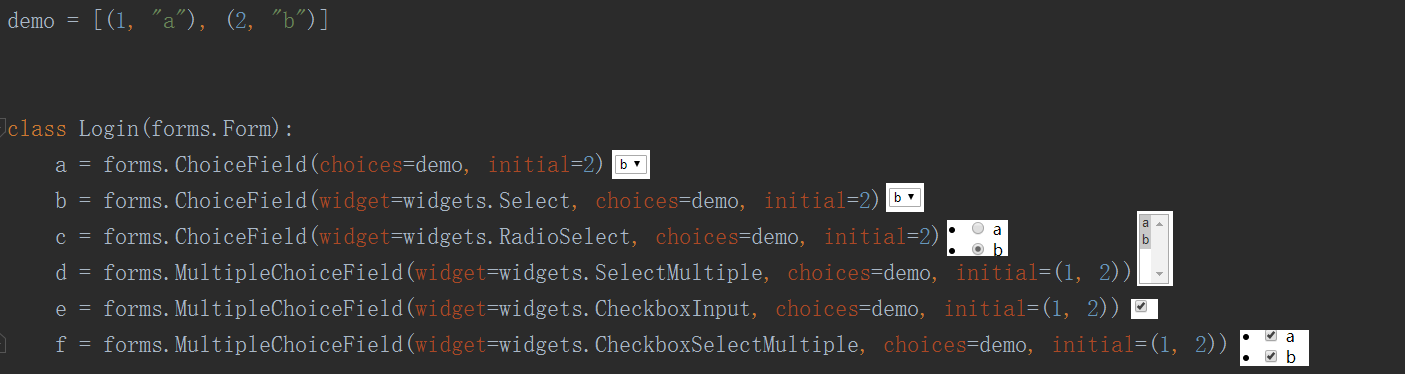
publish=forms.ModelChoiceField(queryset=Publish.objects.all())

单选

publish=forms.ModelMultChoiceField(queryset=Publish.objects.all())

多选
<select name="a" id="id_a">

    <option value="1">a</option>

    <option value="2" selected="">b</option>

</select>

-------------------------------------------------------------

<select name="b" id="id_b">

    <option value="1">a</option>

    <option value="2" selected="">b</option>

</select>

------------------------------------------------------------

<ul id="id_c">

    <li><label for="id_c_0"><input type="radio" name="c" value="1" required="" id="id_c_0">

        a</label>

    </li>

    <li><label for="id_c_1"><input type="radio" name="c" value="2" checked="" required="" id="id_c_1">

        b</label>

    </li>

</ul>

------------------------------------------------------------

<select name="d" required="" id="id_d" multiple="multiple">

    <option value="1" selected="">a</option>

    <option value="2" selected="">b</option>

</select>

------------------------------------------------------------------

<input type="checkbox" name="e" value="(1, 2)" checked="" required="" id="id_e">

-------------------------------------------------------------

<ul id="id_f">

    <li><label for="id_f_0"><input type="checkbox" name="f" value="1" checked="" id="id_f_0">

        a</label>

    </li>

    <li><label for="id_f_1"><input type="checkbox" name="f" value="2" checked="" id="id_f_1">

        b</label>

    </li>

</ul>
choices实时从数据库中更新
方式一

def __init__(self, *args, **kwargs):

    super().__init__(*args, **kwargs)

    self.fields['f'].widget.choices = Book.objects.all().values_list('id', 'caption')
for field in iter(self.fields):

            self.fields[field].widget.attrs.update({

                'class': 'form-control'

            })
方式二 在字段定义时直接使用ORM语句
Field

    required=True,               是否允许为空

    widget=None,                 HTML插件

    label=None,                  用于生成Label标签或显示内容

    initial=None,                初始值

    help_text='',                帮助信息(在标签旁边显示)

    error_messages=None,         错误信息 {'required': '不能为空', 'invalid': '格式错误'}

    show_hidden_initial=False,   是否在当前插件后面再加一个隐藏的且具有默认值的插件(可用于检验两次输入是否一直)

    validators=[],               自定义验证规则

    localize=False,              是否支持本地化

    disabled=False,              是否可以编辑

    label_suffix=None            Label内容后缀

CharField(Field)

    max_length=None,             最大长度

    min_length=None,             最小长度

    strip=True                   是否移除用户输入空白

IntegerField(Field)

    max_value=None,              最大值

    min_value=None,              最小值

FloatField(IntegerField)

    ...

DecimalField(IntegerField)

    max_value=None,              最大值

    min_value=None,              最小值

    max_digits=None,             总长度

    decimal_places=None,         小数位长度

BaseTemporalField(Field)

    input_formats=None          时间格式化

DateField(BaseTemporalField)    格式:2015-09-01

TimeField(BaseTemporalField)    格式:11:12

DateTimeField(BaseTemporalField)格式:2015-09-01 11:12

DurationField(Field)            时间间隔:%d %H:%M:%S.%f

    ...

RegexField(CharField)

    regex,                      自定制正则表达式

    max_length=None,            最大长度

    min_length=None,            最小长度

    error_message=None,         忽略,错误信息使用 error_messages={'invalid': '...'}

EmailField(CharField)

    ...

FileField(Field)

    allow_empty_file=False     是否允许空文件

ImageField(FileField)

    ...

    注:需要PIL模块,pip3 install Pillow

    以上两个字典使用时,需要注意两点:

        - form表单中 enctype="multipart/form-data"

        - view函数中 obj = MyForm(request.POST, request.FILES)

URLField(Field)

    ...

BooleanField(Field)

    ...

NullBooleanField(BooleanField)

    ...

ChoiceField(Field)

    ...

    choices=(),                选项,如:choices = ((0,'上海'),(1,'北京'),)

    required=True,             是否必填

    widget=None,               插件,默认select插件

    label=None,                Label内容

    initial=None,              初始值

    help_text='',              帮助提示

ModelChoiceField(ChoiceField)

    ...                        django.forms.models.ModelChoiceField

    queryset,                  # 查询数据库中的数据

    empty_label="---------",   # 默认空显示内容

    to_field_name=None,        # HTML中value的值对应的字段

    limit_choices_to=None      # ModelForm中对queryset二次筛选

ModelMultipleChoiceField(ModelChoiceField)

    ...                        django.forms.models.ModelMultipleChoiceField

TypedChoiceField(ChoiceField)

    coerce = lambda val: val   对选中的值进行一次转换

    empty_value= ''            空值的默认值

MultipleChoiceField(ChoiceField)

    ...

TypedMultipleChoiceField(MultipleChoiceField)

    coerce = lambda val: val   对选中的每一个值进行一次转换

    empty_value= ''            空值的默认值

ComboField(Field)

    fields=()                  使用多个验证,如下:即验证最大长度20,又验证邮箱格式

                               fields.ComboField(fields=[fields.CharField(max_length=20), fields.EmailField(),])

MultiValueField(Field)

    PS: 抽象类,子类中可以实现聚合多个字典去匹配一个值,要配合MultiWidget使用

SplitDateTimeField(MultiValueField)

    input_date_formats=None,   格式列表:['%Y--%m--%d', '%m%d/%Y', '%m/%d/%y']

    input_time_formats=None    格式列表:['%H:%M:%S', '%H:%M:%S.%f', '%H:%M']

FilePathField(ChoiceField)     文件选项,目录下文件显示在页面中

    path,                      文件夹路径

    match=None,                正则匹配

    recursive=False,           递归下面的文件夹

    allow_files=True,          允许文件

    allow_folders=False,       允许文件夹

    required=True,

    widget=None,

    label=None,

    initial=None,

    help_text=''

GenericIPAddressField

    protocol='both',           both,ipv4,ipv6支持的IP格式

    unpack_ipv4=False          解析ipv4地址,如果是::ffff:192.0.2.1时候,可解析为192.0.2.1, PS:protocol必须为both才能启用

SlugField(CharField)           数字,字母,下划线,减号(连字符)

    ...

UUIDField(CharField)           uuid类型
自定义验证规则
from django.core.validators import RegexValidatorfields.CharField(validators=[RegexValidator(r'^159[0-9]+$', '数字必须以159开头'),])
from django.core.exceptions import ValidationError

CharField(validators=[mobile_validate, ])

def mobile_validate(value):

    mobile_re = re.compile(r'^(13[0-9]|15[012356789]|17[678]|18[0-9]|14[57])[0-9]{8}$')

    if not mobile_re.match(value):

        raise ValidationError('手机号码格式错误')
def clean_username(self):

    username = self.cleaned_data.get('username')

    if '' in username:

        raise ValidationError('只含666学不会')

    else:

        return username
django - 总结 - form表单的更多相关文章
- Django的form表单
html的form表单 django中,前端如果要提交一些数据到views里面去,需要用到 html里面的form表单. 例如: # form2/urls.py from django.contrib ...
- Django 11 form表单(状态保持session、form表单及注册实现)
Django 11 form表单(状态保持session.form表单及注册实现) 一.状态保持 session 状态保持 #1.http协议是无状态的:每次请求都是一次新的请求,不会记得之前通信的状 ...
- 转载:Django之form表单
转载: 一.使用form类创建一个表单 先定义好一个RegForm类: forms.py from django import forms # 导入forms类 class NameForm(form ...
- Django--分页器(paginator)、Django的用户认证、Django的FORM表单
分页器(paginator) >>> from django.core.paginator import Paginator >>> objects = ['joh ...
- django之form表单验证
django中的Form一般有两种功能: 输入html 验证用户输入 #!/usr/bin/env python # -*- coding:utf- -*- import re from django ...
- django中form表单的提交:
一,关于表单: 表单在百度百科的解释: 表单在网页中主要负责数据采集功能.一个表单有三个基本组成部分: 表单标签:这里面包含了处理表单数据所用CGI程序的URL以及数据提交到服务器的方法. 表单域 ...
- Day19 Django之Form表单验证、CSRF、Cookie、Session和Model操作
一.Form表单验证 用于做用户提交数据的验证1.自定义规则 a.自定义规则(类,字段名==html中的name值)b.数据提交-规则进行匹配代码如下: """day19 ...
- Django的form表单之文件上传
在生成input标签的时候可以指定input标签的类型为file类型 <!DOCTYPE html> <html lang="en"> <head&g ...
- 【django之form表单】
一.构建一个表单 假设你想在你的网站上创建一个简单的表单,以获得用户的名字.你需要类似这样的模板: <form action="/your-name/" method=&qu ...
- Django 提交 form 表单(使用sqlite3保存数据)
优化 提交 form 表单,https://www.cnblogs.com/klvchen/p/10608143.html 创建数据库的字段,在 models.py 中添加 from django.d ...
随机推荐
- swoole多端口监听
今天测试swoole写webserver实现多端口监听.记录下爬过的坑:关于tcp协议监听触发不到receive!!!!! 首先上服务端代码 class Http { /** * 服务实例 * @va ...
- OKR相关4本书,好书3本
最近几年看过4本OKR相关的书,有3本是4星.其中第一本是最近看的,剩下3本是2017年看的. OKR源自德鲁克和格鲁夫,跟谷歌是天作之合:4星|<这就是OKR> 4星|<OKR实践 ...
- Python语法教程-基础语法01
目录 1. Python应用 2. 在Linux中写python 3. Python基础语法 1. 注释 2. 变量定义及类型 3. 格式化输出 4. 用户输入 5. 运算符 6.数据转换 7. 判断 ...
- c++11の简单线程管理
1.简单的例子 #include "stdafx.h" #include <iostream> #include <thread> void functio ...
- springboot aop + logback + 统一异常处理 打印日志
1.src/resources路径下新建logback.xml 控制台彩色日志打印 info日志和异常日志分不同文件存储 每天自动生成日志 结合myibatis方便日志打印(debug模式) < ...
- 基于Armitage的MSF自动化集成攻击实践
基于Armitage的MSF自动化集成攻击实践 目录 0x01 实践环境 0x02 预备知识 0x03 Armitage基础配置 0x04 Nmap:Armitage下信息搜集与漏洞扫描 0x05 A ...
- PHP性能优化:in_array和isset 在大数组查询中耗时相差巨大,以及巧妙使用array_flip
今天在PHP业务开发中,发现了一个问题. 两个较大数组(20万+元素),遍历其中一个$a,另一个数组$b用于查找元素. 比如 foreach($a as $val){ if(in_array($xx, ...
- VUE中 style scoped 修改原有样式
作用域CSS 当<style>标记具有该scoped属性时,其CSS将仅应用于当前组件的元素.这类似于Shadow DOM中的样式封装.它有一些警告,但不需要任何polyfill.通过使用 ...
- Facebook第三方网页登录(JavaScript SDK)
文档网址:https://developers.facebook.com/docs/facebook-login/web#logindialog 一.应用配置 https://www.faceboo ...
- 关于表单元素的name及HTML中的id
这种在上高级WEB课时,老师为表单元素赋了name值,之后直接在JS中使用该值而不需要使用document.get...来获取了,例: <!DOCTYPE html> <html&g ...