
docker—tomcat 报错:Failed to get D-Bus connection: Operation not permitted
docker search centos 查系统镜像
docker pull docker.io/centos
进入容器
[root@git opt]# docker images

REPOSITORY                         TAG                 IMAGE ID            CREATED             SIZE

docker.io/tomcat8                  latest              37e6b19c14e0         hours ago         MB

gitalb-zh                          latest              dd61a1ec3cdc         days ago          1.72 GB

docker.io/twang2218/gitlab-ce-zh   latest              1f71f185271a         days ago         1.63 GB

docker.io/centos                   latest              2d194b392dd1         weeks ago          MB
docker run -it docker.io/centos /bin/bash
安装tomcat
yum -y install tomcat......

代码路径: /usr/share/tomcat/webapps/ROOT/index.jsp

配置文件路径: /usr/share/tomcat/
把装好tomcat容器,生成镜像
[root@git opt]# docker ps

CONTAINER ID        IMAGE               COMMAND             CREATED             STATUS              PORTS                   NAMES

a9717660d785        docker.io/tomcat8   "/usr/sbin/init"    About an hour ago   Up About an hour    0.0.0.0:888->8080/tcp   tomcat8

[root@git opt]# docker commit a9717660d785 docker.io/tomcat8
用新镜像生成容器进行访问
[root@git opt]# docker images

REPOSITORY                         TAG                 IMAGE ID            CREATED             SIZE

docker.io/tomcat8                  latest              37e6b19c14e0        26 hours ago        517 MB

gitalb-zh                          latest              dd61a1ec3cdc        2 days ago          1.72 GB

docker.io/twang2218/gitlab-ce-zh   latest              1f71f185271a        11 days ago         1.63 GB

docker.io/centos                   latest              2d194b392dd1        2 weeks ago         195 MB
docker run -itd -p 888:8080 --privileged=true --name tomcat8 docker.io/tomcat8 /usr/sbin/init   (注:参数-d 是后台运行)

结尾如果 /bin/bash 进入容器后无法启动服务,报错:Failed to get D-Bus connection: Operation not permitted

据说是centos7的BUG

所以这里需 /usr/sbin/init   进入容器后可以使用systemctl 命令

因为这样会把宿主机的dbus服务带入容器启动

[root@a9717660d785 /]# ps -ef

UID         PID   PPID  C STIME TTY          TIME CMD

root          1      0  0 07:38 ?        00:00:00 /usr/sbin/init

root         17      1  0 07:38 ?        00:00:00 /usr/lib/systemd/systemd-journald

root         27      1  0 07:38 ?        00:00:00 /usr/sbin/sshd -D

dbus         28      1  0 07:38 ?        00:00:00 /bin/dbus-daemon --system --address=systemd: --nofork --nopidfile --systemd-activation

root         29      1  0 07:38 ?        00:00:00 /usr/lib/systemd/systemd-logind
如果想进入:
[root@git opt]# docker ps

CONTAINER ID        IMAGE               COMMAND             CREATED             STATUS              PORTS                   NAMES

a9717660d785        docker.io/tomcat8   "/usr/sbin/init"    About an hour ago   Up About an hour    0.0.0.0:888->8080/tcp   tomcat8

[root@git opt]# docker exec -it a9717660d785 bash
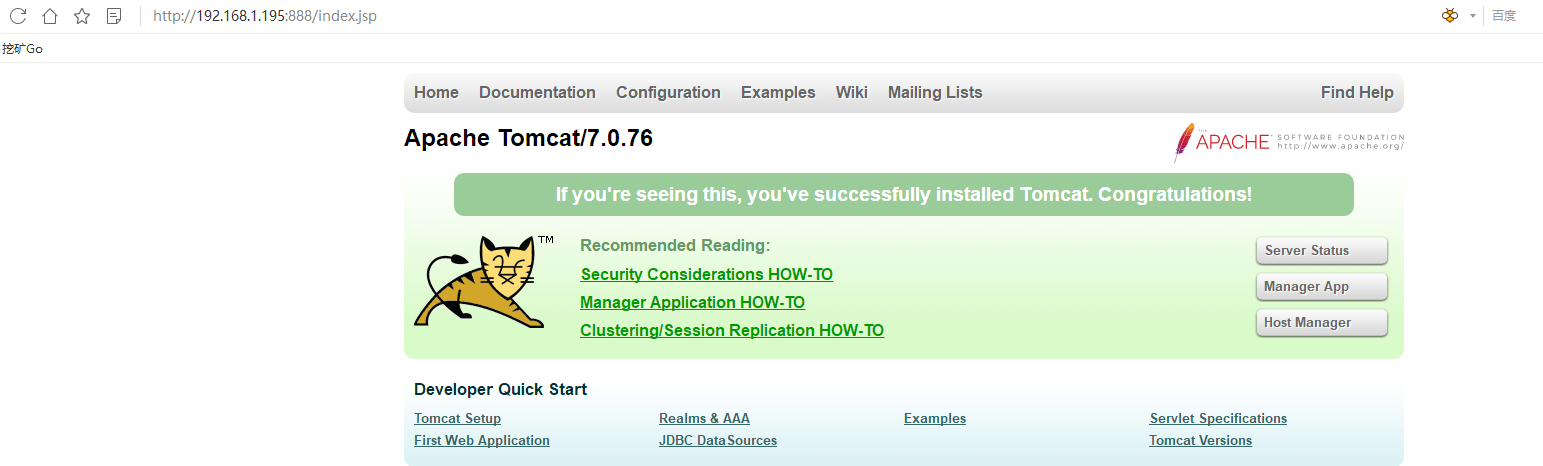
访问看效果:

docker—tomcat 报错:Failed to get D-Bus connection: Operation not permitted的更多相关文章
- 巨坑npm run dev 报错 终于找到正确答案 Error: EPERM: operation not permitted, open '/data/public/build/css/add.p
Windows10环境 npm run dev 报错 终于找到正确答案 Error: EPERM: operation not permitted, open '/data/public/build ...
- docker pull报错failed to register layer: Error processing tar file(exit status 1): open permission denied
近来在一个云主机上操作docker pull,报错如下: failed to register layer: Error processing ): open /etc/init.d/hwclock. ...
- Docker 内pip安装package报错: Failed to establish a new connection: [Errno -3] Temporary failure in name resolution'
说来奇幻(对本菜来说, 经常遇到堪称奇幻的问题) 之前在docker里面各种安装都没问题, 也不知道什么引起的, 昨天晚上调试的时候卸载了一个包的版本,然后就安不上了. 宿主机安装依然各种流畅,唯独d ...
- maven发布到tomcat报错: Publishing failed Could not publish to the server. java.lang.IndexOutOfBoundsException
eclipse中将maven项目发布到tomcat报错时: Publishing failed Could not publish to the server. java.lang.IndexOutO ...
- Tomcat报错: Failed to start component [StandardEngine[Catalina].StandardHost[localhost].StandardContext[/myApp]]
Tomcat报错:严重: A child container failed during startjava.util.concurrent.ExecutionException: org.apach ...
- 第一次安装tomcat报错,出现failed to install tomcat8 service错误
第一次安装tomcat报错,出现failed to install tomcat8 service错误(0) 一.一般情况下这种错误都是没有卸载干净造成的,安全卸载Tomcat的方法 (转载); ht ...
- docker启动报错iptables failed: -重建docker0网络恢复
# docker启动报错 [root@localhost mysqlconf]# docker run -d -p 8080:8080 --link zookeeper:zookeeper -e du ...
- tomcat运行报错Failed to start component [StandardEngine[Catalina].StandardHost[localhost].
tomcat运行报错Failed to start component [StandardEngine[Catalina].StandardHost[localhost].多半情况是找不到jar包 解 ...
- junit单元测试报错Failed to load ApplicationContext,但是项目发布到tomcat浏览器访问没问题
junit单元测试报错Failed to load ApplicationContext,但是项目发布到tomcat浏览器访问没问题,说明代码是没问题的,配置也没问题.开始时怀疑是我使用junit版本 ...
随机推荐
- a标签的download属性
a标签加上downlaod属性后,就可完成对href属性链接文件的下载,但仅仅是限于同源文件,如果是非同源,download属性会失效. 无download属性的时候,a标签的默认行为是链接跳转进行预 ...
- vue项目打包后在IE浏览器报错,页面显示空白
之前写一个项目,一直放在谷歌浏览器调试测试,到尾声时放到IE浏览器结果直接白屏,页面打不开 找了网上的方法,加了babel-polyfill插件后还是不行,后来排查发现是打包插件出了问题,因为用的项目 ...
- oracle 使用问题
12541: 典型的listener.ora 文件内容: SID_LIST_LISTENER = (注册到监听器的service name所在区域) (SID_LIST = (SID_DE ...
- fiddler获取响应时间以及服务器IP
抓包工具fiddler实现http协议请求应答抓包.在接口测试.性能测试.安全测试等软件测试活动过程中,可能会遇到需要获取接口响应时间.接口服务器IP这样的情况.默认情况下fiddler不支持接口响应 ...
- cmd中subst的使用
SUBST [drive1: [drive2:]path] drive1: 指定要指派路径的虚拟驱动器.[drive2:]path 指定物理驱动器和要指派给虚拟驱动器的路径. 路径替换 ...
- zencart搜索结果页面静态化 advanced_search_result
首先,确认网站是否安装了ultimate_seo_urls 伪静态模块. 修改include/classes/seo.url.php 大约126行添加代码 'keyword' => 'sale' ...
- Django学习系列13:Django ORM和第一个模型
ORM—对象关系映射器,是一个数据抽象层,描述存储在数据库中的表,行和列.处理数据库时,可以使用熟悉的面向对象方式,写出更好的代码. 在ORM的概念中,类对应数据库中的表,属性对应列,类的单个实例表示 ...
- Mongodb文档查询
MongoDB 查询数据的语法格式如下: db.collection.find(query, projection) query :可选,使用查询操作符指定查询条件 projection :可选,使用 ...
- bash配置相关
登录方式 登录方式分为两种方式:
- 理解 Cookie、Session、Token
发展史 Cookie Session Token Token的起源 基于服务器的验证 基于服务器验证方式暴露的一些问题 基于Token的验证原理 Tokens的优势 发展史 1.很久很久以前,Web ...