
4412 Linux设备总线
总线_设备_驱动注册流程详解
注册流程图
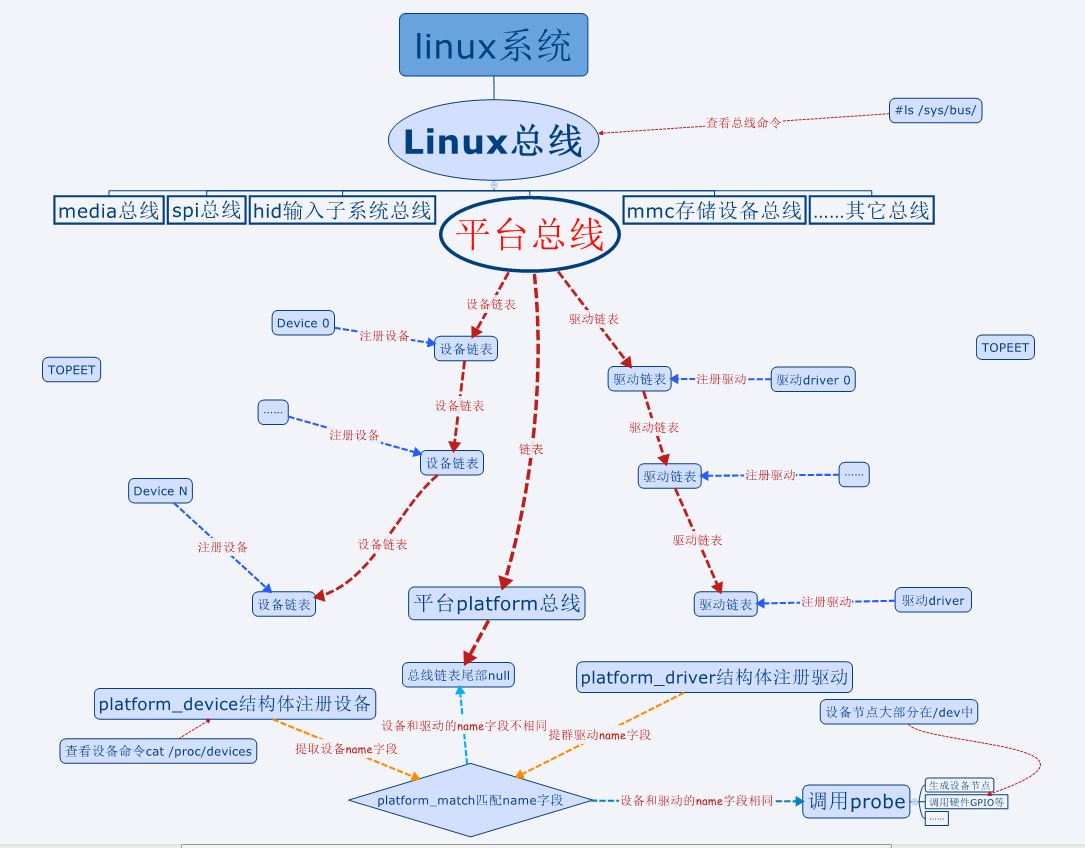
• 设备一般都需要先注册,才能注册驱动
– 现在越来越多的热拔插设备,反过来了。先注册驱动,设备来了再注册
设备
• 本节使用的命令
– 查看总线的命令#ls /sys/bus/
– 查看设备号的命令#cat /proc/devices
• 设备都有主设备号和次设备号,否则255个设备号不够用
– 查看杂项设备号的命令#cat /proc/misc
二、总线设备注册
关于注册设备的一点说明
• 早先的Linux会使用单独的文件注册设备,现在大多是使用引入的虚拟平台,使用虚拟平台来注册设备会容易很多
• 如果大家在网上看到大段的注册设备的代码,可简单了解一下,知道有这么个东西就成,不用去深究。不要去学习“屠龙技”,现在基本都是直接在平台文件中注册设备
注册设备
• 注册设备使用结构体platform_device,该结构体在头文件“vim include/linux/platform_device.h”中。头文件中也有注册设备和卸载设备的函数,了解即可
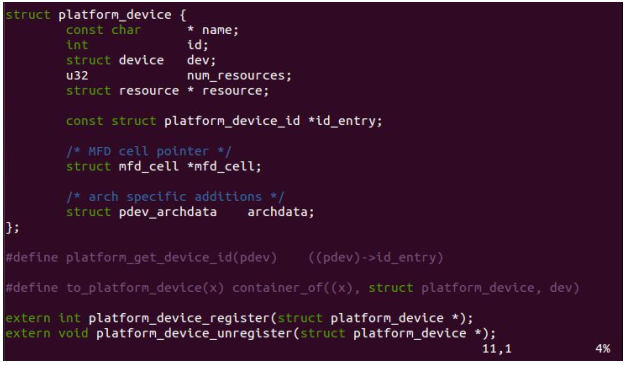
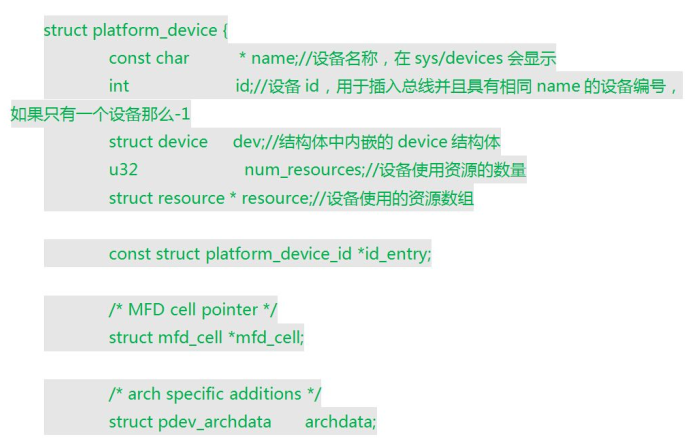
操作过程
– 注册设备。将设备结构体放到平台文件中,会自动注册设备,不用去调用注册设备的函数。
vim arch/arm/mach-exynos/mach-itop4412.c
添加设备注册
#ifdef CONFIG_HELLO_CTL

struct platform_device s3c_device_hello_ctl = {

        .name   = "hello_ctl",

        .id             = -,

};

#endif

#ifdef CONFIG_LEDS_CTL

struct platform_device s3c_device_leds_ctl = {

        .name   = "leds",

        .id             = -,

};

#endif
和这个
#ifdef CONFIG_HELLO_CTL

    &s3c_device_hello_ctl,

#endif

#ifdef CONFIG_LEDS_CTL

    &s3c_device_leds_ctl,

#endif
– 在Kconfig文件中添加编译HELLO设备的宏定义(前面教程中已经添加)
– 配置menuconfig中的HELLO宏定义,生成新的.config文件
– 生成新的zImage
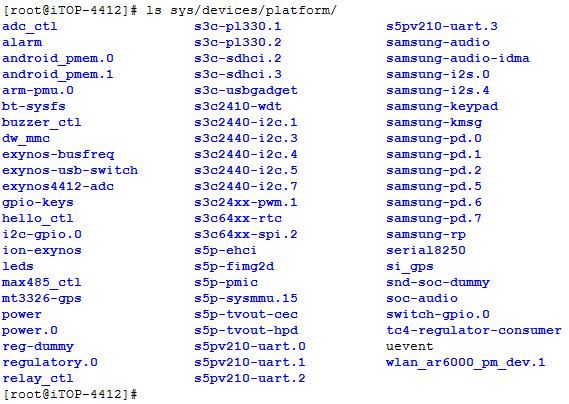
• 注册完之后在虚拟平台总线下可以查到注册的设备
– ls /sys/devices/platform/
中间遇到的问题:编译make zImage的时候提示
arch/arm/mach-exynos/mach-itop4412.c:: error: 's3c_device_hello_ctl' undeclared here (not in a function)
这个的没有写正确
#ifdef CONFIG_HELLO_CTL
struct platform_device s3c_device_hello_ctl = {
三、总线驱动注册
头文件
• 驱动注册使用结构体platform_driver,该结构体在头文件“vim include/linux/platform_device.h”中
• 驱动注册platform_driver_register,驱动卸载函数 platform_driver_unregister也在这个头文件中
– 这两个函数的参数都只有结构体platform_driver
struct platform_driver {

    int (*probe)(struct platform_device *);

    int (*remove)(struct platform_device *);

    void (*shutdown)(struct platform_device *);

    int (*suspend)(struct platform_device *, pm_message_t state);

    int (*resume)(struct platform_device *);

    struct device_driver driver;

    const struct platform_device_id *id_table;

};
注册结构体
• 驱动常见的几种状态,初始化,移除,休眠,复位
– 就像PC一样,有的驱动休眠之后无法使用,有的可以使用;有的系统唤醒之后,驱动需要重新启动才能正常工作,也有直接就可以使用等等
• probe函数:platform_match函数匹配之后,驱动调用的初始化函数
• remove函数: 移除驱动函数
• suspend函数: 悬挂(休眠)驱动函数
• resume函数: 休眠后恢复驱动
• device_driver数据结构的两个参数
– name和注册的设备name要一致
– owner一般赋值THIS_MODULE
#include <linux/module.h>

#include <linux/init.h>

/* device register header file, include device and driver struct

 * register and remove function */

#include <linux/platform_device.h>

#define DRIVER_NAME "hello_ctl"

MODULE_LICENSE("Dual BSD/GPL");

MODULE_AUTHOR("TOPEET");

static int hello_probe(struct platform_driver *pdv)

{

    printk(KERN_EMERG "\tinitialized\n");

    return ;

}

static int hello_remove(struct platform_driver *pdv)

{

    return ;

}

static void hello_shutdown(struct platform_driver *pdv)

{

}

static int hello_suspend(struct platform_driver *pdv)

{

    return ;

}

static int hello_resume(struct platform_driver *pdv)

{

    return ;

}

struct platform_driver hello_driver = {

    .probe    = hello_probe,

    .remove   = hello_remove,

    .shutdown = hello_shutdown,

    .suspend  = hello_suspend,

    .resume   = hello_resume,

    .driver = {

        .name  = DRIVER_NAME,

        .owner = THIS_MODULE,

    }

};

static int hello_init(void)

{

    int DriverState;

    printk(KERN_EMERG "Hello world enter!\n");

    DriverState = platform_driver_register(&hello_driver);

    printk(KERN_EMERG "\tDriverState is %d\n", DriverState);

    return ;

}

static void hello_exit(void)

{

    printk(KERN_EMERG "Hello world exit!\n");

    platform_driver_unregister(&hello_driver);

}

module_init(hello_init);

module_exit(hello_exit);
register driver
实验
• 在mini_linux_module的基础上添加驱动注册部分
• 编译,在开发板上加载和卸载驱动
mount -t nfs -o nolock 192.168.2.147:/home/topeet/linux /mnt/nfs
挂载了nfs后,加载内核后
[root@iTOP-]# insmod probe_linux_module.ko

[ 8454.570719] Hello world enter!

[ 8454.572614]  initialized

[ 8454.582781]  DriverState is
[root@iTOP-4412]# rmmod probe_linux_module
[ 8647.985422] Hello world exit!
4412 Linux设备总线的更多相关文章
- Linux 设备总线驱动模型
尽管LDD3中说对多数程序员掌握设备驱动模型不是必要的,但对于嵌入式Linux的底层程序员而言,对设备驱动模型的学习非常重要. Linux设备模型的目的:为内核建立一个统一的设备模型,从而又一 ...
- Linux设备总线
kobject和kset是Linux设备模型中最基本的元素,其中,kset是同种类型kobject对象的集合.每个在内核中注册的kobject对象都对于sysfs文件系统中的一个目录.下面是自己花的一 ...
- linux设备驱动归纳总结(九):1.platform总线的设备和驱动【转】
本文转载自:http://blog.chinaunix.net/uid-25014876-id-111745.html linux设备驱动归纳总结(九):1.platform总线的设备和驱动 xxxx ...
- linux设备驱动归纳总结(八):4.总线热插拔【转】
本文转载自:http://blog.chinaunix.net/uid-25014876-id-110774.html linux设备驱动归纳总结(八):4.总线热插拔 xxxxxxxxxxxxxxx ...
- linux设备驱动归纳总结(八):2.总线、设备和驱动的关系【转】
本文转载自:http://blog.chinaunix.net/uid-25014876-id-110295.html linux设备驱动归纳总结(八):2.总线.设备和驱动的关系 xxxxxxxxx ...
- linux设备驱动归纳总结(八):1.总线、设备和驱动【转】
本文转载自:http://blog.chinaunix.net/uid-25014876-id-109733.html linux设备驱动归纳总结(八):1.总线.设备和驱动 xxxxxxxxxxxx ...
- Linux设备模型(总线、设备、驱动程序和类)
Linux设备驱动程序学习(13) -Linux设备模型(总线.设备.驱动程序和类)[转] 文章的例子和实验使用<LDD3>所配的lddbus模块(稍作修改). 提示:在学习这部分内容是一 ...
- linux PMBus总线及设备驱动分析
PMBus协议规范介绍 PMBus是一套对电源进行配置.控制和监控的通讯协议标准.其最新版本为1.3,该规范还在不断演进中,比如新标准中新增的zone PMBus.AVSBus等特性.在其官网上有详细 ...
- 芯灵思SinlinxA33开发板 Linux平台总线设备驱动
1.什么是platform(平台)总线? 相对于USB.PCI.I2C.SPI等物理总线来说,platform总线是一种虚拟.抽象出来的总线,实际中并不存在这样的总线. 那为什么需要platform总 ...
随机推荐
- Jenkins使用二:新建任务
准备一个用于测试脚本,就打印hello world 新建job 配置: 添加步骤 立即构建
- Learn Python the hard way, ex40 字典,可爱的字典
#!/usr/bin/python #coding:utf-8 cities ={'CA':'sf','MI':'dt','FL':'je'} #创建字典 cities['NY']='ny' #增加新 ...
- Unity3D热更新方案网摘总结
参考:http://blog.csdn.net/guofeng526/article/details/52662994 http://blog.csdn.net/u010019717/article/ ...
- 命令行下DEBIAN7时间错误的问题(转)
Debian下的时间设置问题 Debian系统经常会遇到时间不准的情况,以下几个步骤可让您轻松摆脱烦恼: 1.设定正确的时区编辑/etc/timezone,写入Asia/Shanghai 2.使用da ...
- mybatis注解开发实体类属性和数据库字段不对应问题
/** * 查询所有用户 * @return */ @Select("select * from user") @Results(id="userMap",va ...
- LayUI Table复杂表头实现
LayUI table官方文档中在介绍复杂表头时的用例仅使用了自动渲染的方式作为参考,而并未用到方法渲染的方式来做用例,这让部分不太熟悉layUI table的开发者会有些头疼,不知道如何在方法渲染中 ...
- Python 学习笔记17 文本 - 读写
在我们的编程过程中,我们经常需要对文件进行读写操作. 在Python中,对文本的读写非常的方便,只需要简单的几行代码就可以实现. 我们首先新建一个文本文件"Text.txt", 里 ...
- [eclipse中使用Git插件] 008 - git操作pull、merge、stash、commit
写在前面: 看标题其实还有001-007之类,本来准备写详细的类似教程一样的东东,但是懒了且时间有限(以后或许会补吧),所以跳到008,录下主要的操作. 所以本随笔的重点就是[pull+merge+s ...
- document.domain vs location.hostname vs location.host
限制是同源政策的相同规则 document.domain 获取域名 location.hostname 获取域名 location.host 获取域名+端口 document.domain ...
- ls命令输出文件的绝对路径
find $PWD | xargs ls -ld 再结合 grep 筛选