
4412 Linux设备总线
总线_设备_驱动注册流程详解
注册流程图
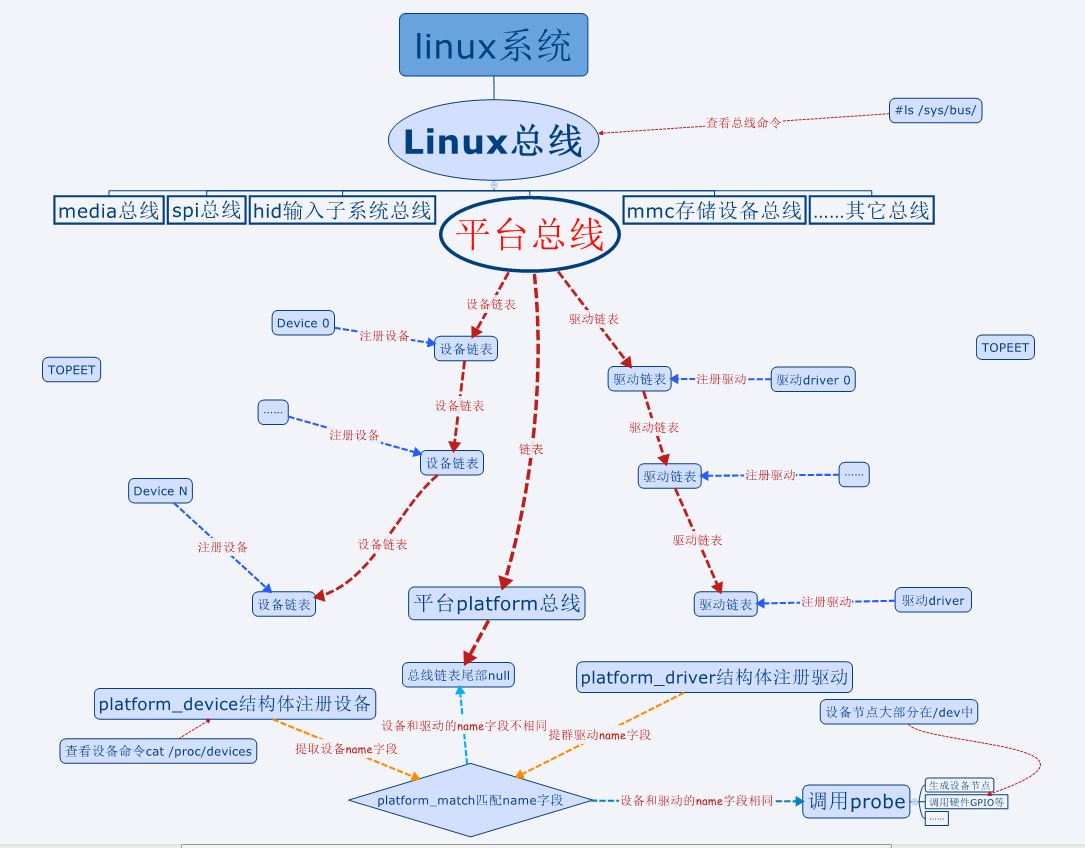
• 设备一般都需要先注册,才能注册驱动
– 现在越来越多的热拔插设备,反过来了。先注册驱动,设备来了再注册
设备
• 本节使用的命令
– 查看总线的命令#ls /sys/bus/
– 查看设备号的命令#cat /proc/devices
• 设备都有主设备号和次设备号,否则255个设备号不够用
– 查看杂项设备号的命令#cat /proc/misc
二、总线设备注册
关于注册设备的一点说明
• 早先的Linux会使用单独的文件注册设备,现在大多是使用引入的虚拟平台,使用虚拟平台来注册设备会容易很多
• 如果大家在网上看到大段的注册设备的代码,可简单了解一下,知道有这么个东西就成,不用去深究。不要去学习“屠龙技”,现在基本都是直接在平台文件中注册设备
注册设备
• 注册设备使用结构体platform_device,该结构体在头文件“vim include/linux/platform_device.h”中。头文件中也有注册设备和卸载设备的函数,了解即可
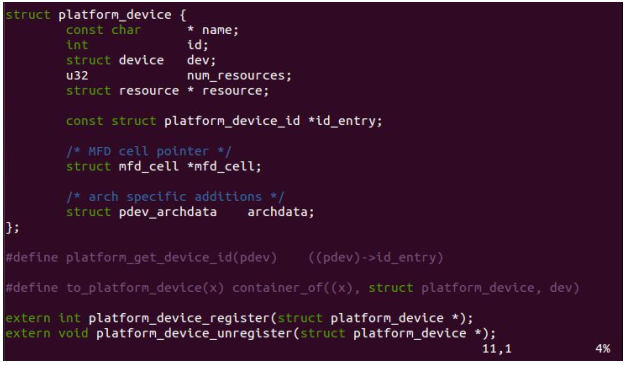
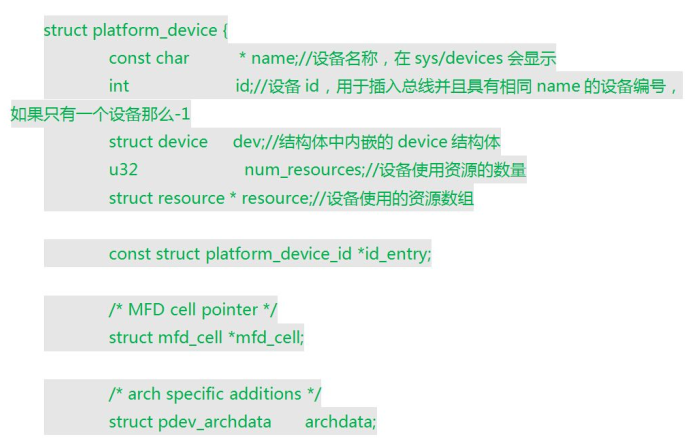
操作过程
– 注册设备。将设备结构体放到平台文件中,会自动注册设备,不用去调用注册设备的函数。
vim arch/arm/mach-exynos/mach-itop4412.c
添加设备注册
#ifdef CONFIG_HELLO_CTL

struct platform_device s3c_device_hello_ctl = {

        .name   = "hello_ctl",

        .id             = -,

};

#endif

#ifdef CONFIG_LEDS_CTL

struct platform_device s3c_device_leds_ctl = {

        .name   = "leds",

        .id             = -,

};

#endif
和这个
#ifdef CONFIG_HELLO_CTL

    &s3c_device_hello_ctl,

#endif

#ifdef CONFIG_LEDS_CTL

    &s3c_device_leds_ctl,

#endif
– 在Kconfig文件中添加编译HELLO设备的宏定义(前面教程中已经添加)
– 配置menuconfig中的HELLO宏定义,生成新的.config文件
– 生成新的zImage
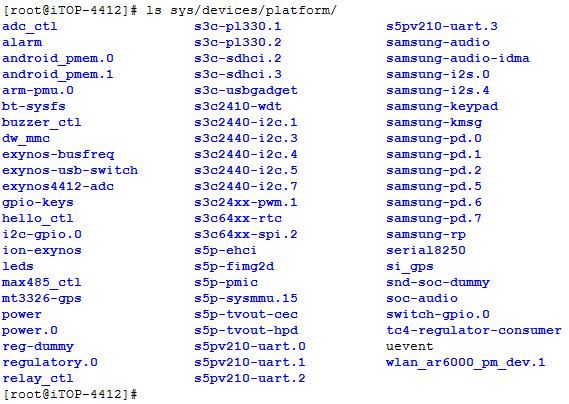
• 注册完之后在虚拟平台总线下可以查到注册的设备
– ls /sys/devices/platform/
中间遇到的问题:编译make zImage的时候提示
arch/arm/mach-exynos/mach-itop4412.c:: error: 's3c_device_hello_ctl' undeclared here (not in a function)
这个的没有写正确
#ifdef CONFIG_HELLO_CTL
struct platform_device s3c_device_hello_ctl = {
三、总线驱动注册
头文件
• 驱动注册使用结构体platform_driver,该结构体在头文件“vim include/linux/platform_device.h”中
• 驱动注册platform_driver_register,驱动卸载函数 platform_driver_unregister也在这个头文件中
– 这两个函数的参数都只有结构体platform_driver
struct platform_driver {

    int (*probe)(struct platform_device *);

    int (*remove)(struct platform_device *);

    void (*shutdown)(struct platform_device *);

    int (*suspend)(struct platform_device *, pm_message_t state);

    int (*resume)(struct platform_device *);

    struct device_driver driver;

    const struct platform_device_id *id_table;

};
注册结构体
• 驱动常见的几种状态,初始化,移除,休眠,复位
– 就像PC一样,有的驱动休眠之后无法使用,有的可以使用;有的系统唤醒之后,驱动需要重新启动才能正常工作,也有直接就可以使用等等
• probe函数:platform_match函数匹配之后,驱动调用的初始化函数
• remove函数: 移除驱动函数
• suspend函数: 悬挂(休眠)驱动函数
• resume函数: 休眠后恢复驱动
• device_driver数据结构的两个参数
– name和注册的设备name要一致
– owner一般赋值THIS_MODULE
#include <linux/module.h>

#include <linux/init.h>

/* device register header file, include device and driver struct

 * register and remove function */

#include <linux/platform_device.h>

#define DRIVER_NAME "hello_ctl"

MODULE_LICENSE("Dual BSD/GPL");

MODULE_AUTHOR("TOPEET");

static int hello_probe(struct platform_driver *pdv)

{

    printk(KERN_EMERG "\tinitialized\n");

    return ;

}

static int hello_remove(struct platform_driver *pdv)

{

    return ;

}

static void hello_shutdown(struct platform_driver *pdv)

{

}

static int hello_suspend(struct platform_driver *pdv)

{

    return ;

}

static int hello_resume(struct platform_driver *pdv)

{

    return ;

}

struct platform_driver hello_driver = {

    .probe    = hello_probe,

    .remove   = hello_remove,

    .shutdown = hello_shutdown,

    .suspend  = hello_suspend,

    .resume   = hello_resume,

    .driver = {

        .name  = DRIVER_NAME,

        .owner = THIS_MODULE,

    }

};

static int hello_init(void)

{

    int DriverState;

    printk(KERN_EMERG "Hello world enter!\n");

    DriverState = platform_driver_register(&hello_driver);

    printk(KERN_EMERG "\tDriverState is %d\n", DriverState);

    return ;

}

static void hello_exit(void)

{

    printk(KERN_EMERG "Hello world exit!\n");

    platform_driver_unregister(&hello_driver);

}

module_init(hello_init);

module_exit(hello_exit);
register driver
实验
• 在mini_linux_module的基础上添加驱动注册部分
• 编译,在开发板上加载和卸载驱动
mount -t nfs -o nolock 192.168.2.147:/home/topeet/linux /mnt/nfs
挂载了nfs后,加载内核后
[root@iTOP-]# insmod probe_linux_module.ko

[ 8454.570719] Hello world enter!

[ 8454.572614]  initialized

[ 8454.582781]  DriverState is
[root@iTOP-4412]# rmmod probe_linux_module
[ 8647.985422] Hello world exit!
4412 Linux设备总线的更多相关文章
- Linux 设备总线驱动模型
尽管LDD3中说对多数程序员掌握设备驱动模型不是必要的,但对于嵌入式Linux的底层程序员而言,对设备驱动模型的学习非常重要. Linux设备模型的目的:为内核建立一个统一的设备模型,从而又一 ...
- Linux设备总线
kobject和kset是Linux设备模型中最基本的元素,其中,kset是同种类型kobject对象的集合.每个在内核中注册的kobject对象都对于sysfs文件系统中的一个目录.下面是自己花的一 ...
- linux设备驱动归纳总结(九):1.platform总线的设备和驱动【转】
本文转载自:http://blog.chinaunix.net/uid-25014876-id-111745.html linux设备驱动归纳总结(九):1.platform总线的设备和驱动 xxxx ...
- linux设备驱动归纳总结(八):4.总线热插拔【转】
本文转载自:http://blog.chinaunix.net/uid-25014876-id-110774.html linux设备驱动归纳总结(八):4.总线热插拔 xxxxxxxxxxxxxxx ...
- linux设备驱动归纳总结(八):2.总线、设备和驱动的关系【转】
本文转载自:http://blog.chinaunix.net/uid-25014876-id-110295.html linux设备驱动归纳总结(八):2.总线.设备和驱动的关系 xxxxxxxxx ...
- linux设备驱动归纳总结(八):1.总线、设备和驱动【转】
本文转载自:http://blog.chinaunix.net/uid-25014876-id-109733.html linux设备驱动归纳总结(八):1.总线.设备和驱动 xxxxxxxxxxxx ...
- Linux设备模型(总线、设备、驱动程序和类)
Linux设备驱动程序学习(13) -Linux设备模型(总线.设备.驱动程序和类)[转] 文章的例子和实验使用<LDD3>所配的lddbus模块(稍作修改). 提示:在学习这部分内容是一 ...
- linux PMBus总线及设备驱动分析
PMBus协议规范介绍 PMBus是一套对电源进行配置.控制和监控的通讯协议标准.其最新版本为1.3,该规范还在不断演进中,比如新标准中新增的zone PMBus.AVSBus等特性.在其官网上有详细 ...
- 芯灵思SinlinxA33开发板 Linux平台总线设备驱动
1.什么是platform(平台)总线? 相对于USB.PCI.I2C.SPI等物理总线来说,platform总线是一种虚拟.抽象出来的总线,实际中并不存在这样的总线. 那为什么需要platform总 ...
随机推荐
- 测开之路七十二:性能测试工具之locust简介
locust官网:https://locust.io/ locust安装(不支持python3.7):pip install locustio 或者pycharm安装 官网给出的样例 根据官网代码 ...
- 下载 GitHub 上保存在 AWS 的文件
通过 GitHub 下载文件时,发现很多文件保存在亚马逊的 AWS 上.而国内访问 AWS 的速度很慢,经常会有文件下载失败.常用的解决方案是挂代理,但我这边挂了代理还是很慢,只好找其他办法. AWS ...
- [LeetCode] 477. Total Hamming Distance(位操作)
传送门 Description The Hamming distance between two integers is the number of positions at which the co ...
- Web控件LinkButton
<asp:LinkButton ID="" runat="server" ></asp:LinkButton> 编译后就变成了回发事件 ...
- EasyUI的columns中列标题居中
$("#supDataList").datagrid({ url: "../Ajax/SupplierAjax.ashx", queryParams: ...
- An easy problem (位运算)
[题目描述] 给出一个整数,输出比其大的第一个数,要求输出的数二进制表示和原数二进制表示下1的个数相同. [题目链接] http://noi.openjudge.cn/ch0406/1455/ [算法 ...
- Go语言_流程控制语句:for、if、else、switch 和 defer
流程控制语句:for.if.else.switch 和 defer 学习如何使用条件.循环.分支和推迟语句来控制代码的流程. Go 作者组编写,Go-zh 小组翻译. https://go-zh.or ...
- ansiable介绍及安装
ansible介绍: Ansible默认通过 SSH 协议管理机器. ssh协议介绍:https://www.cnblogs.com/yaozhiqiang/p/9944894.html 安装ansi ...
- 【学习总结】Python-3-字符串函数split()的妙用
参考: 菜鸟教程-Python3-Python字符串-split() 语法: str.split(str="", num=string.count(str)) 参数 str -- ...
- 独立成分分析(Independent Component Analysis)
ICA是一种用于在统计数据中寻找隐藏的因素或者成分的方法.ICA是一种广泛用于盲缘分离的(BBS)方法,用于揭示随机变量或者信号中隐藏的信息.ICA被用于从混合信号中提取独立的信号信息.ICA在20世 ...