
springmvc/springboot开发restful API
非rest的url写法:
查询  GET /user/query?name=tom

详情  GET /user/getinfo?id=

创建  POST /user/create?name=tom

修改  POST /user/update?id=&name=tom

删除  GET /user/delete?id=
rest风格的写法
查询  GET /user?name=tom

详情  GET /user/

创建  POST /user

修改  PUT /user

删除  DELETE /user/
rest接口设计参考:https://github.com/huobiapi/API_Docs/wiki/REST_api_reference
https://github.com/huobiapi/API_Docs
coinflext api: https://github.com/coinflex-exchange/API
1、Rest概念,来自百度百科
REST即表述性状态传递(英文:Representational State Transfer,简称REST)是Roy Fielding博士在2000年他的博士论文中提出来的一种软件架构风格。它是一种针对网络应用的设计和开发方式,可以降低开发的复杂性,提高系统的可伸缩性。
目前在三种主流的Web服务实现方案中,因为REST模式的Web服务与复杂的SOAP和XML-RPC对比来讲明显的更加简洁,越来越多的web服务开始采用REST风格设计和实现。
2、RESTful API的要求
1)用URL描述资源;
2)使用HTTP方法描述行为;使用HTTP状态码来表示不同的结果;
3)使用json来交互数据;
4)RESTful只是一种风格,并不是强制的标准。
总结:使用URL定位资源,使用HTTP方法操作资源。
GET     用来获取资源;

POST    用来新建资源(也可以用于更新资源);

PUT     用来更新资源;

DELETE  用来删除资源
3、Glory of REST
REST是一种软件接口设计的模型。REST 成熟度模型:(搜索关键字:steps toward the glory of REST)
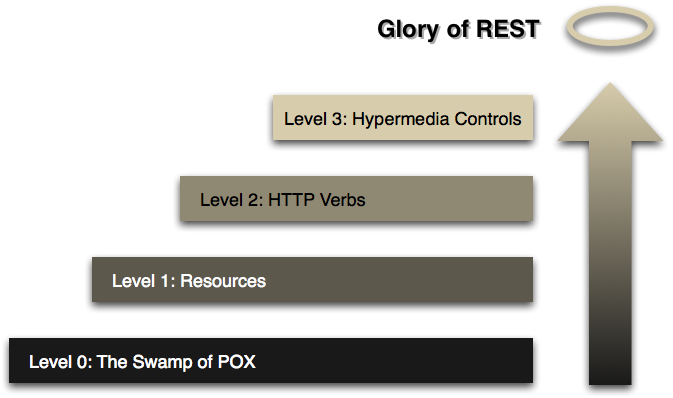
level0: 使用http作为传输方式;
level1: 引入资源概念,每个资源都有对应的URL;
level2: 使用http方法进行不同的操作,使用http状态码来表示不同的结果。
level3: 使用超媒体,在资源的表达中包含了链接信息。
4、springmvc/springboot开发restful API
IndexController
@RestController

public class IndexController {

    @Autowired

    private UserService userService;

    @GetMapping("/user/{id}")

    public Object getUserById(@PathVariable Integer id) {

        return userService.getUserById(id);

    }

}
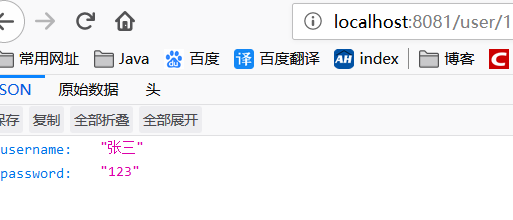
测试结果:
5、使用MockMVC 编写测试用例(单元测试)
参考:https://www.cnblogs.com/xy-ouyang/p/10681965.html
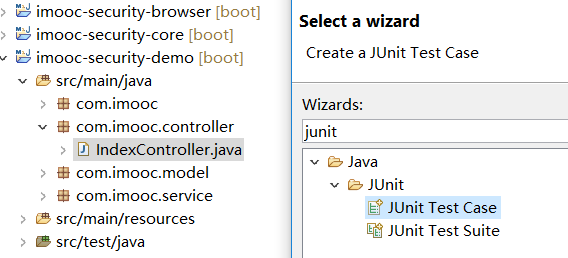
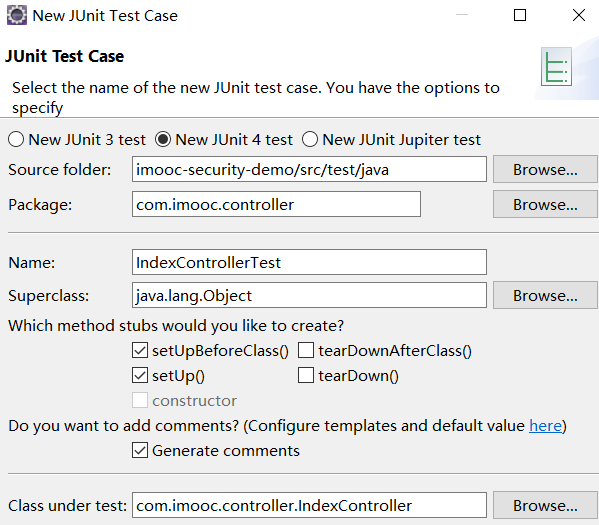
选中IndexController,右键/new/Junit Test Case
测试用例代码:
package com.imooc.controller;

import org.junit.Before;

import org.junit.Test;

import org.junit.runner.RunWith;

import org.springframework.beans.factory.annotation.Autowired;

import org.springframework.boot.test.context.SpringBootTest;

import org.springframework.http.MediaType;

import org.springframework.test.context.junit4.SpringRunner;

import org.springframework.test.web.servlet.MockMvc;

import org.springframework.test.web.servlet.request.MockMvcRequestBuilders;

import org.springframework.test.web.servlet.result.MockMvcResultHandlers;

import org.springframework.test.web.servlet.result.MockMvcResultMatchers;

import org.springframework.test.web.servlet.setup.MockMvcBuilders;

import org.springframework.web.context.WebApplicationContext;

/**

 * @author oy

 * @date 2019年6月22日 下午11:14:56

 * @version 1.0.0

 */

@RunWith(SpringRunner.class)

@SpringBootTest

public class IndexControllerTest {

    @Autowired

    private WebApplicationContext wac;

    private MockMvc mocMvc;

    @Before

    public void setUp() throws Exception {

        mocMvc = MockMvcBuilders.webAppContextSetup(wac).build();

    }

    @Test

    public void testGetUserById() throws Exception {

        String mvcResult = mocMvc.perform(MockMvcRequestBuilders.get("/user/1")

                .contentType(MediaType.APPLICATION_FORM_URLENCODED))

                .andDo(MockMvcResultHandlers.print()) // 打印信息

                .andExpect(MockMvcResultMatchers.status().isOk()) // 期望返回的状态码为200

                .andExpect(MockMvcResultMatchers.jsonPath("$.length()").value(2)) // 期望返回的json数据中有两个字段

                .andExpect(MockMvcResultMatchers.jsonPath("$.username").value("张三")) // 期望返回的json数据中username字段的值为"张三"

                .andReturn().getResponse().getContentAsString();

        System.out.println("mvcResult: " + mvcResult);

    }

}
控制台打印结果:
MockHttpServletRequest:

      HTTP Method = GET

      Request URI = /user/1

       Parameters = {}

          Headers = {Content-Type=[application/x-www-form-urlencoded]}

Handler:

             Type = com.imooc.controller.IndexController

           Method = public java.lang.Object com.imooc.controller.IndexController.getUserById(java.lang.Integer)

Async:

    Async started = false

     Async result = null

Resolved Exception:

             Type = null

ModelAndView:

        View name = null

             View = null

            Model = null

FlashMap:

       Attributes = null

MockHttpServletResponse:

           Status = 200

    Error message = null

          Headers = {Content-Type=[application/json;charset=UTF-8]}

     Content type = application/json;charset=UTF-8

             Body = {"username":"张三","password":"123"}

    Forwarded URL = null

   Redirected URL = null

          Cookies = []

mvcResult: {"username":"张三","password":"123"}
测试用例的代码简洁写法:使用静态导入
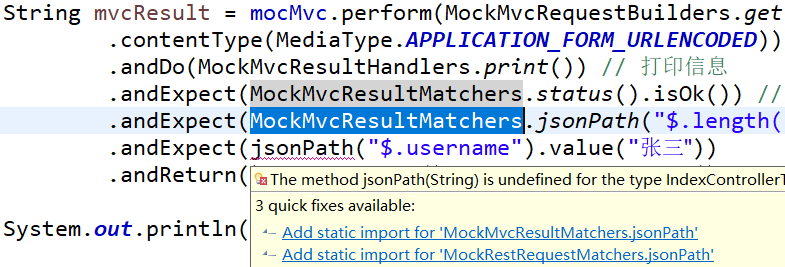
package com.imooc.controller;

import static org.springframework.test.web.servlet.request.MockMvcRequestBuilders.get;

import static org.springframework.test.web.servlet.result.MockMvcResultHandlers.print;

import static org.springframework.test.web.servlet.result.MockMvcResultMatchers.jsonPath;

import static org.springframework.test.web.servlet.result.MockMvcResultMatchers.status;

import org.junit.Before;

import org.junit.Test;

import org.junit.runner.RunWith;

import org.springframework.beans.factory.annotation.Autowired;

import org.springframework.boot.test.context.SpringBootTest;

import org.springframework.http.MediaType;

import org.springframework.test.context.junit4.SpringRunner;

import org.springframework.test.web.servlet.MockMvc;

import org.springframework.test.web.servlet.setup.MockMvcBuilders;

import org.springframework.web.context.WebApplicationContext;

/**

 * @author oy

 * @date 2019年6月22日 下午11:14:56

 * @version 1.0.0

 */

@RunWith(SpringRunner.class)

@SpringBootTest

public class IndexControllerTest {

    @Autowired

    private WebApplicationContext wac;

    private MockMvc mocMvc;

    @Before

    public void setUp() throws Exception {

        mocMvc = MockMvcBuilders.webAppContextSetup(wac).build();

    }

    @Test

    public void testGetUserById() throws Exception {

        String mvcResult = mocMvc.perform(get("/user/1")

                .contentType(MediaType.APPLICATION_FORM_URLENCODED))

                .andDo(print()) // 打印信息

                .andExpect(status().isOk()) // 期望返回的状态码为200

                .andExpect(jsonPath("$.length()").value(2)) // 期望返回的json数据中有两个字段

                .andExpect(jsonPath("$.username").value("张三"))

                .andReturn().getResponse().getContentAsString();

        System.out.println("mvcResult: " + mvcResult);

    }

}
6、@PageableDefault指定默认的分页参数
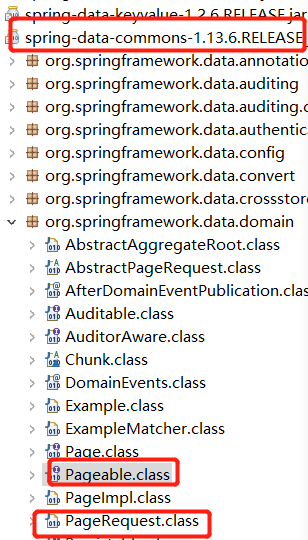
测试代码:
@RunWith(SpringRunner.class)

@SpringBootTest

public class IndexControllerTest {

    @Autowired

    private WebApplicationContext wac;

    private MockMvc mocMvc;

    @Before

    public void setUp() throws Exception {

        mocMvc = MockMvcBuilders.webAppContextSetup(wac).build();

    }

    @Test

    public void testGetUserById() throws Exception {

        String mvcResult = mocMvc.perform(get("/user/1")

//                .param("page", "2")

//                .param("size", "10")

//                .param("sort", "id,desc")

                .contentType(MediaType.APPLICATION_FORM_URLENCODED))

                .andDo(print()) // 打印信息

                .andExpect(status().isOk()) // 期望返回的状态码为200

                .andExpect(jsonPath("$.length()").value(2)) // 期望返回的json数据中有两个字段

                .andExpect(jsonPath("$.username").value("张三"))

                .andReturn().getResponse().getContentAsString();

        System.out.println("mvcResult: " + mvcResult);

    }

}
IndexController
@RestController

public class IndexController {

    @Autowired

    private UserService userService;

    @GetMapping("/user/{id}")

    public Object getUserById(@PathVariable Integer id,

            @PageableDefault(page = 1, size = 10, sort = "id,asc") Pageable pageable) {

        String str = ReflectionToStringBuilder.toString(pageable, ToStringStyle.MULTI_LINE_STYLE);

        System.out.println(str);

        return userService.getUserById(id);

    }

}
控制台打印结果:
org.springframework.data.domain.PageRequest@7d522180[

  sort=id,asc: ASC

  page=1

  size=10

]
7、测试用例中jsonpath的用法
github上面搜索jsonpath ==> https://github.com/json-path/JsonPath
8、@PathVariable 以及url映射中使用正则表达式
@GetMapping("/user/{id:\\d+}")

public Object getUserById(@PathVariable Integer id) {

    return userService.getUserById(id);

}
此时,请求url为 /user/a 时,报404。
参考:
1)详解REST架构风格:http://www.uml.org.cn/zjjs/201805142.asp
2)REST,以及RESTful的讲解:https://blog.csdn.net/qq_21383435/article/details/80032375
springmvc/springboot开发restful API的更多相关文章
- ASP.NET Core Web API 开发-RESTful API实现
ASP.NET Core Web API 开发-RESTful API实现 REST 介绍: 符合REST设计风格的Web API称为RESTful API. 具象状态传输(英文:Representa ...
- flask开发restful api系列(8)-再谈项目结构
上一章,我们讲到,怎么用蓝图建造一个好的项目,今天我们继续深入.上一章中,我们所有的接口都写在view.py中,如果几十个,还稍微好管理一点,假如上百个,上千个,怎么找?所有接口堆在一起就显得杂乱无章 ...
- flask开发restful api
flask开发restful api 如果有几个原因可以让你爱上flask这个极其灵活的库,我想蓝图绝对应该算上一个,部署蓝图以后,你会发现整个程序结构非常清晰,模块之间相互不影响.蓝图对restfu ...
- SpringBoot 构建RestFul API 含单元测试
相关博文: 从消费者角度评估RestFul的意义 SpringBoot 构建RestFul API 含单元测试 首先,回顾并详细说明一下在快速入门中使用的 @Controller . @RestC ...
- 描述怎样通过flask+redis+sqlalchemy等工具,开发restful api
flask开发restful api系列(8)-再谈项目结构 摘要: 进一步介绍flask的项目结构,使整个项目结构一目了然.阅读全文 posted @ 2016-06-06 13:54 月儿弯弯02 ...
- 使用Spring MVC开发RESTful API
第3章 使用Spring MVC开发RESTful API Restful简介 第一印象 左侧是传统写法,右侧是RESTful写法 用url描述资源,而不是行为 用http方法描述行为,使用http状 ...
- flask开发restful api系列(7)-蓝图与项目结构
如果有几个原因可以让你爱上flask这个极其灵活的库,我想蓝图绝对应该算上一个,部署蓝图以后,你会发现整个程序结构非常清晰,模块之间相互不影响.蓝图对restful api的最明显效果就是版本控制:而 ...
- flask开发restful api系列(6)-配置文件
任何一个好的程序,配置文件必不可少,而且非常重要.配置文件里存储了连接数据库,redis的用户密码,不允许有任何闪失.要有灵活性,用户可以自己配置:生产环境和开发环境要分开,最好能简单的修改一个东西, ...
- flask开发restful api系列(1)
在此之前,向大家说明的是,我们整个框架用的是flask + sqlalchemy + redis.如果没有开发过web,还是先去学习一下,这边只是介绍如果从开发web转换到开发移动端.如果flask还 ...
随机推荐
- ubuntu系统熄屏无法唤醒
ubuntu系统熄屏无法唤醒 解决办法:重启后,安装laptop-mode-tools工具包. 1.检查是否安装了grep laptop-mode-tools 工具包 $ dpkg -l | grep ...
- [转帖]Ubuntu 18.04 server安装图形界面及realvnc远程桌面连接
Ubuntu 18.04 server安装图形界面及realvnc远程桌面连接 https://blog.csdn.net/networken/article/details/88938304 转帖 ...
- redis内存满了怎么办?
redis最为缓存数据库,一般用于存储缓存数据,用于缓解数据库压力,但是缓存太多,内存满了怎么办呢.一般有以下几种方法 一.增加内存 redis存储于内存中,数据太多,占用太多内存,那么增加内存就是最 ...
- 如何用item pipeline(管道)清洗数据
版权声明:本文为博主原创文章,转载请注明出处:如果博客中有错误之处抑或有可以改进的地方,欢迎在评论区留言. https://blog.csdn.net/f156207495/article/detai ...
- Solution for automatic update of Chinese word segmentation full-text index in NEO4J
Solution for automatic update of Chinese word segmentation full-text index in NEO4J 1. Sample data 2 ...
- [wpf]wpf full screen.
void window_KeyDown(object sender,KeyEventArgs e) { if(e.Key == Key.F11) { Window.ResizeMode = Resiz ...
- spring boot 是如何利用jackson进行反序列化的?
以下面的代码为例: @RestController public class HelloController { @RequestMapping("/") public BillS ...
- 普通交叉验证(OCV)和广义交叉验证(GCV)
普通交叉验证OCV OCV是由Allen(1974)在回归背景下提出的,之后Wahba和Wold(1975)在讨论 了确定多项式回归中多项式次数的背景,在光滑样条背景下提出OCV. Craven和Wa ...
- CSS高度坍塌问题的原因以及解决办法
原因: 在文档流中,父元素的高度默认是被子元素撑开的,也就是子元素多高,父元素就多高.但是当为子元素设置浮动以后,子元素会完全脱离文档流,此时将会导致子元素无法撑起父元素的高度,导致父元素的高度塌陷. ...
- python-函数3(全局变量与局部变量)
python-函数3(全局变量与局部变量) 全局变量与局部变量 school = "goy edu" 全局变量,在最上面定义的 def change_name(name): glo ...