
编辑器UEditor入门学习
优点:非常使用的富文本编辑器,对比于之前使用的summernote,比前者多出了更多的字体图标
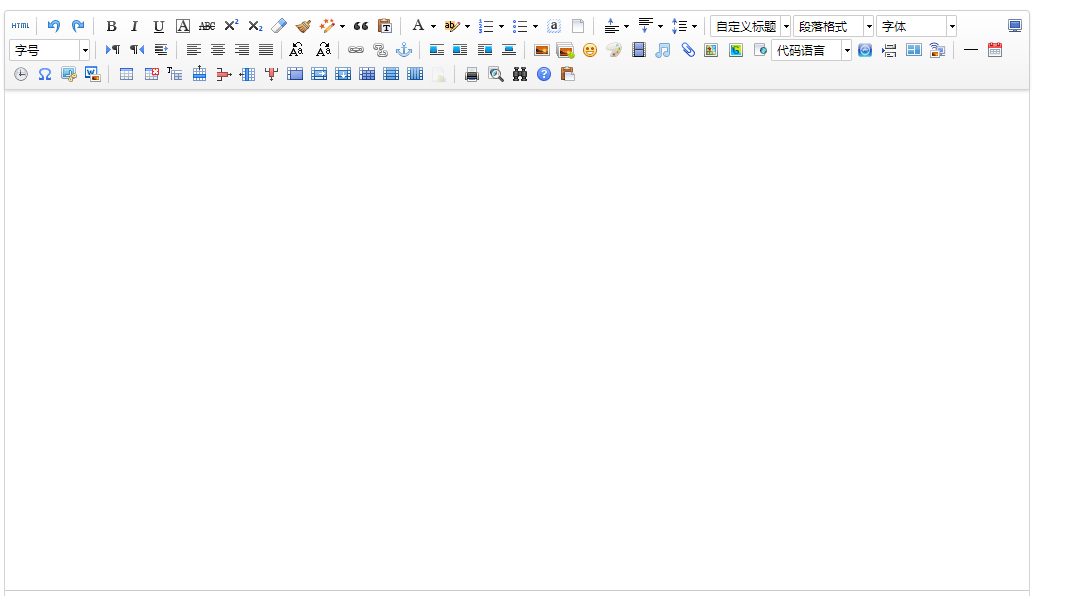
废话少说,直接步骤:
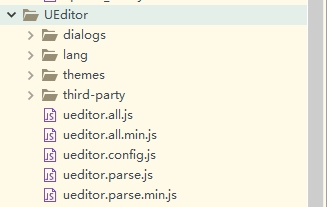
1、导入资源(全部放在单独的文件下即可,下图为“UEditor”文件夹)
2、引用UEditor和JS实例化

<div class="container" style="margin:20px 10px;">

	<script id="editor" type="text/plain"></script>

</div>
<script type="text/javascript">

    //实例化编辑器

    //建议使用工厂方法getEditor创建和引用编辑器实例,如果在某个闭包下引用该编辑器,直接调用UE.getEditor('editor')就能拿到相关的实例

    var ue = UE.getEditor('editor',{

        initialFrameWidth:1400,

        initialFrameHeight:500

    });

</script>


3、如果按照以上操作是能正常显示完整Demo,但是会提示

这个需要自己去手动配置上传文件目录,一下提供JSP部署的博文,引用别人的:https://blog.csdn.net/gfd54gd5f46/article/details/60887313
提供官方完成实例:
index.html
 <!DOCTYPE HTML PUBLIC "-//W3C//DTD HTML 4.01 Transitional//EN"

         "http://www.w3.org/TR/html4/loose.dtd">

 <html>

 <head>

     <title>完整demo</title>

     <meta http-equiv="Content-Type" content="text/html;charset=utf-8"/>

     <script type="text/javascript" charset="utf-8" src="ueditor.config.js"></script>

     <script type="text/javascript" charset="utf-8" src="ueditor.all.min.js"> </script>

     <!--建议手动加在语言,避免在ie下有时因为加载语言失败导致编辑器加载失败-->

     <!--这里加载的语言文件会覆盖你在配置项目里添加的语言类型,比如你在配置项目里配置的是英文,这里加载的中文,那最后就是中文-->

     <script type="text/javascript" charset="utf-8" src="lang/zh-cn/zh-cn.js"></script>

     <style type="text/css">

         div{

             width:100%;

         }

     </style>

 </head>

 <body>

 <div>

     <h1>完整demo</h1>

     <script id="editor" type="text/plain" style="width:1024px;height:500px;"></script>

 </div>

 <div id="btns">

     <div>

         <button onclick="getAllHtml()">获得整个html的内容</button>

         <button onclick="getContent()">获得内容</button>

         <button onclick="setContent()">写入内容</button>

         <button onclick="setContent(true)">追加内容</button>

         <button onclick="getContentTxt()">获得纯文本</button>

         <button onclick="getPlainTxt()">获得带格式的纯文本</button>

         <button onclick="hasContent()">判断是否有内容</button>

         <button onclick="setFocus()">使编辑器获得焦点</button>

         <button onmousedown="isFocus(event)">编辑器是否获得焦点</button>

         <button onmousedown="setblur(event)" >编辑器失去焦点</button>

     </div>

     <div>

         <button onclick="getText()">获得当前选中的文本</button>

         <button onclick="insertHtml()">插入给定的内容</button>

         <button id="enable" onclick="setEnabled()">可以编辑</button>

         <button onclick="setDisabled()">不可编辑</button>

         <button onclick=" UE.getEditor('editor').setHide()">隐藏编辑器</button>

         <button onclick=" UE.getEditor('editor').setShow()">显示编辑器</button>

         <button onclick=" UE.getEditor('editor').setHeight(300)">设置高度为300默认关闭了自动长高</button>

     </div>

     <div>

         <button onclick="getLocalData()" >获取草稿箱内容</button>

         <button onclick="clearLocalData()" >清空草稿箱</button>

     </div>

 </div>

 <div>

     <button onclick="createEditor()">

     创建编辑器</button>

     <button onclick="deleteEditor()">

     删除编辑器</button>

 </div>

 <script type="text/javascript">

     //实例化编辑器

     //建议使用工厂方法getEditor创建和引用编辑器实例,如果在某个闭包下引用该编辑器,直接调用UE.getEditor('editor')就能拿到相关的实例

     var ue = UE.getEditor('editor');

     function isFocus(e){

         alert(UE.getEditor('editor').isFocus());

         UE.dom.domUtils.preventDefault(e)

     }

     function setblur(e){

         UE.getEditor('editor').blur();

         UE.dom.domUtils.preventDefault(e)

     }

     function insertHtml() {

         var value = prompt('插入html代码', '');

         UE.getEditor('editor').execCommand('insertHtml', value)

     }

     function createEditor() {

         enableBtn();

         UE.getEditor('editor');

     }

     function getAllHtml() {

         alert(UE.getEditor('editor').getAllHtml())

     }

     function getContent() {

         var arr = [];

         arr.push("使用editor.getContent()方法可以获得编辑器的内容");

         arr.push("内容为:");

         arr.push(UE.getEditor('editor').getContent());

         alert(arr.join("\n"));

     }

     function getPlainTxt() {

         var arr = [];

         arr.push("使用editor.getPlainTxt()方法可以获得编辑器的带格式的纯文本内容");

         arr.push("内容为:");

         arr.push(UE.getEditor('editor').getPlainTxt());

         alert(arr.join('\n'))

     }

     function setContent(isAppendTo) {

         var arr = [];

         arr.push("使用editor.setContent('欢迎使用ueditor')方法可以设置编辑器的内容");

         UE.getEditor('editor').setContent('欢迎使用ueditor', isAppendTo);

         alert(arr.join("\n"));

     }

     function setDisabled() {

         UE.getEditor('editor').setDisabled('fullscreen');

         disableBtn("enable");

     }

     function setEnabled() {

         UE.getEditor('editor').setEnabled();

         enableBtn();

     }

     function getText() {

         //当你点击按钮时编辑区域已经失去了焦点,如果直接用getText将不会得到内容,所以要在选回来,然后取得内容

         var range = UE.getEditor('editor').selection.getRange();

         range.select();

         var txt = UE.getEditor('editor').selection.getText();

         alert(txt)

     }

     function getContentTxt() {

         var arr = [];

         arr.push("使用editor.getContentTxt()方法可以获得编辑器的纯文本内容");

         arr.push("编辑器的纯文本内容为:");

         arr.push(UE.getEditor('editor').getContentTxt());

         alert(arr.join("\n"));

     }

     function hasContent() {

         var arr = [];

         arr.push("使用editor.hasContents()方法判断编辑器里是否有内容");

         arr.push("判断结果为:");

         arr.push(UE.getEditor('editor').hasContents());

         alert(arr.join("\n"));

     }

     function setFocus() {

         UE.getEditor('editor').focus();

     }

     function deleteEditor() {

         disableBtn();

         UE.getEditor('editor').destroy();

     }

     function disableBtn(str) {

         var div = document.getElementById('btns');

         var btns = UE.dom.domUtils.getElementsByTagName(div, "button");

         for (var i = 0, btn; btn = btns[i++];) {

             if (btn.id == str) {

                 UE.dom.domUtils.removeAttributes(btn, ["disabled"]);

             } else {

                 btn.setAttribute("disabled", "true");

             }

         }

     }

     function enableBtn() {

         var div = document.getElementById('btns');

         var btns = UE.dom.domUtils.getElementsByTagName(div, "button");

         for (var i = 0, btn; btn = btns[i++];) {

             UE.dom.domUtils.removeAttributes(btn, ["disabled"]);

         }

     }

     function getLocalData () {

         alert(UE.getEditor('editor').execCommand( "getlocaldata" ));

     }

     function clearLocalData () {

         UE.getEditor('editor').execCommand( "clearlocaldata" );

         alert("已清空草稿箱")

     }

 </script>

 </body>

 </html>
index.html
编辑器UEditor入门学习的更多相关文章
- springboot+layui 整合百度富文本编辑器ueditor入门使用教程(踩过的坑)
springboot+layui 整合百度富文本编辑器ueditor入门使用教程(踩过的坑) 写在前面: 富文本编辑器,Multi-function Text Editor, 简称 MTE, 是一 ...
- PyQt4入门学习笔记(一)
PyQt4入门学习笔记(一) 一直没有找到什么好的pyqt4的教程,偶然在google上搜到一篇不错的入门文档,翻译过来,留以后再复习. 原始链接如下: http://zetcode.com/gui/ ...
- 百度富文本编辑器UEditor安装配置全过程
网站开发时富文本编辑器是必不可少的,他可以让用户自行编辑内容的样式然后上传到后台!下面我们来介绍如何安装使用百度富文本编辑器 一.下载并且设置百度富文本编辑器的样式 你可以去百度UEditor ...
- OpenCV入门学习笔记
OpenCV入门学习笔记 参照OpenCV中文论坛相关文档(http://www.opencv.org.cn/) 一.简介 OpenCV(Open Source Computer Vision),开源 ...
- Vim入门学习之Vim解析
Vim解析... ----------------------- 首先你要会从官网上下载你想要的Vim版本: 官网: http://www.vim.org/==================== ...
- PHP 入门学习教程及进阶(源于知乎网友的智慧)
思过崖历程: 自学的动机.自学的技巧.自学的目标三个方面描述学习PHP的经历 一.自学的动机: 一定要有浓厚的兴趣,兴趣是最后的老师,可以在你迷茫的时候不断地支撑着你走下去. 自学不是为了工作,不是为 ...
- SpringMVC入门学习(二)
SpringMVC入门学习(二) ssm框架 springMVC 在上一篇博客中,我简单介绍了一下SpringMVC的环境配置,和简单的使用,今天我们将进一步的学习下Springmvc的操作. mo ...
- 在ASP.NET Core2.0中使用百度在线编辑器UEditor(转)
一.起因 UEditor是百度旗下的富文本编辑器,对于后端上传处理仅提供了Asp.Net 版的支持. 如果想在.Net Core项目中使用,那么后台上传接口需要重构. UEditorNetCore:百 ...
- Grunt入门学习之(1) -- 环境安装
Grunt入门学习(1) - 环境安装 这周根据项目需要,在项目的基础上分模块开发了一个小的项目板块,但是在规范组织每个模块的代码和其依赖性时比较麻烦,需要一个项目板块的构建工具.各个模块都包括其对应 ...
随机推荐
- 了解并安装Nginx
公司使用nginx作为请求分发服务器,发现本人在查看nginx配置上存在些许困难,故仔细阅读了陶辉的<深入理解nginx模块开发与框架>第一部分,并作此记录. 了解 我根据书上的思路来了解 ...
- c++ easyX的学习
画象棋盘来浅显学习了解easyx 了解象棋盘的构成: 如图就为一个基本的象棋棋盘我们下面就用esayx来画出这个棋盘,我的感觉这个棋盘大概分为两个部分:第一部分就是棋盘的大致布局,第二个就是棋盘的细节 ...
- Python基础编程:字符编码、数据类型、列表
目录: python简介 字符编码介绍 数据类型 一.Python简介 Python的创始人为Guido van Rossum.1989年圣诞节期间,在阿姆斯特丹,Guido为了打发圣诞节的无趣,决心 ...
- kotlin函数式编程入门及图片处理
函数式编程入门: 对于面向对象编程[OOP]和函数式编程[FP] 由于在JAVA8的学习中系统的学习过了,所以这里对其概念就不过多解释了,下面直接用代码来看下在kotlin中函数式编程是如何编写的: ...
- visudo修改编辑器vim
update-alternatives --config editor
- C#中引用参数ref和输出参数out
引用参数 用于按引用传递自变量. 为引用参数传递的自变量必须是具有明确值的变量,并且在方法执行期间,引用参数指明的存储位置与自变量相同. 引用参数使用 ref 修饰符进行声明. 输出参数 用于按引用传 ...
- C++构造函数实例
#include<iostream> #include <string> using namespace std; class Person { public: //无参(默认 ...
- 从hive中读取数据推送到kafka
由python2.7语言实现的,包也比较旧了. # -*- coding: utf-8 -*- # Version: 1.0.0 # Description: py_Hive2Kafka2kafka ...
- UVA 10491 Cows and Cars (全概率公式)
#include<bits/stdc++.h> #include<stdio.h> #include<iostream> #include<cmath> ...
- Linux开机启动和登录时各个文件的执行顺序
1.在Linux内核被加载后,第一个运行的程序便是/sbin/init 该文件会读取/etc/inittab文件,并依据此文件来进行初始化工作.其中/etc/inittab文件最主要的作用就是设定Li ...