
How to get Timer Job History
1. Get Timer Job internal name with id.
Job ID can be found in SharePoint CA.

Below PowerShell can help you retrieve all jobs’ Internal Name by keywords.
Get-SPTimerJob | Sort-Object name | where {$_.Name -like "*Profile*"} | ft id,name
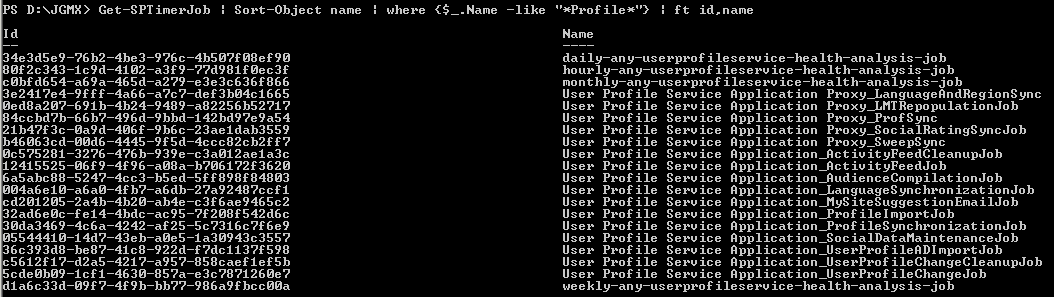
2. Using script in attachment, you can get the history of specific Timer Job

The result will be like this.

PowerShell
$LogTime = Get-Date -Format yyyy-MM-dd_hh-mm

$LogFile = ".\TimerJobReportPatch-$LogTime.rtf"

# Add SharePoint PowerShell Snapin

if ( (Get-PSSnapin -Name Microsoft.SharePoint.PowerShell -ErrorAction SilentlyContinue) -eq $null ) {

    Add-PSSnapin Microsoft.SharePoint.Powershell

}

$scriptBase = split-path $SCRIPT:MyInvocation.MyCommand.Path -parent

Set-Location $scriptBase

#Deleting any .rtf files in the scriptbase location

$FindRTFFile = Get-ChildItem $scriptBase\*.* -include *.rtf

if($FindRTFFile)

{

    foreach($file in $FindRTFFile)

        {

            remove-item $file

        }

}

start-transcript $logfile

Function TimerJobReport()

{

    $Output = $scriptBase + "\" + "TimerJobReport.csv";

"Name" + "," + "Status" + ","  + "LastRun" + "," + "Schedule"  | Out-File -Encoding Default -FilePath $Output;

    write-host "Generating TimerJob generic report" -fore yellow

    $TimerJobs = get-sptimerjob

    foreach($TimerJob in $Timerjobs)

    {

$TimerJob.name + "," + $TimerJob.status + "," + $TimerJob.lastruntime + "," + $TimerJob.schedule  | Out-File -Encoding Default  -Append -FilePath $Output;

    }

    write-host "TimerJob genric report collected and placed under " $Output -fore green

}

Function TimerJobHistory()

{

    $Output1 = $scriptBase + "\" + "TimerJobHistoryReport.csv";

"Name" + "," + "Status" + ","  + "ServerName" + "," + "WebApplicationName" + "," + "ErrorMessage"  | Out-File -Encoding Default -FilePath $Output1;

    write-host "Generating TimerJob history report" -fore yellow

    $TimerJobs = get-sptimerjob

    foreach($TimerJob in $Timerjobs)

    {

        $JobHistories = $TimerJob.historyentries

        foreach($Jobhistory in $JobHistories)

        {

            if($TimerJob.lastruntime.ToUniversalTime() -eq $JobHistory.starttime)

            {

$TimerJob.Name + "," + $Jobhistory.status + "," + $Jobhistory.servername + "," + $Jobhistory.WebApplicationName + "," + $Jobhistory.ErrorMessage | Out-File -Encoding Default  -Append -FilePath $Output1;

            }

        }

    }

    write-host "TimerJob history report generated and placed under " $output1 -fore green

}

Function SpecificTimerJob()

{

    $Output2 = $scriptBase + "\" + "SpecificTimerJobHistoryReport.csv";

"Name" + "," + "Status" + ","  + "ServerName" + "," + "TimerJobStartTime" + "," + "WebApplicationName" + "," + "ErrorMessage"  | Out-File -Encoding Default -FilePath $Output2;

    $TimerJobName = read-host "Enter the timer job name "

    $Timerjob = get-sptimerjob -identity $TimerJobName

    $jobHistories = @($timerjob.historyentries)

$HowManyHistory = read-host "Please enter the number of histories that you want to return for this timerjob "

    for($i = 0 ; $i -le $HowManyHistory; $i++)

    {

$TimerJob.Name + "," + $jobHistories[$i].status + "," + $jobHistories[$i].servername + "," + $jobHistories[$i].StartTime + "," + $jobHistories[$i].WebApplicationName + "," + $jobHistories[$i].ErrorMessage | Out-File -Encoding Default  -Append -FilePath $Output2;

    }

    break;

}

write-host "########################################################################################################" -fore cyan

write-host "Enter 1 to get SP Timer job generic reports" -fore green

write-host "Enter 2 to get specific SP Timer job report " -fore green

write-host "########################################################################################################" -fore cyan

$option = read-host "Enter the option "

switch($option)

{

    1{

        TimerJobReport

        TimerJobHistory

     }

    2{

        SpecificTimerJob

     }

}

write-host "SCRIPT COMPLETED" -fore green

stop-transcript
How to get Timer Job History的更多相关文章
- 如何收缩超大的SharePoint_Config数据库
前言 在已经运行了2年多的SharePoint服务器上,发现SharePoint_Config的数据库文件越来越大,已经达到90几个GB,收缩可以减小20几个GB,但是一周以后又会恢复到90几个GB大 ...
- 怎样收缩超大的SharePoint_Config数据库
前言 在已经执行了2年多的SharePointserver上,发现SharePoint_Config的数据库文件越来越大,已经达到90几个GB,收缩能够减小20几个GB,可是一周以后又会恢复到90几个 ...
- Azure WebJob-Custom Schedule for Azure Web Job Timer Triggers
如果想实现Azure Schedule WebJob,有两种方法: 1. 配置CRON Expression,网上有在线CRON配置工具,根据业务需要配置即可 注意:Azure的CRON Expres ...
- JavaScript(JS)之Javascript对象BOM,History,Location,Function...(二)
https://www.cnblogs.com/haiyan123/p/7594046.html 在JavaScript中除了null和undefined以外其他的数据类型都被定义成了对象,也可以用创 ...
- JS BOM基础 全局对象 window location history screen navigator
全局变量声明的两种方式:1,window.变量名=值;2,var 变量名=值; 全局函数声明的两种方式:1,window.函数名=function(){}2,function 函数名=function ...
- History API与浏览器历史堆栈管理
移动端开发在某些场景中有着特殊需求,如为了提高用户体验和加快响应速度,常常在部分工程采用SPA架构.传统的单页应用基于url的hash值进行路由,这种实现不存在兼容性问题,但是缺点也有--针对不支持o ...
- 使用backbone的history管理SPA应用的url
本文介绍如何使用backbone的history模块实现SPA应用里面的URL管理.SPA应用的核心在于使用无刷新的方式更改url,从而引发页面内容的改变.从实现上来看,url的管理和页面内容的管理是 ...
- 使用h5的history改善ajax列表请求体验
信息比较丰富的网站通常会以分页显示,在点“下一页”时,很多网站都采用了动态请求的方式,避免页面刷新.虽然大家都是ajax,但是从一些小的细节还是 可以区分优劣.一个小的细节是能否支持浏览器“后退”和“ ...
- HTML5学习笔记之History API
这系列文章主要是学习Html5相关的知识点,以学习API知识点为入口,由浅入深的引入实例,让大家一步一步的体会"h5"能够做什么,以及在实际项目中如何去合理的运用达到使用自如,完美 ...
随机推荐
- Python第一天 - set
(一)初识set dict的作用是建立一组 key 和一组 value 的映射关系,dict的key是不能重复的.有的时候,我们只想要 dict 的 key,不关心 key 对应的 value,目的就 ...
- CSS中div覆盖另一个div
将一个div覆盖在另一个div上有两种手段:一是设置margin为负值,二是设置绝对定位. 可以根个人情况设置z-index的值 1->position 为absolute的情况 <htm ...
- 从零开始编写自己的C#框架(5)——三层架构介绍
三层架构对于开发人员来说,已经是司空见惯了,除了大型与超小型项目外,大多都是这种架构来进行开发. 在这里为初学者们简单介绍一下三层架构: (下面内容摘自<趣味理解:三层架构与养猪—<.NE ...
- swift 中单例的写法
在swift中单例的写法和oc的有所不同,在书写的时候又分很多种写法,,如果一个.swift 文件只创建了一个类,可以用那种dispatch_once的写法,如果一个.swift文件中有很多类的存在, ...
- iframe编程的一些问题
前几天做一个用iframe显示曲线图的demo,发现对iframe的contentDocument绑定 onclick事件都无效,而在页面中对iframe.contentDocument的onclic ...
- 奇妙的NULL值,你知道多少
<NULL值的多义性分析> 谈到NULL值,很多人都是很熟悉,但是深入了解后,又感觉到陌生,对其含义和用法,都无法很准确的理解.NULL在数据库和编程语言中,存在的意义和附带的含义不同. ...
- HTTP图解(大牛必经之路)
本节内容 俗话说好的开发,底层知识必须过硬,不然再创新的技术,你也理解不深入,比如python web开发工程师,想要学习任何一个框架,底层都是http和socket,底层抓牢了,学起来会很轻松,所以 ...
- css学习--css基础
学习慕课网笔记,课程:http://www.imooc.com/code/2024 1.css选择器 子选择器:parent>child 子选择器是指选择parent的范围内的第一个子元素.这里 ...
- Apworks框架实战(一):Apworks到底是什么?
简介 Apworks是一款基于Microsoft .NET的面向领域驱动的企业级应用程序开发框架,它适用于以领域模型为核心的企业级系统的开发和集成.Apworks不仅能够很好地支持经典的分层架构,而且 ...
- jQuery-1.9.1源码分析系列(十五) 动画处理
首先需要有队列(queue)的基本知识.见上一章. a.动画入口jQuery.fn.animate函数执行流程详解 先根据参数调用jQuery.speed获取动画相关参数,得到一个类似如下的对象:并且 ...