
开发react 应用最好用的脚手架 create-react-app
安装
npx create-react-app my-app

cd my-app

npm start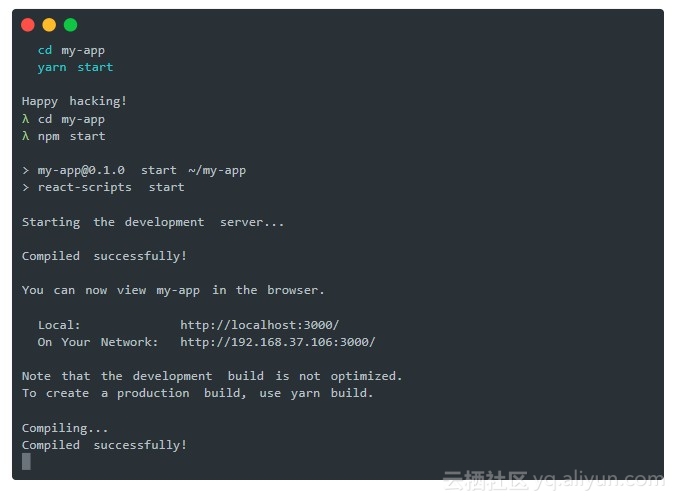
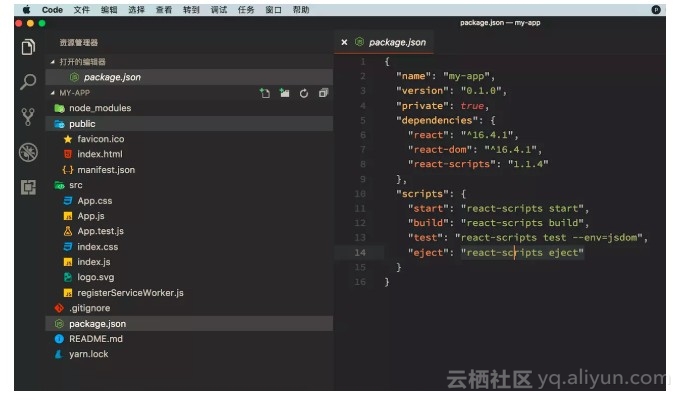
配置
这样的”零配置”没法满足我们的需求,我们需要自定义,需要加一些 loader,plugin 等。
react 团队当然也提供了这样的途径
yarn eject

    Removes this tool and copies build dependencies, configuration files

    and scripts into the app directory. If you do this, you can’t go back!
执行 yarn eject (这是一个不可逆操作)
这个命令将部分配置文件释放出来,目录结构就变成下面这样子了
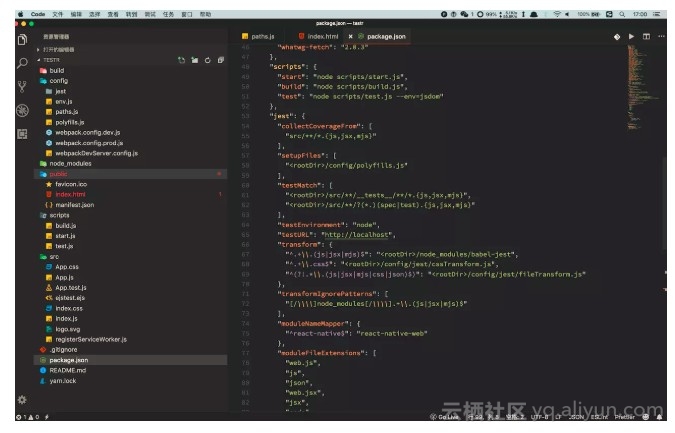
这时候就能够对 webpack.config 进行配置了,不过有的同学也会发现,package.json script 中并没有发现 webpack -c config.js 类似的命令,也没有看到.eslintrc、.babelrc 等配置文件。
不过 package.json->script 中能看到 这三条命令
"start": "node scripts/start.js",

"build": "node scripts/build.js",

"test": "node scripts/test.js --env=jsdom"
打开用户开发环境的 start.js 看看
片段:
// We attempt to use the default port but if it is busy, we offer the user to

// run on a different port. `choosePort()` Promise resolves to the next free port.

choosePort(HOST, DEFAULT_PORT)

  .then(port => {

    if (port == null) {

      // We have not found a port.

      return;

    }

    const protocol = process.env.HTTPS === 'true' ? 'https' : 'http';

    const appName = require(paths.appPackageJson).name;

    const urls = prepareUrls(protocol, HOST, port);

    // Create a webpack compiler that is configured with custom messages.

    const compiler = createCompiler(webpack, config, appName, urls, useYarn);

    // Load proxy config

    const proxySetting = require(paths.appPackageJson).proxy;

    const proxyConfig = prepareProxy(proxySetting, paths.appPublic);

    // Serve webpack assets generated by the compiler over a web sever.

    const serverConfig = createDevServerConfig(proxyConfig, urls.lanUrlForConfig);

    const devServer = new WebpackDevServer(compiler, serverConfig);

    // Launch WebpackDevServer.

    devServer.listen(port, HOST, err => {

      if (err) {

        return console.log(err);

      }

      if (isInteractive) {

        clearConsole();

      }

      console.log(chalk.cyan('Starting the development server...\n'));

      openBrowser(urls.localUrlForBrowser);

    });

    ['SIGINT', 'SIGTERM'].forEach(function(sig) {

      process.on(sig, function() {

        devServer.close();

        process.exit();

      });

    });

  })

  .catch(err => {

    if (err && err.message) {

      console.log(err.message);

    }

    process.exit(1);

  });
在 start.js 中通过代码来启动 webpack 以及 DevServer
eslint 和 babel 的配置 写在了 package.json 里
"babel": {

  "presets": [

    "react-app"

  ]

},

"eslintConfig": {

  "extends": "react-app"

},
能中 dependencies 中找到对应的两个库 babel-preset-react-app和eslint-config-react-app
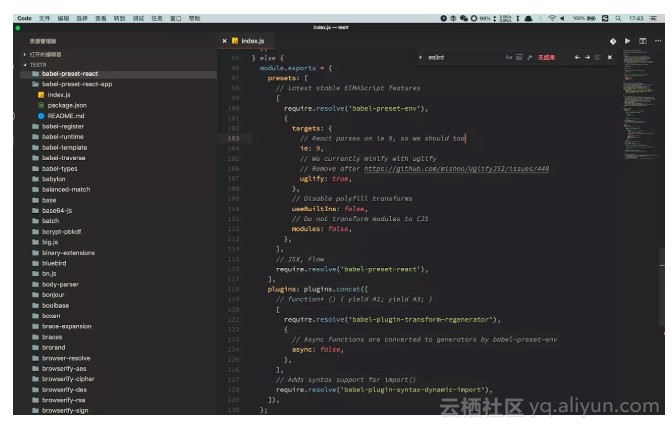
查看babel-preset-react-app源码,就能看到具体的 babel 配置了(eslint-config-react-app 同理),对这一块不熟悉的同学可以看看怎样组合 presets plugin 和 polyfill 的( ps:经常看到网上很多人贴出来的配置 会打包一大堆不需要的 polyfill )
开发react 应用最好用的脚手架 create-react-app的更多相关文章
- React(一)使用脚手架创建React项目
1.安装脚手架 现在使用较多的就是这三种脚手架工具: react-boilerplate react-redux-starter-kit create-react-app 我使用的是第三种,faceb ...
- 如何扩展 Create React App 的 Webpack 配置
如何扩展 Create React App 的 Webpack 配置 原文地址https://zhaozhiming.github.io/blog/2018/01/08/create-react-a ...
- 在 .NET Core 5 中集成 Create React app
翻译自 Camilo Reyes 2021年2月22日的文章 <Integrate Create React app with .NET Core 5> [1] Camilo Reyes ...
- 【每天学一点-04】使用脚手架搭建 React+TypeScript+umi.js+Antd 项目
一.使用脚手架搭建项目框架 1.首先使用脚手架搭建React项目(React+TypeScript+Umi.js) 在控制台输入命令:yarn create @umijs/umi-app 2.引入An ...
- React笔记:快速构建脚手架(1)
1. Create React APP React官方提供的脚手架工程Create React App:https://github.com/facebook/create-react-app Cre ...
- tap news:week5 0.0 create react app
参考https://blog.csdn.net/qtfying/article/details/78665664 先创建文件夹 安装create react app 这个脚手架(facebook官方提 ...
- 利用 Create React Native App 快速创建 React Native 应用
本文介绍的 Create-React-Native-App 是非常 Awesome 的工具,而其背后的 Expo 整个平台也让笔者感觉非常的不错.笔者目前公司是采用 APICloud 进行移动应用开发 ...
- 深入 Create React App 核心概念
本文差点难产而死.因为总结的过程中,多次怀疑本文是对官方文档的直接翻译和简单诺列:同时官方文档很全面,全范围的介绍无疑加深了写作的心智负担.但在最终的梳理中,发现走出了一条与众不同的路,于是坚持分享出 ...
- 使用create react app教程
This project was bootstrapped with Create React App. Below you will find some information on how to ...
- React前端有钱途吗?《React+Redux前端开发实战》学起来
再不学React就真的跟不上大前端的形式了,目前几乎所有前端的招聘条件都是精通React者优先,看看拉勾网的React薪资,都是15K-20K,这个暑假,必须动起来了. 如果你熟悉JavaScript ...
随机推荐
- 【python实例】要求输出字符串中最少一个最多八个的所有字符串组合(连续)
""" 题目:字符串str="ABCDEFGHIJK",要求输出最少一个最多八个的所有组合(向后连续字母) 输出如下: A [0::] AB ABC ...
- html5 图片墙
代码实例: <!DOCTYPE html> <html> <head> <style> body,html{ padding:0;margin:0;wi ...
- bzoj5210 最大连通子块和 动态 DP + 堆
题目传送门 https://lydsy.com/JudgeOnline/problem.php?id=5210 题解 令 \(dp[x][0]\) 表示以 \(x\) 为根的子树中的包含 \(x\) ...
- python输出转义字符
转义字符在字符串中不代表自己,比如\n代表回车,不代表\n字符,那我想输入转义字符本身呢? 答:在字符串前面加个r 如print(“aa\nbb”) 会输出aa bb 如print(r"aa ...
- mysql Got a packet bigger than 'max_allowed_packet' bytes
背景 数据库备份执行SQL文件时,执行到图片表插入图片数据时错误: 错误提示:Got a packet bigger than 'max_allowed_packet' bytes 原因分析及解决 m ...
- Vue学习笔记-父子通信案例
<div id="app"> <cpn :number1="num1" :number2="num2" @num1chan ...
- mybatis模糊查询(转载)
原文地址:http://blog.csdn.net/luqin1988/article/details/7865643 模糊查询: 1. sql中字符串拼接 SELECT * FROM tableNa ...
- STM32输入捕获TIM2四通道
相比于一通道,原子的例程里因为清了计数时间,所以要对程序进行修改. 记录上升沿后的计数,然后记录下降沿的计数.相减后计算高电平时间,对于定时器中断间隔的边界要分开处理. 这里因为我的接收机时间是1ms ...
- jQuery积累:serialize()、stringify()、toJSON()
*)表单serialize()序列化,和serializeArray() ##)应用场景 当Ajax或者get请求发送表单中的某一个,或者某几个值到后台时,通过jQuery就能获取到这些值.然后作为A ...
- 01 【零基础入门】html学习笔记(1)
之前学习了前端的一些基础知识,现在想深入地.精通地学习前端,往前端和全栈工程师方向发展. 之前学习前端主要是通过看视频,结合动手练习.现在认为看书+视频+实践,应该是最高效的学习方法.对于html.c ...