
maven项目创建5 service层整合
创建service相关文件
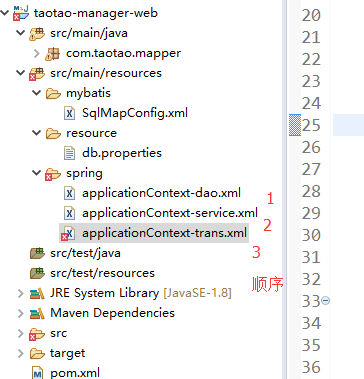
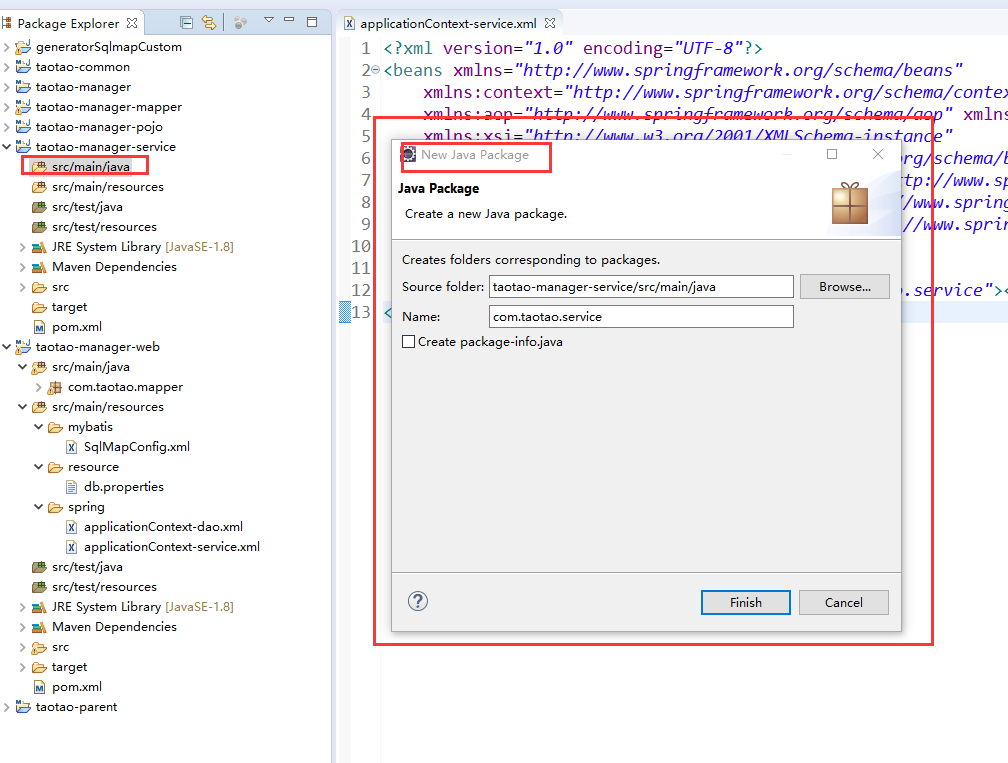
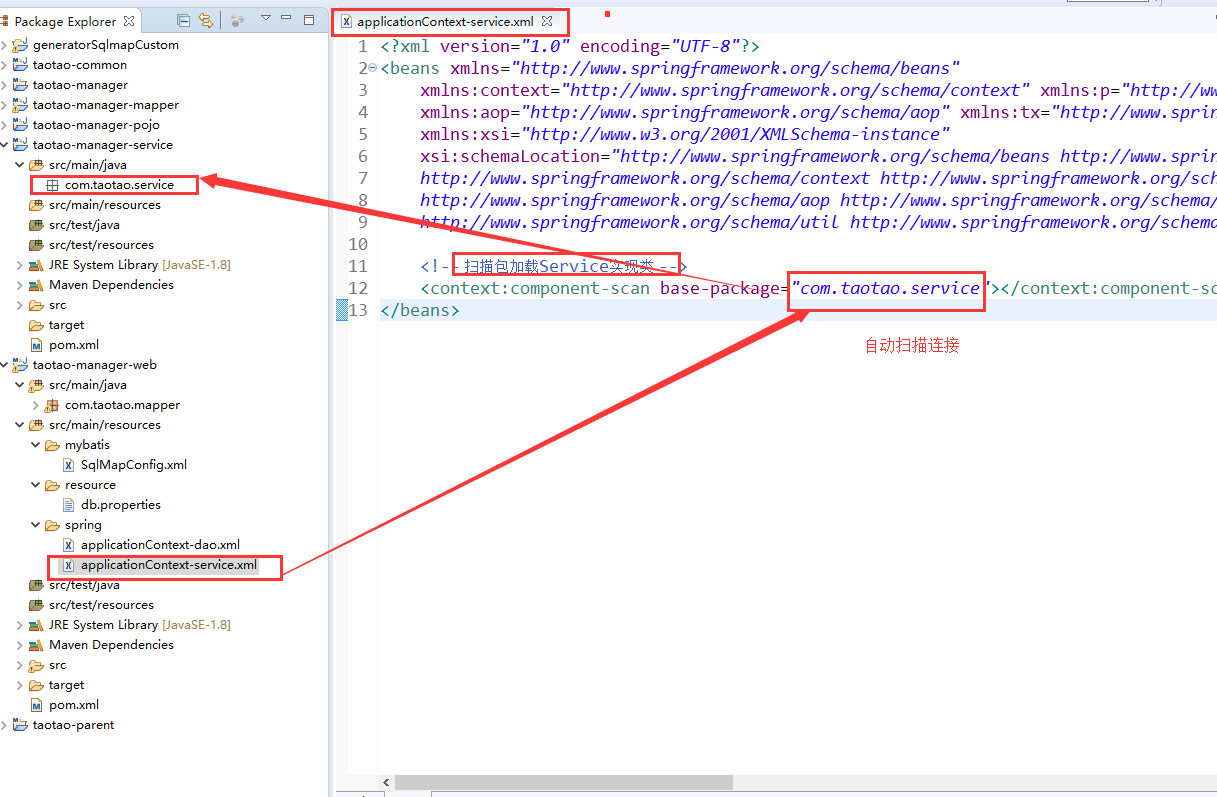
创建applicationContext-service.xml文件
<?xml version="1.0" encoding="UTF-8"?>

<beans xmlns="http://www.springframework.org/schema/beans"

    xmlns:context="http://www.springframework.org/schema/context" xmlns:p="http://www.springframework.org/schema/p"

    xmlns:aop="http://www.springframework.org/schema/aop" xmlns:tx="http://www.springframework.org/schema/tx"

    xmlns:xsi="http://www.w3.org/2001/XMLSchema-instance"

    xsi:schemaLocation="http://www.springframework.org/schema/beans http://www.springframework.org/schema/beans/spring-beans-4.0.xsd

    http://www.springframework.org/schema/context http://www.springframework.org/schema/context/spring-context-4.0.xsd

    http://www.springframework.org/schema/aop http://www.springframework.org/schema/aop/spring-aop-4.0.xsd http://www.springframework.org/schema/tx http://www.springframework.org/schema/tx/spring-tx-4.0.xsd

    http://www.springframework.org/schema/util http://www.springframework.org/schema/util/spring-util-4.0.xsd">

    <!-- 扫描包加载Service实现类 -->

    <context:component-scan base-package="com.taotao.service"></context:component-scan>

</beans>
配置事务
applicationContext-trans.xml

<?xml version="1.0" encoding="UTF-8"?>

<beans xmlns="http://www.springframework.org/schema/beans"

    xmlns:context="http://www.springframework.org/schema/context" xmlns:p="http://www.springframework.org/schema/p"

    xmlns:aop="http://www.springframework.org/schema/aop" xmlns:tx="http://www.springframework.org/schema/tx"

    xmlns:xsi="http://www.w3.org/2001/XMLSchema-instance"

    xsi:schemaLocation="http://www.springframework.org/schema/beans http://www.springframework.org/schema/beans/spring-beans-4.0.xsd

    http://www.springframework.org/schema/context http://www.springframework.org/schema/context/spring-context-4.0.xsd

    http://www.springframework.org/schema/aop http://www.springframework.org/schema/aop/spring-aop-4.0.xsd http://www.springframework.org/schema/tx http://www.springframework.org/schema/tx/spring-tx-4.0.xsd

    http://www.springframework.org/schema/util http://www.springframework.org/schema/util/spring-util-4.0.xsd">

    <!-- 事务管理器 -->

    <bean id="transactionManager"

        class="org.springframework.jdbc.datasource.DataSourceTransactionManager">

        <!-- 数据源 -->

        <property name="dataSource" ref="dataSource" />

    </bean>

    <!-- 通知 -->

    <tx:advice id="txAdvice" transaction-manager="transactionManager">

        <tx:attributes>

            <!-- 传播行为 -->

            <tx:method name="save*" propagation="REQUIRED" />

            <tx:method name="insert*" propagation="REQUIRED" />

            <tx:method name="add*" propagation="REQUIRED" />

            <tx:method name="create*" propagation="REQUIRED" />

            <tx:method name="delete*" propagation="REQUIRED" />

            <tx:method name="update*" propagation="REQUIRED" />

            <tx:method name="find*" propagation="SUPPORTS" read-only="true" />

            <tx:method name="select*" propagation="SUPPORTS" read-only="true" />

            <tx:method name="get*" propagation="SUPPORTS" read-only="true" />

        </tx:attributes>

    </tx:advice>

    <!-- 切面 -->

    <aop:config>

        <aop:advisor advice-ref="txAdvice"

            pointcut="execution(* com.taotao.service.*.*(..))" />

    </aop:config>

</beans>
报错先不用管
maven项目创建5 service层整合的更多相关文章
- maven项目创建4 dao层整合
项目配置文件要放在打包成war包的web项目中 创建文件步骤 1 SqlMapConfig.xml <?xml version="1.0" encoding=" ...
- maven项目创6 表现层整合
springmvc.xm创建l 和 web.xml配置 ,报错先不管 springmvc.xml com.taotao.controller 空包 其中 资源映射 是等 web.x ...
- ssm框架整合+maven项目创建
在引入外部maven插件后就可以创建一个maven项目了,这篇文章主要介绍ssm框架的整合和如何创建一个maven项目 1.在开发工具的项目空白区单击右键,依次选择New.Other,会出现如下界面, ...
- Maven学习 五 Maven项目创建(1)jar项目
第一步:Maven项目的创建 File->new->Maven project. 点击下一步 上方的两个多选框选上,第一个是不使用archetype 原型模板,第二个是使用默认工作空间 点 ...
- IntelliJ IDEA 进行Maven项目创建build
IntelliJ IDEA 进行Maven项目创建build 1,文件-新建-maven 项目:2,编写pom.xml文件:3,鼠标放到左下,然后选择Maven Projects,然后可以查看项目信息 ...
- Eclipse+Maven 项目创建
★:jar包下载不了的话可能是镜像里没有这个版本,换个低版本的就行 ★:eclipse工程validating很慢,可以先关掉验证(一般对项目没什么影响) ★:eclipse工程pom.xml文件报错 ...
- 详解Maven项目利用java service wrapper将Java程序生成Windows服务
在项目的开发中,有时候需要将Java应用程序打包成Windows服务,我们就直接可以通过windows的服务来启动和关闭java程序了. 本博文将通过有两种方法实现该功能,手动创建法和Maven自动打 ...
- Maven学习 七 Maven项目创建(2)war项目
一.web项目的目录结构 如果手动创建一个java web项目,其基本的目录结构包括:METE-INF,WEB-INF,以及WEB-INF下必须包含一个web.xml文件 二.使用Maven创建wa ...
- springmvc 项目完整示例09 maven项目创建
需求表均同springmvc案例 此处只是使用maven 注意,以下所有需要建立在你的eclipse等已经集成配置好了maven了,说白了就是新建项目的时候已经可以找到maven了 没有的话需要安装m ...
随机推荐
- [Python3] 040 文件 一般使用
目录 文件 1. open 函数 2. with 语句 3. 先写再读 3.1 写 3.2 读 4. "位置"的查询与移动 4.1 tell() 4.2 seek(cookie, ...
- 课程计划安排 ver: 2016-12-14
录的越多,后续肯定会涨价. <x86 从实模式到保护模式> 这本书涉及到除了汇编语言,还有一些计算机架构和操作系统方面相关的知识点. 不仅为学习高级编程语言打下了非常扎实的基础,学完C++ ...
- Go语言中 Print,Println 和 Printf 的区别(八)
Print 和 Println 这两个打印方式类似,只在格式上有区别 1. Println 打印的每一项之间都会有空行,Print 没有,例如: fmt.Println("go", ...
- 洛谷 P3370 【模板】字符串哈希 (set||map||哈希||字典树(mle)
P3370 [模板]字符串哈希 题目描述 如题,给定N个字符串(第i个字符串长度为Mi,字符串内包含数字.大小写字母,大小写敏感),请求出N个字符串中共有多少个不同的字符串. #友情提醒:如果真的想好 ...
- IDEA2018.2.6激活(可用)
破解插件下载: 链接:https://pan.baidu.com/s/1j2_kEm_Akcph6Qb8hr6soQ 提取码:hv64 将下载包放入bin文件夹下,修改bin中的两个文件 idea.e ...
- spark教程(14)-共享变量
spark 使用的架构是无共享的,数据分布在不同节点,每个节点有独立的 CPU.内存,不存在全局的内存使得变量能够共享,驱动程序和任务之间通过消息共享数据 举例来说,如果一个 RDD 操作使用了驱动程 ...
- JAVA二维码编码&解码
QRCodeUtil.java package web; import java.awt.AlphaComposite; import java.awt.Color; import java.awt. ...
- 什么是blazor
blazor是一个微软推出的基于webassembly和C#(面向对象) 以及F#(面向函数)的前端框架 它类似vue react anglar的单页前端框架 只是他不再使用js 或typescrip ...
- mysql update join
随手记录一下 UPDATE information f1 LEFT JOIN topic f2 ON f1.id = f2.id SET f1.img_url = f2.img_url
- QuickSort(快排)的JAVA实现
QuickSort的JAVA实现 这是一篇算法课程的复习笔记 用JAVA对快排又实现了一遍. 先实现的是那个easy版的,每次选的排序轴都是数组的最后一个: package com.algorithm ...