
用MR生成HFile文件格式后,数据批量导入HBase
环境hadoop cdh5.4.7 hbase1.0.0
测试数据:
topsid uid roler_num typ
10 111111 255 0
在Hbase 创建t2数据库: create 't2','info'。创建数据库t2, columnFamily:info
import java.io.IOException;

import java.net.URI;

import java.text.SimpleDateFormat;

import java.util.Date;

import org.apache.hadoop.conf.Configuration;

import org.apache.hadoop.fs.FileSystem;

import org.apache.hadoop.fs.Path;

import org.apache.hadoop.hbase.KeyValue;

import org.apache.hadoop.hbase.client.HTable;

import org.apache.hadoop.hbase.io.ImmutableBytesWritable;

import org.apache.hadoop.hbase.mapreduce.HFileOutputFormat2;

import org.apache.hadoop.hbase.util.Bytes;

import org.apache.hadoop.io.LongWritable;

import org.apache.hadoop.io.Text;

import org.apache.hadoop.mapreduce.Job;

import org.apache.hadoop.mapreduce.Mapper;

import org.apache.hadoop.mapreduce.lib.input.FileInputFormat;

import org.apache.hadoop.mapreduce.lib.input.TextInputFormat;

import org.apache.hadoop.mapreduce.lib.output.FileOutputFormat;

public class HFileCreate {

    static class HFileImportMapper2 extends

            Mapper<LongWritable, Text, ImmutableBytesWritable, KeyValue> {

        protected SimpleDateFormat sdf = new SimpleDateFormat("yyyyMMdd");

        protected final String CF_KQ = "info";

        protected final int ONE = 1;

        @Override

        protected void map(LongWritable key, Text value, Context context)

                throws IOException, InterruptedException {

            String line = value.toString();

            System.out.println("line : " + line);

            String[] datas = line.split("\\s+");

            // row格式为:yyyyMMdd-sid-uid-role_num-timestamp-typ

            String row =

                     datas[0] + "-" + datas[1] + "-" + datas[2] + "-"

                     + "-" + datas[3];

            ImmutableBytesWritable rowkey = new ImmutableBytesWritable(

                    Bytes.toBytes(row));

            KeyValue kv = new KeyValue(Bytes.toBytes(row),

                    this.CF_KQ.getBytes(), datas[3].getBytes(),

                    Bytes.toBytes(this.ONE));

            context.write(rowkey, kv);

        }

    }

    public static void main(String[] args) {

        Configuration conf = new Configuration();

        conf.addResource("hbase-site.xml");

        String tableName = "t2";

        String input  = "hdfs://node11:9000/datas/t3";

        String output = "hdfs://node11:9000/datas/out12";

        System.out.println("table : " + tableName);

        HTable table;

        try {

            // 运行前,删除已存在的中间输出目录

            try {

                FileSystem fs = FileSystem.get(URI.create(output), conf);

                fs.delete(new Path(output), true);

                fs.close();

            } catch (IOException e1) {

                e1.printStackTrace();

            }

            table = new HTable(conf, tableName.getBytes());

            Job job = new Job(conf);

            job.setJobName("Generate HFile");

            job.setJarByClass(HFileCreate.class);

            job.setInputFormatClass(TextInputFormat.class);

            job.setMapperClass(HFileImportMapper2.class);

            FileInputFormat.setInputPaths(job, input);

            job.getConfiguration().set("mapred.mapoutput.key.class",

                    "org.apache.hadoop.hbase.io.ImmutableBytesWritable");

            job.getConfiguration().set("mapred.mapoutput.value.class",

                    "org.apache.hadoop.hbase.KeyValue");

            FileOutputFormat.setOutputPath(job, new Path(output));

            HFileOutputFormat2.configureIncrementalLoad(job, table);

            try {

                job.waitForCompletion(true);

            } catch (InterruptedException e) {

                e.printStackTrace();

            } catch (ClassNotFoundException e) {

                e.printStackTrace();

            }

        } catch (IOException e) {

            e.printStackTrace();

        }

    }

}
输出目录要有带columnFamily的文件HFile才生成成功:

4、需要先配置自己HBase_HOME 在配置文件中自己查看。
echo $HBase_HOME
5、我的配置:export HBASE_HOME=/home/hbase-1.0.0-cdh5.4.7
输入:
HADOOP_CLASSPATH=`${HBASE_HOME}/bin/hbase classpath` hadoop jar ${HBASE_HOME}/lib/hbase-server-1.0.0-cdh5.4.7.jar
例如我的:
HADOOP_CLASSPATH=`${HBASE_HOME}/bin/hbase classpath` hadoop jar /home/hbase-1.0.0-cdh5.4.7/lib/hbase-server-1.0.0-cdh5.4.7.jar completebulkload /datas/out12 t2
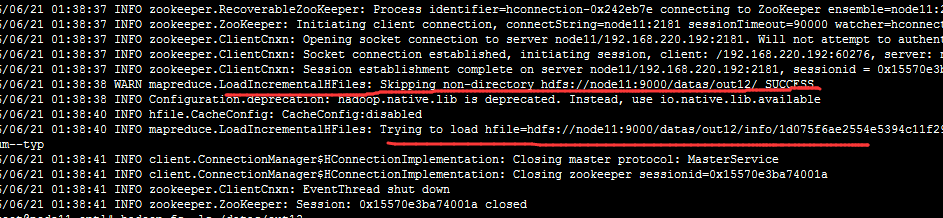
一般执行到这步就 成功导入。
6、查询HBase
7、HBase-site.xml
<?xml version="1.0"?>

<?xml-stylesheet type="text/xsl" href="configuration.xsl"?>

<!--

/**

 *

 * Licensed to the Apache Software Foundation (ASF) under one

 * or more contributor license agreements.  See the NOTICE file

 * distributed with this work for additional information

 * regarding copyright ownership.  The ASF licenses this file

 * to you under the Apache License, Version 2.0 (the

 * "License"); you may not use this file except in compliance

 * with the License.  You may obtain a copy of the License at

 *

 *     http://www.apache.org/licenses/LICENSE-2.0

 *

 * Unless required by applicable law or agreed to in writing, software

 * distributed under the License is distributed on an "AS IS" BASIS,

 * WITHOUT WARRANTIES OR CONDITIONS OF ANY KIND, either express or implied.

 * See the License for the specific language governing permissions and

 * limitations under the License.

 */

-->

<configuration>

      <property>

  <name>hbase.rootdir</name>

  <value>hdfs://node11:9000/hbase</value>

</property>

<property>

  <name>hbase.cluster.distributed</name>

  <value>true</value>

</property>

<property>

  <name>hbase.zookeeper.quorum</name>

  <value>node11</value>

</property>

<property>

  <name>dfs.replication</name>

  <value>1</value>

</property>

<property>

  <name>hbase.regionserver.wal.codec</name>

  <value>org.apache.hadoop.hbase.regionserver.wal.IndexedWALEditCodec</value>

</property>

<property>

  <name>hbase.region.server.rpc.scheduler.factory.class</name>

  <value>org.apache.hadoop.hbase.ipc.PhoenixRpcSchedulerFactory</value>

  <description>Factory to create the Phoenix RPC Scheduler that uses separate queues for index and metadata updates</description>

</property>

<property>

  <name>hbase.rpc.controllerfactory.class</name>

  <value>org.apache.hadoop.hbase.ipc.controller.ServerRpcControllerFactory</value>

  <description>Factory to create the Phoenix RPC Scheduler that uses separate queues for index and metadata updates</description>

</property>

<property>

  <name>hbase.coprocessor.regionserver.classes</name>

  <value>org.apache.hadoop.hbase.regionserver.LocalIndexMerger</value>

</property>

<property>

  <name>hbase.master.loadbalancer.class</name>

  <value>org.apache.phoenix.hbase.index.balancer.IndexLoadBalancer</value>

</property>

<property>

  <name>hbase.coprocessor.master.classes</name>

  <value>org.apache.phoenix.hbase.index.master.IndexMasterObserver</value>

</property>

</configuration>
用MR生成HFile文件格式后,数据批量导入HBase的更多相关文章
- 数据批量导入HBase
测试数据: datas 1001 lilei 17 13800001111 1002 lily 16 13800001112 1003 lucy 16 13800001113 1004 meimei ...
- SQL Server中bcp命令的用法以及数据批量导入导出
原文:SQL Server中bcp命令的用法以及数据批量导入导出 1.bcp命令参数解析 bcp命令有许多参数,下面给出bcp命令参数的简要解析 用法: bcp {dbtable | query} { ...
- .net core利用MySqlBulkLoader大数据批量导入MySQL
最近用core写了一个数据迁移小工具,从SQLServer读取数据,加工后导入MySQL,由于数据量太过庞大,数据表都过百万,常用的dapper已经无法满足.三大数据库都有自己的大数据批量导入数据的方 ...
- 将execl里的数据批量导入数据库
本文将采用NPOI插件来读取execl文件里的数据,将数据加载到内存中的DataTable中 /// <summary> /// 将Excel转换为DataTable /// </s ...
- mysql中把一个表的数据批量导入另一个表中
mysql中把一个表的数据批量导入另一个表中 不管是在网站开发还是在应用程序开发中,我们经常会碰到需要将MySQL或MS SQLServer某个表的数据批量导入到另一个表的情况,甚至有时还需要指定 ...
- ELK数据批量导入
数据批量导入 • 使用 _bulk 批量导入数据 – 批 ...
- [Django]数据批量导入
前言:历经一个月的复习,考试终于结束了.这期间上班的时候有研究了Django网页制作过程中,如何将数据批量导入到数据库中. 这个过程真的是惨不忍睹,犯了很多的低级错误,这会在正文中说到的.再者导入数据 ...
- 将Excle中的数据批量导入数据库
namespace 将Excle中的数据批量导入数据库{ class Program { static void Main(string[] args) { S ...
- Java实现Excel数据批量导入数据库
Java实现Excel数据批量导入数据库 概述: 这个小工具类是工作中的一个小插曲哦,因为提数的时候需要跨数据库导数... 有的是需要从oracle导入mysql ,有的是从mysql导入oracle ...
随机推荐
- [转]云计算:SaaS、PaaS、IaaS、CaaS
http://blog.csdn.net/it_man/article/details/8441902 近两年来,随着云计算技术的飞速发展,越来越多的厂商意识到了它巨大的潜在价值.随着微软.IBM.G ...
- 自己实现一个类似 jQuery 的函数库
假如我们有一个需求,需要给元素添加样式类,使用原生的JS很容易搞定. 1 抽取函数 function addClass(node, className){ node.classList.add(cla ...
- crack Tut.ReverseMe1.exe
测试文件:https://www.wocloud.com.cn/webclient/share/sindex.action?id=i9K_Br6TgE7ZLB3oBGUcJmKcRy5TUdZ8U6_ ...
- Django中的APP
3. Django中的APP: 什么是APP?以及为什么要用APP? project --> 项目 (老男孩教育大学校) APP --> 应用 (Linux学院/Python学院/大数据学 ...
- 一次Linux服务器空间满的随笔解决记录
昨天突然无法上传文件到服务器上的,FTP工具总是到99%就卡住了.查了一下说可能是服务器满了. 赶紧用 df -h 命令查看空间使用情况.果然100%了. 想想上次查询才不到50%,怎么突然就满了了呢 ...
- Cytoscape软件简介
• Cytoscape一款开源的网络显示和分析软件. 软件的核心部分提供了 网络显示.布局.查询等方面的基本功能. • Cytoscape源自系统生物学,通过Cytoscape,用户可以在可视化的 环 ...
- 第二周作业—N42-虚怀若谷
一.描述Linux发行版的系统目录名称命名规则以及用途 1.文件名命名规则 (1).文件名最长255字节 (2).包括路径在内的文件名称最长4095个字节 (3).除了斜扛和NUL,所有字符都有效.但 ...
- jmeter+ant+jenkins搭建接口自动化测试环境
jmeter+ant+jenkins搭建接口自动化测试环境(基于win) 1.jmeter jmeter依赖java运行环境,所以需要提前下载jdk并配置好环境变量 官网下载(http://jmete ...
- Struts2基础-3 -继承ActionSupport接口创建Action控制器+javaBean接收请求参数+ 默认Action配置处理请求错误 + 使用ActionContext访问ServletAPI
1.目录结构及导入的jar包 2.web.xml 配置 <?xml version="1.0" encoding="UTF-8"?> <web ...
- Vue的使用总结(2)
1.Vue 中 class 和 style 的绑定 在 Vue 中,可以通过数据绑定来操作元素的 class 列表和内联样式,操作 class 和 style 是用 v-bind 来绑定的.在将 v- ...