
C#.NET 操作Windows服务(安装、卸载)
注意点:
1.安装时要请求到管理员权限。
2.卸载前,一定要停止掉Windows服务,否则需要重启或注销电脑。代码无法停止服务时,使用services.msc来停止。
开始:
1。新建一个名为“Windows服务操作”的WINFORM程序。
2。在解决方案里添加一个Windows服务项目,名为“ADemoWinSvc”。
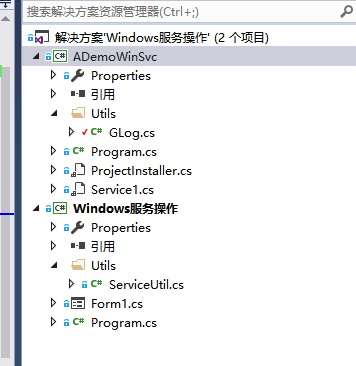
3。双击“Service1.cs”,右键,添加安装程序。
4。双击“ProjectInstaller.cs”,修改“serviceProcessInstaller1”中的“Account”为“LocalSystem”.
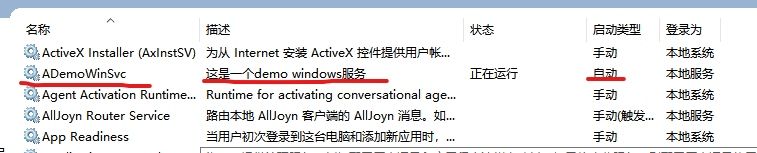
5。修改“serviceInstaller1”,"Description"设置为“这是一个demo windows服务”,ServiceName 设置为“ADemoWinSvc”,StartType 设置为“Automatic”。
6。修改“Service1.cs”的代码,增加服务启动日志和停止日志。
using CommonUtils;

using System;

using System.Collections.Generic;

using System.ComponentModel;

using System.Data;

using System.Diagnostics;

using System.Linq;

using System.ServiceProcess;

using System.Text;

namespace ADemoWinSvc

{

    public partial class Service1 : ServiceBase

    {

        public Service1()

        {

            InitializeComponent();

        }

        protected override void OnStart(string[] args)

        {

            GLog.WLog("服务已启动");

        }

        protected override void OnStop()

        {

            GLog.WLog("服务已停止");

        }

    }

}
工具类:
using System;

using System.IO;

namespace CommonUtils

{

    public static class GLog

    {

        static object _lockObj = new object();

        public static void WLog(string content)

        {

            lock (_lockObj)

            {

                string curPath = System.IO.Path.GetDirectoryName(System.Reflection.Assembly.GetExecutingAssembly().ManifestModule.FullyQualifiedName);

                string logDir = "Logs";

                string logDirFullName = Path.Combine(curPath, logDir);

                try

                {

                    if (!Directory.Exists(logDirFullName))

                        Directory.CreateDirectory(logDirFullName);

                }

                catch { return; }

                string fileName = "Logs" + DateTime.Now.ToString("yyyy-MM-dd") + ".txt";

                string logFullName = Path.Combine(logDirFullName, fileName);

                try

                {

                    using (FileStream fs = new FileStream(logFullName, FileMode.Append, FileAccess.Write))

                    using (StreamWriter sw = new StreamWriter(fs))

                        sw.WriteLine(DateTime.Now.ToString("yyyy-MM-dd HH:mm:ss.fff") + " " + content);

                }

                catch { return; }

            }

        }

    }

}
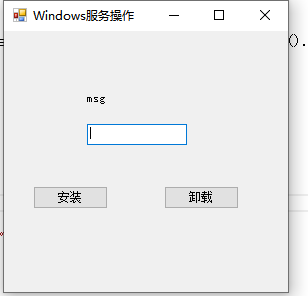
7。回到winform程序,在“Form1.cs”上添加“安装”和“卸载”2个按钮。
代码如下:
using CommonUtils;

using System;

using System.Collections;

using System.Collections.Generic;

using System.ComponentModel;

using System.Data;

using System.Drawing;

using System.IO;

using System.Linq;

using System.Text;

using System.Windows.Forms;

namespace Windows服务操作

{

    public partial class Form1 : Form

    {

        public Form1()

        {

            InitializeComponent();

        }

        private void Form1_Load(object sender, EventArgs e)

        {

        }

        /// <summary>

        /// windows服务名

        /// </summary>

        static string _winSvcName = "ADemoWinSvc";

        /// <summary>

        /// windows服务对应的exe 名

        /// </summary>

        static string _winSvcExeName = "ADemoWinSvc.exe";

        private void btnSetup_Click(object sender, EventArgs e)

        {

            try

            {

                //是否存在服务

                if (ServiceUtil.ServiceIsExisted(_winSvcName))

                {

                    //已存在,检查是否启动

                    if (ServiceUtil.IsRun(_winSvcName))

                    {

                        //服务是已启动状态

                        lblMsg.Text = "[001]服务是已启动状态";

                    }

                    else

                    {

                        //未启动,则启动

                        ServiceUtil.StarService(_winSvcName);

                        lblMsg.Text = "[002]服务是已启动状态";

                    }

                }

                else

                {

                    //不存在,则安装

                    IDictionary mySavedState = new Hashtable();

                    string curPath = System.IO.Path.GetDirectoryName(System.Reflection.Assembly.GetExecutingAssembly().ManifestModule.FullyQualifiedName);

                    string apppath = Path.Combine(curPath, _winSvcExeName);

                    ServiceUtil.InstallService(mySavedState, apppath);

                    lblMsg.Text = "[003]服务是已启动状态";

                    //安装后并不会自动启动。需要启动这个服务

                    ServiceUtil.StarService(_winSvcName);

                    lblMsg.Text = "[004]服务是已启动状态";

                }

            }

            catch (Exception ex)

            {

                MessageBox.Show(ex.Message);

            }

        }

        private void btnUninstall_Click(object sender, EventArgs e)

        {

            //** 卸载服务最重要的是先停止,否则电脑需要重启或注销 **

            try

            {

                //是否存在服务

                if (!ServiceUtil.ServiceIsExisted(_winSvcName))

                {

                    MessageBox.Show("服务不存在,不需要卸载");

                    return;

                }

                //如果服务正在运行,停止它

                if (ServiceUtil.IsRun(_winSvcName))

                {

                    ServiceUtil.StopService(_winSvcName);

                }

                //再检查一次是否在运行

                if (ServiceUtil.IsRun(_winSvcName))

                {

                    MessageBox.Show("服务无法停止,请手动停止这个服务");

                    return;

                }

                //卸载

                ServiceUtil.UnInstallServiceByName(_winSvcName);

                lblMsg.Text = "[005]服务已卸载";

            }

            catch (Exception ex)

            {

                MessageBox.Show(ex.Message);

            }

        }

    }

}
使用到的工具类:
using System;

using System.Collections;

using System.Collections.Generic;

using System.Configuration.Install;

using System.Diagnostics;

using System.Linq;

using System.ServiceProcess;

using System.Text;

namespace CommonUtils

{

    /// <summary>

    /// windows服务操作工具类

    /// </summary>

    public static class ServiceUtil

    {

        /// <summary>

        /// 服务是否正在运行

        /// </summary>

        /// <param name="name"></param>

        /// <returns></returns>

        public static bool IsRun(string name)

        {

            bool IsRun = false;

            try

            {

                if (!ServiceIsExisted(name)) return false;

                var sc = new ServiceController(name);

                if (sc.Status == ServiceControllerStatus.StartPending || sc.Status == ServiceControllerStatus.Running)

                {

                    IsRun = true;

                }

                sc.Close();

            }

            catch

            {

                IsRun = false;

            }

            return IsRun;

        }

        /// <summary>

        /// 启动服务

        /// </summary>

        /// <param name="name"></param>

        /// <returns></returns>

        public static bool StarService(string name)

        {

            try

            {

                var sc = new ServiceController(name);

                if (sc.Status == ServiceControllerStatus.Stopped || sc.Status == ServiceControllerStatus.StopPending)

                {

                    sc.Start();

                    sc.WaitForStatus(ServiceControllerStatus.Running, new TimeSpan(0, 0, 10));

                }

                else

                {

                }

                sc.Close();

                return true;

            }

            catch (Exception ex)

            {

                throw ex;

            }

        }

        /// <summary>

        /// 停止服务(有可能超时)

        /// </summary>

        /// <param name="name"></param>

        /// <returns></returns>

        public static bool StopService(string name)

        {

            try

            {

                var sc = new ServiceController(name);

                if (sc.Status == ServiceControllerStatus.Running || sc.Status == ServiceControllerStatus.StartPending)

                {

                    sc.Stop();

                    //停止服务超时时间:56秒。

                    sc.WaitForStatus(ServiceControllerStatus.Stopped, new TimeSpan(0, 0, 56));

                }

                else

                {

                }

                sc.Close();

                return true;

            }

            catch (Exception ex)

            {

                throw ex;

            }

        }

        /// <summary>

        /// 是否存在

        /// </summary>

        /// <param name="serviceName"></param>

        /// <returns></returns>

        public static bool ServiceIsExisted(string serviceName)

        {

            ServiceController[] services = ServiceController.GetServices();

            foreach (ServiceController s in services)

                if (s.ServiceName.ToLower() == serviceName.ToLower())

                    return true;

            return false;

        }

        /// <summary>

        /// 安装

        /// </summary>

        /// <param name="stateSaver"></param>

        /// <param name="filepath"></param>

        public static void InstallService(IDictionary stateSaver, string filepath)

        {

            try

            {

                AssemblyInstaller myAssemblyInstaller = new AssemblyInstaller();

                myAssemblyInstaller.UseNewContext = true;

                myAssemblyInstaller.Path = filepath;

                myAssemblyInstaller.Install(stateSaver);

                myAssemblyInstaller.Commit(stateSaver);

                myAssemblyInstaller.Dispose();

            }

            catch (Exception ex)

            {

                throw ex;

            }

        }

        /// <summary>

        /// 使用路径卸载(有时候不便于用路径来卸载,则使用SC DELETE 名称来卸载)

        /// </summary>

        /// <param name="filepath"></param>

        public static void UnInstallService(string filepath)

        {

            try

            {

                AssemblyInstaller myAssemblyInstaller = new AssemblyInstaller();

                myAssemblyInstaller.UseNewContext = true;

                myAssemblyInstaller.Path = filepath;

                myAssemblyInstaller.Uninstall(null);

                myAssemblyInstaller.Dispose();

            }

            catch (Exception ex)

            {

                throw ex;

            }

        }

        /// <summary>

        /// 使用windows服务名卸载

        /// </summary>

        /// <param name="WinServiceName"></param>

        public static void UnInstallServiceByName(string WinServiceName)

        {

            ProcessStartInfo pStart = new ProcessStartInfo("sc.exe");

            Process pRoc = new Process();

            pStart.Arguments = " delete " + WinServiceName;

            pStart.UseShellExecute = false;

            pStart.CreateNoWindow = false;

            pRoc.StartInfo = pStart;

            pRoc.Start();

            pRoc.WaitForExit();

        }

    }

}
winform 程序里要引用 System.Configuration.Install、System.ServiceProcess 这2个程序集。
8。分别编译ADemoWinSvc、Windows服务操作,将ADemoWinSvc.exe 复制到Windows服务操作.exe 所在目录。
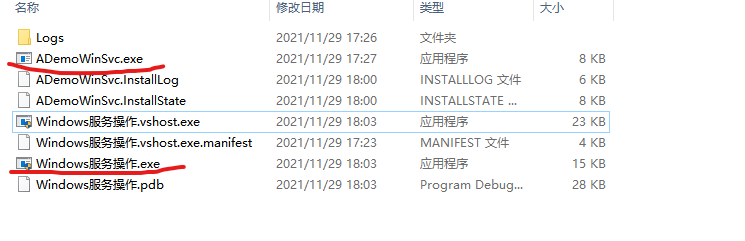
9。管理员身份运行Windows服务操作.exe,点击安装按钮,即可看到效果。

-
C#.NET 操作Windows服务(安装、卸载)的更多相关文章
- C#版Windows服务安装卸载小工具-附源码
前言 在我们的工作中,经常遇到Windows服务的安装和卸载,在之前公司也普写过一个WinForm程序选择安装路径,这次再来个小巧灵活的控制台程序,不用再选择,只需放到需要安装服务的目录中运行就可以实 ...
- windows服务安装卸载
到C盘下找到对应的开发VS的installutil.exe文件,复制到程序的执行文件(*.exe)相同目录下在开始程序中找到VS命令提示工具 转到程序的执行文件(*.exe)目录下 C:\>cd ...
- 2.Windows服务-->安装卸载服务
1.使用vs组件“VS2012开发人员命令提示” 工具,进行安装卸载服务(必须以“管理员身份运行") 安装和卸载的时候选择合适的安装程序工具地址,例如: 安装服务:C:\Windows\Mi ...
- C# 操作windows服务[启动、停止、卸载、安装]
主要宗旨:不已命令形式操作windows服务 static void Main(string[] args) { var path = @"E:\开发辅助项目\WCF\WCF.Test\WC ...
- C#操作windows服务,安装、卸载、停止、启动
public class ServiceUtil { private string _ServiceName = string.Empty; private string _AppName = str ...
- Windows服务安装与卸载
Windows服务安装与卸载,使用到了InstallUtil.exe 安装: c: cd "C:\Windows\Microsoft.NET\Framework\v4.0.30319&quo ...
- C# windows服务安装及卸载
--C# windows服务安装及卸载 保存BAT文件 执行即可 @SET FrameworkDir=%WINDIR%\Microsoft.NET\Framework@SET Framework ...
- Windows 服务安装与卸载 (通过 Sc.exe)
1. 安装 新建文本文件,重命名为 ServiceInstall.bat,将 ServiceInstall.bat 的内容替换为: sc create "Verity Platform De ...
- Windows 服务安装与卸载 (通过 installutil.exe)
1. 安装 安装 .NET Framework ; 新建文本文件,重命名为 ServiceInstall.bat,将 ServiceInstall.bat 的内容替换为: C:\\Windows\\M ...
随机推荐
- Java多线程编程实战指南 设计模式 读书笔记
线程设计模式在按其有助于解决的多线程编程相关的问题可粗略分类如下. 不使用锁的情况下保证线程安全: Immutable Object(不可变对象)模式.Thread Specific Storage( ...
- Poetry(1)Poetry介绍与安装
介绍 Poetry 是Python 中的依赖管理和打包工具,当然它也可以配置虚拟环境.它允许您声明项目所依赖的库,并为您管理(安装/更新)它们. 之前一直使用virtualenvwrapper管理虚拟 ...
- 联想SR658安装显卡驱动【NVIDIA Tesla V100】
1. 安装基础依赖环境 yum -y install gcc kernel-devel kernel-headers 2.查看内核和源码版本是否一致 查看内核版本: ls /boot | grep v ...
- rocketMQ(一)基础环境
一.安装: http://rocketmq.apache.org/dowloading/releases/ https://www.apache.org/dyn/closer.cgi?path=roc ...
- RBAC 权限管理模型
一.RBAC模型--基于角色的访问控制 什么是RBAC RBAC(Role-Based Access Control)基于角色的访问控制.这是从传统的权限模型的基础之上,改进而来并且相当成熟的权限模型 ...
- Alpha-技术规格说明书
项目 内容 这个作业属于哪个课程 2021春季软件工程(罗杰 任健) 这个作业的要求在哪里 团队项目-计划-功能规格说明书 一.架构与技术栈 1.整体架构 本项目的整体架构如上图所示.下面我们将对涉及 ...
- UltraSoft - Alpha - 发布声明
DDL_Killer Alpha版本发布声明 1. Alpha 阶段功能描述与版本实现 功能描述 设计原型 Alpha实现 登陆界面 注册界面 首页 日历视图 事项详情页 新建事项 列表视图 课程视图 ...
- Linux多线程实例解析
Linux系统下的多线程遵循POSIX线程接口,称为 pthread.编写Linux下的多线程程序,需要使用头文件pthread.h,连接时需要使用库libpthread.a.顺便说一下,Linux ...
- Python环境配置详细步骤以及第一个程序
打开python官网:https://www.python.org/ 在官网找与自己电脑系统匹配的版本路径 这里以python3.7.2版本为例: 下载完成后,使用管理员身份进行安装: 打开命令提 ...
- 矩阵n次幂的计算
1.归纳法 两大数学归纳法 题目一 2.递推关系 题目一 题目二 3.方阵 题目一 4.矩阵对角化(重点) 题目一 题目二 题目三 题目四 5.矩阵性质(综合) 题目一 题目二 对于副对角线: 题目三