
Appium问题解决方案(5)- selenium.common.exceptions.InvalidSelectorException: Message: Locator Strategy 'name' is not supported for this session
背景
使用Appium Server 1.15.1版本
执行了以下脚本
test = driver.find_element_by_name("自动化测试")

print(test.text)
报了以下错误
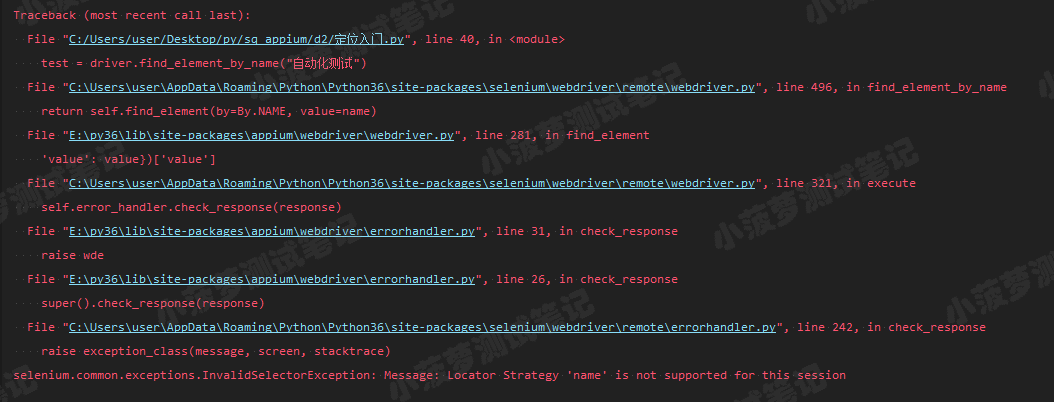
圈重点
selenium.common.exceptions.InvalidSelectorException: Message: Locator Strategy 'name' is not supported for this session
简译: by_name 这种定位元素方式已经不支持了
然后查了下资料,发现是在appium1.5之后, by_name 的这种定位方式已经彻底移除
解决方法一
最简单,不再用 by_name 定位方式了,改用id、class、xpath、accessibility id
解决方法二
看了网上的教程【driver.js】,最终发现也是没用的,这里就不展开了~还是换个定位方式叭!
Appium问题解决方案(5)- selenium.common.exceptions.InvalidSelectorException: Message: Locator Strategy 'name' is not supported for this session的更多相关文章
- selenium的报错信息:selenium.common.exceptions.InvalidSelectorException: Message: invalid selector: Compound class names not permitted
报错信息:selenium.common.exceptions.InvalidSelectorException: Message: invalid selector: Compound class ...
- Appium新版本遇到的问题,不能通过 name 去定位元素抛 Message: Locator Strategy 'name' is not supported for this session
环境: 1.Appium: 1.15.1 2.Python: 3.7.0 3.Selenium: 3.141.0 4.IDE: Pycharm 5.PC:Windows 10 问题:在 Pycharm ...
- 【Seleniuem】selenium.common.exceptions.InvalidSelectorException
selenium.common.exceptions.InvalidSelectorException: Message: invalid selector: An invalid or illega ...
- Appium问题解决方案(8)- selenium.common.exceptions.WebDriverException: Message: An unknown server-side error occurred while processing the command. Original error: Could not sign with default certificate.
背景 运行时代码报错: selenium.common.exceptions.WebDriverException: Message: An unknown server-side error occ ...
- appium selenium.common.exceptions.WebDriverException: Message: Parameters were incorrect
selenium.common.exceptions.WebDriverException: Message: Parameters were incorrect. We wanted {" ...
- selenium.common.exceptions.WebDriverException: Message: unknown Error: cannot find Chrome binary
使用Chrome浏览器时,经常会遇到以下报错:浏览器没有调用起来 selenium.common.exceptions.WebDriverException: Message: unknown Err ...
- python + web自动化,点击不生效,提示“selenium.common.exceptions.ElementClickInterceptedException: Message: element click intercepted: Element is not clickable at point (117, 674)”
前言: 在做web自动化时,遇到一个缩放了浏览器比例的操作,从100%缩小到80%,再进行点击的时候,弹出报错信息,无法点击 selenium.common.exceptions.ElementCli ...
- selenium.common.exceptions.TimeoutException: Message: Screenshot: available via screen
在使用selenium+phantomjs的时候在Windows平台下能够正常工作,在Linux下却不能,并得到错误信息: selenium.common.exceptions.TimeoutExce ...
- selenium使用遇到的问题(selenium.common.exceptions.WebDriverException: Message: 'chromedriver' executable needs to be in PATH.)
1.安装pip3 install selenium 2.使用browser=webdriver.Chrome()时报错 :selenium.common.exceptions.WebDriverExc ...
随机推荐
- 在屏幕上搜索图片并返回图片所在位置的坐标的AutoHotkey脚本源代码(类似大漠插件)
;~ 在屏幕上搜索图片并返回图片所在位置的坐标的AutoHotkey脚本源代码(类似大漠插件) ; https://www.autohotkey.com/boards/viewtopic.php?t ...
- 在阿里云上单机部署k8s1.18
系统:CentOS Linux release 8.1.1911 配置主机名 [root@iZwz9e3t4tj14jzewdtvj8Z ~]# hostnamectl set-hostname la ...
- Cell Reports | 上海瑞金医院糜坚青等揭示组蛋白酰化/乙酰化修饰比率调控BRD4基因组分布
景杰生物 | 报道 组蛋白翻译后修饰,被认为构成一类超越基因序列的"组蛋白密码",控制着遗传信息的组织层次及其在染色质层面的解读.组蛋白赖氨酸乙酰化是研究最早的一类组蛋白修饰, ...
- ASP.NET Corec初步使用Quartz.NET
一.什么是Quartz.NET? Quartz.NET 是一个功能齐全的开源作业调度系统,可用于从最小的应用程序到大型企业系统. Quartz.NET是纯净的,它是一个.Net程序集,是非常流行的Ja ...
- 阿里饿死了么Android面试凉经,两轮面完被虐哭了,怒清购物车。。。卸载饿死了么
大家应该看过很多分享面试成功的经验,但根据幸存者偏差的理论,也许多看看别人面试失败在哪里,对自己才更有帮助. 最近跟一个朋友聊天,他漫不经心地复习了几个月,就去参加了饿了么面试,第二面结束后,嗯,挂了 ...
- .NET Core/.NET5/.NET6 开源项目汇总13:模板引擎
系列目录 [已更新最新开发文章,点击查看详细] 开源项目是众多组织与个人分享的组件或项目,作者付出的心血我们是无法体会的,所以首先大家要心存感激.尊重.请严格遵守每个项目的开源协议后再使用.尊 ...
- git的基本操作命令与基础
本文针对window用户进行git操作 1.git是分布式版本控制系统,需要用户名和邮箱作为一个标识.在任何文件夹中点击右键,选择Git Bash Here ,配置全局用户名和邮件或者局部用户名和邮件 ...
- Java-Collection、Map及Array之间的转换
1 List -> Map 设个User类: public class User { private String userName; private String userId; privat ...
- Linux平台上转换文件编码
Linux系统的iconv指令是一个很好的文件编码转换工具,支持的编码范围广,使用方便,例如将一个utf-8编码的文件(名为tic)转换为gbk编码: iconv -f utf-8 -t gbk ti ...
- 42岁大龄程序员的迷茫,看我最新尝鲜.net 5+Dapper搭建的WebAPI框架
42岁大龄程序员的迷茫 我真傻,真的.我单知道雪天是野兽在深山里没有食吃,会到村里来;我不知道春天也会有-- 我真傻,真的.我单知道程序员要活到老学到老,年龄大了要失业;我不知道码农(新型农民工)也会 ...