
Appium问题解决方案(5)- selenium.common.exceptions.InvalidSelectorException: Message: Locator Strategy 'name' is not supported for this session
背景
使用Appium Server 1.15.1版本
执行了以下脚本
test = driver.find_element_by_name("自动化测试")

print(test.text)
报了以下错误
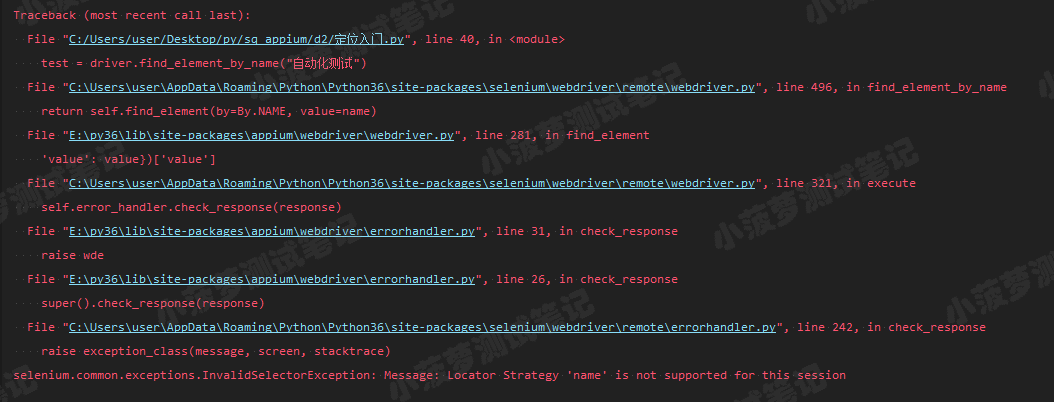
圈重点
selenium.common.exceptions.InvalidSelectorException: Message: Locator Strategy 'name' is not supported for this session
简译: by_name 这种定位元素方式已经不支持了
然后查了下资料,发现是在appium1.5之后, by_name 的这种定位方式已经彻底移除
解决方法一
最简单,不再用 by_name 定位方式了,改用id、class、xpath、accessibility id
解决方法二
看了网上的教程【driver.js】,最终发现也是没用的,这里就不展开了~还是换个定位方式叭!
Appium问题解决方案(5)- selenium.common.exceptions.InvalidSelectorException: Message: Locator Strategy 'name' is not supported for this session的更多相关文章
- selenium的报错信息:selenium.common.exceptions.InvalidSelectorException: Message: invalid selector: Compound class names not permitted
报错信息:selenium.common.exceptions.InvalidSelectorException: Message: invalid selector: Compound class ...
- Appium新版本遇到的问题,不能通过 name 去定位元素抛 Message: Locator Strategy 'name' is not supported for this session
环境: 1.Appium: 1.15.1 2.Python: 3.7.0 3.Selenium: 3.141.0 4.IDE: Pycharm 5.PC:Windows 10 问题:在 Pycharm ...
- 【Seleniuem】selenium.common.exceptions.InvalidSelectorException
selenium.common.exceptions.InvalidSelectorException: Message: invalid selector: An invalid or illega ...
- Appium问题解决方案(8)- selenium.common.exceptions.WebDriverException: Message: An unknown server-side error occurred while processing the command. Original error: Could not sign with default certificate.
背景 运行时代码报错: selenium.common.exceptions.WebDriverException: Message: An unknown server-side error occ ...
- appium selenium.common.exceptions.WebDriverException: Message: Parameters were incorrect
selenium.common.exceptions.WebDriverException: Message: Parameters were incorrect. We wanted {" ...
- selenium.common.exceptions.WebDriverException: Message: unknown Error: cannot find Chrome binary
使用Chrome浏览器时,经常会遇到以下报错:浏览器没有调用起来 selenium.common.exceptions.WebDriverException: Message: unknown Err ...
- python + web自动化,点击不生效,提示“selenium.common.exceptions.ElementClickInterceptedException: Message: element click intercepted: Element is not clickable at point (117, 674)”
前言: 在做web自动化时,遇到一个缩放了浏览器比例的操作,从100%缩小到80%,再进行点击的时候,弹出报错信息,无法点击 selenium.common.exceptions.ElementCli ...
- selenium.common.exceptions.TimeoutException: Message: Screenshot: available via screen
在使用selenium+phantomjs的时候在Windows平台下能够正常工作,在Linux下却不能,并得到错误信息: selenium.common.exceptions.TimeoutExce ...
- selenium使用遇到的问题(selenium.common.exceptions.WebDriverException: Message: 'chromedriver' executable needs to be in PATH.)
1.安装pip3 install selenium 2.使用browser=webdriver.Chrome()时报错 :selenium.common.exceptions.WebDriverExc ...
随机推荐
- phpmyadmin scripts/setup.php 反序列化漏洞(WooYun-2016-199433)
phpmyadmin 2.x版本 POST /scripts/setup.php HTTP/1.1 Host: 192.168.49.2:8080 Accept-Encoding: gzip, def ...
- 使用C#winform编写渗透测试工具--SQL注入
使用C#winform编写渗透测试工具--SQL注入 本篇文章主要介绍使用C#winform编写渗透测试工具,实现SQL注入的功能.使用python编写SQL注入脚本,基于get显错注入的方式进行数据 ...
- 使用vue实现简单的待办事项
待办事项 效果图 目录结构 详细代码 AddNew.vue <template> <div> <input v-model="content"/> ...
- HCNA Routing&Switching之STP基础
前文我们了解了VLAN动态注册协议GVRP相关话题,回顾请参考https://www.cnblogs.com/qiuhom-1874/p/15113770.html:今天我们来讨论下二层环路和STP相 ...
- 适配Android4.4~Android11,调用系统相机,系统相册,系统图片裁剪,转换文件(对图片进行上传等操作)
前言 最近Android对于文件的许多方法进行了修改,网络上又没有对Android4到Android11关于系统相机.系统相册和系统裁剪的适配方案,我花了几天事件总结了一下,先上源码 DEMO源码 先 ...
- 浅析Java断言
Java断言 1.断言的概念 Java的断言机制assert是一种用于测试阶段的语法特性,它允许我们在测试期间向代码中插入一些检查语句.代码发布时这些检测语句将被自动移除. 断言关键字assert有下 ...
- JavaSE-常用类
JavaSE-常用类 Obeject Java Object类是所有类的父类,也就是说Java的所有类都继承了Object,子类可以使用Object的所有方法. Object类位于java.lang包 ...
- IP笔记
自动专用IP地址APIPA的范围是B类地址块169.254.0.0--169.254.255.255
- logmein逆向
IDA打开整体先看看. 学个函数: strcpy:即字符串复制 v8=这么一大串字符串 我们让程序调到sub_4007F0(),就OK. 我们使用python来写, 主要迷惑的还是下面都是情深深雨蒙蒙 ...
- 题解 string
传送门 考试的时候只来得及糊了个\(n^4\)的暴力,结果考完发现\(n^2\)比\(n^4\)还好写 题意就是就是要求把一堆字符串的前后缀拼起来之后在原串中出现了多少次 然而前后缀可以有很多,再枚举 ...