
wayne编译支持k8s1.16+
GitHub: https://github.com/Qihoo360/wayne
文档: 由于wayne 官方文档链接已经失效了,我们可以通过这里查看 wayne 文档, 除了这个地方,我们询问之前开发者是还有一个地方存有官方文档的。 https://github.com/Qihoo360/cloud-website 这个地方存有历史官网文档。
一、wayne 构建原因
wayne 自己构建的原因: 由于1.8.5 和 1.8.6 是不支持 k8s 高一点的版本(1.16+)。 由于我们近期新项目使用了的k8s 版本是 1.20 我们在我们老的wayne版本上是不支持的.
1.1 、老版本报错内容
具体现象就是: 点击发布提示没有找到对应的资源,后端报错。
E1220 17:35:19.031666       1 reflector.go:126] pkg/mod/k8s.io/client-go@v11.0.0+incompatible/tools/cache/reflector.go:94: Failed to list *v1beta1.DaemonSet: the server could not find the requested resource

E1220 17:35:19.031758       1 reflector.go:126] pkg/mod/k8s.io/client-go@v11.0.0+incompatible/tools/cache/reflector.go:94: Failed to list *v1beta1.StatefulSet: the server could not find the requested resource

E1220 17:35:19.035617       1 reflector.go:126] pkg/mod/k8s.io/client-go@v11.0.0+incompatible/tools/cache/reflector.go:94: Failed to list *v1beta1.Deployment: the server could not find the requested resource

E1220 17:35:19.073638       1 reflector.go:126] pkg/mod/k8s.io/client-go@v11.0.0+incompatible/tools/cache/reflector.go:94: Failed to list *v1beta1.ReplicaSet: the server could not find the requested resource

E1220 17:35:19.073648       1 reflector.go:126] pkg/mod/k8s.io/client-go@v11.0.0+incompatible/tools/cache/reflector.go:94: Failed to list *v1beta1.ReplicaSet: the server could not find the requested resource
1.2 、wayne 官方
支持1.16+ 代码 issue: https://github.com/Qihoo360/wayne/pull/565, 也合并到master了,前后端都有更新, 但是目前看wayne-frontend前端镜像是没有更新的。 后端镜像是有更新的,
二、构建步骤
目前我们的策略是, 前端镜像自己构建,后端镜像使用 dockerhub 上面的 latest。
2.1 、前端镜像
构建需要环境:
docker 需要安装
yum install -y yum-utils \

  device-mapper-persistent-data \

  lvm2

# 阿里的源,国内使用较快

yum-config-manager --add-repo http://mirrors.aliyun.com/docker-ce/linux/centos/docker-ce.repo

# 生成缓存

yum makecache

# 安装最新稳定版本 Docker CE

yum install docker-ce docker-ce-cli containerd.io

systemctl start docker
git 需要安装
yum install git -y
拉取代码
拉取
cd /opt && git clone https://github.com/Qihoo360/wayne.git

cd wayne

git submodule update --init --recursive  # 这个必须执行,首次执行会有输出,如果没有输出的话,那么从新拉取下,然后执行。
使用down zip 方式不要使用这个,这个存在一些问题。
我们看下 Makefile
.PHONY: run-backend run-worker run-frontend syncdb release

MAKEFLAGS += --warn-undefined-variables

# Build variables

REGISTRY_URI :=360cloud

RELEASE_VERSION :=$(shell git describe --always --tags)

UI_BUILD_VERSION :=v1.0.2

SERVER_BUILD_VERSION :=v1.0.2

update-version:

	./hack/updateversion.sh

# run module

run-backend:

	cd src/backend/ && go run main.go

run-frontend:

	cd src/frontend/ && npm start

# dev

syncdb:

	go run src/backend/database/syncdb.go orm syncdb

sqlall:

	go run src/backend/database/syncdb.go orm sqlall > _dev/wayne.sql

initdata:

	go run src/backend/database/generatedata/main.go > _dev/wayne-data.sql

swagger-openapi:

	cd src/backend && swagger generate spec -o ./swagger/openapi.swagger.json

## server builder image

build-server-image:

	docker build --no-cache -t $(REGISTRY_URI)/wayne-server-builder:$(SERVER_BUILD_VERSION) -f hack/build/server/Dockerfile .

## ui builder image

build-ui-image:

	docker build --no-cache -t $(REGISTRY_URI)/wayne-ui-builder:$(UI_BUILD_VERSION) -f hack/build/ui/Dockerfile .

# release, requiring Docker 17.05 or higher on the daemon and client

build-backend-image:

	@echo "version: $(RELEASE_VERSION)"

	docker build --no-cache -t $(REGISTRY_URI)/wayne-backend:$(RELEASE_VERSION) .

build-frontend-image:

	@echo "version: $(RELEASE_VERSION)"

	docker build --no-cache -t $(REGISTRY_URI)/wayne-frontend:$(RELEASE_VERSION) -f hack/build/frontend/Dockerfile .

push-image:

	docker tag $(REGISTRY_URI)/wayne-backend:$(RELEASE_VERSION) $(REGISTRY_URI)/wayne-backend:latest

	docker push $(REGISTRY_URI)/wayne-backend:$(RELEASE_VERSION)

	docker push $(REGISTRY_URI)/wayne-backend:latest

	docker tag $(REGISTRY_URI)/wayne-frontend:$(RELEASE_VERSION) $(REGISTRY_URI)/wayne-frontend:latest

	docker push $(REGISTRY_URI)/wayne-frontend:$(RELEASE_VERSION)

	docker push $(REGISTRY_URI)/wayne-frontend:latest
我们找到
build-frontend-image, 我们可以看到是使用了./hack/build/frontend/Dockerfile# requiring Docker 17.05 or higher on the daemon and client
# see https://docs.docker.com/develop/develop-images/multistage-build/
# BUILD COMMAND :
# docker --build-arg RELEASE_VERSION=v1.0.0 -t infra/wayne:v1.0.0 . # build ui
FROM 360cloud/wayne-ui-builder:v1.0.2 as frontend COPY src/frontend /workspace RUN cd /workspace && \
npm run build:aot # build server
FROM openresty/openresty:1.15.8.1-1-centos COPY --from=frontend /workspace/dist/ /usr/local/openresty/nginx/html/ RUN ln -sf /usr/share/zoneinfo/Asia/Shanghai /etc/localtime && \
sed -i '/index index.html index.htm;/a\ try_files $uri $uri/ /index.html;' /etc/nginx/conf.d/default.conf CMD ["/usr/local/openresty/bin/openresty", "-g", "daemon off;"]看这个dockerfile ,我们会发现,这个镜像的构建是通过将src 的源码,然后 npm run build 进行构建,然后将构建好了包,然后拷贝到openresty 镜像了。
如果拉取镜像慢的话,网上找下教程。
配置 163 镜像源
sudo mkdir -p /etc/docker

sudo tee /etc/docker/daemon.json <<-'EOF'

{

"registry-mirrors": ["http://hub-mirror.c.163.com"]

}

EOF

sudo systemctl daemon-reload

sudo systemctl restart docker
构建前端镜像
make build-frontend-image
如果遇到一些问题,可以看末尾。
给镜像增加tag,上传至 dockerhub
docker pull djxslp/wayne-frontend:latest # 这个是我已经构建好了的镜像。是自己基于github 代码的master 分支编译的(2021.12.21 15:00)
2.1 、后端镜像
使用dockerhub 上面最新的
360cloud/wayne-backend:latest
自己构建
Dockerfile 的内容
# requiring Docker 17.05 or higher on the daemon and client

# see https://docs.docker.com/develop/develop-images/multistage-build/

# BUILD COMMAND :

# docker --build-arg RELEASE_VERSION=v1.0.0 -t infra/wayne:v1.0.0 .

# build server

FROM 360cloud/wayne-server-builder:v1.0.2 as backend

COPY go.mod /go/src/github.com/Qihoo360/wayne

COPY go.sum /go/src/github.com/Qihoo360/wayne

COPY src/backend /go/src/github.com/Qihoo360/wayne/src/backend

RUN export GO111MODULE=on && \

    export GOPROXY=https://goproxy.io && \

    cd /go/src/github.com/Qihoo360/wayne/src/backend && \

    bee generate docs && \

    bee pack -o /_build

# build release image

FROM 360cloud/centos:7

RUN ln -sf /usr/share/zoneinfo/Asia/Shanghai /etc/localtime

COPY --from=backend /_build/backend.tar.gz /opt/wayne/

WORKDIR /opt/wayne/

RUN tar -xzvf backend.tar.gz

CMD ["./backend"
构建命令
make build-backend-image
自己构建的
docker pull djxslp/wayne-backend:latest # 是自己基于github 代码的master 分支编译的(2021.12.21 15:00),最终容器内的监听端口是 8081, 需要注意下。
三、配置和数据库导入
基于 docker-compose 部署, cd hack/docker-compose/
3.1 、前端配置
./conf/config.js
window.CONFIG = {

    URL: 'http://yourip:8080',

    RAVEN: false,

    RAVEN_DSN: 'RAVEN_DSN'

};
需要改的参数 URL: 值为需要为后端后面绑定的域名,示例: https://backend-wayne.baidu.com
3.2、后端配置
./conf/app.conf
必须需要修改的:数据库配置,其他的可以根据情况进行配置。
## mysql

DBName = "wayne"

DBTns = "tcp(127.0.0.1:3306)"

DBUser = "wayne"

DBPasswd = "123456"

DBLoc = "Asia%2FShanghai"

DBConnTTL = 30
3.3 、数据库导入
- 后端数据库
- 手动导入, 我把一个刚安装的数据库导出了。 链接: https://djxblog.oss-cn-shenzhen.aliyuncs.com/picture/typora/wayne.sql
- 程序自动创建, 这个需要给到一个较高的权限,且
wayne库原本不存在,如果库存在,则不会进行自动创建。
3.4、 启动服务
安装docker-compose
curl -L https://github.com/docker/compose/releases/download/1.24.0/docker-compose-`uname -s`-`uname -m` -o /usr/local/bin/docker-compose

chmod +x /usr/local/bin/docker-compose
启动服务
cd  hack/docker-compose

docker-compose up -d
四、中途遇到的问题和一些思考
登录无效参数 Invalid Param
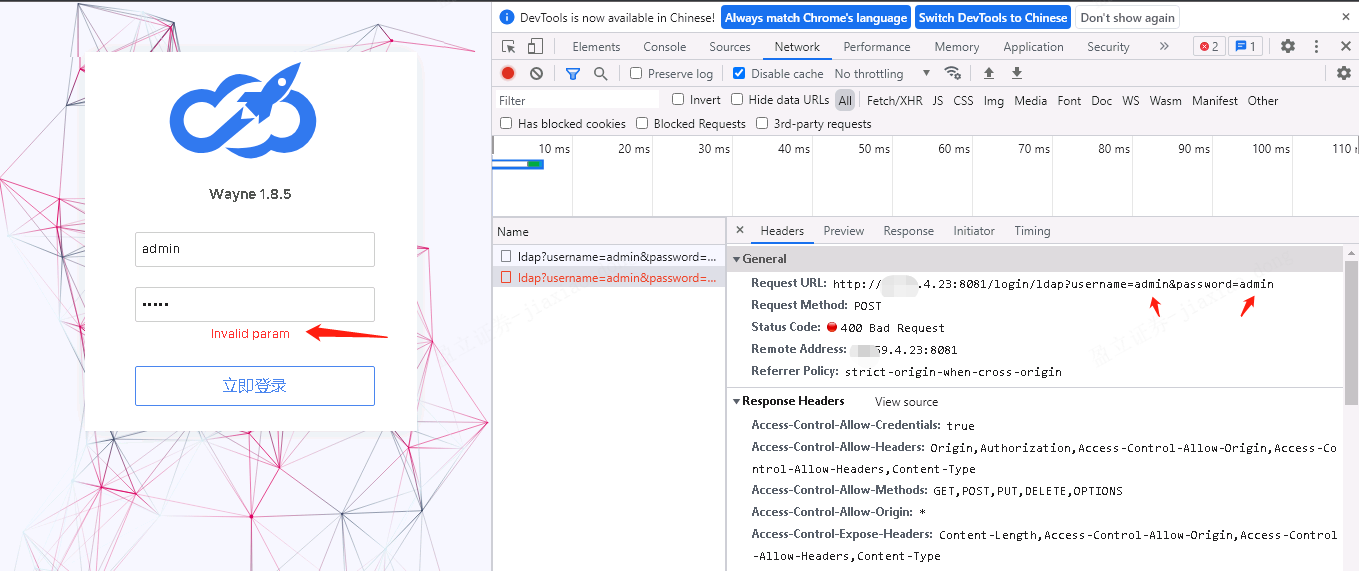
问题原因:
https://github.com/Qihoo360/wayne/pull/578
之前版本(1.8.5/1.8.6), 用户名和密码都是在 URL 中的,也就是如图所示,现在新的版本是改为JSON 了。
版本未找到, 也就是tag 未指定。
[root@ops-pinpoint-185 wayne]# make  build-frontend-image

fatal: Not a valid object name HEAD

version:

docker build --no-cache -t 360cloud/wayne-frontend: -f hack/build/frontend/Dockerfile .

invalid argument "360cloud/wayne-frontend:" for "-t, --tag" flag: invalid reference format

See 'docker build --help'.
我们直接在 Makefile 里面写死版本。
RELEASE_VERSION :=v1.8.7.1
wayne编译支持k8s1.16+的更多相关文章
- VScode,code::blocksC语言编译运行出现不支持的16位应用程序解决方法
最近,莫名其妙c代码就是编译运行不了,老是提示不支持的16位应用程序 然后网上找了各种教程 只有这个成功了(害得我还升了下系统) 实现进入Windows设置 然后点更新和安全--恢复 然后点高级启动- ...
- PHP编译支持mysqli
PHP编译支持mysqli前提是必须安装mysql直接上命令先进入源码包我的源码包是在/usr/local/php-5.2.1/ext/mysqli这样进入 cd /usr/local/php-5.2 ...
- Mac系统下编译支持Android平台的最新X264编码器
Mac系统下编译支持Android平台的最新X264编码器 原文来自 http://www.mingjianhua.com,转载请注明出处 1.首先去官网下载最新的x264源代码,解压到任意目录 ht ...
- [Android 编译(一)] Ubuntu 16.04 LTS 成功编译 Android 6.0 源码教程
本文转载自:[Android 编译(一)] Ubuntu 16.04 LTS 成功编译 Android 6.0 源码教程 1 前言 经过3天奋战,终于在Ubuntu 16.04上把Android 6. ...
- nginx编译支持HTTP2.0
nginx编译支持HTTP2.0 nginx编译支持HTTP2.0 wget https://www.openssl.org/source/openssl-1.1.0i.tar.gz #openssl ...
- 用 runcloud.io 免费部署、优化管理你的多个VPS( 目前支持 Ubuntu 16.04 )
使用RunCloud.io轻松实现Web部署 使用VPS.云服务器,通常会安装基本的操作系统,之后必须自己安装Apache,MySQL,PHP,尤其是服务器的性能优化,这对大多数人来说可能是非常具有挑 ...
- xmake v2.5.7 发布,包依赖锁定和 Vala/Metal 语言编译支持
xmake 是一个基于 Lua 的轻量级跨平台构建工具,使用 xmake.lua 维护项目构建,相比 makefile/CMakeLists.txt,配置语法更加简洁直观,对新手非常友好,短时间内就能 ...
- xmake v2.6.1 发布,使用 Lua5.4 运行时,Rust 和 C++ 混合编译支持
xmake 是一个基于 Lua 的轻量级跨平台构建工具,使用 xmake.lua 维护项目构建,相比 makefile/CMakeLists.txt,配置语法更加简洁直观,对新手非常友好,短时间内就能 ...
- 自编译Apache Spark2.3.3支持CDH5.16.1
1 下载源代码文件 https://archive.apache.org/dist/spark/spark-2.3.3/ 2 解压后导入编辑器,修改依赖的Hadoop版本,下面截图是修改后的,要看自己 ...
随机推荐
- Codeforces 1499G - Graph Coloring(带权并查集+欧拉回路)
Codeforces 题面传送门 & 洛谷题面传送门 一道非常神仙的题 %%%%%%%%%%%% 首先看到这样的设问,做题数量多一点的同学不难想到这个题.事实上对于此题而言,题面中那个&quo ...
- 文件IO与标准IO的区别
文件IO与标准IO的区别 文件I/O就是操作系统封装了一系列函数接口供应用程序使用,通过这些接口可以实现对文件的读写操作,文件I/O是采用系统直接调用的方式,因此当使用这些接口对文件进行操作时,就会立 ...
- R连接mysql数据库方法详解
Warning messages: 1: In odbcDriverConnect("DSN=Rdata;UID=root") : [RODBC] ERROR: state IM0 ...
- JAVA写入TXT
用java生成txt文件有两种方式: 1)是通过字符流(或字节流): 2)是直接调用PrintWriter类. 具体实现过程如下: 1)字符流(字节流) 代码如下: import java.io.Fi ...
- Label -- 跳出循环的思路
let num = 0 ; outPoint: //label for (let i = 0; i < 10; i++) { for ( let j = 0; j < 10; j++) { ...
- C#数据库连接方式【简版】
using System;using System.Collections.Generic;using System.ComponentModel;using System.Drawing;using ...
- hive向mysql导入数据sqoop命令出错
报错信息: java.lang.Exception: java.io.IOException: java.lang.ClassNotFoundException: info at org.apache ...
- 强化学习实战 | 表格型Q-Learning玩井字棋(一)
在 强化学习实战 | 自定义Gym环境之井子棋 中,我们构建了一个井字棋环境,并进行了测试.接下来我们可以使用各种强化学习方法训练agent出棋,其中比较简单的是Q学习,Q即Q(S, a),是状态动作 ...
- Spark基础:(一)初识Spark
1.Spark中的Python和Scala的Shell (1): Python的Spark Shell 也就是我们常说的PySpark Shell进入我们的Spark目录中然后输入 bin/pyspa ...
- JTable 单元格合并 【转】
单元格合并 一.单元格合并.(1)我们可以使用Jtable的三个方法:getCellRect(),columnAtPoint(),and rowAtPoint().第一个方法返回一个单元格的边界(Re ...