
NX Open显示符号(UF_DISP_display_temporary_point)
UF_DISP_display_temporary_point
使用方法:
 1 Dim x As Double = 0, y As Double = 0, z As Double = 0

 2

 3        Dim theUfSession = UFSession.GetUFSession()

 4        theUfSession.Disp.Refresh()

 5

 6        Dim view_tag As NXOpen.Tag = NXOpen.Tag.Null

 7        theUfSession.View.AskWorkView(view_tag)

 8

 9        Dim which_views = NXOpen.UF.UFDisp.ViewType.UseWorkView

10

11        Dim layer_number As Integer = 0

12        theUfSession.Layer.AskWorkLayer(layer_number)

13        Dim color As NXOpen.UF.UFObj.DispProps

14        With color

15            .layer = layer_number

16            .color = 216 ' 114

17            .blank_status = UFConstants.UF_OBJ_NOT_BLANKED

18            .line_width = UFConstants.UF_OBJ_WIDTH_NORMAL

19            .highlight_status = True

20        End With

21

22        For Each marker_type In [Enum].GetValues(GetType(NXOpen.UF.UFDisp.PolyMarker))

23            Try

24                Dim makerpos() As Double = {x, y, z}

25                theUfSession.Disp.DisplayTemporaryPoint(view_tag, which_views, makerpos, color, marker_type)

26            Catch ex As Exception

27            End Try

28            Dim ref_point As UFDisp.TextRef = NXOpen.UF.UFDisp.TextRef.Middleleft

29            Dim text as String = marker_type

30            Dim text_coord() As Double = {x + 2, y, z}

31            theUfSession.Disp.DisplayTemporaryText(view_tag, which_views, text, text_coord, ref_point, color, 3, 1)

32            text = [Enum].GetName(marker_type.GetType, marker_type)

33            text_coord = {x + 5, y, z}

34            theUfSession.Disp.DisplayTemporaryText(view_tag, which_views, text, text_coord, ref_point, color, 3, 1)

35            y -= 2

36        Next
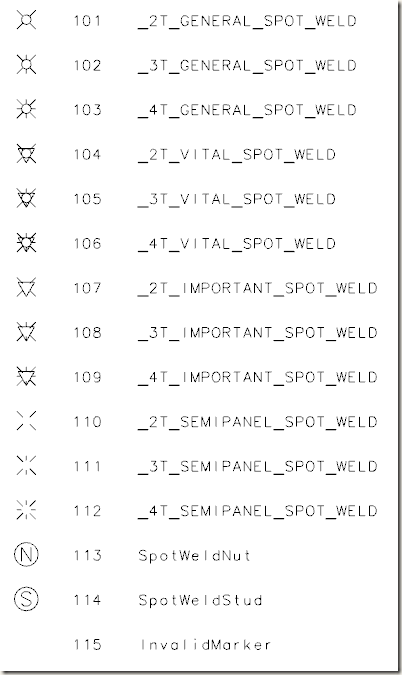
效果图、序号、名称如下所示:
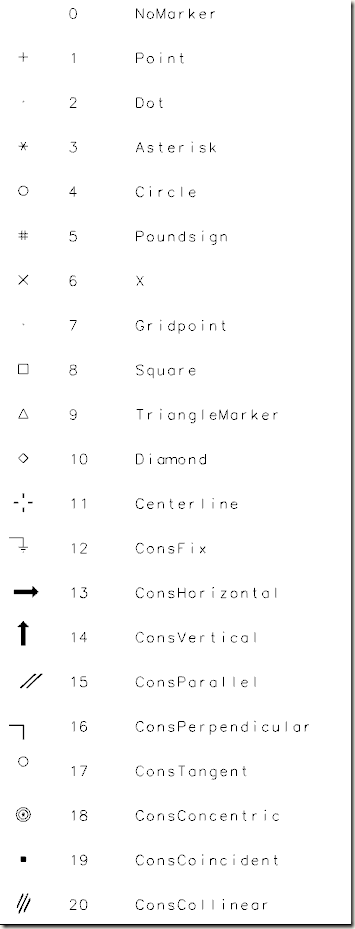
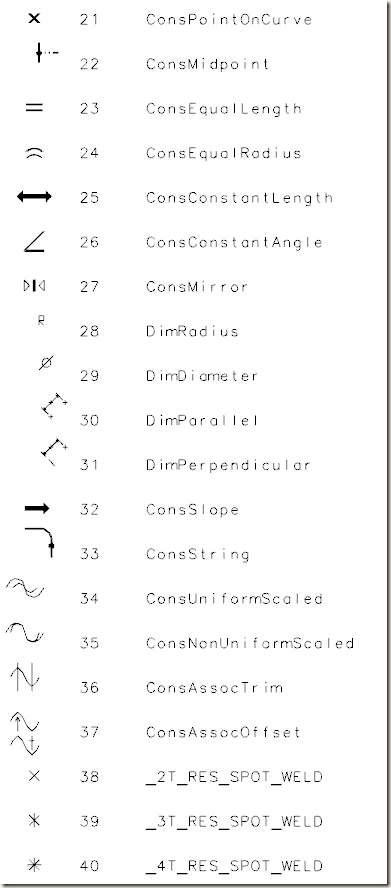

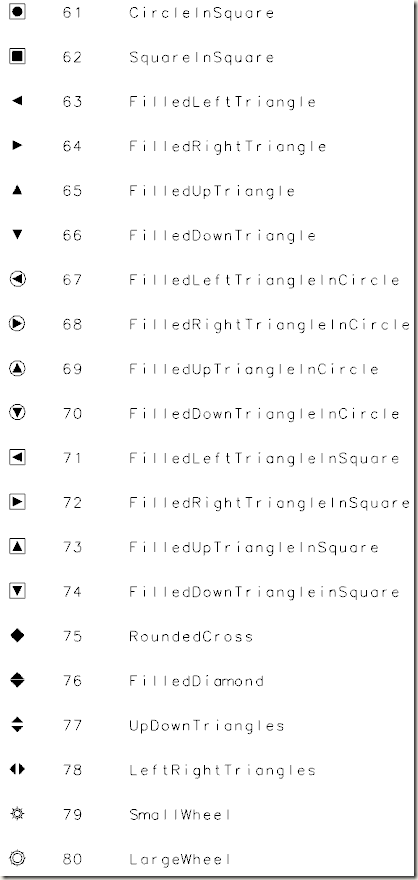
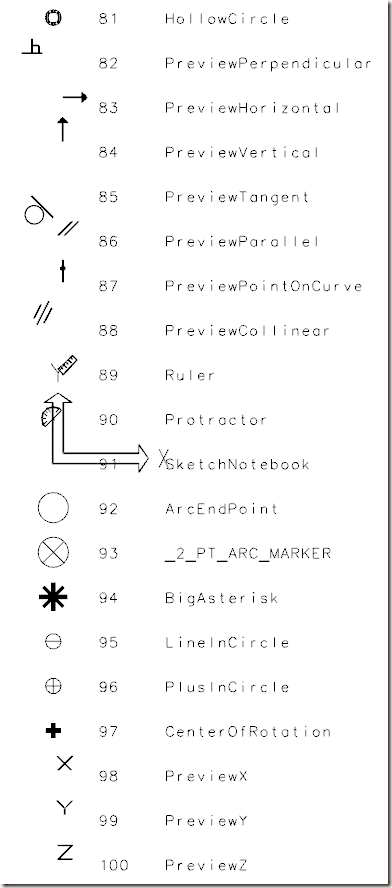
NX Open显示符号(UF_DISP_display_temporary_point)的更多相关文章
- .PRT extension and multiple NX versions
http://nxway.blogspot.ca/2007/10/prt-extension-and-multiple-nx-versions.html To open prt files with ...
- 安装 NoMachine(NX) client and server
(1)Windows上直接安装nxclient-3.5.0-9.exe即可 (2)Linux上 准备linux rpms nxclient-3.5.0-7.x86_64.rpmnxnode-3.5.0 ...
- linux 远程桌面工具NX
1.在linux服务器上需要安装3个文件,下载地址为: http://www.nomachine.com/download-package.php?Prod_Id=1977 nxclient-3.4. ...
- Linux_x86下NX与ASLR绕过技术
本文介绍Linux_x86下NX与ASLR绕过技术,并对GCC的Stack Canaries保护技术进行原理分析. 本文使用存在漏洞代码如下: /* filename : sof.c */ #incl ...
- UG/NX 8.0安装方法(图文详解)
UG8.0,自从被西门子收购后改名为NX,也称NX8.0,作为一款非常优秀三维模具设计软件.他可以针对用户的虚拟产品设计和工艺设计的需求,提供经过实践验证的解决方案.其以全面的设计概念.良好的界面受到 ...
- NX 栈不可执行的绕过方式--ROP链
目标程序下载 提取码:5o0a 环境:Ubuntu linux 工具 pwn-gdb pwntools python库 ROPgadget ( 这些工具可以到github官网找) 1.检查程序开了哪些 ...
- 将NX模型导入Process Designer的方法
如何把一个有焊点的零件从nx中输入到process designer 中? 用户在NX中做了一个prt文件, 想把它输入到process designer中, 并且包括焊点信息, 该如何做? 解决 ...
- [Angular] Improve Server Communication in Ngrx Effects with NX Data Persistence in Angular
Communicating with a remote server via HTTP presents an extra level of complexity as there is an inc ...
- 【转】linux 远程桌面工具NX
1.在linux服务器上需要安装3个文件,下载地址为: http://www.nomachine.com/download-package.php?Prod_Id=1977 nxclient-3.4. ...
随机推荐
- GUI容器之Panel
Panel //panel可以看成是一个空间,但不能单独存在 public class MyPanel { public static void main(String[] args) { Frame ...
- openresty lua-resty-string md5 sha aes random string
安装 https://github.com/openresty/lua-resty-string $ sudo opm get openresty/lua-resty-string $ ls -al ...
- 痞子衡嵌入式:MCUXpresso IDE下工程链接文件配置管理与自动生成机制
大家好,我是痞子衡,是正经搞技术的痞子.今天痞子衡给大家介绍的是MCUXpresso IDE下工程链接文件配置管理与自动生成机制. 痞子衡在 2018 年初写过一个专题 <嵌入式开发文件系列&g ...
- 获取input对应的的选项
需求是把所有题目中的选项ABCDEF等对应保存到后台, 这个问卷中有多选项和单选项 var data = {}; $(".u-box .u-item").each(function ...
- Android——菜单(Menu)
菜单的运用在Android中很常见,今天就两节体育课,闲下来也想认真的学一学,正好项目中也会有应用.我是跟着菜鸟教程进行学习的,我相应的粘了一些我自己认为比较重要的,以供方便记录学习. 本章给大家带来 ...
- python IO流操作
python IO流操作 学习完本篇,你将会独立完成 实现操作系统中文件及文件目录的拷贝功能. 将目标图片拷贝到指定的目录中 实现一个自动阅卷程序, Right.txt保存正确答案,xx(学生姓名). ...
- PHP的变量赋值
这个标题估计很多人会不屑一顾,变量赋值?excuse me?我们学开发的第一课就会了好不好.但是,就是这样基础的东西,反而会让很多人蒙圈,比如,值和引用的关系.今天,我们就来具体讲讲. 首先,定义变量 ...
- mysql5.7执行sql语句提示Expression #1 of ORDER BY clause is not in GROUP BY
mysql 新版本出现group by 语句不兼容问题 [Err] 1055 - Expression #1 of ORDER BY clause is not in GROUP BY clause ...
- Shell系列(26)- 条件判断之两个文件比较
两个文件之间进行比较 测试选项 作用 文件1 -net 文件2 判断文件1的修改时间是否比文件2的新(如果新则为真) 文件1 -ot 文件2 判断文件1的修改时间是否比文件2的旧(如果旧则为真) 文件 ...
- sonar扫面代码总体流程