
不使用pvc的方式在K8S中部署apisix-gateway
不使用pvc的方式在K8S中部署apisix-gateway
简介
我的apisix使用etcd作为数据存储服务器,官方的使用pvc方式或者docker-compose的方式,对于新手不太友好,本篇是从etcd的安装到apisix的打通都会涉及。
部署etcd
etcd 是一个分布式键值对存储,设计用来可靠而快速的保存关键数据并提供访问。通过分布式锁,leader选举和写屏障(write barriers)来实现可靠的分布式协作。etcd集群是为高可用,持久性数据存储和检索而准备。
ubuntu部署etcd
ubuntu中部署etcd的两种方式:
一种是去GitHub下载二进制的安装包,还有一种是apt-get install etcd,第二种方式我也尝试过,可能是我软件源的问题,版本有点老,所以我就换成了使用第一种方式,而且也比较推荐使用第一种方式。
我用的etcd下载的版本是3.5.2,废话不多说直接看步骤:
1、将etcd etcdctl etcdutl 二进制文件拷贝到/usr/local/bin目录下
/usr/local/bin
2、创建一个etcd的etcd.conf.yml,将下面代码拷贝进去,我这里etcd就简单的配置了一下,没有做集群,所以yml很简单。
name: etcd-1

data-dir: /home/etcd/data

listen-client-urls: http://0.0.0.0:2379

advertise-client-urls: http://0.0.0.0:2379
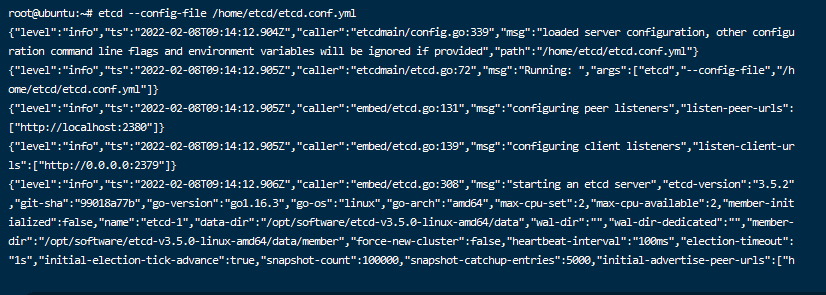
3、通过etcd --config-file etcd.conf.yml的路径运行,如下图就是成功了,也可以使用etcd manager客户端来测试。

4、如果使用etcd直接启动的话没有办法后台运行,所以我们需要在/etc/systemd/system目录下创建一个etcd.service来进行后台运行。
[Unit]

Description=ETCD Server

Documentation=https://github.com/coreos/etcd

After=network-online.target

Wants=network-online.target

[Service]

User=root

Group=root

ExecStart= etcd --config-file /home/etcd/etcd.conf.yml

[Install]

WantedBy=multi-user.target
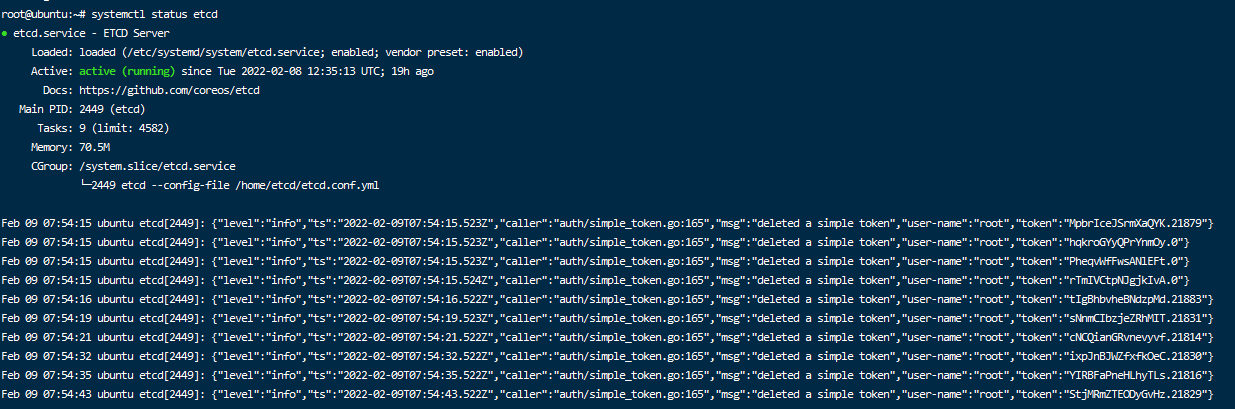
5、创建好之后可以通过以下命令来确定运行状态如下图:
# 启动

sudo systemctl start etcd.service

# 查看状态

sudo systemctl status etcd.service

# 开机自启

sudo systemctl enable etcd.service
6、设置用户名和密码# 设置版本为V3
export ETCDCTL_API=3
# 添加用户
etcdctl user add root
# 开启认证
etcdctl auth enable
K8S部署apisix
apisix-gateway在部署的时候分为两块,分别是apisix和apisix-dashboard面板,所以看起来比较绕,不过apisix在部署的时候使用的是yaml文件覆盖的方式,所以我这里是将yaml存储到configmap中了,方便进行统一管理。我使用的k8s是Ubuntu出品的microk8s,用它的主要原因是因为配置简单。
- apisix是服务端,用来进行网络请求转发。
- apisix-dashboard是他的控制面板,用来进行可视化配置。
apisix介绍
apisix是基于 OpenResty + etcd 实现的云原生、高性能、可扩展的微服务 API 网关。它是国人开源,目前已经进入 Apache 进行孵化。APISIX 通过插件机制,提供了动态负载平衡、身份验证、限流限速等等功能,当然我们也可以自己开发插件进行拓展。
- 动态负载均衡:跨多个上游服务的动态负载均衡,目前已支持 round-robin 轮询和一致性哈希算法。
- 身份验证:支持 key-auth、JWT、basic-auth、wolf-rbac 等多种认证方式。
- 限流限速:可以基于速率、请求数、并发等维度限制。
部署apisix
1、创建apisix.conf.yaml,并存储到configmap中,
apisix:

node_listen: 9080              # APISIX listening port

enable_ipv6: false

allow_admin:                  # http://nginx.org/en/docs/http/ngx_http_access_module.html#allow

    - 0.0.0.0/0              # We need to restrict ip access rules for security. 0.0.0.0/0 is for test.

admin_key:

- name: "admin"

    key: edd1c9f034335f136f87ad84b625c8f1

    role: admin                 # admin: manage all configuration data

                                # viewer: only can view configuration data

- name: "viewer"

    key: 4054f7cf07e344346cd3f287985e76a2

    role: viewer

enable_control: true

control:

    ip: "0.0.0.0"

    port: 9092

etcd:

host:          # supports defining multiple etcd host addresses for an etcd cluster

    - "http://192.168.31.170:2379"

user: "root"    # ignore etcd username if not enable etcd auth

password: "root"  # ignore etcd password if not enable etcd auth

discovery:

nacos:

    host:

    - "http://47.100.213.49:8848"

    prefix: "/nacos/v1/"

    fetch_interval: 30    # default 30 sec

    weight: 100           # default 100

    timeout:

    connect: 2000       # default 2000 ms

    send: 2000          # default 2000 ms

    read: 5000          # default 5000 ms

plugin_attr:

prometheus:

    export_addr:

    ip: "0.0.0.0"

    port: 9091

plugins:

- client-control

- ext-plugin-pre-req

- zipkin

- request-id

- fault-injection

- serverless-pre-function

- batch-requests

- cors

- ip-restriction

- ua-restriction

- referer-restriction

- uri-blocker

- request-validation

- openid-connect

- wolf-rbac

- hmac-auth

- basic-auth

- jwt-auth

- key-auth

- consumer-restriction

- authz-keycloak

- proxy-mirror

- proxy-cache

- proxy-rewrite

- api-breaker

- limit-conn

- limit-count

- limit-req

- gzip

- server-info

- traffic-split

- redirect

- response-rewrite

- grpc-transcode

- prometheus

- echo

- http-logger

- sls-logger

- tcp-logger

- kafka-logger

- syslog

- udp-logger

- serverless-post-function

- ext-plugin-post-req

stream_plugins:

- ip-restriction

- limit-conn

- mqtt-proxy
2、使用kubectl命令创建configmap
kubectl create configmap sukt-apisix-gateway-config --from-file=config.yaml=/home/sukt-platform/apisix/apisix-gateway-config.yaml -n sukt-platform
3、新建apisix-deployment.yaml
apiVersion: apps/v1

kind: Deployment

metadata:

name: sukt-apisix-gateway

namespace: sukt-platform

spec:

selector:

    matchLabels:

    app: sukt-apisix-gateway

template:

    metadata:

    labels:

        app: sukt-apisix-gateway

    spec:

    containers:

    - name: sukt-apisix-gateway

        image: apache/apisix:2.10.3-alpine

        imagePullPolicy: IfNotPresent

        resources:

        limits:

            cpu: 500m

            memory: 1Gi

        requests:

            cpu: 250m

            memory: 256Mi

        securityContext:

        privileged: false

        terminationMessagePath: /dev/termination-log

        terminationMessagePolicy: File

        volumeMounts:

        - mountPath: /usr/local/apisix/conf/config.yaml

        name: config

        subPath: config.yaml

        ports:

        - containerPort: 9080

        - containerPort: 9443

    dnsPolicy: ClusterFirst

    restartPolicy: Always

    schedulerName: default-scheduler

    securityContext: {}

    terminationGracePeriodSeconds: 30

    volumes:

        - configMap:

            defaultMode: 420

            name: sukt-apisix-gateway-config

        name: config
4、新建apisix-service.yaml
apiVersion: v1

kind: Service

metadata:

name: sukt-apisix-gateway-nodetype

labels:

    app: sukt-apisix-gateway-nodetype

namespace: sukt-platform

spec:

type: NodePort

selector:

    app: sukt-apisix-gateway

ports:

- port: 9080

    name: transfer1

    targetPort: 9080

    nodePort: 30107

- port: 9443

    name: transfer2

    targetPort: 9443

    nodePort: 30108
部署apisix-dashboard
1、创建apisix-dashboard-config.yaml,并存储到configmap中,
#

# Licensed to the Apache Software Foundation (ASF) under one or more

# contributor license agreements.  See the NOTICE file distributed with

# this work for additional information regarding copyright ownership.

# The ASF licenses this file to You under the Apache License, Version 2.0

# (the "License"); you may not use this file except in compliance with

# the License.  You may obtain a copy of the License at

#

#     http://www.apache.org/licenses/LICENSE-2.0

#

# Unless required by applicable law or agreed to in writing, software

# distributed under the License is distributed on an "AS IS" BASIS,

# WITHOUT WARRANTIES OR CONDITIONS OF ANY KIND, either express or implied.

# See the License for the specific language governing permissions and

# limitations under the License.

#

conf:

listen:

    host: 0.0.0.0     # `manager api` listening ip or host name

    port: 9000          # `manager api` listening port

allow_list:           # If we don't set any IP list, then any IP access is allowed by default.

    - 0.0.0.0/0

etcd:

    endpoints:          # supports defining multiple etcd host addresses for an etcd cluster

    - "http://192.168.31.170:2379"

                        # yamllint disable rule:comments-indentation

                        # etcd basic auth info

    username: "root"    # ignore etcd username if not enable etcd auth

    password: "root"  # ignore etcd password if not enable etcd auth

    mtls:

    key_file: ""          # Path of your self-signed client side key

    cert_file: ""         # Path of your self-signed client side cert

    ca_file: ""           # Path of your self-signed ca cert, the CA is used to sign callers' certificates

    # prefix: /apisix     # apisix config's prefix in etcd, /apisix by default

log:

    error_log:

    level: warn       # supports levels, lower to higher: debug, info, warn, error, panic, fatal

    file_path:

        logs/error.log  # supports relative path, absolute path, standard output

                        # such as: logs/error.log, /tmp/logs/error.log, /dev/stdout, /dev/stderr

    access_log:

    file_path:

        logs/access.log  # supports relative path, absolute path, standard output

                        # such as: logs/access.log, /tmp/logs/access.log, /dev/stdout, /dev/stderr

                        # log example: 2020-12-09T16:38:09.039+0800	INFO	filter/logging.go:46	/apisix/admin/routes/r1	{"status": 401, "host": "127.0.0.1:9000", "query": "asdfsafd=adf&a=a", "requestId": "3d50ecb8-758c-46d1-af5b-cd9d1c820156", "latency": 0, "remoteIP": "127.0.0.1", "method": "PUT", "errs": []}

authentication:

secret:

    secret              # secret for jwt token generation.

                        # NOTE: Highly recommended to modify this value to protect `manager api`.

                        # if it's default value, when `manager api` start, it will generate a random string to replace it.

expire_time: 3600     # jwt token expire time, in second

users:                # yamllint enable rule:comments-indentation

    - username: admin   # username and password for login `manager api`

    password: P@ssW0rd

    - username: user

    password: P@ssW0rd

plugins:                          # plugin list (sorted in alphabetical order)

- api-breaker

- authz-keycloak

- basic-auth

- batch-requests

- consumer-restriction

- cors

# - dubbo-proxy

- echo

# - error-log-logger

# - example-plugin

- fault-injection

- grpc-transcode

- hmac-auth

- http-logger

- ip-restriction

- jwt-auth

- kafka-logger

- key-auth

- limit-conn

- limit-count

- limit-req

# - log-rotate

# - node-status

- openid-connect

- prometheus

- proxy-cache

- proxy-mirror

- proxy-rewrite

- redirect

- referer-restriction

- request-id

- request-validation

- response-rewrite

- serverless-post-function

- serverless-pre-function

# - skywalking

- sls-logger

- syslog

- tcp-logger

- udp-logger

- uri-blocker

- wolf-rbac

- zipkin

- server-info

- traffic-split
2、使用kubectl命令创建configmap
kubectl create configmap sukt-apisix-dashboard-config --from-file=config.yaml=/home/sukt-platform/apisix/apisix-dashboard-config.yaml -n sukt-platform
3、新建apisix-dashboard-deployment.yaml
apiVersion: apps/v1

kind: Deployment

metadata:

name: sukt-apisix-dashboard

namespace: sukt-platform

spec:

selector:

    matchLabels:

    app: sukt-apisix-dashboard

template:

    metadata:

    labels:

        app: sukt-apisix-dashboard

    spec:

    nodeName: microk8sslave1 # 部署到指定的node节点

    containers:

    - name: sukt-apisix-dashboard

        image: apache/apisix-dashboard:2.10.1-alpine

        imagePullPolicy: IfNotPresent

        resources:

        limits:

            cpu: 500m

            memory: 1Gi

        requests:

            cpu: 250m

            memory: 256Mi

        securityContext:

        privileged: false

        terminationMessagePath: /dev/termination-log

        terminationMessagePolicy: File

        volumeMounts:

        - mountPath: /usr/local/apisix-dashboard/conf/conf.yaml

        name: config

        subPath: config.yaml #这个位置对应的是comfigmap中的名字,不是 /usr/local/apisix-dashboard/conf/conf.yaml

        ports:

        - containerPort: 9000

    dnsPolicy: ClusterFirst

    restartPolicy: Always

    schedulerName: default-scheduler

    securityContext: {}

    terminationGracePeriodSeconds: 30

    volumes:

        - configMap:

            defaultMode: 420

            name: sukt-apisix-dashboard-config

        name: config
4、新建apisix-dashboard-service.yaml
apiVersion: v1

kind: Service

metadata:

name: sukt-apisix-dashboard-nodetype

labels:

    app: sukt-apisix-dashboard-nodetype

namespace: sukt-platform

spec:

type: NodePort

selector:

    app: sukt-apisix-dashboard

ports:

- port: 9000

    name: transfer1

    targetPort: 9000

    nodePort: 30109
运行效果图
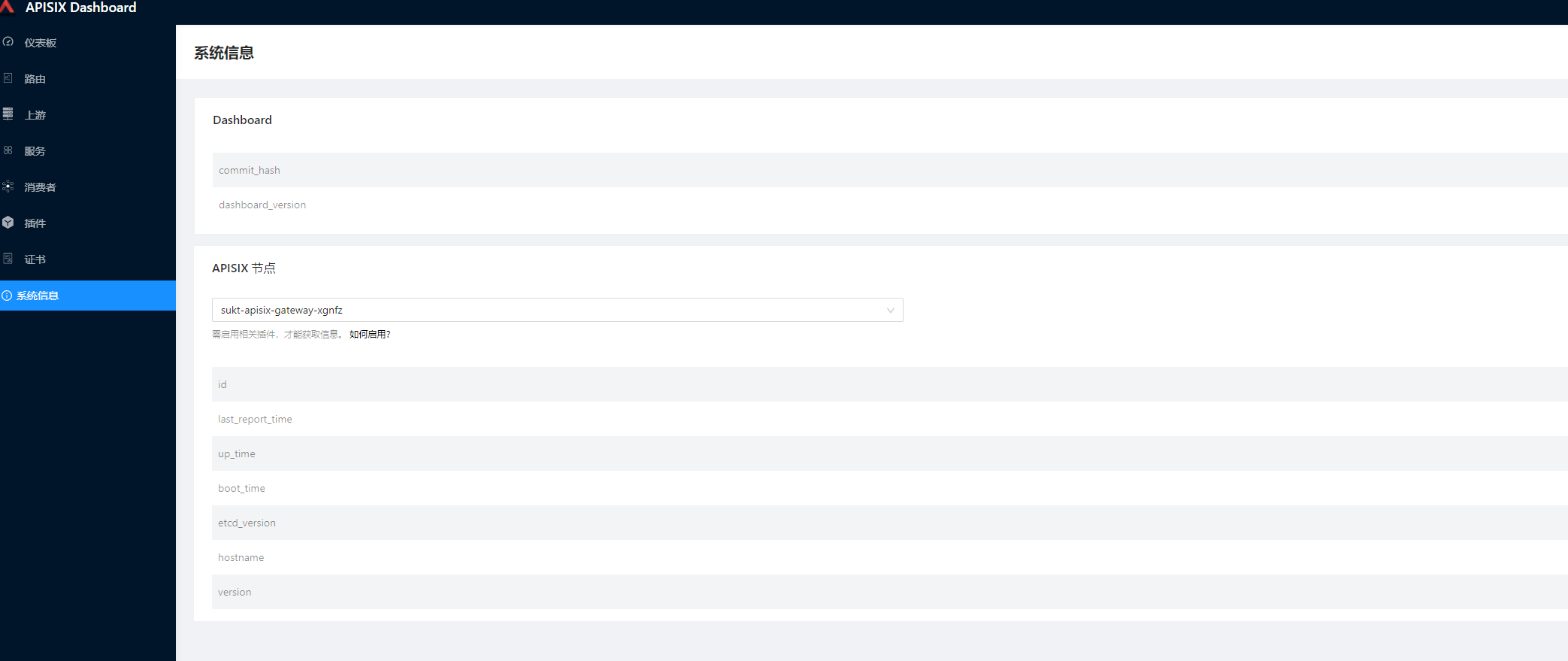
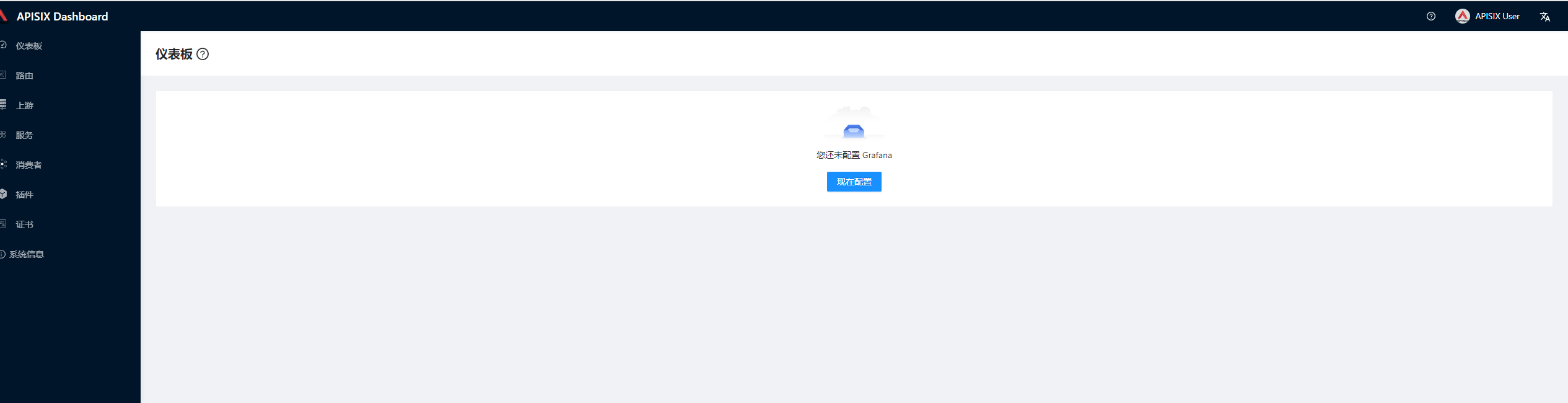
可以通过dashboard面板的系统信息查看apisix-gateway的运行信息
结语
apisix-gateway文章分为两篇,本篇只是讲解了如何在k8s中安装以及启动,下一章讲解如何进行转发以及其他功能测试等。
不使用pvc的方式在K8S中部署apisix-gateway的更多相关文章
- K8S中部署apisix(非ingress)
不使用pvc的方式在K8S中部署apisix-gateway 简介 因为公司项目准备重构,现在做技术储备,之前公司项目使用的ocelot做网关,ocelot是.net平台下的一个网关,也是很不错,但是 ...
- k8s中部署springcloud
安装和配置数据存储仓库MySQL 1.MySQL简介 2.MySQL特点 3.安装和配置MySQL 4.在MySQL数据库导入数据 5.对MySQL数据库进行授权 1.MySQL简介 MySQL 是一 ...
- 在k8s中部署前后端分离项目进行访问的两种配置方式
第一种方式 (1) nginx配置中只写前端项目的/根路径配置 前端项目使用的Dockerfile文件内容 把前端项目编译后生成的dist文件夹放在nginx的html默认目录下,浏览器访问前端项目时 ...
- Prometheus K8S中部署Alertmanager
Prometheus K8S中部署Alertmanager 设置告警和通知的主要步骤如下:一.部署Alertmanager二.配置Prometheus与Alertmanager通信三.配置告警 1. ...
- Kubernetes之在k8s中部署Java应用
部署好了k8s以后 部署参考https://www.cnblogs.com/minseo/p/12055731.html 怎么在k8s部署应用 项目迁移到k8s平台是怎样的流程 1,制作镜像 2,控制 ...
- Docker & k8s 系列三:在k8s中部署单个服务实例
本章将会讲解: pod的概念,以及如何向k8s中部署一个单体应用实例. 在上面的篇幅中,我们了解了docker,并制作.运行了docker镜像,然后将镜像发布至中央仓库了.然后又搭建了本机的k8s环境 ...
- 【转】K8S中部署Helm
K8S中的包管理工具 1. 客户端Helm(即Helm) 通过脚本安装:curl https://raw.githubusercontent.com/helm/helm/master/scripts ...
- k8s集群中部署prometheus server
1.概述 本文档主要介绍如何在k8s集群中部署prometheus server用来作为监控的数据采集服务器,这样做可以很方便的对k8s集群中的指标.pod的.节点的指标进行采集和监控. 2.下载镜像 ...
- 使用 Nocalhost 开发 Kubernetes 中的 APISIX Ingress Controller
本文作者:黄鑫鑫 - Nocalhost 项目核心开发者 腾讯云 CODING DevOps 研发工程师.硕士毕业于中山大学数据科学与计算机学院,曾负责过平安云主机及国家超算中心容器云平台等相关业务, ...
随机推荐
- 【Java】质数判断
static boolean isPrime(int n) { if(n<=1) { return false; } if(n==2||n==3) { return true; } if(n%6 ...
- Limitations of the Lipschitz constant as a defense against adversarial examples
目录 概 主要内容 Huster T., Chiang C. J. and Chadha R. Limitations of the lipschitz constant as a defense a ...
- Variational Inference with Normalizing Flow
目录 概 主要内容 一些合适的可逆变换 代码 Rezende D., Mohamed S. Variational Inference with Normalizing Flow. ICML, 201 ...
- electron使用动态配置文件及持久化存储
1.如何在打包之后,把动态配置文件比如[config.json]放在根目录,不被打包到asar文件中 //解决思路,electron可以拷贝静态资源,比如你把config.json放在项目的根目录下, ...
- 编写Java程序,以树形结构显示国家-直辖市/省/州信息
返回本章节 返回作业目录 需求说明: 以树形结构显示国家-直辖市/省/州信息 实现思路: 创建显示树形结构的类Tree,在该类中定义Map类型的全局实例属性countryMap,该Map集合用于存放所 ...
- 你在寻找Vue3移动端项目框架嘛?请看这里
现在web开发变得更加美妙高效,在于开发工具设计得更好了,丰富性与易用性,都有所提高.丰富性带来了一个幸福的烦恼,就是针对实际应用场景,如何选择工具 ? 1. Vue Cli和Vite之间的选择 Vi ...
- Windows10中同时安装MySQL5和MySQL8
Windows10中同时安装MySQL5和MySQL8 同时安装的话,在执行mysql install要注意加名字,比如:mysqld --install MYSQL5 MySQL-5.5.54 ZI ...
- centos7 常规修改信息(比较杂的)持续更新
修改主机名 临时修改主机名 hostname syscal 永久修改主机名,修改后要重启系统 vi /etc/hostname 修改本地hosts 修改本地hosts,与windows的本地的host ...
- Servlet中分发器和重定向两兄弟
注:图片如果损坏,点击文章链接:https://www.toutiao.com/i6513702111698485767/ 弄清这个两兄弟,我们还是从练习中去理解 先创建一个数据提交页面,注意路径 编 ...
- HttpRunner3的用例是怎么运行起来的
在PyCharm中打开examples/httpbin/basic_test.py: 首先映入眼帘的是左上角那个绿色小箭头,点了一下,可以直接运行,意味着HttpRunner是能够直接被pytest驱 ...